
⚠️ SadCaptcha is looking for devs! To learn more, send a message to @toughdata on telegram.
Shopee Captcha Solver API
This project is the SadCaptcha Shopee Captcha Solver API client. The purpose is to make integrating SadCaptcha into your Selenium, Playwright, or Async Playwright app as simple as one line of code. Instructions for integrating with Selenium, Playwright, and Async Playwright are described below in their respective sections.
The end goal of this tool is to solve every single Shopee captcha. Currently we are able to solve the crawling image and the puzzle slide:
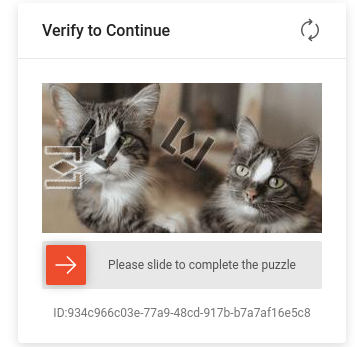
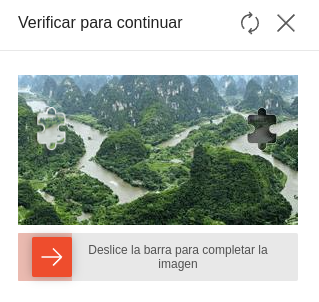
The Crawling Image challenge is the one where there is a puzzle piece that travels in an unpredictable trajectory, and there are two possible locations where the solution may be. This often shows up at login. The puzzle slide is just a simple challenge that asks you to move the piece to the correct location.
Requirements
- Python >= 3.10
- If using Nodriver - Chromium installed on system. This is the recommended method. Must use chromium, since Google Chrome does not support programmatically loading extensions.
- If using Selenium - Selenium properly installed and in
PATH. - If using Playwright - Playwright must be properly installed with
playwright install. - Stealth plugin - You should use the appropriate
stealthplugin for whichever browser automation framework you are using.- For Selenium, you can use undetected-chromedriver
- For Playwright, you can use playwright-stealth
Installation
This project can be installed with pip. Just run the following command:
pip install shopee-captcha-solver
Nodriver Client (Recommended)
⚠️ IMPORTANT ⚠️ Must use Chromium for nodriver since Google chrome no longer supports programmatically loading extensions!!
Nodriver is the latest advancement in undetected automation technology, and is the recommended method for using SadCaptcha.
Import the function make_nodriver_solver
This function will create an noddriver instance patched with the Shopee Captcha Solver chrome extension.
The extension will automatically detect and solve the captcha in the background, and there is nothing further you need to do.
from shopee_captcha_solver.launcher import make_nodriver_solver

async def main():
    launch_args = ["--headless=chrome"] # If running headless, use this option, or headless=new
    api_key = "YOUR_API_KEY_HERE"
    # NOTE: Keyword arguments passed to make_nodriver_solver() are directly passed to nodriver.start()!
    driver = await make_nodriver_solver(
        api_key,
        browser_args=launch_args,
        browser_executable_path="/usr/bin/chromium-browser" # IMPORTANT! Must use Chromium for nodriver since Google chrome no longer supports programmatically loading extensions!!
    ) # Returns nodriver browser
    # ... [The rest of your code that accesses shopee goes here]
    # Now shopee captchas will be automatically solved!
All keyword arguments passed to make_nodriver_solver() are passed directly to nodriver.start().
Selenium Client
Selenium is not reccommended for this since Shopee has strong bot detection. Use the nodriver package instead.
Import the function make_undetected_chromedriver_solver.
This function will create an undetected chromedriver instance patched with the Shopee Captcha Solver chrome extension.
The extension will automatically detect and solve the captcha in the background, and there is nothing further you need to do.
from shopee_captcha_solver import make_undetected_chromedriver_solver
from selenium_stealth import stealth
from selenium.webdriver import ChromeOptions
import undetected_chromedriver as uc

chrome_options = ChromeOptions()
# chrome_options.add_argument("--headless=chrome") # If running headless, use this option

api_key = "YOUR_API_KEY_HERE"
driver = make_undetected_chromedriver_solver(api_key, options=options) # Returns uc.Chrome instance
stealth(driver) # Add stealth if needed
# ... [The rest of your code that accesses shopee goes here]

# Now shopee captchas will be automatically solved!
You may also pass ChromeOptions to make_undetected_chromedriver_solver(), as well as keyword arguments for uc.Chrome().
Playwright Client
Playwright is not reccommended for this since Shopee has strong bot detection. Use the nodriver package instead.
Import the function make_playwright_solver_context.
This function will create a playwright BrowserContext instance patched with the Shopee Captcha Solver chrome extension.
The extension will automatically detect and solve the captcha in the background, and there is nothing further you need to do.
from shopee_captcha_solver import make_playwright_solver_context
from playwright.sync_api import sync_playwright

# Need this arg if running headless
launch_args = ["--headless=chrome"]

api_key = "YOUR_API_KEY_HERE"
with sync_playwright() as p:
    context = make_playwright_solver_context(p, api_key, args=launch_args) # Returns playwright BrowserContext instance
    # ... [The rest of your code that accesses shopee goes here]

# Now shopee captchas will be automatically solved!
You may also pass keyword args to this function, which will be passed directly to playwright's call to playwright.chromium.launch_persistent_context().
By default, the user data directory is a tempory directory that is deleted at the end of runtime.
Async Playwright Client
Import the function make_async_playwright_solver_context.
This function will create an async playwright BrowserContext instance patched with the Shopee Captcha Solver chrome extension.
The extension will automatically detect and solve the captcha in the background, and there is nothing further you need to do.
import asyncio
from playwright.async_api import async_playwright
from shopee_captcha_solver import make_async_playwright_solver_context

# Need this arg if running headless
launch_args = ["--headless=chrome"]

async def main():
    api_key = "YOUR_API_KEY_HERE"
    async with async_playwright() as p:
        context = await make_async_playwright_solver_context(p, api_key, args=launch_args) # Returns playwright BrowserContext instance
        # ... [The rest of your code that accesses shopee goes here]

asyncio.run(main())

# Now shopee captchas will be automatically solved!
You may also pass keyword args to this function, which will be passed directly to playwright's call to playwright.chromium.launch_persistent_context().
By default, the user data directory is a tempory directory that is deleted at the end of runtime.
Contact
- Homepage: https://www.sadcaptcha.com/
- Email: greg@sadcaptcha.com
- Telegram @toughdata
1 maintainer

Download files
Download the file for your platform. If you're not sure which to choose, learn more about installing packages.
Source Distribution
Built Distribution
Filter files by name, interpreter, ABI, and platform.
If you're not sure about the file name format, learn more about wheel file names.
Copy a direct link to the current filters
File details
Details for the file shopee_captcha_solver-0.2.2.tar.gz.
File metadata
- Download URL: shopee_captcha_solver-0.2.2.tar.gz
- Upload date:
- Size: 24.1 kB
- Tags: Source
- Uploaded using Trusted Publishing? No
- Uploaded via:
twine/6.2.0 CPython/3.14.3
File hashes
| Algorithm | Hash digest | |
|---|---|---|
| SHA256 |
0049e0901920eca8393c55a7c7fc77a71b2fddd5a4dc3b089c180c8531cc3616
|
|
| MD5 |
fd99f463a35724dde22248051f6935a9
|
|
| BLAKE2b-256 |
774e39f25572fb3c587ebdcc212887e6b4e38d28a529e554e3568df86c09bb17
|
File details
Details for the file shopee_captcha_solver-0.2.2-py3-none-any.whl.
File metadata
- Download URL: shopee_captcha_solver-0.2.2-py3-none-any.whl
- Upload date:
- Size: 32.4 kB
- Tags: Python 3
- Uploaded using Trusted Publishing? No
- Uploaded via:
twine/6.2.0 CPython/3.14.3
File hashes
| Algorithm | Hash digest | |
|---|---|---|
| SHA256 |
3445ae82dd74ed0607347fb20768a37337a93f8537f325c7db91cbcc359a4be5
|
|
| MD5 |
afb37f37be9137528371adaf203eb4ab
|
|
| BLAKE2b-256 |
531a5fe24fa528b4856fe628f4a789642c267639d7480a61897049bd298eec74
|














