

Shopify Spy




Shopify Spy is a command-line tool and Python library for scraping product and collection data from ecommerce stores. It supports Shopify and WooCommerce stores out of the box, using their public JSON endpoints.
To find Shopify stores to scrape, try searching Google with site:myshopify.com.
Installation
pipx and uv tool install CLI tools in isolated environments, so they won't conflict with other Python projects:
# pipx
pipx install shopify-spy

# uv
uv tool install shopify-spy

# Or run it once without installing
uvx shopify-spy scrape --peek https://www.example.com
To use it as a Python library (import shopify_spy), the package has to be in the environment the script runs in; a pipx or uv tool install only provides the command:
# In a project (this also installs the CLI)
uv add shopify-spy        # or: pip install shopify-spy

# A one-off script, no project or virtual environment needed
uv run --with 'shopify-spy>=0.3' python script.py
A script can also declare the dependency itself (inline script metadata), so uv run script.py works from any directory:
# /// script
# dependencies = ["shopify-spy>=0.3"]
# ///
import shopify_spy as spy
Requires Python 3.11+.
Quick Start
Command line
# Scrape a Shopify store (default)
shopify-spy scrape https://www.example.com

# Scrape a WooCommerce store
shopify-spy scrape --platform woocommerce https://www.example.com

# Scrape multiple stores
shopify-spy scrape https://store1.com https://store2.com https://store3.com

# Download product images
shopify-spy scrape https://www.example.com --images

# Include collections (Shopify only)
shopify-spy scrape https://www.example.com --collections

# Scrape multiple stores from a file
shopify-spy scrape --url-file stores.txt

# Specify output directory
shopify-spy scrape https://www.example.com --output ./my-data

# Sample 10 items (useful for testing)
shopify-spy scrape https://www.example.com --limit 10

# Quick peek at a store (prints 1 item to stdout, no file output)
shopify-spy scrape --peek https://www.example.com

# Peek and pipe to jq
shopify-spy scrape --peek https://www.example.com 2>/dev/null | jq '.product.title'

# Bypass robots.txt restrictions
shopify-spy scrape --ignore-robots https://www.example.com
Results are saved as JSONL in the output directory (default: ./output). Use --format to choose JSON, CSV, or XML instead. A live item counter is displayed during scraping.
Python
The same engine is a library, so a script can scrape, filter and save in one pass:
import shopify_spy as spy

# Items are plain dicts, yielded while the stores are scraped
for item in spy.scrape("https://www.example.com", max_items_per_store=100):
    print(item["product"]["title"])

# Several stores to a file, then check which ones failed and why
run = spy.scrape(["store1.com", "store2.com"], on_failure="warn")
spy.write_items(run, "products.jsonl")
for store in run.result.failed:
    print(store.input_url, store.status, store.hint)
See Use as a library for the options, failure handling, images and async use. help(spy.scrape) documents every option.
Features
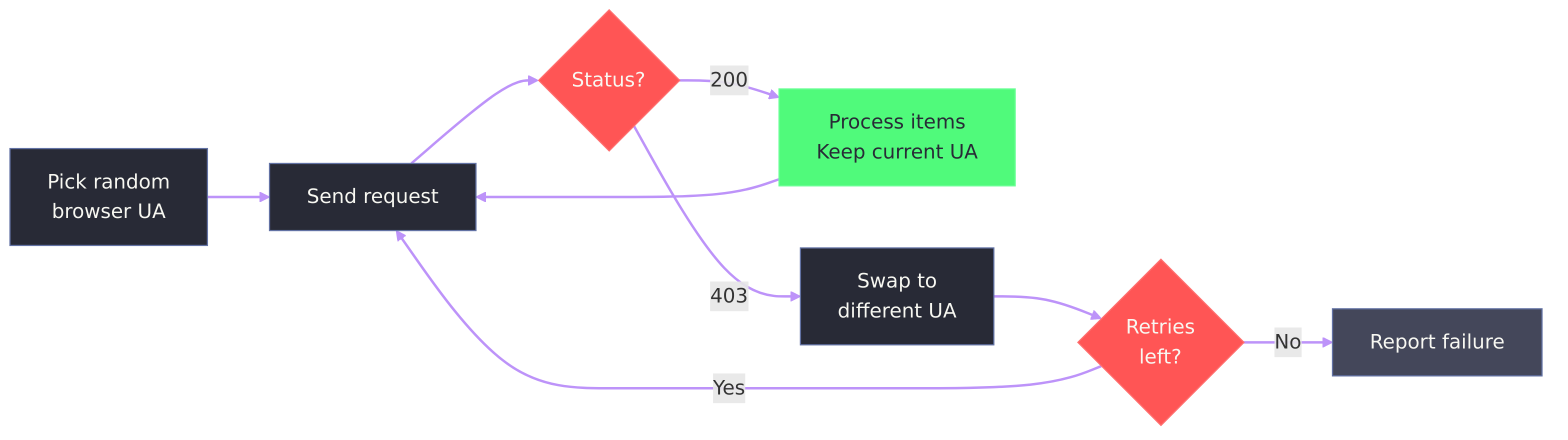
- Automatic user-agent rotation. Requests use a random browser user-agent. If a server responds with 403, the tool swaps to a different UA and retries.
- Failure diagnostics. When a scrape returns 0 items, the tool explains why for each store (403, 404, robots.txt, timeout, no response) and suggests flags to try. Malformed URLs are skipped with a warning instead of breaking the run.
- Python library.
import shopify_spygives the same scraping engine as the CLI; see Use as a library. - Log files. Detailed logs go to a log file, keeping the terminal clean. Use
--verboseto also print to the terminal. - Status JSON. Each run writes a machine-readable status file with per-URL results, errors, and timing.
- Bail timeout. Automatically aborts if no items are scraped within
--bailseconds (default: 30). - Coding-agent friendly. Designed for use by AI coding agents (Claude Code, Cursor, etc.):
- Suggested workflow, with nothing to install:
uvx shopify-spy scrape --peek URLto see an item's shape, then a script run withuv run --with 'shopify-spy>=0.3' python script.pythat filters and saves only what the task needs. Use the CLI for whole-catalog dumps and image downloads. - Agents can write Python scripts against the library instead of driving the CLI: items are plain dicts with typed definitions (
ShopifyProductItem,WooCommerceProductItem),summarize()gives the same fields on both platforms, and every option is documented inhelp(spy.scrape) --peekpipes a single item to stdout for quick schema inspection; warnings and errors go to stderr, so stdout stays valid JSONL- Non-zero exit codes on failure with diagnostic messages explaining why
- Status JSON with machine-readable per-URL results and error details
--bailprevents dead runs from hanging indefinitely--quietsuppresses visual noise; log files capture the details separately- A Python API whose failures are explicit:
ScrapeFailedwhen every store fails, per-store statuses and hints
- Suggested workflow, with nothing to install:
Supported Platforms
| Platform | Mechanism | Notes |
|---|---|---|
| Shopify | /products.json bulk endpoint, sitemap fallback |
Products and collections |
| WooCommerce | /wp-json/wc/store/v1/products |
No authentication required |
Commands
scrape
Scrape products and collections from Shopify and WooCommerce stores.
shopify-spy scrape [URL] [OPTIONS]
Arguments:
URL...- One or more store URLs (optional if using--url-file)
Options:
--platform, -p PLATFORM- Ecommerce platform:shopify,woocommerce(default:shopify)--limit, -n INT- Stop each store after N items (per store; useful for sampling or testing)--url-file, -f FILE- File containing URLs (one per line;#starts a comment)--products / --no-products- Scrape products (default: yes; Shopify only)--collections / --no-collections- Scrape collections (default: no; Shopify only)--images / --no-images- Download images (default: no)--output, -o PATH- Output directory (default:./output)--format, -F FORMAT- Output format:json,jsonl,csv,xml(default:jsonl)--config, -c FILE- Path to YAML config file--concurrent INT- Concurrent requests per host (default: 16)--max-stores INT- Stores scraped at once (default: 16)--throttle / --no-throttle- Auto-throttle requests (default: yes)--user-agent, -A TEXT- Custom User-Agent header--ignore-robots, -i- Ignore robots.txt restrictions--insecure- Don't verify TLS certificates--bail INT- Abort if no items scraped within N seconds (default: 30, 0 to disable)--peek- Print 1 item to stdout as JSONL and exit (no files or directories created)--verbose, -v- Show debug output (logs to both file and terminal)--quiet, -q- Suppress the live item counter
init
Create a default configuration file.
shopify-spy init [PATH]
Arguments:
PATH- Where to create the config file (default:./shopify-spy.yaml)
Options:
--force, -f- Overwrite existing file
Configuration
Shopify Spy can be configured via YAML file. Create one with shopify-spy init:
# shopify-spy.yaml
scrape:
  platform: shopify   # Platform: shopify, woocommerce
  products: true      # Scrape product data (Shopify only)
  collections: false  # Scrape collection data (Shopify only)
  images: false       # Download product images
  bail: 30            # Abort if no items scraped within N seconds (0 = off)

output:
  dir: ./output       # Output directory for results
  format: jsonl       # Output format: json, jsonl, csv, xml
  images_subdir: images  # Subdirectory for downloaded images

network:
  concurrent_requests: 16  # Concurrent requests per host
  timeout: 180             # Request timeout (seconds)
  retries: 2               # Retry failed requests
  # user_agent: MyBot/1.0 (+https://example.com)  # Custom user agent
  respect_robots_txt: true
  verify_tls: true         # Verify TLS certificates (false = --insecure)
  max_concurrent_stores: 16  # Stores scraped at once

throttle:
  enabled: true            # Auto-throttle based on server response
  start_delay: 1           # Initial download delay (seconds)
  max_delay: 60            # Maximum download delay (seconds)
  target_concurrency: 1.0  # Target concurrent requests (higher = faster)
Config file search order:
- Path specified with
--config ./shopify-spy.yaml~/.config/shopify-spy/config.yaml
CLI options override config file settings.
Output
Results are saved in the output directory (JSONL by default, configurable via --format):
output/
  data/
    shopify_spider_2024-01-15T10-30-00.jsonl
  status/
    shopify_spider_2024-01-15T10-30-00_status.json
  images/
    full/
      <image files>
A status JSON file is written for each run with metadata:
{
  "items_scraped": 47,
  "urls": [
    {"url": "https://store.com", "items": 47, "status": "ok", "code": "ok"}
  ],
  "finish_reason": "finished",
  "duration_seconds": 12.3,
  "log_file": "/home/user/.local/state/shopify-spy/logs/shopify_spider_2024-01-15T10-30-00.log"
}
status is a human-readable label; code is the matching StoreStatus value from the Python API:
status |
code |
Meaning |
|---|---|---|
ok |
ok |
Items were scraped |
ok |
partial |
Items were scraped, but part of the catalog couldn't be reached |
0 items |
empty |
The store answered but had no products |
timed out |
timed_out |
No items within --bail seconds |
403 Forbidden |
forbidden |
The store returned 403s and no successful response |
404 Not Found |
not_found |
The store returned 404s and no successful response; check the URL and --platform |
blocked by robots.txt |
robots_blocked |
robots.txt forbade the store's requests; try --ignore-robots |
TLS error |
tls_error |
The certificate failed verification; try --insecure |
no response |
no_response |
The store never answered (DNS, connection or network failure) |
failed |
error |
An unexpected error (details in the log file) |
stopped |
stopped |
Interrupted (Ctrl-C) before producing anything |
invalid URL |
invalid_url |
The URL was malformed and skipped before scraping |
finish_reason summarizes the run: finished, item_limit (a store reached --limit), bail (a store hit the --bail timeout), crawler_failed (a store raised an unexpected error), or shutdown (interrupted).
Detailed logs are written to a log file (not the terminal). Log files are stored in the platform-appropriate state directory (e.g., ~/.local/state/shopify-spy/logs/ on Linux). Use --verbose to also print logs to the terminal.
Shopify output
Each line contains the full product or collection JSON from Shopify's API, plus two added fields:
{
  "product": { "title": "...", "variants": [...], "images": [...], ... },
  "url": "https://store.com/products/item.json",
  "store": "store.com",
  "image_urls": ["https://cdn.shopify.com/.../product.jpg"]
}
WooCommerce output
Each line contains the full product JSON from the WooCommerce Store API, plus two added fields:
{
  "id": 123,
  "name": "Product Name",
  "slug": "product-name",
  "permalink": "https://store.com/product/product-name/",
  "sku": "SKU-001",
  "prices": { "price": "5200", "currency_code": "USD", "currency_minor_unit": 2 },
  "images": [{ "id": 1, "src": "https://..." }],
  "store": "store.com",
  "image_urls": ["https://..."]
}
Note: WooCommerce prices are strings in minor currency units (divide by 10^currency_minor_unit to get the decimal value).
Image Metadata
When using --images, each item includes a scraped_images field with download info:
{
  "image_urls": ["https://cdn.shopify.com/.../product.jpg"],
  "scraped_images": [
    {
      "url": "https://cdn.shopify.com/.../product.jpg",
      "path": "full/abc123def.jpg",
      "checksum": "d41d8cd98f00b204e9800998ecf8427e",
      "status": "downloaded"
    }
  ]
}
Images are saved in their original format, named by the SHA-1 of their URL, with the extension of the format their bytes are in. The path is relative to the images directory (output/images/ by default), and files younger than 90 days are reused ("status": "uptodate"). Supported formats are JPEG, PNG, GIF, WebP, AVIF, HEIC/HEIF, JPEG XL, JPEG 2000, BMP, TIFF and ICO; anything else, such as an SVG or an error page served in place of an image, is logged and counted as a failed image instead of being saved.
In CSV output, nested values (such as product) are JSON-encoded.
Parsing Output
With jq:
# Shopify: extract product titles
cat output/*.jsonl | jq '.product.title'

# WooCommerce: extract product names and prices
cat output/*.jsonl | jq '{name: .name, price: .prices.price, currency: .prices.currency_code}'
With Python:
import json

with open("output/shopify_spider_2024-01-15.jsonl") as f:
    for line in f:
        item = json.loads(line)
        print(item["product"]["title"])  # Shopify
        # print(item["name"])            # WooCommerce
With pandas:
import pandas as pd

df = pd.read_json("output/shopify_spider_2024-01-15.jsonl", lines=True)
products = pd.json_normalize(df["product"])  # Shopify
With polars:
import polars as pl

df = pl.read_ndjson("output/shopify_spider_2024-01-15.jsonl")
Use as a library
The CLI is built on a Python API that scripts (and coding agents) can use directly:
import shopify_spy as spy

# Items arrive as plain dicts while stores are scraped
for item in spy.scrape("https://www.example.com", max_items_per_store=100):
    print(item["product"]["title"])

# Several stores; stream to a file and inspect failures afterwards
run = spy.scrape(["a.com", "b.com"], on_failure="warn")
spy.write_items(run, "products.jsonl")
for store in run.result.failed:
    print(store.input_url, store.status, store.hint)

# Learn the schema from one item
item = spy.scrape("a.com").first()
print(spy.summarize(item))  # title, prices as Decimal, URL: same fields on both platforms

# Filter across platforms and write a CSV
rows = (spy.summarize(i) for i in spy.scrape(urls))
spy.write_items((r.asdict() for r in rows if r.min_price and r.min_price < 50), "cheap.csv")

# Retry stores that robots.txt blocked
result = spy.scrape(spy.read_url_file("stores.txt"), on_failure="ignore").collect()
blocked = [s.input_url for s in result.failed if s.status == "robots_blocked"]
spy.write_items(spy.scrape(blocked, respect_robots_txt=False), "products.jsonl", append=True)
- Failures are never silent. By default
scrape()raisesScrapeFailed(listing each store's status) when every store failed;on_failure="warn"or"ignore"relax that, andstrict=Trueraises when any store failed. EachStoreResulthas astatus, an item count and sometimes ahint, such as a likely wrongplatform. - Options match the CLI:
platform,products,collections,images(withimages_dir),max_items_per_store(per store; useitertools.islicefor a total),bail,concurrent_requests,request_timeout,retries,user_agent,respect_robots_txt,verify_tls,max_concurrent_storesand thethrottle_*settings. - Images:
images=True, images_dir="images"saves files underimages/full/; each item'sscraped_imagesrecords have apathrelative toimages_dir, so the file isPath(images_dir) / record["path"]. - No side effects: nothing is written unless
images=True, no config file is read, and nothing is printed (logs go to theshopify_spylogger). - Async code and notebooks use
scrape_async(), which takes the same options:
async for item in spy.scrape_async("https://www.example.com"):
    ...

result = await spy.scrape_async(urls, platform="woocommerce")  # RunResult with .items
scrape() runs its own event loop, so it raises a clear error inside an already running loop (Jupyter, async frameworks); use scrape_async() there.
Limitations
WooCommerce Store API required. WooCommerce scraping uses the public Store API (/wp-json/wc/store/v1/products), available in WooCommerce 3.x and later. Stores that have disabled the REST API via security plugins or broadly block crawlers may not be scrapeable. When a scrape returns 0 items, the tool prints a diagnostic message explaining the likely cause (403 Forbidden, 404 Not Found, robots.txt blocking, etc.) and exits with code 1.
Rate limiting. Scraping very large stores may result in temporary bans. Auto-throttling is enabled by default, but you can adjust the settings or disable it for faster scraping:
# Disable throttling (faster but riskier)
shopify-spy scrape https://example.com --no-throttle
Feedback
Found a bug or have a suggestion? Open an issue.
License
Credits
Icon by Bartama Graphic.
1 maintainer

Metadata
1 maintainer
Release files for shopify-spy 0.3.0
For a detailed explanation of source distributions (sdists) and built distributions (wheels), please see the package formats documentation.
Source distribution (sdist)
| File | Size | Uploaded | Provenance | Actions |
|---|---|---|---|---|
| shopify_spy-0.3.0.tar.gz | 552.6 kB | Without provenance | Details for shopify_spy-0.3.0.tar.gz |
Built distribution (wheel)
| File | Interpreter | ABI | Platform | Actions Reset |
|---|---|---|---|---|
| shopify_spy-0.3.0-py3-none-any.whl | Python 3 | none | any | Details for shopify_spy-0.3.0-py3-none-any.whl |
Total release size: 614.4 kB
Release files / shopify_spy-0.3.0.tar.gz
| Download URL | shopify_spy-0.3.0.tar.gz |
|---|---|
| Size | 552.6 kB |
| Tags | Source |
|
SHA-256 checksum How to use checksums |
3dda846e3a6ca84c4641ad6726aee4d9356cd64c26b5ecbe60f0523289d97e25
|
|
BLAKE2b-256 checksum How to use checksums |
fdadd3e940440d93b017f0fbda5da13e5248f61c3774b7c733afda541892018b
|
| Upload date | |
|
Uploaded using Trusted Publishing? What is trusted publishing? |
No |
| Uploaded via |
uv/0.13.4 {"installer":{"name":"uv","version":"0.13.4","subcommand":["publish"]},"python":null,"implementation":{"name":null,"version":null},"distro":{"name":"NixOS","version":"26.05","id":"yarara","libc":null},"system":{"name":null,"release":null},"cpu":null,"openssl_version":null,"setuptools_version":null,"rustc_version":null,"ci":null}
|
Release files / shopify_spy-0.3.0-py3-none-any.whl
| Download URL | shopify_spy-0.3.0-py3-none-any.whl |
|---|---|
| Size | 61.8 kB |
| Tags | Python 3 |
|
SHA-256 checksum How to use checksums |
ca3545bb297c062adc846dcf7e0a7bacb74817c79189e16cc68184e7f0695d4c
|
|
BLAKE2b-256 checksum How to use checksums |
2deacfc5381c4dffa69fa98f24a78f3d80e3ea9257206cc2ded700abf7d1bfc9
|
| Upload date | |
|
Uploaded using Trusted Publishing? What is trusted publishing? |
No |
| Uploaded via |
uv/0.13.4 {"installer":{"name":"uv","version":"0.13.4","subcommand":["publish"]},"python":null,"implementation":{"name":null,"version":null},"distro":{"name":"NixOS","version":"26.05","id":"yarara","libc":null},"system":{"name":null,"release":null},"cpu":null,"openssl_version":null,"setuptools_version":null,"rustc_version":null,"ci":null}
|
Security for shopify-spy 0.3.0
Provenance
Provenance describes where a file came from. On PyPI, provenance is shared via attestations, which provide a verifiable record of the build or publishing details. View details, limitations and caveats.
No provenance found
None of the files in this release were uploaded with provenance metadata.
A note on package security
PyPI is a repository for distributing packages, not a service for auditing them. While third-party security researchers and our staff do their best to detect and remove malicious packages, PyPI cannot guarantee the quality, security or suitability of any given package.
To learn more about protecting yourself from malicious actors, visit our package security documentation.














