
A local-only URL shortener (˶˘ ³˘)♡
Verified details
These details have been verified by PyPIProject links
GitHub Statistics
Maintainers

Project description
shortiepy 🌸
Your local URL shortener (˶˘ ³˘)♡
- 🔒 100% offline - no data leaves your machine
- 🌈 Cross-platform (Linux/macOS/Windows)
- 📋 Auto-copies short URLs to clipboard
- 🎀 Pastel colors & kaomojis everywhere!
Installation
- Using
pipx[Recommended]
Follow instructions to install pipx here: pipx.pypa.io/stable/installation and after installing pipx in your system, install shortiepy:
pipx install shortiepy
- Using
pip
pip install shortiepy
Usage
- Add a URL
shortiepy add https://example.com
- Start server
shortiepy serve  # will run in forground
# OR
shortiepy start  # will run in background
- View docs
shortiepy docs
Create Links from browser
shortiepy supports creating short URLs from within your browser (without having to use CLI add command).
You can visit /new route and provide code (this will be used to generate short url) and url (the URL you want to create short link for) query paramters:
-
http://localhost:9876/new?code=meow&url=https://example.com-
It will create short link for
https://example.comusing provided short code:http://localhost:9876/meow -
The
codeparameter is optional and can be omitted.
-
However, vising that URL and route manully is tedious! But if your browser allows it, like I have Brave browser, you can add a shortcut for it:
-
In your browser go to settings and find "search engines". In Brave, it's
brave://settings/searchEnginesand add the following in "Site search":- Name:
shortiepy(or anything you like) - Shortcut:
:sh(or anything you like) - URL:
http://localhost:9876/new?url=%s
- Name:
Click to See Screen Recording of above steps!
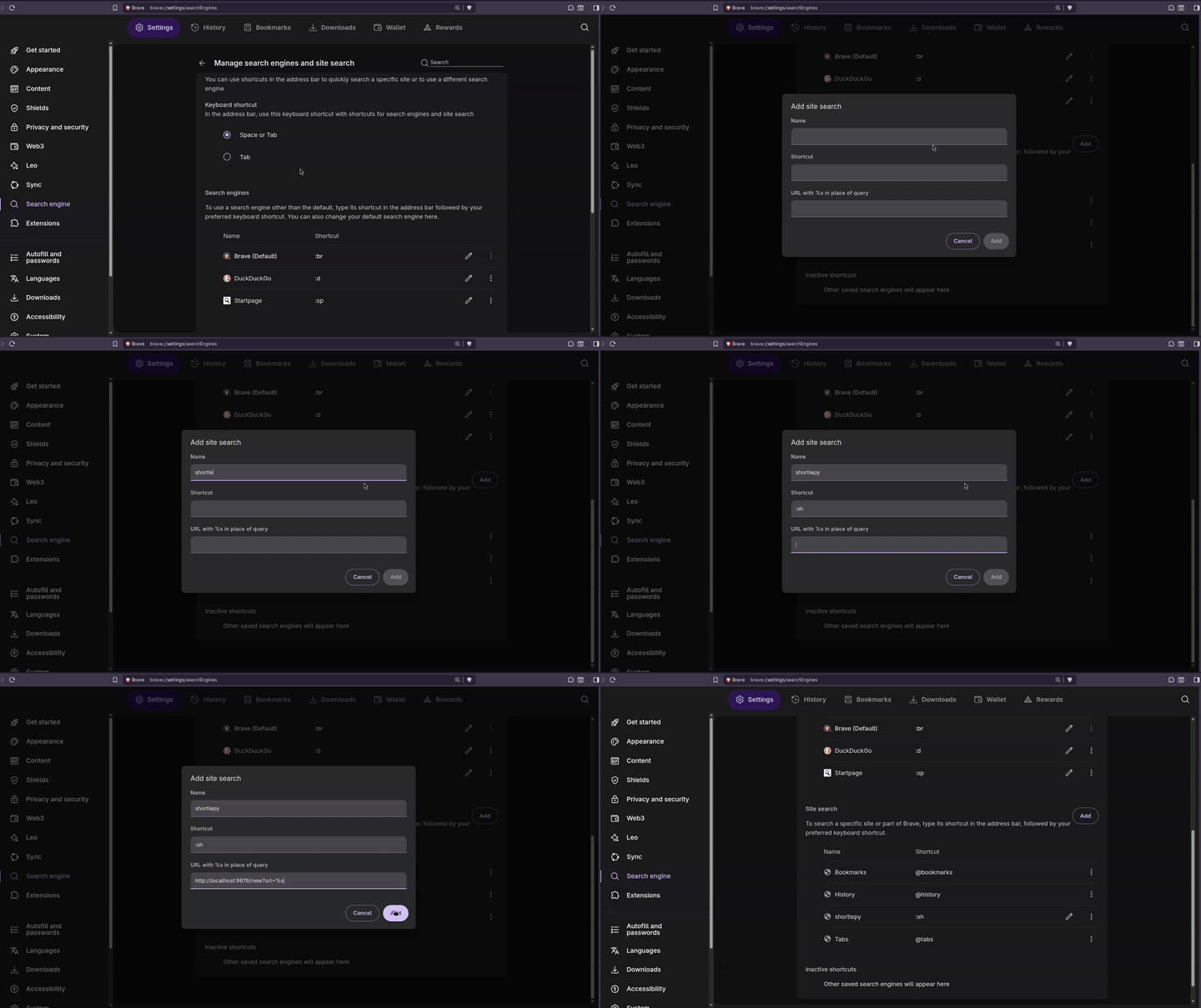
Now when you want to create a short link, just type :sh in url bar and press spacebar, then you can paste the URL you want to create short link for and press enter!
Click to See Screen Recording of above steps!

Shell Completion
Get tab-completion with one command:
shortiepy completion
Restart your shell or reload config (
source ~/.bashrcfor bash ORsource ~/.zshrcfor zsh). Fish users: no restart needed!
That's it! Works for bash, zsh, and fish.
Why
For some reason, when I’m working on things or trying to learn something new, my browser ends up filled with tons of tabs—which makes my laptop-chan angry ~ ₍^. ̫.^₎
I don’t want to close them or bookmark them. I tried manually copying URLs into a .txt file, but then I wished there was a simple way to turn long links into short ones I could use later.
I didn’t want to send anything online, and existing self-hosted URL shorteners felt like overkill for such a small need.
So I made this: a minimal, local-only URL shortener. It started as a single script file and isn’t perfect—but it just works! ~ ദ്ദി/ᐠ。‸。ᐟ\
For Developers
Want to tinker with shortiepy or contribute? Here's how to set it up locally:
- Clone the repository locally and change the directory into it:
git clone https://github.com/CheapNightbot/shortiepy.git && cd shortiepy
- Install
shortiepy:
# Create a virtual environment (keeps things clean!)
python -m venv .venv

# Activate it
source .venv/bin/activate  # Linux/macOS
# OR
.venv\Scripts\activate     # Windows

# Install in editable mode (changes reflect instantly!)
pip install -e .
Now you can run shortiepy from anywhere in your terminal!
Made a change? It’ll work immediately—no reinstall needed!
Updating Shell Completions
If you modify CLI commands or options, regenerate completions:
./scripts/generate-completions.sh
This updates the files in
shortiepy/completions/directory.
Project details
Verified details
These details have been verified by PyPIProject links
GitHub Statistics
Maintainers
Release history Release notifications | RSS feed


Download files
Download the file for your platform. If you're not sure which to choose, learn more about installing packages.
Source Distribution
Built Distribution
Filter files by name, interpreter, ABI, and platform.
If you're not sure about the file name format, learn more about wheel file names.
Copy a direct link to the current filters
File details
Details for the file shortiepy-1.1.1.tar.gz.
File metadata
- Download URL: shortiepy-1.1.1.tar.gz
- Upload date:
- Size: 18.6 kB
- Tags: Source
- Uploaded using Trusted Publishing? Yes
- Uploaded via: twine/6.1.0 CPython/3.12.9
File hashes
| Algorithm | Hash digest | |
|---|---|---|
| SHA256 |
b222af8630f58e55e033fa9167b9ff502da246d3b6b4479a3c2961956a25f475
|
|
| MD5 |
f9e306c99ea148d8db479708a1116101
|
|
| BLAKE2b-256 |
e9c019b4cd1cf7564cad0cef7babfdf9a2f8fa466ef646e8e4d1b9997c2aec22
|
Provenance
The following attestation bundles were made for shortiepy-1.1.1.tar.gz:
Publisher:
release.yml on CheapNightbot/shortiepy
-
Statement:
-
Statement type:
https://in-toto.io/Statement/v1 -
Predicate type:
https://docs.pypi.org/attestations/publish/v1 -
Subject name:
shortiepy-1.1.1.tar.gz -
Subject digest:
b222af8630f58e55e033fa9167b9ff502da246d3b6b4479a3c2961956a25f475 - Sigstore transparency entry: 991774893
- Sigstore integration time:
-
Permalink:
CheapNightbot/shortiepy@05dc952d73545c560b34bf828c00662a923f406d -
Branch / Tag:
refs/tags/1.1.1 - Owner: https://github.com/CheapNightbot
-
Access:
public
-
Token Issuer:
https://token.actions.githubusercontent.com -
Runner Environment:
github-hosted -
Publication workflow:
release.yml@05dc952d73545c560b34bf828c00662a923f406d -
Trigger Event:
push
-
Statement type:
File details
Details for the file shortiepy-1.1.1-py3-none-any.whl.
File metadata
- Download URL: shortiepy-1.1.1-py3-none-any.whl
- Upload date:
- Size: 16.2 kB
- Tags: Python 3
- Uploaded using Trusted Publishing? Yes
- Uploaded via: twine/6.1.0 CPython/3.12.9
File hashes
| Algorithm | Hash digest | |
|---|---|---|
| SHA256 |
f0ddd4d83d56b23ad324daf5fc76d743649e4f3c2716f7220c1700fc2802d7e4
|
|
| MD5 |
cc6957ca4d5c6067663428033ace26e4
|
|
| BLAKE2b-256 |
39d8faf60e1a42ce9337f288c663c6b9b77fddfea33e0cd23f8098c9f70ca696
|
Provenance
The following attestation bundles were made for shortiepy-1.1.1-py3-none-any.whl:
Publisher:
release.yml on CheapNightbot/shortiepy
-
Statement:
-
Statement type:
https://in-toto.io/Statement/v1 -
Predicate type:
https://docs.pypi.org/attestations/publish/v1 -
Subject name:
shortiepy-1.1.1-py3-none-any.whl -
Subject digest:
f0ddd4d83d56b23ad324daf5fc76d743649e4f3c2716f7220c1700fc2802d7e4 - Sigstore transparency entry: 991774897
- Sigstore integration time:
-
Permalink:
CheapNightbot/shortiepy@05dc952d73545c560b34bf828c00662a923f406d -
Branch / Tag:
refs/tags/1.1.1 - Owner: https://github.com/CheapNightbot
-
Access:
public
-
Token Issuer:
https://token.actions.githubusercontent.com -
Runner Environment:
github-hosted -
Publication workflow:
release.yml@05dc952d73545c560b34bf828c00662a923f406d -
Trigger Event:
push
-
Statement type:






