
⚡ ShortsFlow AI Studio
The self-hosted Opus Clip alternative.
Paste a podcast or YouTube link, get captioned 9:16 Shorts that cut to whoever is talking. Free, local, no watermark, no credit caps.
Clip long videos with local Whisper, an LLM that scores the hooks, face-tracked 9:16 crops, a stacked two-speaker split or active-speaker switching, and Remotion spring captions. Or generate from an idea with 30+ formats (facts quizzes, explainers, top-5 lists, stories) and drive everything from a browser UI, the CLI, Docker, Colab or an MCP agent.


🎬 Running in production: the YouTube channel @spottheliee is generated and posted entirely by ShortsFlow - 6 "spot the lie" Shorts a day from one GitHub Actions workflow.






⭐ If ShortsFlow saves you an Opus Clip subscription, please star the repo - it helps more creators find it.
⚡ Quick Start - pick one
| Option | Command | Best for |
|---|---|---|
| ☁️ Google Colab (free GPU, zero install) | |
Trying it in 5 minutes |
| 🐳 Docker (browser WebUI) | docker run -p 7860:7860 -e GEMINI_API_KEY=your_key ghcr.io/ghost1412/shorts-generator → open http://localhost:7860 |
Servers, Linux, no Python setup |
| 📦 pip | pip install "shortsflow @ git+https://github.com/ghost1412/shorts-generator" then shortsflow init and shortsflow doctor |
Using it as a command from anywhere |
| 🌐 Browser WebUI | pip install -r requirements-full.txt && python webui.py |
Local use with a GPU |
| 🖥️ Desktop Studio GUI (Windows) | setup.bat && launch.bat |
Windows desktop |
| 🤖 AI agents | python mcp_server.py or point your agent at SKILL.md |
Claude Code, Cursor, n8n |
git clone --depth 1 https://github.com/ghost1412/shorts-generator.git
cd shorts-generator
🐧 Linux / macOS:
chmod +x setup.sh && ./setup.sh && python3 webui.py
⚡ ShortsFlow vs Opus Clip, Klap & Vizard
| ⚡ ShortsFlow | Paid clippers | |
|---|---|---|
| Price | Free (MIT). You pay only for the LLM key you choose, or $0 with Ollama | ~$19-49 / month with minute or credit caps |
| Where your video goes | Stays on your machine; Whisper runs locally | Uploaded to their cloud |
| Watermark / export limits | None | Watermark and caps on lower tiers |
| Face-tracked 9:16 reframing | ✅ | ✅ |
| Podcast layouts | ✅ single, stacked split, active-speaker switching | ✅ varies by tool |
| Word-level animated captions | ✅ Remotion (Hormozi, Glow Box, Bounce, Minimal) | ✅ |
| Virality / hook score per clip | ✅ in --output_json (WebUI view planned) |
✅ |
| Dubbing | ✅ | Often a paid add-on |
| Idea-to-video (facts, explainers, stories) | ✅ 30+ modes | ❌ clipping only |
| Automation | ✅ CLI, MCP server, Docker, GitHub Actions | API usually on higher tiers |
| Polished timeline editor | ❌ not yet | ✅ |
| Multi-platform scheduling | ✅ TikTok / Instagram / YouTube via Upload-Post (python -m engine.publish) |
✅ |
Honest take: the paid tools have a nicer editor and scheduling. ShortsFlow wins on cost, privacy, and being scriptable.
🖥️ Desktop Studio GUI (gui_app.py)

- 3-Column Single-Window Studio Layout: Live 9:16 vertical canvas preview, mode picker, preset cards, and 1-click render launcher.
- Interactive Remotion Presets: 1-click selection between
HORMOZI,GLOW_BOX,BOUNCE, andMINIMALspring captions.
🎬 Video Generator Modes
| Mode | Visual Format | Quick Command |
|---|---|---|
| ✂️ AI Clipping | Slices long YouTube/local videos into high-scoring vertical shorts | py main.py --source_video "URL" --smart_crop |
| 🔢 Top 5 Countdown | Numbered listicle countdown shorts (#5 ➔ #1) with rank badges | py main.py --mode TOP_5 --category "inventions" |
| 💬 Chat Story | Animated text message conversation shorts (iMessage format) | py main.py --mode CHAT_STORY --category "mystery" |
| 👥 Podcast | 2-speaker debate shorts with alternating multi-voice synthesis | py main.py --mode PODCAST --prompt "AI future" |
| 🌐 Video Dubbing | Multilingual video translation & voice re-synthesis | py main.py --mode DUB --source_video "clip.mp4" --target_lang es |
| 🧮 Manim Explainer | Programmatic 2D/3D math, CS, and science animations | py main.py --mode EXPLAINER --prompt "Gravity" |
| 💡 AI Facts | High-energy trivia & mystery facts with scene stock loops | py main.py --mode FACTS --category "space" |
| 📖 AI Story | Narrative story voiceover with visual scene stitching | py main.py --mode STORY --category "sci-fi" |
| 🤔 This or That (WYR) | Split-screen dilemma challenge with VS central badge | py main.py --mode WYR --category "superpowers" |
| 🧩 Emoji Guess | Interactive emoji puzzle game with animated reveal | py main.py --mode EMOJI_GUESS --category "movies" |
| 📰 News Breakdown | RSS news headline summary with cartoon personas | py main.py --mode NEWS --cartoon --persona mafia_cat |
🎛️ Engine Power Capabilities
| Capability | Supported Technologies & Flags |
|---|---|
| 🎙️ Voice Synthesis & Cloning | Local Kokoro TTS (--tts_provider kokoro, no key), Zero-Shot Voice Cloning (--clone_voice "sample.wav"), VoiceStudio Local REST (--tts_provider voicestudio), ElevenLabs, EdgeTTS |
| 📐 Aspect Ratios | 9:16 (Vertical), 16:9 (Landscape), 1:1 (Square), 4:5 (Social Feed) via --aspect_ratio |
| 🔊 Audio Mastering & SFX | Auto SFX (whoosh, pop, riser, boom), Dynamic BGM Audio Ducking (--auto_ducking), Studio Master Filter (--enhance_audio) |
| 🎥 Motion & Visual Filters | Dynamic Camera Push-In Zoom (--enable_zoom), 12 Color Grade Presets (--video_filter cyberpunk, kurosawa, teal_orange) |
| 📦 Batch Automation | Automated queue execution from CSV / text lists (--batch_file "topics.txt") |
| 🤖 Multi-LLM Matrix | Google Gemini, Local Ollama (qwen3:8b), DeepSeek, Groq, Anthropic, OpenRouter (--llm_provider) |
🎨 Visual Color Grading Presets (--video_filter)
| Preset Name | Visual Atmosphere | Preset Name | Visual Atmosphere |
|---|---|---|---|
dynamic |
AI auto-switches color grade per scene beat | kurosawa |
Black & White high-contrast samurai |
cyberpunk |
Neon boosted purples/blues for night sci-fi | teal_orange |
Blockbuster movie cinematic color balance |
cinematic_warm |
Golden hour warmth for scenery & drama | vibrant_action |
Sharp contrast & saturation for sports/action |
vintage_vhs |
Analog retro tape scanlines & color shift | moody_dark |
Dark fantasy / horror shadow contrast |
🤖 Model Context Protocol (MCP) & AI Agent Server
ShortsFlow AI Studio provides a native MCP Server (mcp_server.py) allowing AI assistants (Claude Desktop, Cursor, Antigravity, n8n, AutoGPT) to create shorts autonomously:
# Launch MCP Server over standard I/O for AI IDEs & Workflow Engines
python mcp_server.py
Available MCP Tools:
generate_short: Create AI shorts from topics or prompts.extract_clips: Slice long YouTube videos into vertical shorts with face tracking, a stacked two-speaker split (layout: split) or active-speaker switching (layout: active).generate_social_package: Generate platform metadata (.meta.json) for YouTube Shorts, TikTok, and Reels.get_render_status: Query live rendering job progress.
🔌 REST API & Webhooks
pip install -r requirements-full.txt
SHORTSFLOW_API_KEY=change-me python -m shortsflow.api        # http://127.0.0.1:8080/docs
curl -X POST localhost:8080/v1/clips -H "Authorization: Bearer change-me" -H "Content-Type: application/json"   -d '{"source_video": "https://youtu.be/VIDEO_ID", "layout": "active", "clip_count": 3, "webhook_url": "https://example.com/hook"}'
# -> {"id": "a1b2c3", "status": "queued", "url": "/v1/jobs/a1b2c3"}
curl localhost:8080/v1/jobs/a1b2c3 -H "Authorization: Bearer change-me"   # status + files[] download links
POST /v1/shorts generates from an idea (mode, category, prompt...). Webhooks are signed with
X-ShortsFlow-Signature: sha256=<HMAC of body> when SHORTSFLOW_WEBHOOK_SECRET is set. Jobs run one at a time by default
(SHORTSFLOW_MAX_CONCURRENT). With Docker: SHORTSFLOW_API_KEY=change-me docker compose --profile api up api (refuses to start without a key). A ready-made n8n flow lives in examples/n8n/.
📤 Publish & Schedule (TikTok, Instagram Reels, YouTube Shorts)
Clip extraction writes metadata.json (title, description, tags) and a badge thumbnail next to every clip. Post them with
Upload-Post, which holds the platform logins (set UPLOAD_POST_API_KEY and UPLOAD_POST_USER):
# preview what would be posted, then post now or stagger one clip every 3 hours
python -m engine.publish sessions/extraction_123/metadata.json --platforms tiktok,instagram,youtube --dry-run
python -m engine.publish sessions/extraction_123/metadata.json --platforms tiktok,instagram --start 2026-11-02T10:00 --every 180 --timezone Europe/Madrid
🏷️ Brand Kit
Burn your logo, @handle and a closing end card into every clip (placed clear of the Shorts/Reels UI):
py main.py --source_video "URL" --logo logo.png --handle @mychannel --end_card "Follow for more"
py main.py --source_video "URL" --brand examples/brand.json      # same thing as a preset file
python -m engine.branding existing_clip.mp4 --logo logo.png --handle @mychannel   # any finished video
💡 Top Command Recipes
# 1. Podcast Shorts that cut to whoever is talking (stacked split when unsure) + silence removal
py main.py --source_video "https://www.youtube.com/watch?v=VIDEO_ID" --extract_mode shorts --layout active --tighten --use_remotion

# 1b. Prompt-based clipping: only the moments that match your request (LLM search, keyword fallback offline)
py main.py --source_video "https://www.youtube.com/watch?v=VIDEO_ID" --find "where they discuss pricing" --clip_count 3 --use_remotion

# 1a. Cut the ums and uhs (and silences) out of clips
py main.py --source_video "URL" --tighten --remove_fillers --use_remotion

# 1c. Emoji pop on keywords in HORMOZI/BOUNCE captions (needs an emoji font; included in the Docker image)
py main.py --source_video "URL" --use_remotion --caption_style HORMOZI --caption_emoji

# 1d. Fully local, zero-cost voice: Kokoro TTS (no API key; ~120 MB model downloads once)
py main.py --mode FACTS --category "space" --tts_provider kokoro --voice af_heart --use_remotion

# 2. High-Retention Short with Voice Cloning, Zoom Motion & Audio Ducking
py main.py --mode FACTS --category "cyberpunk AI" --tts_provider voicestudio --clone_voice "my_voice.wav" --enable_zoom --auto_ducking --use_remotion

# 3. Render Landscape 16:9 YouTube Video with SFX
py main.py --mode EXPLAINER --prompt "Quantum physics" --aspect_ratio 16:9 --sfx_preset whoosh

# 4. Translate and Dub Video into Spanish
py main.py --mode DUB --source_video "https://www.youtube.com/watch?v=VIDEO_ID" --target_lang es --use_remotion

# 5. Process Batch Content Calendar Queue
py main.py --batch_file "topics.txt" --mode FACTS --aspect_ratio 9:16 --use_remotion
⚙️ Environment Configuration (.env)
Rename env.example to .env:
GEMINI_API_KEY=your_gemini_key_here
HF_API_KEY=your_huggingface_key_here
PEXELS_API_KEY=your_pexels_key_here

# Local Voice Studio & Production Defaults
VOICE_PROVIDER=auto
VOICE_STUDIO_URL=http://localhost:8000/v1/audio/speech
DEFAULT_ASPECT_RATIO=9:16
AUTO_DUCKING=true
🤖 AI Agent Onboarding
If you are an AI Coding Agent (Cursor, Antigravity, Claude Code, Copilot, AutoGPT) onboarding into this codebase, see AGENTS.md for structured architectural context, module maps, CLI skills, and execution rules, and ROADMAP.md for the open task board.
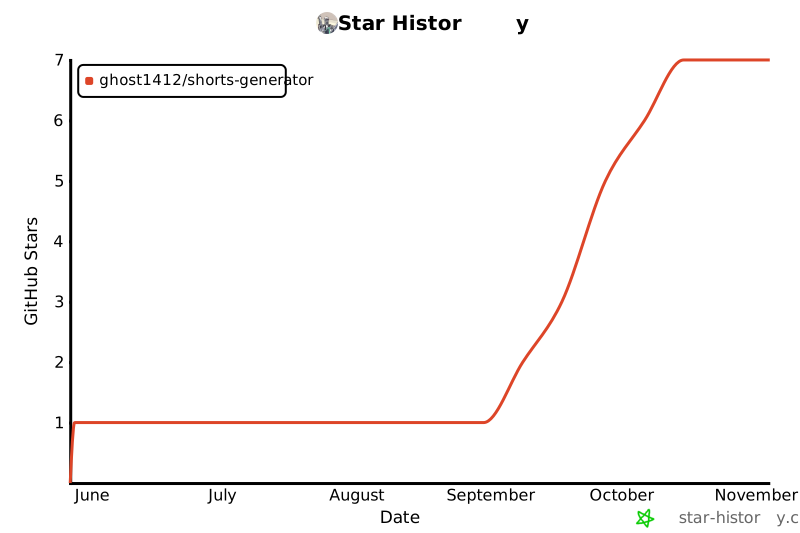
⭐ Star History
📄 License
ShortsFlow AI Studio is open-source software licensed under the MIT License.
1 maintainer

Metadata
1 maintainer
Release files for shortsflow 0.1.0
For a detailed explanation of source distributions (sdists) and built distributions (wheels), please see the package formats documentation.
Source distribution (sdist)
| File | Size | Uploaded | Provenance | Actions |
|---|---|---|---|---|
| shortsflow-0.1.0.tar.gz | 10.7 MB | With provenance | Details for shortsflow-0.1.0.tar.gz |
Built distribution (wheel)
| File | Interpreter | ABI | Platform | Actions Reset |
|---|---|---|---|---|
| shortsflow-0.1.0-py3-none-any.whl | Python 3 | none | any | Details for shortsflow-0.1.0-py3-none-any.whl |
Total release size: 21.3 MB
Release files / shortsflow-0.1.0.tar.gz
| Download URL | shortsflow-0.1.0.tar.gz |
|---|---|
| Size | 10.7 MB |
| Tags | Source |
|
SHA-256 checksum How to use checksums |
e2d2948f62c036025ab9a80cb03e7451ba892ff523eb6fad8c9ffae5e4a62c59
|
|
BLAKE2b-256 checksum How to use checksums |
7d24ba47c04f20d31facd6b1caef572b7b33e8a97ae7b053e991b909d0030976
|
| Upload date | |
|
Uploaded using Trusted Publishing? What is trusted publishing? |
Yes |
| Uploaded via |
twine/7.0.0 CPython/3.13.16
|
Provenance
Provenance describes where a file came from. On PyPI, provenance is shared via attestations, which provide a verifiable record of the build or publishing details. View details, limitations and caveats.


PyPI Publish Attestation
PyPI verified that this artifact, at this checksum, originated from the publisher listed below.
Signed by GitHub Actions, verified by PyPI on Nov 1, 2026.
Transparency logRelease files / shortsflow-0.1.0-py3-none-any.whl
| Download URL | shortsflow-0.1.0-py3-none-any.whl |
|---|---|
| Size | 10.7 MB |
| Tags | Python 3 |
|
SHA-256 checksum How to use checksums |
ff7799c131cae33d0e38f58ecf54d5239fd9c7ce9ff45abf014a0ac468694e5a
|
|
BLAKE2b-256 checksum How to use checksums |
698e972ba306df0d0a8150a690d5fea788e6d63627433604adb7840376459475
|
| Upload date | |
|
Uploaded using Trusted Publishing? What is trusted publishing? |
Yes |
| Uploaded via |
twine/7.0.0 CPython/3.13.16
|
Provenance
Provenance describes where a file came from. On PyPI, provenance is shared via attestations, which provide a verifiable record of the build or publishing details. View details, limitations and caveats.
PyPI Publish Attestation
PyPI verified that this artifact, at this checksum, originated from the publisher listed below.
Signed by GitHub Actions, verified by PyPI on Nov 1, 2026.
Transparency logSecurity for shortsflow 0.1.0
Provenance
Provenance describes where a file came from. On PyPI, provenance is shared via attestations, which provide a verifiable record of the build or publishing details. View details, limitations and caveats.
Full provenance
All 2 files in this release have been uploaded with provenance metadata.
Attestation for shortsflow-0.1.0.tar.gz
PyPI Publish Attestation
PyPI verified that this artifact, at this checksum, originated from the publisher listed below.
Signed by GitHub Actions, verified by PyPI on Nov 1, 2026.
Transparency logA note on package security
PyPI is a repository for distributing packages, not a service for auditing them. While third-party security researchers and our staff do their best to detect and remove malicious packages, PyPI cannot guarantee the quality, security or suitability of any given package.
To learn more about protecting yourself from malicious actors, visit our package security documentation.














