
This release is a pre-release and may not be stable for production use.

ShotX
Advanced Screenshot & Screen Capture Utility for Linux








ShotX
A free, open-source screenshot and screen capture tool for Linux — inspired by ShareX.
ShotX brings the power of ShareX to the Linux desktop: instant screen capture, region selection with auto-detect, annotation tools, screen recording, image editing, OCR, and upload to multiple destinations — all from a single hotkey press or system tray.
Status: Beta — Core features complete, actively maintained.
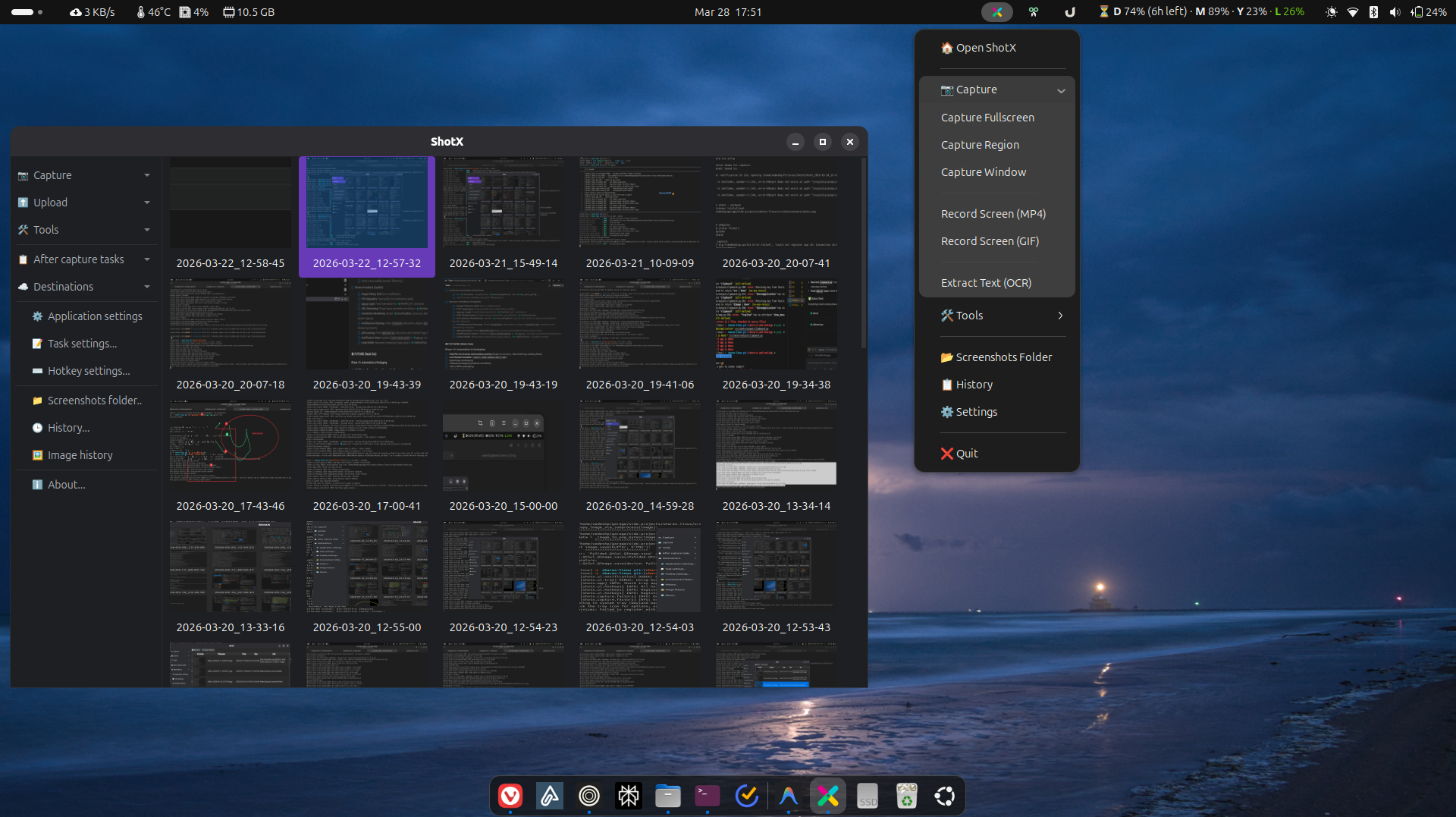
Features
📷 Screen Capture
- Fullscreen — capture entire screen or specific monitor
- Region — drag-select with auto-detect (windows + AT-SPI2 widgets)
- Annotation overlay — annotate directly during region capture
- Configurable delay — countdown timer before capture
- Cursor visibility — option to include/exclude cursor
✏️ Annotation Tools
Built into both the capture overlay and the standalone editor:
- Arrow, rectangle, ellipse, text, freehand draw
- Blur / pixelate, highlight, step numbers
- Eraser, undo/redo, color picker
🎥 Screen Recording
- Record any region as MP4 or GIF
- Audio capture (PulseAudio / PipeWire)
- Wayland (
wf-recorder) and X11 (ffmpeg) backends
☁️ Upload Engine
- Built-in: Imgur, ImgBB, tmpfiles.org
- Cloud: Amazon S3 / S3-compatible (Backblaze, MinIO, etc.)
- Protocol: FTP, SFTP
- Custom:
.sxcuformat compatible with ShareX custom uploaders - URL Shortener: Multiple providers, auto-shorten after upload
🎨 Image Editor
QGraphicsView-based canvas with zoom, pan, keyboard shortcuts- All annotation tools
- Crop & resize with interactive handles
- Effects: borders, shadows, watermarks
- Beautifier: rounded corners, gradient backgrounds, drop shadow
- Combiner: horizontal/vertical image stacking
🛠️ Productivity Tools
- OCR — extract text from any screen region (Tesseract)
- Color Picker — magnifier overlay to pick exact hex color
- Screen Ruler — measure pixel distances and boundaries
- QR Code — scan from screen/clipboard, generate from text
- Hash Checker — file integrity verification (MD5, SHA-1, SHA-256, SHA-512)
- Pin to Screen — pin a captured region as a floating always-on-top window
- Directory Indexer — generate styled HTML index of a directory tree
📜 History & Image History
- Thumbnail Grid — browse recent captures edge-to-edge in the Main Window
- Split-View History — spreadsheet viewer with live preview panel
- Search & Filtering — find captures by filename, extension, or URL
- Batch Operations — multi-select and delete files/records in bulk
- ShareX Formats — copy links as Markdown, HTML, or plain text codes
🖥️ Platform Support
- Wayland-first — xdg-desktop-portal D-Bus API for capture
- X11 fallback — XCB/Xlib capture backend
- Auto-detection of display server
System Dependencies
ShotX is a Python application, but some features require system packages:
| Package | Required For | Install (Ubuntu/Debian) |
|---|---|---|
tesseract-ocr |
OCR text extraction | sudo apt install tesseract-ocr |
libzbar0 |
QR code scanning | sudo apt install libzbar0 |
ffmpeg |
Screen recording (X11) | sudo apt install ffmpeg |
wf-recorder |
Screen recording (Wayland) | sudo apt install wf-recorder |
grim |
Screenshot capture (Wayland, sway) | sudo apt install grim |
slurp |
Region selection (Wayland, sway) | sudo apt install slurp |
xclip |
Clipboard fallback | sudo apt install xclip |
Note: On GNOME Wayland, capture uses the xdg-desktop-portal — no extra packages needed for basic screenshots.
Installation
One-liner (Recommended)
curl -sSL https://shotx.vedeshpadal.me/install.sh | sh
This installs all system dependencies, including OCR, QR scanning, and screen recording.
Native Packages (Ubuntu/Fedora)
Download the latest .deb, .rpm, or AppImage from the GitHub Releases page.
# Ubuntu / Debian
sudo dpkg -i shotx_*.deb

# Fedora / RHEL
sudo rpm -i shotx-*.rpm

# AppImage (any distro)
chmod +x ShotX-*.AppImage && ./ShotX-*.AppImage
The
.deband.rpmpackages bundle a private Python runtime — no system Python or library conflicts.
Homebrew (Linux)
brew tap vedesh-padal/tap
brew install shotx
PyPI
pip install shotx
# or with uv:
uv tool install shotx
From Source
git clone https://github.com/vedesh-padal/ShotX.git
cd ShotX
uv sync
uv run shotx
Usage
# Launch as system tray app (default)
shotx
shotx --tray

# Screen capture
shotx --capture-fullscreen
shotx --capture-region
shotx --capture-window

# Productivity tools
shotx --ocr                       # OCR: select region → text to clipboard
shotx --color-picker              # Pick color → hex to clipboard
shotx --ruler                     # Measure pixel distances
shotx --qr-scan                   # Scan QR from screen region
shotx --qr-generate               # Generate QR from clipboard text
shotx --qr-scan-clipboard         # Scan QR from clipboard image
shotx --pin-region                # Pin region as floating window

# Standalone tools
shotx --hash                      # Open hash checker
shotx --index-dir [PATH]          # Open directory indexer
shotx --edit [IMAGE]              # Open image editor
shotx --history                   # Open capture history viewer

# URL tools
shotx --shorten-url [URL]         # Shorten URL (reads clipboard if no URL)

# Options
shotx --config-dir PATH           # Override config directory
shotx --verbose                   # Enable colored debug logging
Configuration
Settings are stored in ~/.config/shotx/settings.yaml. Configuration is managed via the Settings dialog in the Main Window, or edited directly.
Key configuration areas:
- Capture — output directory, filename pattern, image format, delay, cursor
- Upload — default uploader, API keys, S3/FTP credentials
- Hotkeys — global keyboard shortcuts
- Workflow — after-capture actions (save, clipboard, upload, open editor)
- Notifications — enable/disable desktop notifications
Architecture
ShotX uses an event-driven architecture with domain-specific controllers:
main.py (CLI)
  └── app.py (orchestrator)
        ├── CaptureController  — capture workflows
        ├── UploadController   — upload + URL shortener
        ├── ToolController     — editor, hash, indexer
        ├── EventBus           — inter-component signals
        └── TaskManager        — background thread management
Roadmap
- Phase 1-3 — Core capture, region selection, annotations
- Phase 4 — Screen recording (MP4/GIF)
- Phase 5 — Upload engine (6 backends + custom + URL shortener)
- Phase 6 — Productivity tools (OCR, color picker, ruler, QR, etc.)
- Phase 7 — Image editor (effects, beautifier, combiner)
- Phase 8 — Main Window, history, settings, architecture refactoring
- Phase 9 — Documentation site, PyPI packaging, testing, auto-start
- Phase 10 — Image History grid & enhanced History viewer
- Phase 11 — Automated release pipeline (CI/CD)
- Phase 12 — Native packaging (.deb, .rpm, AppImage, Homebrew)
- Future — Wayland global hotkeys, active window capture on Wayland, watch folders
Tech Stack
| Component | Technology |
|---|---|
| Language | Python 3.10+ |
| GUI Framework | Qt6 / PySide6 |
| Config | YAML (PyYAML) |
| Screen Capture | xdg-desktop-portal (Wayland), XCB/Xlib (X11) |
| Recording | FFmpeg (X11), wf-recorder (Wayland) |
| Upload | httpx, boto3 (S3), paramiko (SFTP) |
| OCR | Tesseract (pytesseract) |
| QR Code | pyzbar, qrcode |
| Image Processing | Pillow, QPainter |
| D-Bus | dbus-next |
Contributing
Contributions are welcome! This project follows clean engineering practices:
- Each commit does one thing
- Clear commit messages following conventional commits
- Feature branches merged via
--no-ff
# Run tests
uv run pytest

# Lint
uv run ruff check src/

# Type check
uv run mypy src/
License
GPL-3.0 — see LICENSE for details. Same license as ShareX.
Acknowledgments
1 maintainer

Metadata
1 maintainer
Release files for shotx 1.0.0b1
For a detailed explanation of source distributions (sdists) and built distributions (wheels), please see the package formats documentation.
Source distribution (sdist)
| File | Size | Uploaded | |
|---|---|---|---|
| shotx-1.0.0b1.tar.gz | 173.9 kB | Details |
Built distribution (wheel)
| File | Interpreter | ABI | Platform | Reset |
|---|---|---|---|---|
| shotx-1.0.0b1-py3-none-any.whl | Python 3 | none | any | Details |
Total release size: 379.8 kB
Release files / shotx-1.0.0b1.tar.gz
| Download URL | shotx-1.0.0b1.tar.gz |
|---|---|
| Size | 173.9 kB |
| Tags | Source |
|
SHA-256 checksum How to use checksums |
89a968953b8e6a4e4de0a0f7a460e7d54d4bbf269ed77d54874e239ad8851dc1
|
|
BLAKE2b-256 checksum How to use checksums |
cbb1abf24c6db86ac07a90c1f2ef83d7fa05693cb7106158c2165d5464f8f82b
|
| Upload date | |
|
Uploaded using Trusted Publishing? What is trusted publishing? |
Yes |
| Uploaded via |
uv/0.11.2 {"installer":{"name":"uv","version":"0.11.2","subcommand":["publish"]},"python":null,"implementation":{"name":null,"version":null},"distro":{"name":"Ubuntu","version":"24.04","id":"noble","libc":null},"system":{"name":null,"release":null},"cpu":null,"openssl_version":null,"setuptools_version":null,"rustc_version":null,"ci":true}
|
Release files / shotx-1.0.0b1-py3-none-any.whl
| Download URL | shotx-1.0.0b1-py3-none-any.whl |
|---|---|
| Size | 205.9 kB |
| Tags | Python 3 |
|
SHA-256 checksum How to use checksums |
fe6925650ef7fc3502b33dd6d78c656c49bd050dd85ca4c2e22558bd31581169
|
|
BLAKE2b-256 checksum How to use checksums |
144537baa03f43072e54f76a0fdf0566f19e3d37546fe22f06e6b9357db24b1e
|
| Upload date | |
|
Uploaded using Trusted Publishing? What is trusted publishing? |
Yes |
| Uploaded via |
uv/0.11.2 {"installer":{"name":"uv","version":"0.11.2","subcommand":["publish"]},"python":null,"implementation":{"name":null,"version":null},"distro":{"name":"Ubuntu","version":"24.04","id":"noble","libc":null},"system":{"name":null,"release":null},"cpu":null,"openssl_version":null,"setuptools_version":null,"rustc_version":null,"ci":true}
|














