

Shownamer - The Ultimate Media Renamer
Shownamer is a powerful yet lightweight command-line tool written in Python that automatically renames your TV show and movie files. It fetches accurate episode titles, release years, and other metadata from online sources like TVmaze and OMDb, transforming your messy filenames into a clean, consistent, and organized format.
[!NOTE] Fetches details and metadata from TVmaze, TMDb, and OMDb API. No API Keys of further tweaking will be required to rename and handle TV Show files. For movies, you'll be prompted for a free OMDb and/or TMDb key on first use — either can be skipped. If a TMDb key is configured, TMDb is used ahead of OMDb automatically, falling back to OMDb if TMDb has no match.
The Philosophy
The philosophy behind Shownamer is simplicity. It's designed to work "out of the box" with minimal configuration. While movie renaming requires a free API key from OMDb and/or TMDB, the tool is designed to be as straightforward as possible. It does one thing and does it well: renaming your media files to make your collection look neat and tidy.
Installation
Installing Shownamer is as simple as running a single command. All you need is Python 3.7 or higher.
pip install shownamer
That's it! You're ready to start renaming your files.
Usage
You can use Shownamer by simply typing shownamer in your terminal. By default, it will scan the current directory for TV show files and rename them.
To see a list of all available options, you can use the --help flag:
shownamer --help
Arguments
| Flag | Description |
|---|---|
--dir |
Specifies the directory where your media files are located. Defaults to the current working directory. |
-m, --movie |
Look for movie files instead of TV shows. |
--api-key |
Your OMDb API key. Overrides the stored API key. (only required for renaming movie files) |
--tmdb-api-key |
Your TMDb API key. Overrides the stored key. If configured, TMDb is used ahead of OMDb for movies. |
--ext |
Specifies the file extensions to consider. Defaults to mkv, mp4, avi, mov, flv. |
--dry-run |
See what changes will be made without actually renaming any files. |
--verbose |
Show more details about what is happening behind the scenes. |
--name |
List all the TV show names detected in the directory. Use with --movie to list movie details. |
--format |
Define your own custom filename format. |
--char |
Replace illegal characters in filenames with a specific character (_, -, .). |
--title |
Embed media title into file metadata after renaming. Compatible with --format and --movie. |
-h, --help |
Print this help message. |
-v, --version |
Print the current version of Shownamer and exit. |
Examples
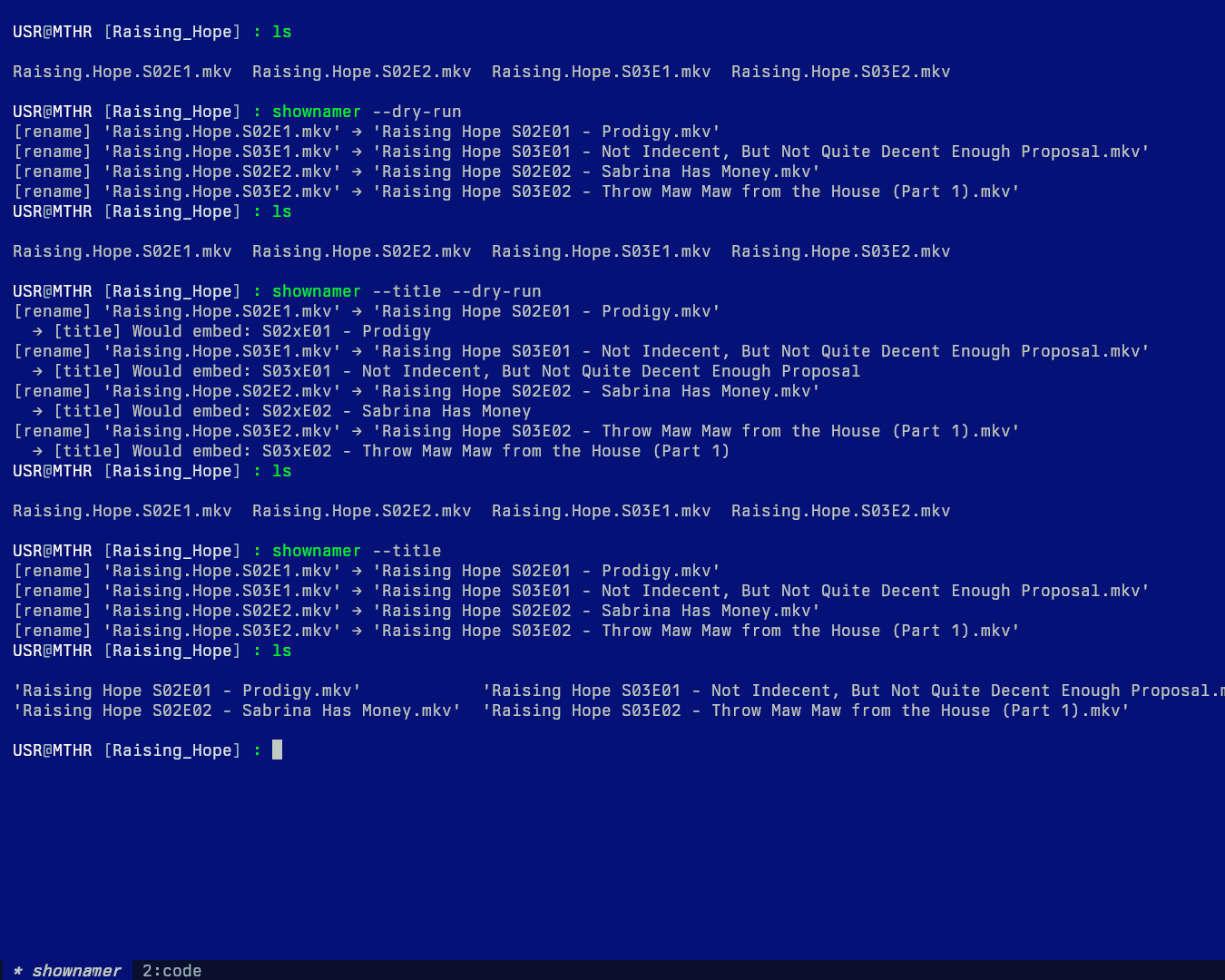
Rename TV Show Episodes
# Rename all supported video files in the current directory
shownamer

# Specify a directory
shownamer --dir "/path/to/your/shows"

# Only consider .mkv and .mp4 files
shownamer --ext mkv mp4
Rename Movie Files
The first time you run the movie command, you'll be prompted for a TMDb key, then an OMDb key. Either prompt can be skipped by entering n or leaving it blank — you don't need both, but having both enables richer metadata (see below). Whichever keys you provide are stored on disk and won't be asked for again.
Get a free TMDb key here: https://www.themoviedb.org/settings/api Get a free OMDb key here: https://www.omdbapi.com/apikey.aspx
If a TMDb key is configured, TMDb is used first for movie lookups; OMDb is only used as a fallback if TMDb has no key or no match for a title. If you also have an OMDb key stored, TMDb results get enriched with OMDb's Awards, Rotten Tomatoes, and Metacritic ratings automatically.
# Rename movie files in the current directory
shownamer --movie

# Provide an OMDb API key directly
shownamer --movie --api-key YOUR_OMDB_API_KEY

# Provide a TMDb API key directly (takes priority over OMDb once configured)
shownamer --movie --tmdb-api-key YOUR_TMDB_API_KEY
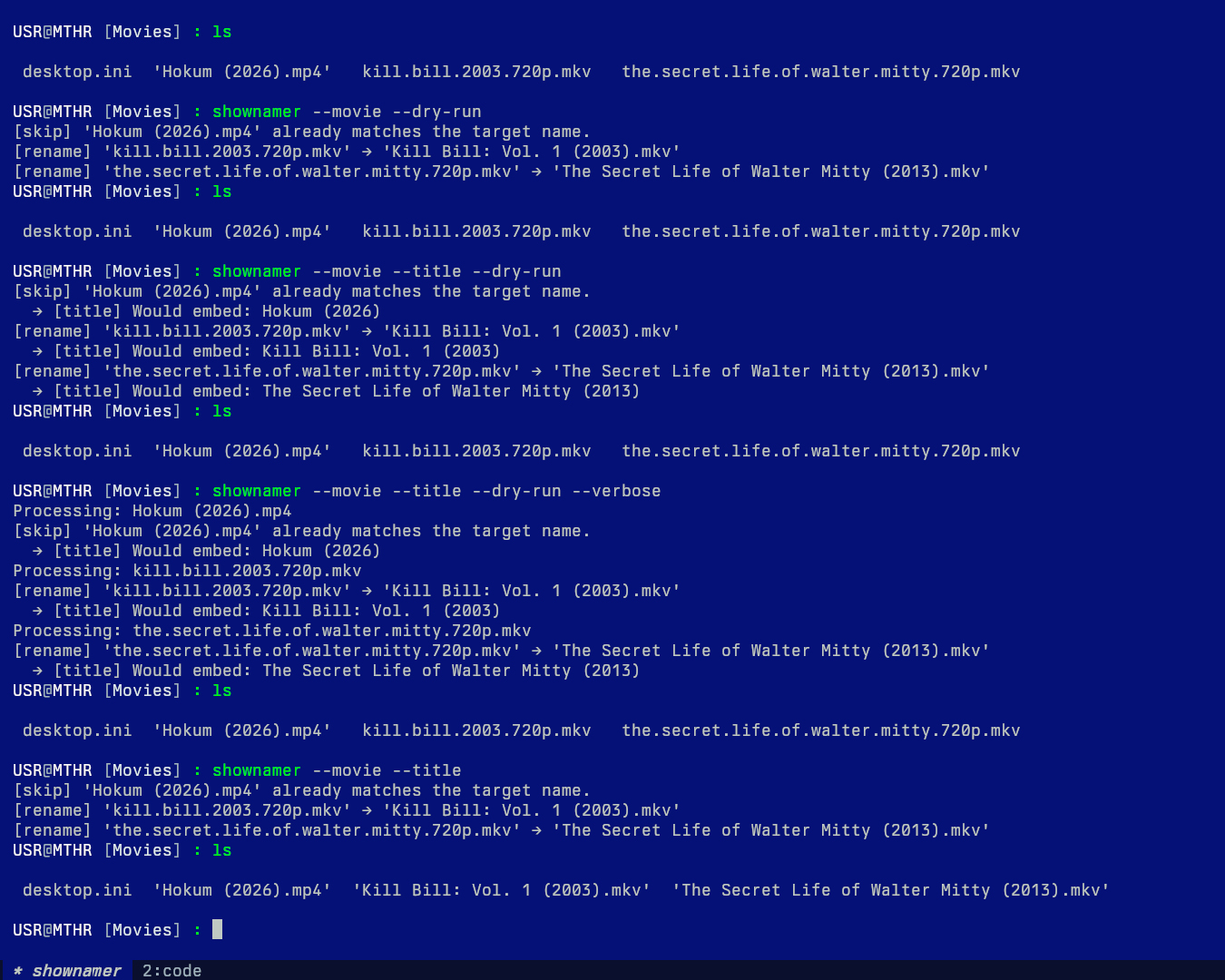
Dry Run and Verbose Mode
# Preview the changes without actually renaming any files
shownamer --dry-run

# See detailed logs of what the tool is doing
shownamer --verbose
List Detected Media
# List all detected TV shows in the current directory
shownamer --name

# List all detected movies
shownamer -m --name
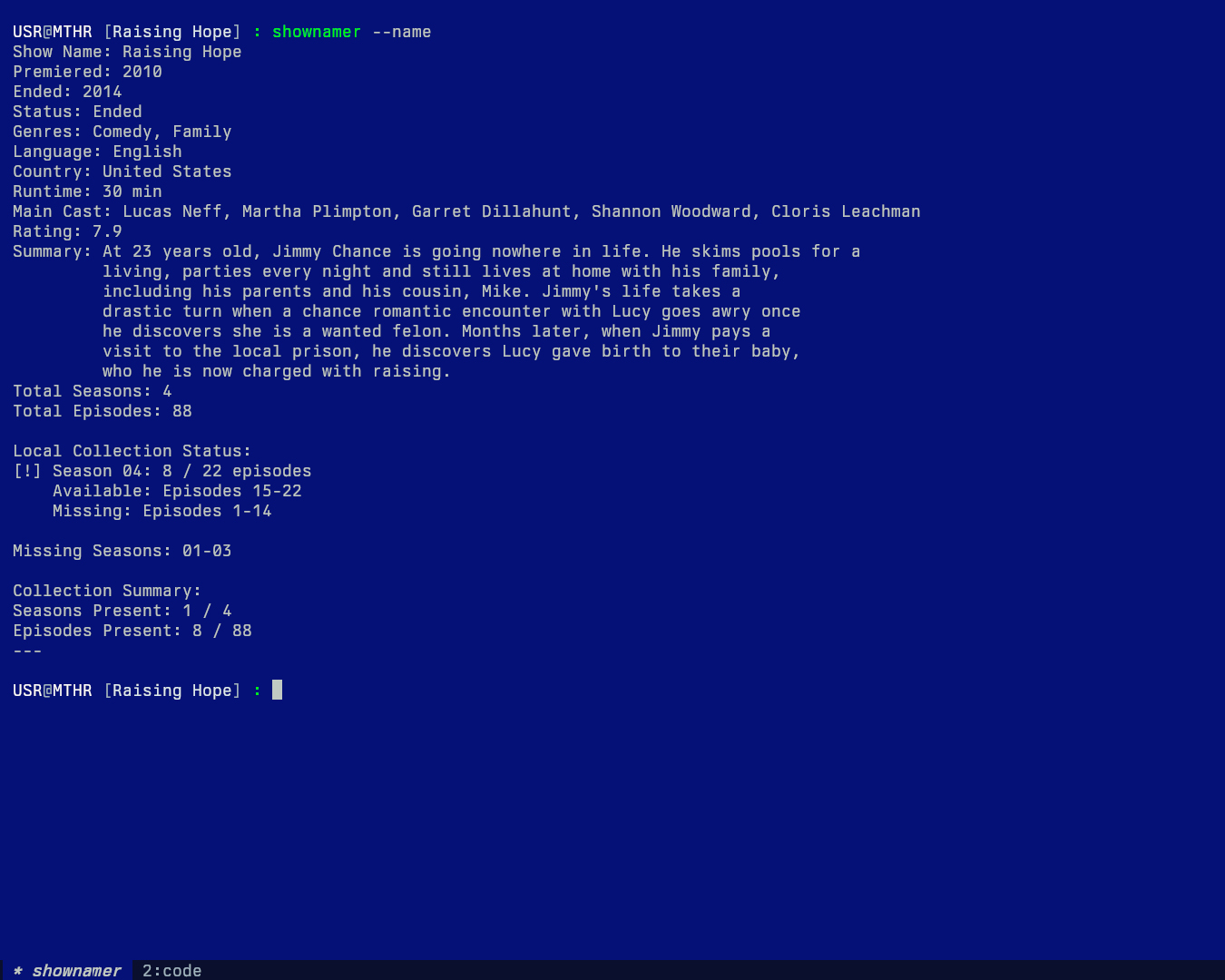
For TV shows, it prints: Show Name, Premiered, Ended, Status, Genres, Language, Country, Runtime, Main Cast, Rating, Summary, Total Seasons, Total Episodes, Local Collection Status (per season, with available/missing episode breakdown), Missing Seasons, and a Collection Summary.
user@device: shownamer --name
Show Name: Raising Hope
Premiered: 2010
Ended: 2014
Status: Ended
Genres: Comedy, Family
Language: English
Country: United States
Runtime: 30 min
Main Cast: Lucas Neff, Martha Plimpton, Garret Dillahunt, Shannon Woodward, Cloris Leachman
Rating: 7.9
Summary: At 23 years old, Jimmy Chance is going nowhere in life. He skims pools for a
         living, parties every night and still lives at home with his family,
         including his parents and his cousin, Mike. Jimmy's life takes a
         drastic turn when a chance romantic encounter with Lucy goes awry once
         he discovers she is a wanted felon. Months later, when Jimmy pays a
         visit to the local prison, he discovers Lucy gave birth to their baby,
         who he is now charged with raising.
Total Seasons: 4
Total Episodes: 88

Local Collection Status:
[!] Season 04: 15 / 22 episodes
    Available: Episodes 8-22
    Missing: Episodes 1-7

Missing Seasons: 01-03

Collection Summary:
Seasons Present: 1 / 4
Episodes Present: 15 / 88
---
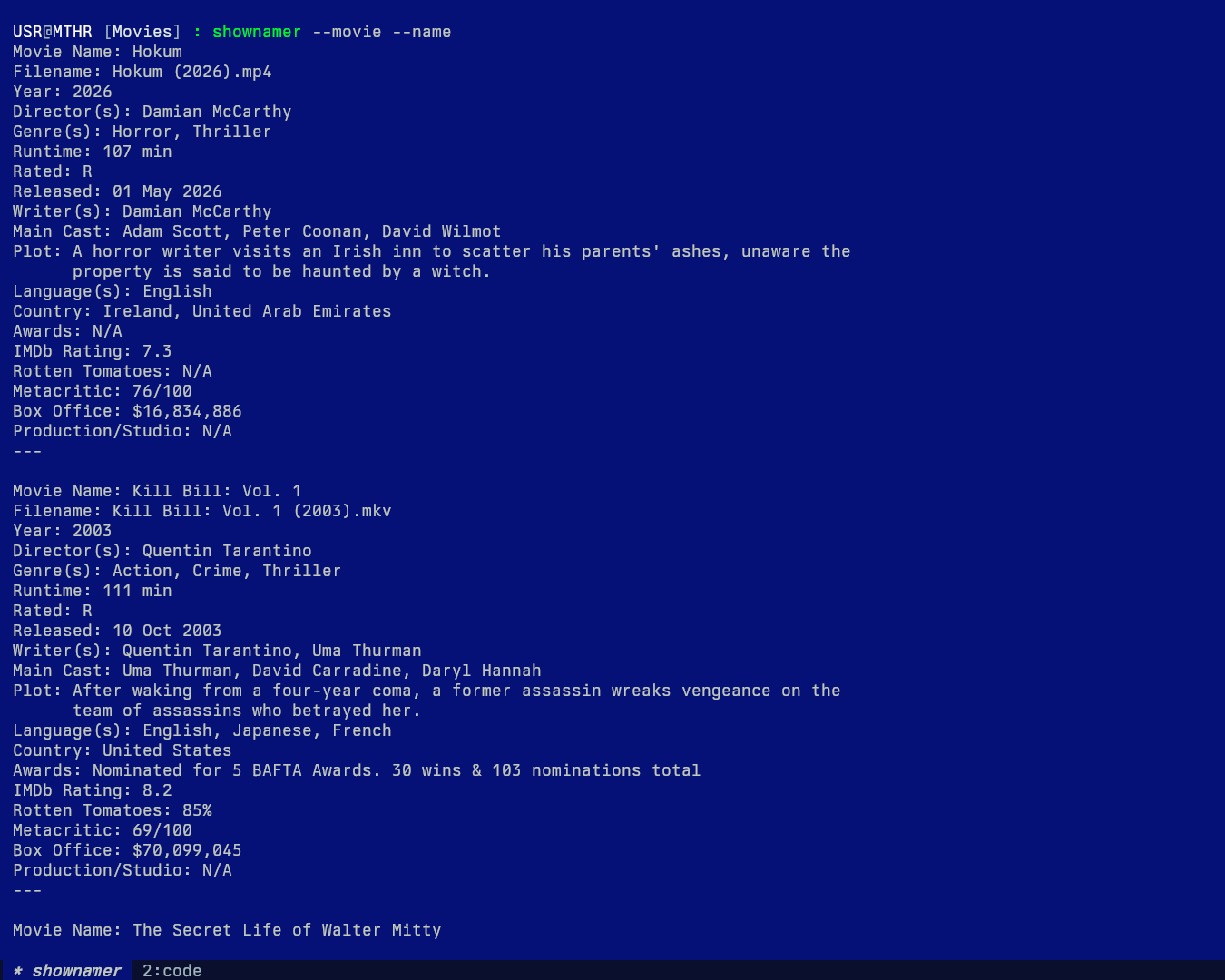
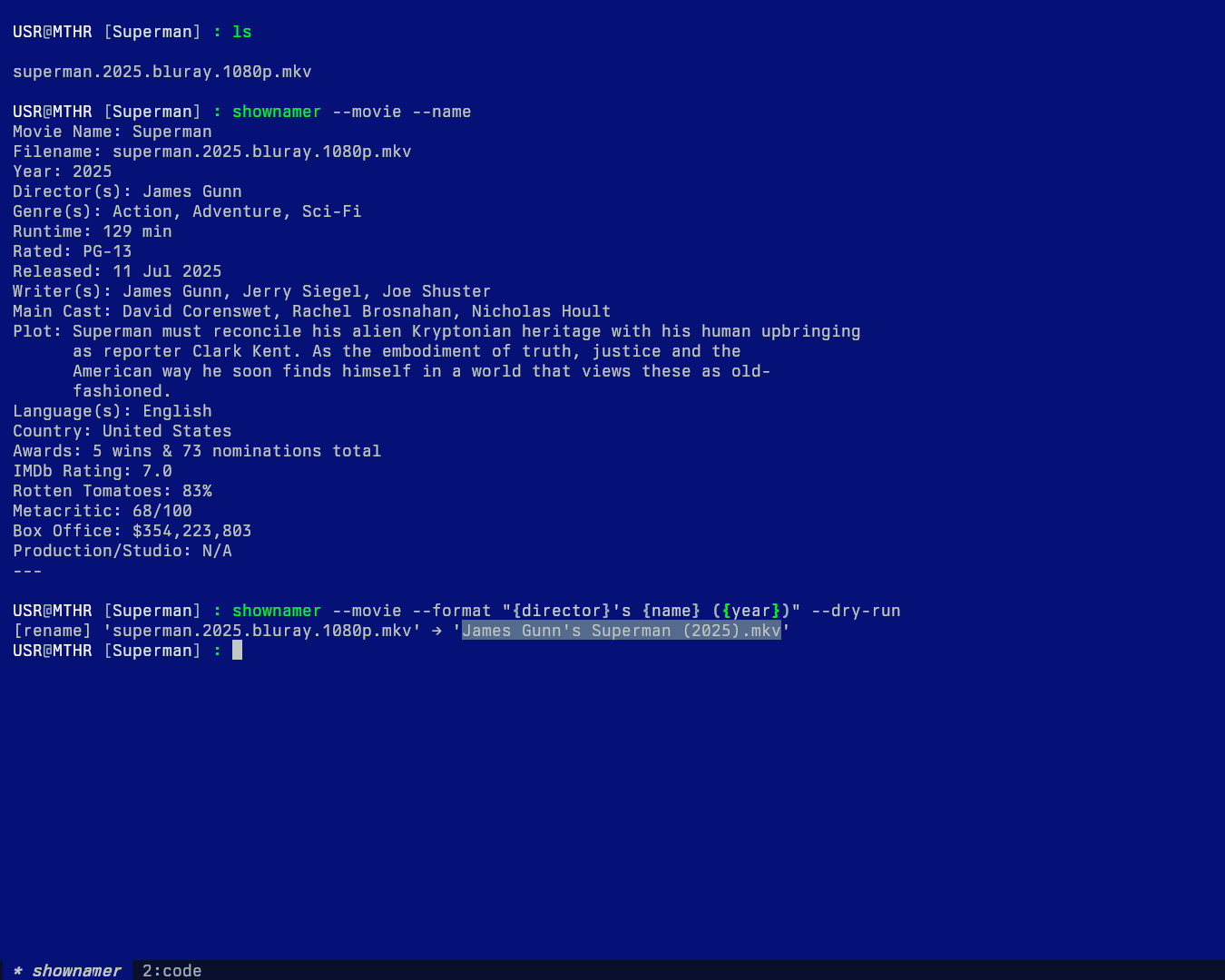
For movies, it prints: Movie Name, Filename, Year, Director(s), Genre(s), Runtime, Rated, Released, Writer(s), Main Cast, Plot, Language(s), Country, Awards, IMDb Rating, Rotten Tomatoes, Metacritic, Box Office.
user@device: shownamer --movie --name
Movie Name: The Secret Life of Walter Mitty
Filename: the.secret.life.of.walter.mitty.720p.mkv
Year: 2013
Tagline: Stop dreaming. Start living.
Director(s): Ben Stiller
Genre(s): Adventure, Comedy, Drama, Fantasy
Runtime: 114 min
Rated: PG
Released: 2013-12-18
Writer(s): Steven Conrad
Main Cast: Ben Stiller, Kristen Wiig, Sean Penn
Plot: A timid magazine photo manager who lives life vicariously through daydreams
      embarks on a true-life adventure when a negative goes missing.
Language(s): en
Country: United Kingdom, United States of America, Australia, Canada, Iceland
Awards: 5 wins & 18 nominations total
IMDb Rating: 7.227
Rotten Tomatoes: 52%
Metacritic: 54/100
Box Office: $188,133,322
Production/Studio: Samuel Goldwyn Films, Red Hour, New Line Cinema,
                   Big Screen Productions, Down Productions,
                   Ingenious Media, 20th Century Fox, TSG Entertainment
---
Fields like Tagline and Collection only appear when the resolved source (TMDb, or OMDb enrichment) actually has a value for them — any field that comes back N/A is omitted from the listing rather than shown as empty.
Custom Filename Formatting
You can use the --format argument to define your own filename structure.
Available Placeholders:
- For TV Shows:
{name},{season},{episode},{title},{year} - For Movies:
{name},{year},{director},{genre}
Formatting Examples:
# Default TV show format: {name} S{season:02}E{episode:02} - {title}
# Output: The Office S01E01 - Pilot.mkv

# Custom TV show format
shownamer --format "{name} ({year}) - {season}x{episode} - {title}"

# Default movie format: {name} ({year})
# Output: The Green Knight (2021).mkv

# Custom movie format
shownamer --movie --format "{director} - {name} ({year}) [{genre}]"
Title Embedding
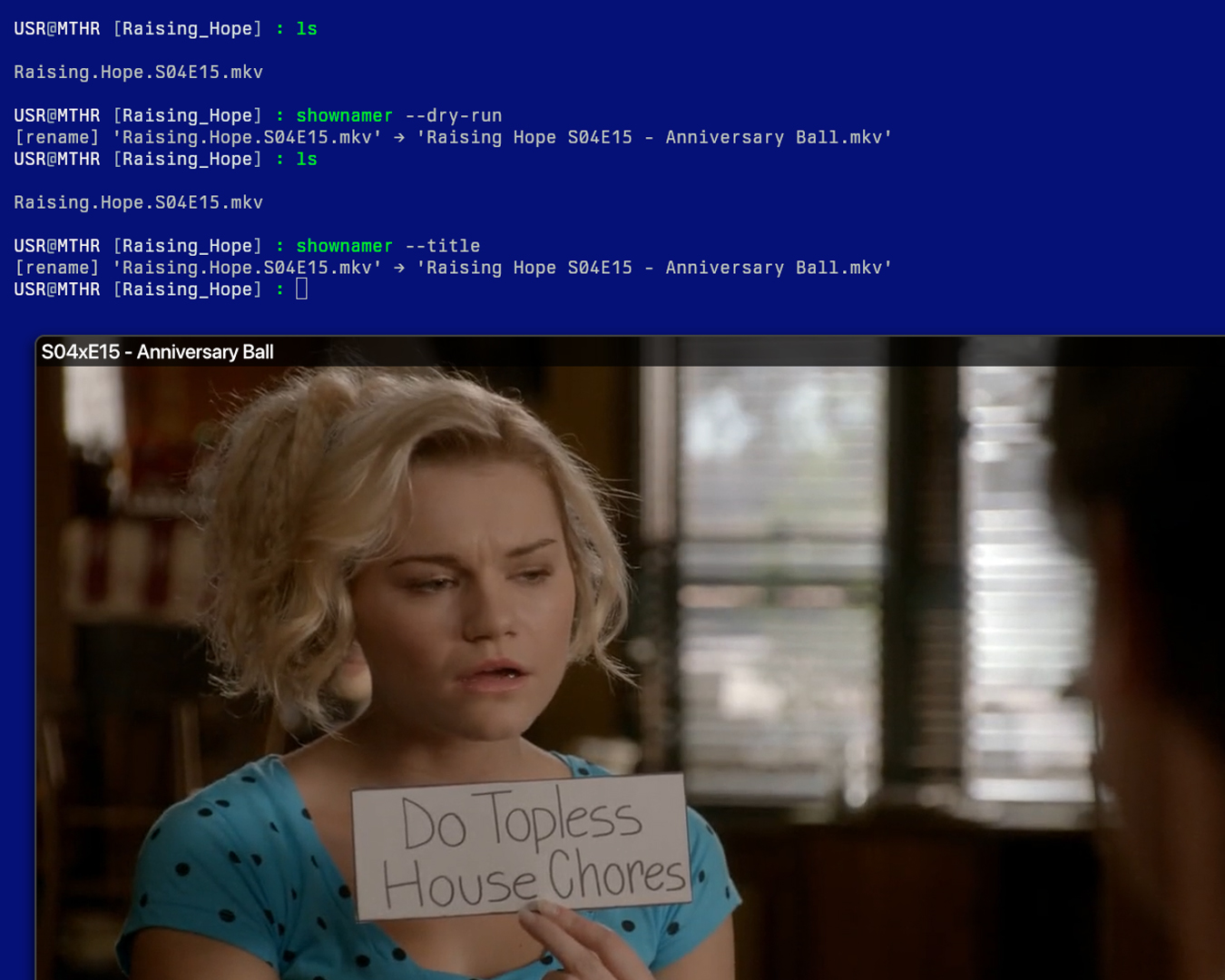
Use the --title flag to write a title string directly into the file's metadata after renaming.
# Embed title metadata after renaming TV show files
shownamer --title

# Embed title metadata after renaming movie files
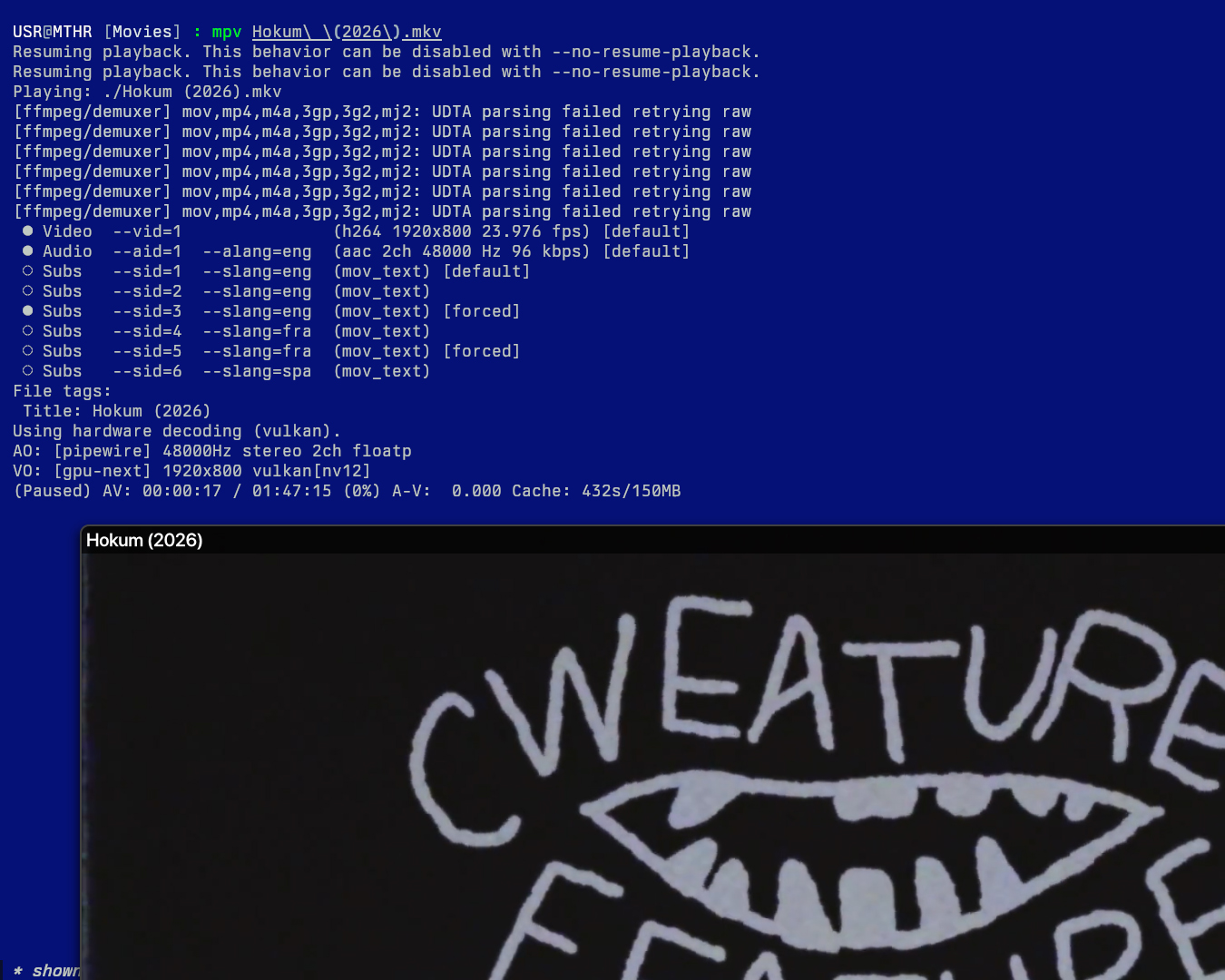
shownamer --movie --title

# Works alongside --format
shownamer --title --format "{name} ({year}) - {season}x{episode} - {title}"

# Preview what would be embedded without touching files
shownamer --title --dry-run
The title string embedded into the metadata follows this format:
| Mode | Embedded Title Format | Example |
|---|---|---|
| Show | S{season:02}xE{episode:02} - {title} |
S02xE05 - The Dinner Party |
| Movie | {name} ({year}) |
The Green Knight (2021) |
When --format is used, the formatted filename string is embedded as-is instead of the defaults above.
Dependencies:
For .mp4, .m4v, and .mov files, title embedding uses mutagen, which is installed automatically with shownamer. For all other formats (.mkv, .avi, etc.), it falls back to ffmpeg, which must be available in your PATH separately.
FAQ
Will this overwrite existing files?
No. The script does not overwrite files. It renames only when the target filename does not exist. You can use --dry-run to preview the result first.
Does it fetch subtitles or cover images?
No. This tool only renames the video files with accurate episode titles.
Contributions
Pull requests, suggestions, and issues are welcome! Let's make it smarter and broader (e.g., subtitle renaming, fuzzy matching, show aliases, etc.).
1 maintainer

Download files
Download the file for your platform. If you're not sure which to choose, learn more about installing packages.
Source Distribution
Built Distribution
Filter files by name, interpreter, ABI, and platform.
If you're not sure about the file name format, learn more about wheel file names.
Copy a direct link to the current filters
File details
Details for the file shownamer-2.5.1.tar.gz.
File metadata
- Download URL: shownamer-2.5.1.tar.gz
- Upload date:
- Size: 22.5 kB
- Tags: Source
- Uploaded using Trusted Publishing? Yes
- Uploaded via:
twine/7.0.0 CPython/3.13.14
File hashes
| Algorithm | Hash digest | |
|---|---|---|
| SHA256 |
2361e4ffa5ec95a7bcd4a4d92b08666477672417b79c1ace30719cd899e39eec
|
|
| MD5 |
b29021100956e034ff43941452304dba
|
|
| BLAKE2b-256 |
3d95fad91fe45135aef4d56ade9b9a05a7b59ba2dd927edbf7cf0820013e2dc2
|
Provenance
The following attestation bundles were made for shownamer-2.5.1.tar.gz:
Publisher:
publish.yml on theamallalgi/shownamer
-
Statement:
-
Statement type:
https://in-toto.io/Statement/v1 -
Predicate type:
https://docs.pypi.org/attestations/publish/v1 -
Subject name:
shownamer-2.5.1.tar.gz -
Subject digest:
2361e4ffa5ec95a7bcd4a4d92b08666477672417b79c1ace30719cd899e39eec - Sigstore transparency entry: 2421848896
- Sigstore integration time:
-
Permalink:
theamallalgi/shownamer@62a02876a952dc783d3edb2c03ecf198d20a0df7 -
Branch / Tag:
refs/tags/v2.5.1 - Owner: https://github.com/theamallalgi
-
Access:
public
-
Token Issuer:
https://token.actions.githubusercontent.com -
Runner Environment:
github-hosted -
Publication workflow:
publish.yml@62a02876a952dc783d3edb2c03ecf198d20a0df7 -
Trigger Event:
push
-
Statement type:
File details
Details for the file shownamer-2.5.1-py3-none-any.whl.
File metadata
- Download URL: shownamer-2.5.1-py3-none-any.whl
- Upload date:
- Size: 20.0 kB
- Tags: Python 3
- Uploaded using Trusted Publishing? Yes
- Uploaded via:
twine/7.0.0 CPython/3.13.14
File hashes
| Algorithm | Hash digest | |
|---|---|---|
| SHA256 |
6f88159572cfef08d02bba05e0ca6eb02ac4ab7899474aa2d3765cba1d83d2b5
|
|
| MD5 |
fc4972f8ddaebdf2fc3325272368e30e
|
|
| BLAKE2b-256 |
03cc19dd1128d31c36f2ea6c1b63f5f0c8e05b29fab6fb5c17ceff63284af20f
|
Provenance
The following attestation bundles were made for shownamer-2.5.1-py3-none-any.whl:
Publisher:
publish.yml on theamallalgi/shownamer
-
Statement:
-
Statement type:
https://in-toto.io/Statement/v1 -
Predicate type:
https://docs.pypi.org/attestations/publish/v1 -
Subject name:
shownamer-2.5.1-py3-none-any.whl -
Subject digest:
6f88159572cfef08d02bba05e0ca6eb02ac4ab7899474aa2d3765cba1d83d2b5 - Sigstore transparency entry: 2421848967
- Sigstore integration time:
-
Permalink:
theamallalgi/shownamer@62a02876a952dc783d3edb2c03ecf198d20a0df7 -
Branch / Tag:
refs/tags/v2.5.1 - Owner: https://github.com/theamallalgi
-
Access:
public
-
Token Issuer:
https://token.actions.githubusercontent.com -
Runner Environment:
github-hosted -
Publication workflow:
publish.yml@62a02876a952dc783d3edb2c03ecf198d20a0df7 -
Trigger Event:
push
-
Statement type:







