
showpyfigfonts
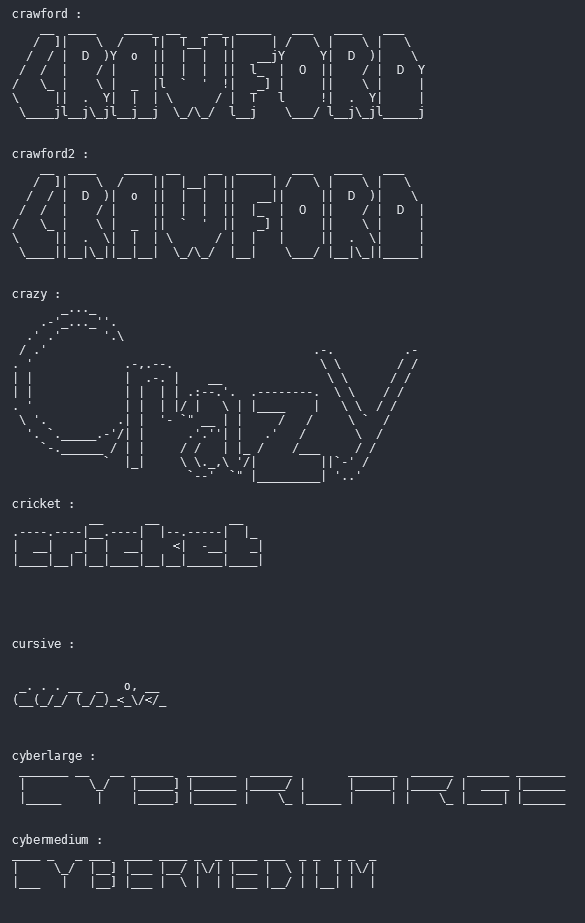
Preview
📑 INDEX
⚙️ Installation
1. Install Python & Git:
-
For Windows:
winget install Python.Python.3.12

winget install Git.Git
-
For Linux:
sudo apt-get update

sudo apt-get install -y git python3
-
For macOS:
brew install python git
-
For Termux:
apt update

apt install git python -y
✅ Setup
pip install showpyfigfonts
1. Download repository:
git clone https://github.com/imegeek/showpyfigfonts
2. Change Directory:
cd showpyfigfonts
3. Run setup.py:
python setup.py install
python setup.py install
❓ How to use?
- Run this command:
showpyfigfonts
usage: showpyfigfonts [-h] [--font name] [text]


positional arguments:

  text                  Render fonts by text.


options:

  -h, --help            show this help message and exit

  --font name, -f name  Render specific font by name.
showpyfigfonts --help
- Print custom text for all fonts:
showpyfigfonts 'hello'
- Print specific font:
showpyfigfonts -f mono12
- Print custom text with specific font:
showpyfigfonts -f mono12 'hello'
1 maintainer

Metadata
1 maintainer
Release files for showpyfigfonts 1.0
For a detailed explanation of source distributions (sdists) and built distributions (wheels), please see the package formats documentation.
Source distribution (sdist)
| File | Size | Uploaded | |
|---|---|---|---|
| showpyfigfonts-1.0.tar.gz | 3.3 kB | Details |
Built distribution (wheel)
| File | Interpreter | ABI | Platform | Reset |
|---|---|---|---|---|
| showpyfigfonts-1.0-py3-none-any.whl | Python 3 | none | any | Details |
Total release size: 6.7 kB
Release files / showpyfigfonts-1.0.tar.gz
| Download URL | showpyfigfonts-1.0.tar.gz |
|---|---|
| Size | 3.3 kB |
| Tags | Source |
|
SHA-256 checksum How to use checksums |
94ef5b740cae027b48d17e03755f5ba0ce4345f851f425b37c494387a2ec8c23
|
|
BLAKE2b-256 checksum How to use checksums |
96de5c3e60c64adf0c3c1044a53d93905a0d588ebb43a0886cc216c6a7847a20
|
| Upload date | |
|
Uploaded using Trusted Publishing? What is trusted publishing? |
No |
| Uploaded via |
twine/4.0.2 CPython/3.12.0
|
Release files / showpyfigfonts-1.0-py3-none-any.whl
| Download URL | showpyfigfonts-1.0-py3-none-any.whl |
|---|---|
| Size | 3.4 kB |
| Tags | Python 3 |
|
SHA-256 checksum How to use checksums |
5bc0f94fda151a6ea0e6ca2b7d14d5af27bdce0246645846c4a6c03ca9c6cef0
|
|
BLAKE2b-256 checksum How to use checksums |
7797aaa88797fc4993aabab620f2a24aa7c185530ccfb2384a5b1735487bb3db
|
| Upload date | |
|
Uploaded using Trusted Publishing? What is trusted publishing? |
No |
| Uploaded via |
twine/4.0.2 CPython/3.12.0
|













