
shpe

A lightweight static analyzer for tracking and validating NumPy tensor shapes without running the code. It is designed to both be a CLI tool that can be used in CI/CD pipelines and a VS Code extension for real-time shape inference and error messages during development.
Important Note for VS Code Extension: This extension requires the core Python CLI tool to function. Please make sure you run
pip install shpein your environment!
VS Code Extension Preview
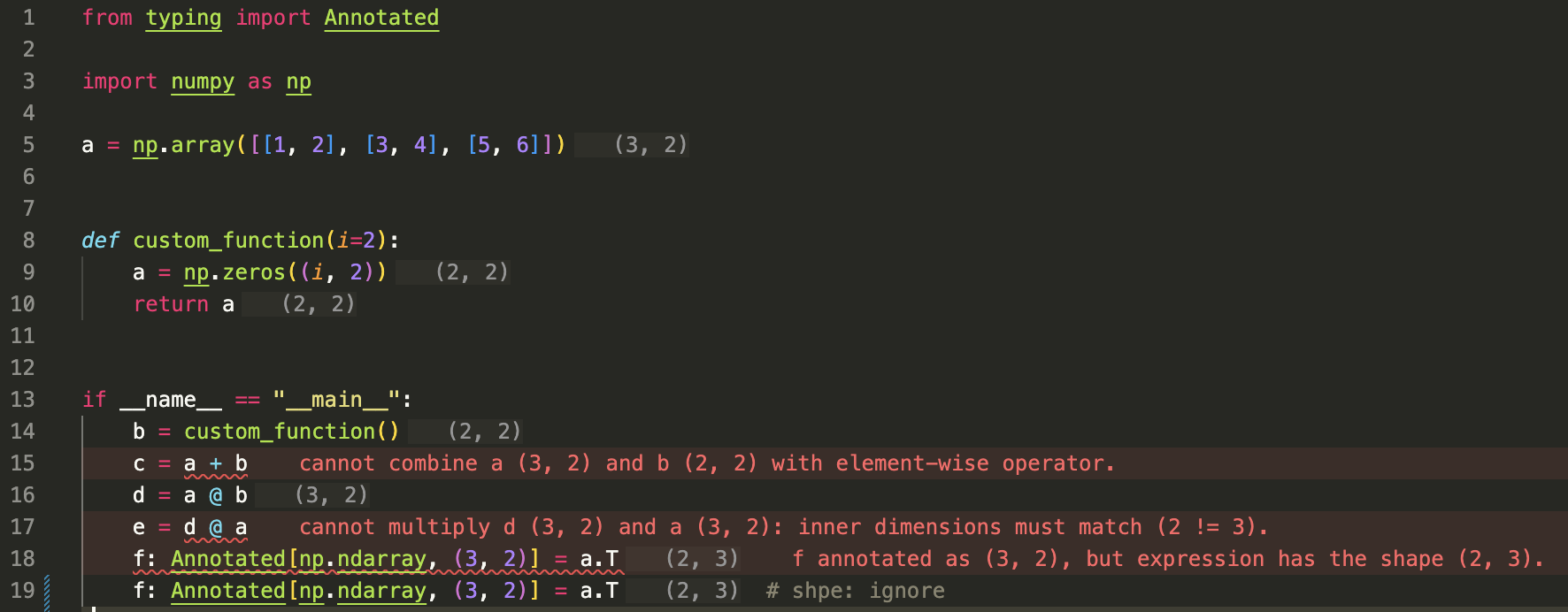
CLI Usage
Alternatively, you can use the CLI tool to check for shape errors in your code.
shpe examples/intro.py
examples/intro.py:15: [Elementwise] cannot combine a (3, 2) and b (2, 2) with element-wise operator.
examples/intro.py:17: [MatMul] cannot multiply d (3, 2)and a (3, 2): inner dimensions must match (2 != 3).
examples/intro.py:18: [Annotation] f annotated as (3, 2), but expression has the shape (2, 3).

Found 3 error(s) across 1 file(s).
You can use the --show-shapes flag to display the inferred shapes of all expressions in the code:
shpe path/to/your/file_or_directory --show-shapes
Installation
Prerequisites: Python 3.12+
-
For VS Code extension, search for
shpein the VS Code marketplace and install it. -
For both CLI and VS Code extension, install
shpe:
pip install shpe
Features
- Infers shapes from NumPy array (
np.array([1, 2, 3])) and NumPy functions (np.zeros((3, 2)),a.T). - Validates shape annotations for NumPy arrays (
c: Annotated[np.ndarray, (3, 2)]). - Validates NumPy operations for shape compatibility (
a + b,a @ b). - Infers shapes for simple functions calls and function bodies (
c = custom_func(a, b)). - Tracks scalar variables used in shape definitions (
np.zeros((dim, 2))).
Checkout examples/demo.py for a more comprehensive demonstration of shpe's capabilities.
Limitations
We prioritize soundness over completeness, so shpe might miss errors. When shpe is uncertain it, does not infer the shape.
False positive:
- We do not track inplace function modification like
b = a.resize((3, 2)), so it might infer the wrong shape.
False negatives:
- Only supports a subset of NumPy arrays and functions.
- No control flow support (if, for, while), variables touched are not inferred.
- No support for recursive functions.
- To keep development simple,
shpeidentifies functions by suffix, so it may not trigger an error in cases like (var.expand_dimswithoutnp.prefix).
If you noticed any bugs or have any feature requests, please report them on GitHub Issues.
Development
Prerequisites: Python 3.12+, uv
To get started locally:
git clone https://github.com/jiaquan-cheng/shpe.git
cd shpe
make setup
We would recommend to using the VS Code extension or the --show-shapes flag to check the inferred shapes of your code while developing.
1 maintainer

Release files for shpe 0.2.2
For a detailed explanation of source distributions (sdists) and built distributions (wheels), please see the package formats documentation.
Source distribution (sdist)
| File | Size | Uploaded | |
|---|---|---|---|
| shpe-0.2.2.tar.gz | 203.7 kB | Details |
Built distribution (wheel)
| File | Interpreter | ABI | Platform | Reset |
|---|---|---|---|---|
| shpe-0.2.2-py3-none-any.whl | Python 3 | none | any | Details |
Total release size: 227.6 kB
Release files / shpe-0.2.2.tar.gz
| Download URL | shpe-0.2.2.tar.gz |
|---|---|
| Size | 203.7 kB |
| Tags | Source |
|
SHA-256 checksum How to use checksums |
c81ceb4eb50cd5cecb2b7987589282f3c478b254a4d9a41725f65525b861b2f2
|
|
BLAKE2b-256 checksum How to use checksums |
6348c9eb7900e9c1658ca4ef2c6f20814d82b467c170e9714048008b9ffb66a6
|
| Upload date | |
|
Uploaded using Trusted Publishing? What is trusted publishing? |
Yes |
| Uploaded via |
twine/7.0.0 CPython/3.13.14
|
Provenance
Provenance describes where a file came from. On PyPI, provenance is shared via attestations, which provide a verifiable record of the build or publishing details. View details, limitations and caveats.


PyPI Publish Attestation
PyPI verified that this artifact, at this checksum, originated from the publisher listed below.
Signed by GitHub Actions, verified by PyPI on Sep 25, 2026.
Transparency logRelease files / shpe-0.2.2-py3-none-any.whl
| Download URL | shpe-0.2.2-py3-none-any.whl |
|---|---|
| Size | 23.8 kB |
| Tags | Python 3 |
|
SHA-256 checksum How to use checksums |
c951117993c5167e9aae2dfb9e47e08ec44d96703642f46aa4c8d3f8da4bcb7a
|
|
BLAKE2b-256 checksum How to use checksums |
576c6b93c13a1dbbc6dcdaff7e3c1e7c6d1e1c60385bb194a1789cdced3a0a8e
|
| Upload date | |
|
Uploaded using Trusted Publishing? What is trusted publishing? |
Yes |
| Uploaded via |
twine/7.0.0 CPython/3.13.14
|
Provenance
Provenance describes where a file came from. On PyPI, provenance is shared via attestations, which provide a verifiable record of the build or publishing details. View details, limitations and caveats.
PyPI Publish Attestation
PyPI verified that this artifact, at this checksum, originated from the publisher listed below.
Signed by GitHub Actions, verified by PyPI on Sep 25, 2026.
Transparency log













