
Solana ShredStream SDK/Decoder for Python, enabling ultra-low latency Solana transaction streaming via UDP shreds from https://www.shredstream.com

Project description
Solana ShredStream SDK for Python
Solana ShredStream SDK/Decoder for Python, enabling ultra-low latency Solana transaction streaming via UDP shreds from ShredStream.com
Part of the ShredStream.com ecosystem — ultra-low latency Solana shred streaming via UDP.


📋 Prerequisites
- Create an account on ShredStream.com
- Launch a Shred Stream and pick your region (Frankfurt, Amsterdam, Singapore, Chicago, and more)
- Enter your server's IP address and the UDP port where you want to receive shreds
- Open your firewall for inbound UDP traffic on that port (e.g. configure your cloud provider's security group)
- Install Python 3.10+
🎁 Want to try before you buy? Open a ticket on our Discord to request a free trial.
📦 Installation
# Create a virtual environment (recommended)
python3 -m venv venv
source venv/bin/activate

# Install the SDK
pip install shredstream
⚡ Quick Start
Create a file main.py:
from shredstream import ShredListener
import os

# Bind to the UDP port configured on ShredStream.com
PORT = int(os.environ.get("SHREDSTREAM_PORT", 8001))

# Decoded transactions — ready-to-use Solana transactions
for slot, transactions in ShredListener(port=PORT):
    for tx in transactions:
        print(f"slot {slot}: {tx.signature}")

# OR raw shreds — lowest latency, arrives before block assembly
# listener = ShredListener(port=PORT)
# for shred in listener.shreds():
#     print(f"slot={shred.slot} index={shred.index} len={len(shred.payload)}")
Run it:
python3 main.py
📖 API Reference
ShredListener
ShredListener(port=8001, recv_buf=25*1024*1024, max_age=10)
| Parameter | Type | Default | Description |
|---|---|---|---|
port |
int |
8001 | UDP port to bind |
recv_buf |
int |
25 MB | Socket receive buffer size |
max_age |
int |
10 | Maximum slot age before eviction |
Methods
- Iterator protocol --
for slot, transactions in listener:yields decoded transactions as they arrive. listener.shreds()-- Generator yielding individualParsedShredobjects.listener.active_slots()-- Number of slots currently being accumulated.listener.stop()-- Closes the UDP socket.
ParsedShred
| Field | Type | Description |
|---|---|---|
slot |
int |
Slot number |
index |
int |
Shred index within the slot |
payload |
bytes |
Raw shred payload (after header) |
batch_complete |
bool |
True if this shred ends an entry batch |
last_in_slot |
bool |
True if this is the last shred in slot |
Transaction
| Field | Type | Description |
|---|---|---|
signatures |
list[bytes] |
Raw 64-byte signatures |
raw |
bytes |
Full wire-format transaction bytes |
signature |
str (property) |
First signature as base58 (lazy, via solders) |
🎯 Use Cases
ShredStream.com shred data powers a wide range of latency-sensitive strategies — HFT, MEV extraction, token sniping, copy trading, liquidation bots, on-chain analytics, and more.
💎 PumpFun Token Sniping
ShredStream.com SDK detects PumpFun token creations ~499ms before they appear on PumpFun's live feed — tested across 25 consecutive detections:
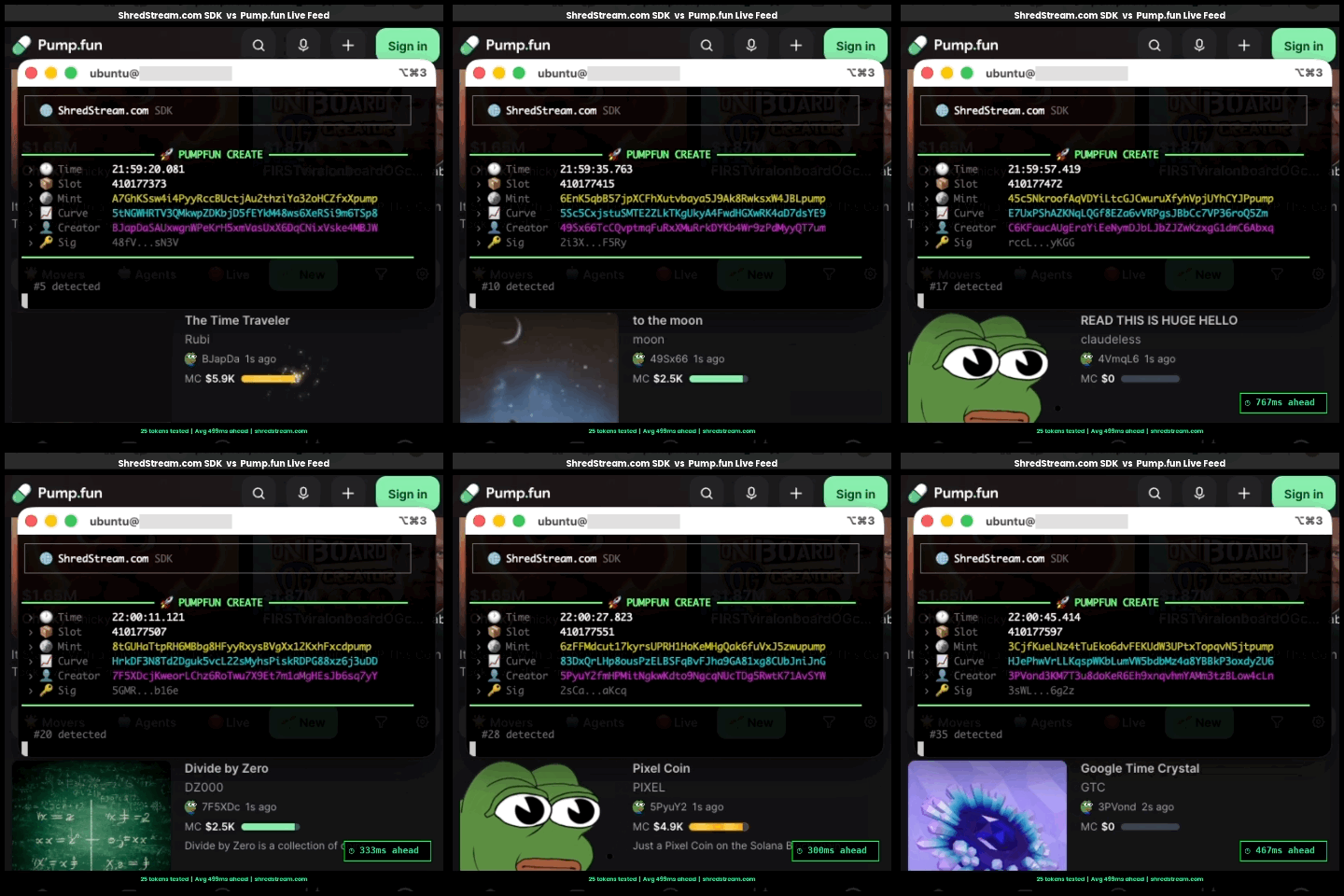
ShredStream.com provides a complete, optimized PumpFun token creation detection code exclusively to Pro plan subscribers and above. Battle-tested, high-performance, ready to plug into your sniping pipeline. To get access, open a ticket on Discord or reach out on Telegram @shredstream.
⚙️ Configuration
OS Tuning
# Linux -- increase max receive buffer
sudo sysctl -w net.core.rmem_max=33554432

# macOS
sudo sysctl -w kern.ipc.maxsockbuf=33554432
Dependencies
solders>=0.21-- Required for base58 signature encoding (tx.signatureproperty). Imported lazily on first access.
💡 Examples
Filter by program
from shredstream import ShredListener
import base58

PUMP_FUN = base58.b58decode("6EF8rrecthR5Dkzon8Nwu78hRvfCKubJ14M5uBEwF6P")

for slot, txs in ShredListener(port=8001):
    for tx in txs:
        if PUMP_FUN in tx.raw:
            print(f"slot {slot}: {tx.signature}")
Raw shred access
from shredstream import ShredListener

listener = ShredListener(port=8001)
for shred in listener.shreds():
    print(f"slot={shred.slot} index={shred.index} len={len(shred.payload)}")
🚀 Launch a Shred Stream
Need a feed? Launch a Solana Shred Stream on ShredStream.com — sub-millisecond delivery, multiple global regions, 5-minute setup.
🔗 Links
- 🌐 Website: https://www.shredstream.com/
- 📖 Documentation: https://docs.shredstream.com/
- 🐦 X (Twitter): https://x.com/ShredStream
- 🎮 Discord: https://discord.gg/4w2DNbTaWD
- 💬 Telegram: https://t.me/ShredStream
- 💻 GitHub: https://github.com/ShredStream
- 🎫 Support: Discord
- 📊 Benchmarks: Discord
📄 License
MIT — ShredStream.com


Download files
Download the file for your platform. If you're not sure which to choose, learn more about installing packages.
Source Distribution
Built Distribution
Filter files by name, interpreter, ABI, and platform.
If you're not sure about the file name format, learn more about wheel file names.
Copy a direct link to the current filters
File details
Details for the file shredstream-1.0.2.tar.gz.
File metadata
- Download URL: shredstream-1.0.2.tar.gz
- Upload date:
- Size: 10.2 kB
- Tags: Source
- Uploaded using Trusted Publishing? No
- Uploaded via: twine/6.2.0 CPython/3.14.3
File hashes
| Algorithm | Hash digest | |
|---|---|---|
| SHA256 |
b6979b81096c2b9704a595714d4127b1f499a5757658b0c85281a827ef8e7b2e
|
|
| MD5 |
045c16dce4565222050b596c982bce4a
|
|
| BLAKE2b-256 |
09d90a23fb6bbee84dd5f7217e4ef5339c17a056994dec7b004ed62ff70315a2
|
File details
Details for the file shredstream-1.0.2-py3-none-any.whl.
File metadata
- Download URL: shredstream-1.0.2-py3-none-any.whl
- Upload date:
- Size: 8.6 kB
- Tags: Python 3
- Uploaded using Trusted Publishing? No
- Uploaded via: twine/6.2.0 CPython/3.14.3
File hashes
| Algorithm | Hash digest | |
|---|---|---|
| SHA256 |
a5aa5e99c737878d3a86d3bfd5c9ccc28222c016a2e23c8fb254021ccf6eac6d
|
|
| MD5 |
9d480649949d0342c45b7c07c28aaa84
|
|
| BLAKE2b-256 |
c2ee2b24fe644e3bbee631fe6e3e3fd6acf233f5b41972b0877adebe1a442e24
|






