
Package to read SI Dyno Data

Project description
SiDynoReader
This package can be used to read CSV files. It creates an object which makes the data in the CSV file easily accessible. In addition, various metrics such as mean value or standard deviation can be retrieved. Another feature is the recognition of measuring points which are defined by means of a special channel.
How to install
This code is available as a pip package. The package can be installed with the following command:
pip install si-dyno-reader
Supported CSV format
CSV are supported, which are separated by a tab. Furthermore, the channel name is expected in the first line and the unit of the corresponding channel in the second. The following is an example:
Time	Throttle	Power	Test_State
s	    %	        kW	       -
500.0	0.0         0.00    0
500.5	0.5	        0.08    50
501.0	1.0	        0.20	100
How to use
The following sections show how this package can be used together with Matplotlib for visualization
Load the CSV File
The path to the csv which is to be loaded is specified in the constructor:
data = DynoDataSet(“data/demoData-00001.001”)
The following additional parameters are available:
test_state_channel_name: str: Allows you to define a custom Test_State channel. The channel nameTest_Stateis the default value.test_state_threshold: float: This can be used to define the value at which the following data should be recognized as a measuring point. Default is50.0.time_channel_name: str: This defines the channel name which represents the time. By default,Timeis defined.time_to_zero: bool: By default, this parameter is defined asTrue. If you want the data in the time channel to remain unchanged, this can be achieved here with the parameter valueFalse.
CSV-Metadata
The following functions and properties return various metadata of the data set:
print(f"Project: {data.project}")
print(f"Dyno: {data.dyno}")
print(f"TestId: {data.test_id}")

Project: 001
Dyno: demoData
TestId: 00002
The following function can be used to query all channels:
print(data.get_channels())

['Time', 'Throttle', 'Power', 'Test_State']
Um den Namen und die Einheit eines Kanals abzufragen, kann folgender Befehl genutzt werden. Der Kanalname ist dabei case insensitiv. Diese Funktion ist für Achsbeschriftungen nützlich.
print(data.get_description("power"))

Power [kW]
Get data
To retrieve data using get_data, there are four different options depending on the given parameters.
A channel name must always be specified. This is case insensitive. If only a channel name is specified, a list of all data is obtained. If time_range is also specified, only the data in a certain time range is obtained. In the example below, this is all data between 10s and 15s.
If the parameter metric is defined, the corresponding metric is returned. You can choose between the following:
MEANMEDIANMINMAXRANGEVARIANCESTD_DEV
If a time range is defined for the metric, the metric is only calculated over the defined period.
print(data.get_data("Power")[:5])

print(data.get_data(channel_name="Time",
                    time_range=[10,15]))

print(data.get_data(channel_name="Time",
                    metric=MetricType.MEDIAN))

print(data.get_data(channel_name="Time",
                    time_range=[10,15],
                    metric=MetricType.MEAN))

[0.0, 0.0875, 0.175, 0.2625, 0.35]
[10.  10.5 11.  11.5 12.  12.5 13.  13.5 14.  14.5]
50.0
12.25
MeasurePoints and TestState
If measuring points are defined using a specific channel, metrics are automatically created for them. This means, for example, that the average value for a measuring point can be queried. The following graphic visualizes how the measuring points are created. The green area represents a measuring point. In the left graphic, the threshold is defined at 50.0. This means that a measuring point is created as soon as the value of the test channel exceeds the threshold of 50.0 here.
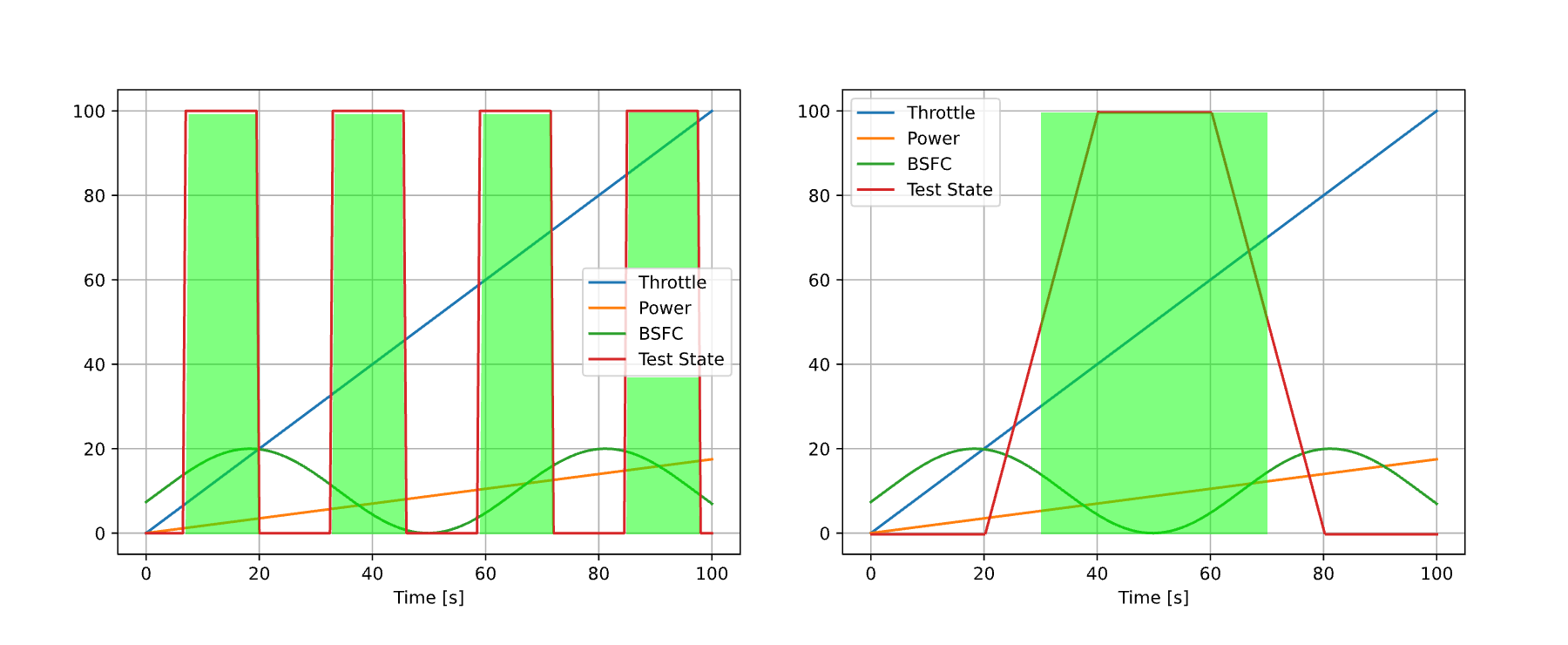
The use of the function for measuring points is shown below. If no metric type is specified, the average value of the individual measuring points is returned by default. If a different metric type is required, this can also be defined.
print(data.get_measure_point("Throttle"))
print(data.get_measure_point("Throttle", metric=MetricType.MIN))

[13.5, 39.5, 65.5, 91.5]
[7.0, 33.0, 59.0, 85.0]
If all data of a measuring point is required, for example for a box plot, this can be achieved with the following function:
print(data.get_measure_point_data("Throttle"))

[[7.0, 7.5, ...], [33.0, 33.5, ...], [59.0, 59.5, ...], [85.0, 85.5, ...]]


Download files
Download the file for your platform. If you're not sure which to choose, learn more about installing packages.
Source Distribution
Built Distribution
Filter files by name, interpreter, ABI, and platform.
If you're not sure about the file name format, learn more about wheel file names.
Copy a direct link to the current filters
File details
Details for the file si_dyno_reader-0.0.5.tar.gz.
File metadata
- Download URL: si_dyno_reader-0.0.5.tar.gz
- Upload date:
- Size: 148.4 kB
- Tags: Source
- Uploaded using Trusted Publishing? No
- Uploaded via: twine/6.1.0 CPython/3.9.6
File hashes
| Algorithm | Hash digest | |
|---|---|---|
| SHA256 |
c58253f7ee1fe6b09327ad7f67ce10a4bf2d2721604c9601f4a6bab47604ff69
|
|
| MD5 |
2d116ede2a8546adcb6129e9b932ab14
|
|
| BLAKE2b-256 |
5ea1d1d66980f929f29c2958fc8deceed944d21349ffef077dee0ff32d6426d4
|
File details
Details for the file si_dyno_reader-0.0.5-py3-none-any.whl.
File metadata
- Download URL: si_dyno_reader-0.0.5-py3-none-any.whl
- Upload date:
- Size: 6.7 kB
- Tags: Python 3
- Uploaded using Trusted Publishing? No
- Uploaded via: twine/6.1.0 CPython/3.9.6
File hashes
| Algorithm | Hash digest | |
|---|---|---|
| SHA256 |
51963b7e728c84863f058f247ed94bb629d5f57444241b8ed7be73e7dacba632
|
|
| MD5 |
f5d7f578cd81654d4a7a5f1889ee517d
|
|
| BLAKE2b-256 |
986c7fda41a52aca9de0dd3525e35e96db3307ba0e8690e275d2052ef88ea966
|






