
sica-bridge

SICA = Structure Investigation and Condition Assessment.
sica-bridge is a Python package that uses a vision-capable LLM to perform post-earthquake visual inspection from photos and to support rapid decision-making for bridge safety assessment.
It outputs an R-state (R1–R4) and a short reason per photo, then aggregates results to component-level and event-level summaries that can be used to prioritize inspections, closures, and follow-up actions.
Current scope: 4 component categories (approaches, columns, joints/hinges, abutments/wingwalls/shear keys).
Post-earthquake Visual Inspection Workflow
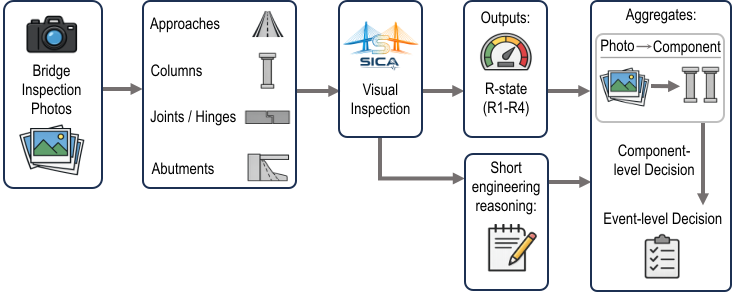
R-states (Action Plan)
- R1 — Open
- R2 — Open but inspection needed
- R3 — Close but inspection needed
- R4 — Close immediately
Repository layout
.
SICA/
├─ pyproject.toml
├─ README.md
├─ src/
│  └─ sica_bridge/
│     ├─ __init__.py
│     ├─ assess/                  # photo-level assessment + aggregation helpers
│     ├─ llm/                     # LLM client interface + prompt builder
│     ├─ registry/                # component registry (ids, display names, filenames)
│     ├─ resources/               # loaders for prompts/rubrics/reference images
│     ├─ schemas/                 # Pydantic output schemas (RState, ComponentAssessment, EventAssessment)
│     ├─ utils/                   # helpers (e.g., robust JSON extraction)
│     ├─ prompts/
│     │  ├─ system.md
│     │  └─ components/           # per-component prompt templates (.md)
│     ├─ rubrics/                 # per-component rubrics (.yaml)
│     └─ assets/
│        └─ damage_examples/      # optional reference images used in prompts
│           └─ <component_id>/
│              ├─ meta.yaml       # optional captions & ordering
│              └─ *.jpg|*.png
└─ tests/                         # pytest unit tests
Install
Requirements
- Python >= 3.10
From PyPI
pip install sica-bridge
From source (recommended for development)
pip install -e .
Dev dependencies
pip install -e ".[dev]"
Quickstart: run the demo
The repo includes a default UI and you can have a quick local deployment for research or testing:
python gui/webserver.py
First install the dependencies:
python -m pip install -e ".[gui]"
Then open the local server URL and upload one or more photos for each component category. Please don't forget to set up the OpenAI or other LLM API key for the testing. If you are planning to use your own computer vision models, please set up the GPU server for testing. Go to Adding a new LLM provider for further information.
How it works (pipeline)
For each uploaded image:
- Load reference images (optional, preset) for the component from:
assets/damage_examples/<component_id>/
- Build a prompt:
prompts/system.mdprompts/components/<component_id>.mdrubrics/<component_id>.yaml(parsed into JSON and embedded)- Pydantic JSON schema for
ComponentAssessment(the output contract)
- Call a
VisionLLMClientto produce JSON-only output. - Parse and validate the JSON into
ComponentAssessment. - Aggregate:
- component-level: worst-case (max severity) across that component’s photos
- event-level: worst-case (max severity) across all component assessments
Schemas
from sica_bridge.schemas import RState, ComponentAssessment, EventAssessment
RState: Enum ofR1,R2,R3,R4ComponentAssessment:component_id: strr_state: RStatereason: strnotes: Optional[str]
EventAssessment:overall_r_state: RStatecomponents: list[ComponentAssessment]
Assessment
from sica_bridge.assess import assess_component, assess_component_many, aggregate_component, aggregate_event
from sica_bridge.llm.openai_client import OpenAIVisionClient
Assess one photo
client = OpenAIVisionClient()
out = assess_component(
    component_id="columns",
    image_bytes=open("my_photo.jpg", "rb").read(),
    mime_type="image/jpeg",
    filename="my_photo.jpg",
    client=client,
)
print(out.r_state, out.reason)
Assess many photos for one component
photos = [
    (open("a.jpg","rb").read(), "a.jpg", "image/jpeg"),
    (open("b.jpg","rb").read(), "b.jpg", "image/jpeg"),
]
results = assess_component_many(component_id="columns", photos=photos, client=client)
Aggregate component and event states
overall_component = aggregate_component(results)  # -> RState
event = aggregate_event(results)                  # -> EventAssessment (worst-case across provided items)
LLM clients
Interface
Implement this provider-agnostic interface:
from sica_bridge.llm.client import VisionLLMClient, VisionInput
VisionLLMClient.complete_json(prompt: str, images: list[VisionInput]) -> str
should return a JSON object as plain text (no markdown), matching the schema.
OpenAI implementation
from sica_bridge.llm.openai_client import OpenAIVisionClient
client = OpenAIVisionClient(model="gpt-5.2")
In case you want to use your own computer vision models or other LLMs, please also check Adding a new LLM provider
Adding / editing components
Component categories are defined in:
src/sica_bridge/registry/components.py
Each component has:
id(stable key used across prompts, rubrics, schemas, GUI)rubric_filenameinrubrics/prompt_filenameinprompts/
To add a new component, add a new ComponentSpec entry and create:
rubrics/<new_id>.yamlprompts/components/<new_id>.md- (optional)
assets/damage_examples/<new_id>/...
Support
SICA is created and developed by Issac K.T. Pang under the supervision of Professor Khalid M. Mosalam (ORCID: 0000-0003-2988-2361). Professor Mosalam contributes supervision and project administration.
SICA is supported by the STAIRLab (STructural Artificial Intelligence Research Lab) at UC Berkeley.

1 maintainer

Metadata
1 maintainer
Release files for sica-bridge 0.1.4
For a detailed explanation of source distributions (sdists) and built distributions (wheels), please see the package formats documentation.
Source distribution (sdist)
| File | Size | Uploaded | Provenance | Actions |
|---|---|---|---|---|
| sica_bridge-0.1.4.tar.gz | 9.7 MB | Without provenance | Details for sica_bridge-0.1.4.tar.gz |
Built distribution (wheel)
| File | Interpreter | ABI | Platform | Actions Reset |
|---|---|---|---|---|
| sica_bridge-0.1.4-py3-none-any.whl | Python 3 | none | any | Details for sica_bridge-0.1.4-py3-none-any.whl |
Total release size: 19.4 MB
Release files / sica_bridge-0.1.4.tar.gz
| Download URL | sica_bridge-0.1.4.tar.gz |
|---|---|
| Size | 9.7 MB |
| Tags | Source |
|
SHA-256 checksum How to use checksums |
bccae2d695ed24c17a065f22f0b3a6764fae80c74833ed6e46315c68adbfc948
|
|
BLAKE2b-256 checksum How to use checksums |
56c3aa5ab50089cf211e20d3fbbfe3c350b0b6fe73f2d775b626ed79b63a683f
|
| Upload date | |
|
Uploaded using Trusted Publishing? What is trusted publishing? |
No |
| Uploaded via |
twine/7.0.0 CPython/3.13.5
|
Release files / sica_bridge-0.1.4-py3-none-any.whl
| Download URL | sica_bridge-0.1.4-py3-none-any.whl |
|---|---|
| Size | 9.7 MB |
| Tags | Python 3 |
|
SHA-256 checksum How to use checksums |
ab44b26e78c33831b44a5732937d07c5c6829087034352e03db13cf9f0a17596
|
|
BLAKE2b-256 checksum How to use checksums |
3df8030f9c372f679764a8560478acda12a81fff2a6bcd4b963d0db480f02d5c
|
| Upload date | |
|
Uploaded using Trusted Publishing? What is trusted publishing? |
No |
| Uploaded via |
twine/7.0.0 CPython/3.13.5
|
Security for sica-bridge 0.1.4
Provenance
Provenance describes where a file came from. On PyPI, provenance is shared via attestations, which provide a verifiable record of the build or publishing details. View details, limitations and caveats.
No provenance found
None of the files in this release were uploaded with provenance metadata.
A note on package security
PyPI is a repository for distributing packages, not a service for auditing them. While third-party security researchers and our staff do their best to detect and remove malicious packages, PyPI cannot guarantee the quality, security or suitability of any given package.
To learn more about protecting yourself from malicious actors, visit our package security documentation.














