
Side Dog
Side Dog helps you follow coding agents across projects: Watch shows their activity over time, while Board shows the live session roster. See edits, tests, commits, pull requests, issues, and agent turns in your terminal or a local browser panel.
Read the Side Dog documentation.
Side Dog was inspired by Sundai Hack 138. Sundai Club is a community for building and launching AI prototypes every Sunday.
Install
Requires Python 3.11+, Git, and macOS or Linux. Install uv, then:
uv tool install side-dog
side-dog --version
Upgrade an existing installation with uv tool upgrade side-dog. If the command
is not found, run uv tool update-shell and open a new terminal.
Follow the platform installation guide for prerequisites,
PATH, upgrades, Git snapshots, uninstall, and offline man pages.
Two terminal views
Watch — follow the work
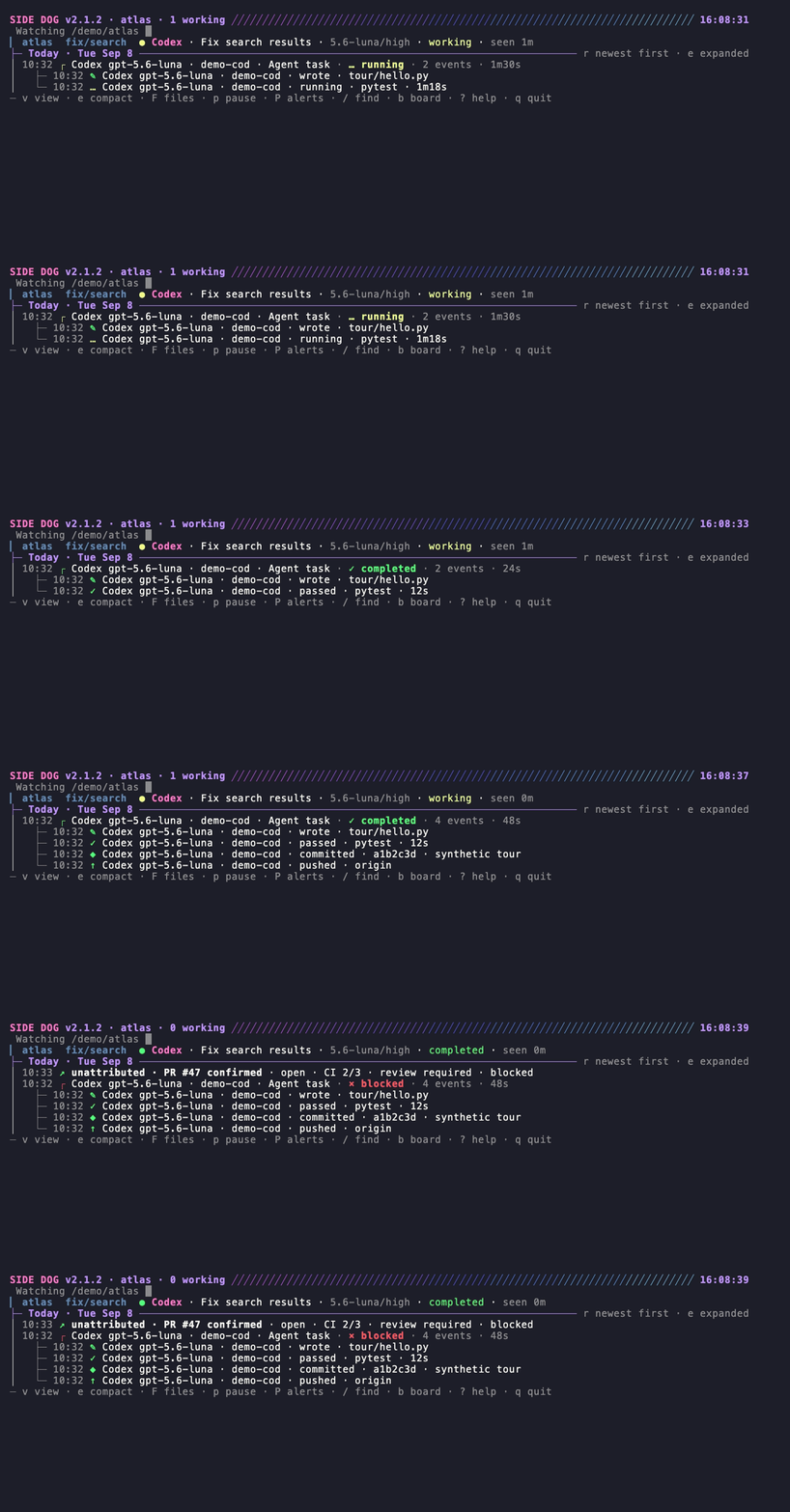
Watch shows a chronological feed with agent/model attribution, edits, test
results, commits, pushes, and PR observations. Press e to expand activity
and b to switch to Board.
Board — see the live roster
Run side-dog board for the live session roster: agent, terminal or app,
repository and branch, linked issues, PR checks and review state, and status.
Use j/k to select a session, Enter for detail, and g to group rows.
Conflicts appear briefly when they are first detected; press c to show the
complete list again. Press A for Attention mode, which keeps only the
sessions that need a person (conflicts, blocked sessions, failed tests,
failing checks, requested changes, or stalled work) and says why on each row;
press it again to return to the full roster. The detail pane opens with a
short brief: status, confirmed issue and PR, the latest milestone, event
counts, and a rule-based cue such as "review PR" or "investigate failed
tests". Press w to switch to Watch.
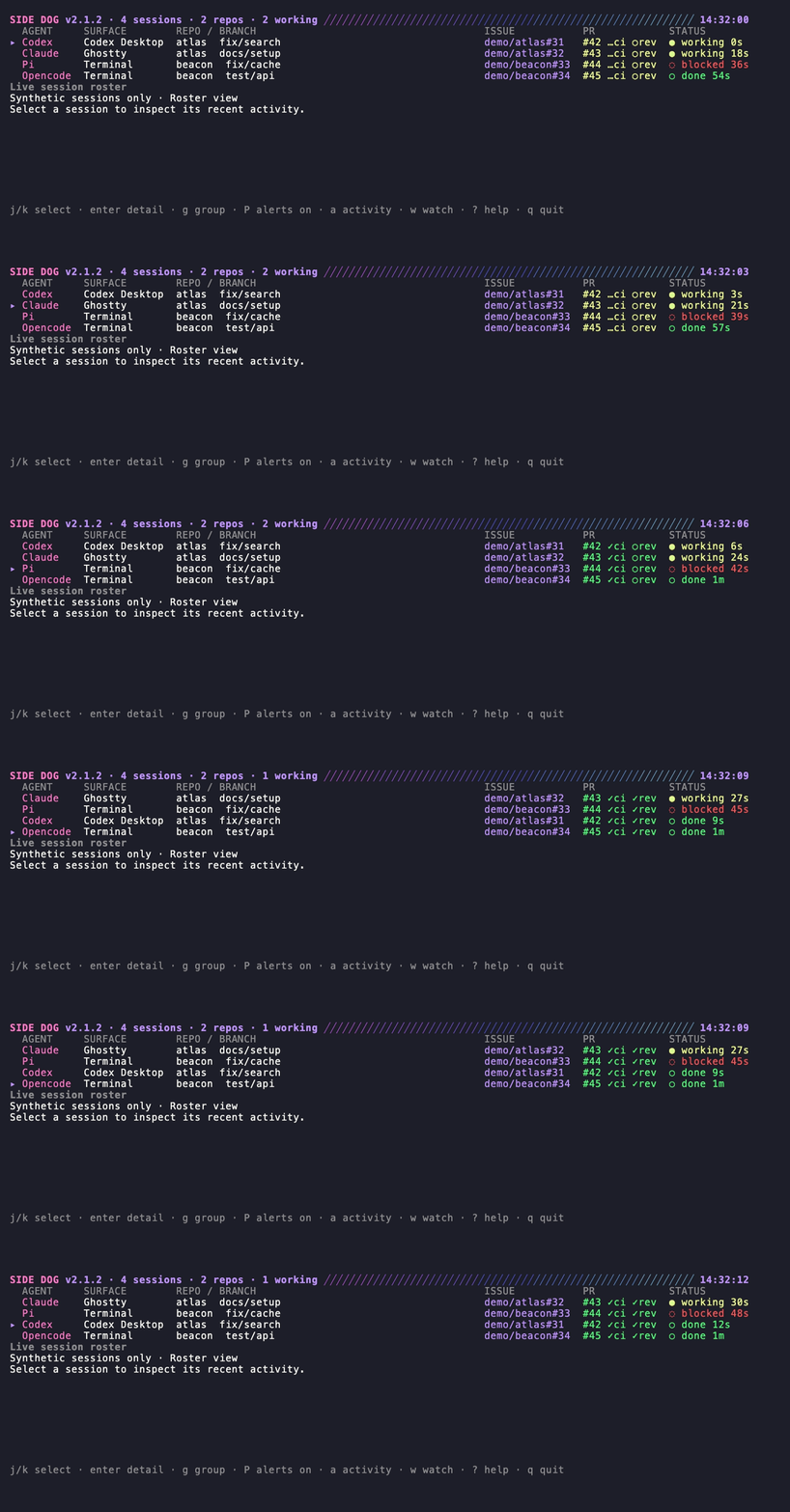
Both recordings use synthetic data rendered by the current terminal UI; they do not expose real agent sessions. See the recording instructions.
Try it
side-dog --version
side-dog demo --watch
side-dog doctor ~/src/my-project
side-dog watch ~/src/my-project
side-dog board
Replace the path with a real project. Use side-dog demo --panel for the browser tour.
For a real project, side-dog panel ~/src/my-project opens the local browser
timeline; its /board page shows the live roster. The server binds to loopback.
Claude Code requires optional project hooks for attributed tool activity; the
other registered agents read local metadata without Side Dog hooks.
Coding agent support
Supports Codex, Claude Code, Pi, OpenCode, Crush, Cursor Agent, Grok Build, DeepSeek Harness, Cline, and Antigravity CLI. Herdr is optional, not an agent. See the current integration table and setup instructions. It distinguishes session discovery from live activity, including Cursor/Grok through T3 Code, and lists custom data-location variables.
With or without Herdr
Herdr is optional. side-dog watch . pins an explicit folder in a standalone
terminal. Bare watch discovers agent folders; inside Herdr it follows Herdr
context. See discovery and everyday use.
What Side Dog shows
Watch is chronological activity; Board presents current sessions. GitHub polling adds state to matching work but never becomes credited agent effort.
Only validated metadata enters Side Dog history or its local browser panel. See privacy, configuration and disposable state. Tokens and estimated cost are separate from PR contribution counts.
Terminal and panel controls
Press ? for help, v for Watch settings, b for Board, and w to return.
In Board, A toggles Attention mode and c reopens the temporary conflict
notice. The browser panel's /board page shows the live roster with the same
session brief under each row.
See view-specific controls and workflows.
Configuration
Optional settings live in ~/.config/side-dog/config.toml. Saved spaces, worktree
discovery, display preferences and notifications are explained in the
configuration guide.
Other commands
side-dog help lists commands. side-dog man opens the bundled offline manual;
side-dog man board opens a command-specific page.
- Troubleshooting
- Documentation validation and platform coverage
- Maintainer release guide
- Dependency maintenance
- Security policy
Develop from a checkout
uv sync --locked
uv run python -m unittest discover -s tests -q
uv run python scripts/build_man_pages.py --check
python scripts/build_docs_site.py
python scripts/check_docs_links.py
Release preparation follows the maintainer guide; merging does not publish a package.
For private vulnerability reporting, use the security policy. Do not put security details in public issues. Side Dog uses the MIT License.
1 maintainer

Download files
Download the file for your platform. If you're not sure which to choose, learn more about installing packages.
Source Distribution
Built Distribution
Filter files by name, interpreter, ABI, and platform.
If you're not sure about the file name format, learn more about wheel file names.
Copy a direct link to the current filters
File details
Details for the file side_dog-2.3.1.tar.gz.
File metadata
- Download URL: side_dog-2.3.1.tar.gz
- Upload date:
- Size: 580.9 kB
- Tags: Source
- Uploaded using Trusted Publishing? Yes
- Uploaded via:
twine/7.0.0 CPython/3.13.14
File hashes
| Algorithm | Hash digest | |
|---|---|---|
| SHA256 |
4af167e0f452f9dc1f225b36fd273d91d14dc6bf88e36cb8d8d95e8d0f64e286
|
|
| MD5 |
837578e391a7ac08da74c8c021aaa5b1
|
|
| BLAKE2b-256 |
e1472cc947023e452280dbbffc7e24c944074b4d2adebcc0f83edaf5cde9282e
|
Provenance
The following attestation bundles were made for side_dog-2.3.1.tar.gz:
Publisher:
release.yml on qfennessy/side-dog
-
Statement:
-
Statement type:
https://in-toto.io/Statement/v1 -
Predicate type:
https://docs.pypi.org/attestations/publish/v1 -
Subject name:
side_dog-2.3.1.tar.gz -
Subject digest:
4af167e0f452f9dc1f225b36fd273d91d14dc6bf88e36cb8d8d95e8d0f64e286 - Sigstore transparency entry: 2773380541
- Sigstore integration time:
-
Permalink:
qfennessy/side-dog@6c4aecdb4cff4dbbc051caef8995bb1b032fdfb9 -
Branch / Tag:
refs/tags/v2.3.1 - Owner: https://github.com/qfennessy
-
Access:
public
-
Token Issuer:
https://token.actions.githubusercontent.com -
Runner Environment:
github-hosted -
Publication workflow:
release.yml@6c4aecdb4cff4dbbc051caef8995bb1b032fdfb9 -
Trigger Event:
push
-
Statement type:
File details
Details for the file side_dog-2.3.1-py3-none-any.whl.
File metadata
- Download URL: side_dog-2.3.1-py3-none-any.whl
- Upload date:
- Size: 342.2 kB
- Tags: Python 3
- Uploaded using Trusted Publishing? Yes
- Uploaded via:
twine/7.0.0 CPython/3.13.14
File hashes
| Algorithm | Hash digest | |
|---|---|---|
| SHA256 |
276bfd6f2bc86a221bfcd8374f457b4e9eb4111d35b884fe67cbe7a5296bb0bb
|
|
| MD5 |
df0515d49462a6f8fe84db118f84d8a0
|
|
| BLAKE2b-256 |
5115c9f6048cb09ed151ae7374124615ec69160f74327a0f52564bde6ba3b734
|
Provenance
The following attestation bundles were made for side_dog-2.3.1-py3-none-any.whl:
Publisher:
release.yml on qfennessy/side-dog
-
Statement:
-
Statement type:
https://in-toto.io/Statement/v1 -
Predicate type:
https://docs.pypi.org/attestations/publish/v1 -
Subject name:
side_dog-2.3.1-py3-none-any.whl -
Subject digest:
276bfd6f2bc86a221bfcd8374f457b4e9eb4111d35b884fe67cbe7a5296bb0bb - Sigstore transparency entry: 2773380574
- Sigstore integration time:
-
Permalink:
qfennessy/side-dog@6c4aecdb4cff4dbbc051caef8995bb1b032fdfb9 -
Branch / Tag:
refs/tags/v2.3.1 - Owner: https://github.com/qfennessy
-
Access:
public
-
Token Issuer:
https://token.actions.githubusercontent.com -
Runner Environment:
github-hosted -
Publication workflow:
release.yml@6c4aecdb4cff4dbbc051caef8995bb1b032fdfb9 -
Trigger Event:
push
-
Statement type:














