
side-vim
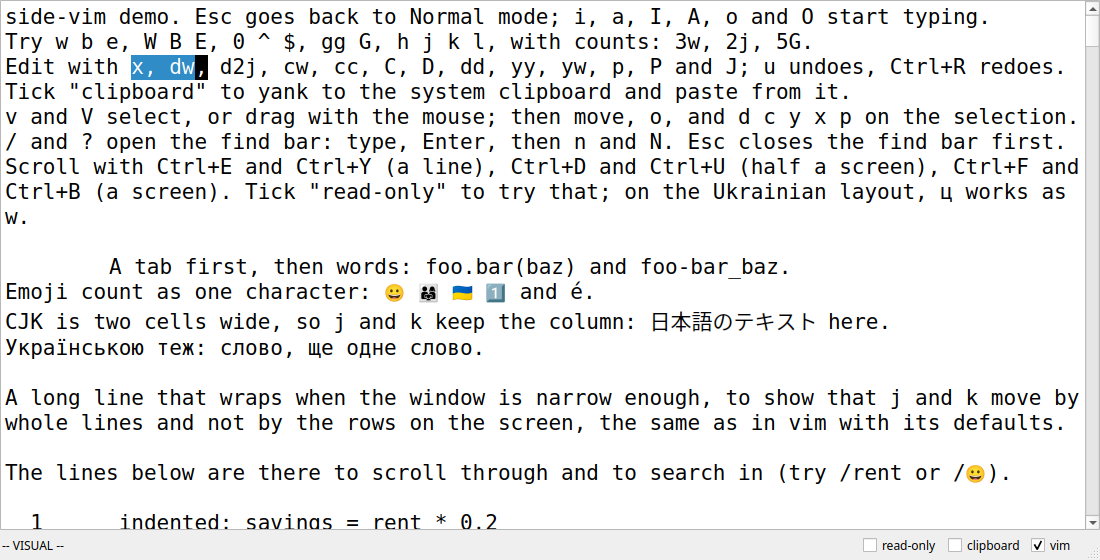
A Vim mode for PySide6's QPlainTextEdit. Attach it to an existing editor to add
Normal, Insert, Visual and Visual Line modes.
Install
Requires Python 3.12 or newer and PySide6 6.8 or newer. Installing side-vim also installs PySide6-Essentials.
uv add side-vim
Usage
import sys

from PySide6.QtWidgets import QApplication, QLabel, QPlainTextEdit, QVBoxLayout, QWidget

from side_vim import VimMode

app = QApplication(sys.argv)
window = QWidget()
editor = QPlainTextEdit("Try w, i, Esc, v and y.")
status = QLabel()
layout = QVBoxLayout(window)
layout.addWidget(editor)
layout.addWidget(status)

vim = VimMode(editor)  # Starts in Normal mode. Qt deletes it with the editor.
status.setText(vim.mode.value)
vim.mode_changed.connect(lambda mode: status.setText(mode.value))

window.resize(800, 500)
window.show()
editor.setFocus()
sys.exit(app.exec())
Attach one VimMode per editor. Import Mode to compare vim.mode with
Mode.NORMAL, Mode.INSERT, Mode.VISUAL or Mode.VISUAL_LINE.
| API | Behavior |
|---|---|
vim.mode_changed.connect(callback) |
Calls callback(mode) when the mode changes. |
vim.pending_changed.connect(callback) |
Calls callback(text) with pending keys such as 2d, or "" when done. |
vim.escape_hook = callback |
Calls callback() before handling Esc. Return True if the app used it, for example to close a popup. |
vim.search_hook = callback |
/ calls callback(True); ? calls callback(False). The app opens its search UI. |
vim.set_search("rent", forward=True) |
Saves the search text and jumps to the next match. n repeats in that direction; N reverses it. |
vim.normal() |
Goes to Normal mode as Esc does, from Insert or Visual mode. |
vim.clipboard = True |
Uses the system clipboard for yank, delete, change and paste. Defaults to False. |
vim.layout_map = UKRAINIAN |
Maps Ukrainian letters to Vim keys. This is the default; import UKRAINIAN from side_vim. Set None to disable it, or pass your own dictionary. |
vim.set_enabled(False) |
Restores the plain editor and its cursor. True enables Vim in Normal mode. Read the setting through vim.enabled. |
vim.detach() |
Removes Vim from the editor. To turn it off for a while, use set_enabled(False). |
When the app accepts a search, call set_search with its text and direction,
after normal() if the search was opened from Insert mode.
Search is case-sensitive, wraps around the document, and uses plain text rather
than regular expressions. Each editor keeps its own search. An empty string
clears it. In Insert mode or while disabled, set_search saves the search without
moving the cursor. The demo
shows a find bar and an Esc hook together.
The unnamed register is shared between editors in the same process. With
clipboard=False, yank in one editor and paste in another. With clipboard=True,
text copied in another app pastes as whole lines if it ends in a newline.
Supported keys
Counts work with motions and edits: 3w, 5G, 2dd, y3j. A counted insert
repeats the typed text: 3ix<Esc> inserts xxx.
| Action | Keys |
|---|---|
| Move | h j k l, w b e, W B E, 0 ^ $, gg G |
| Insert | i a I A o O |
| Delete, change, yank | d c y followed by a motion; dd cc yy, x D C |
| Paste, join | p P, J |
| Undo, redo | u, Ctrl+R |
| Select | v for characters, V for lines; motions extend the selection |
| Edit a selection | d c y x p; o switches its ends |
| Search | / ? through the app hook, then n N |
| Scroll a line | Ctrl+E, Ctrl+Y |
| Scroll half a screen | Ctrl+D, Ctrl+U |
| Scroll a screen | Ctrl+F, Ctrl+B |
| Return to Normal | Esc, Ctrl+[ |
In Normal and Visual modes, the Ctrl keys above take priority over app shortcuts.
j and k keep the screen column across tabs and wide characters, and a wrapped
line counts as one line, as in Vim.
This release has only the keys above. It has no repeat (.), text objects,
f t r ~, colon commands, macros, marks, named registers or block selection.
Differences from Vim
side-vim follows Vim 9.1 with its default settings, except for these:
- Joined emoji and flags, such as 👨👩👧 and 🇺🇦, are one character. Vim splits them into their parts. Accents, CJK and single emoji work as in Vim.
- Search uses plain text, not regular expressions. There is no command line.
/and?callsearch_hook, then the app shows its own search box and passes the text toset_search. Jputs one space after a period, like Vim withnojoinspaces. Vim's default puts two.- Qt stops scrolling when the last line reaches the bottom of the editor. Vim
scrolls on until the last line is at the top, so
Ctrl+FandCtrl+Estop sooner near the end. The cursor still goes to the line Vim picks. - In Insert mode the editor handles every key except Esc and
Ctrl+[. Arrows, Backspace and app shortcuts work as in any Qt editor. Vim's Insert mode keys, such asCtrl+W,Ctrl+UandCtrl+O, are not there. - In Normal and Visual modes, Ctrl keys that side-vim doesn't use go to the
editor or the app, and so do PageUp, PageDown and the function keys.
Ctrl+Aselects all, for example. Qt's keys that change the text do nothing in these modes: paste, cut,Ctrl+BackspaceandCtrl+Delete. In Vim,Ctrl+Vstarts a block selection, which side-vim doesn't have. - Other keys without a command do nothing in Normal mode. They never type text.
- Esc in Normal mode with nothing pending goes to the app, for example to close a dialog. Vim beeps.
- A read-only editor allows movement, scrolling, selection, yank and search, and ignores edits. Vim only warns when you change a read-only file.
- Dragging with the mouse in Normal mode starts Visual mode.
- Outside Insert mode, Ukrainian letters work as the Latin keys in the same
place, so
цisw. Vim needslangmapfor that. Punctuation stays as typed,ґisn't mapped because its key moves between layout variants, and/needs the English layout. - On macOS, Ctrl means the physical Control key. Command shortcuts stay with the app.
- The tab width comes from the editor's tab stop, not from a
tabstopsetting. uand the app's undo share the editor's undo stack, so they undo the same steps.
Develop
uv sync --locked
make run       # Demo window
make check     # Ruff and pytest
make format    # Format Python
make record    # Record expected results using local Vim
make unicode   # Regenerate Vim character classes and widths
make mac-keys  # Key checks on a Mac
Tests run Qt offscreen. CI runs for release tags and can also be started from Actions → CI → Run workflow. It tests Linux, macOS and Windows on Python 3.12 and 3.14, and the lowest allowed PySide6 on Python 3.12. The tests replay saved Vim cases, so CI doesn't need Vim. Recording them needs Vim, and the scrolling cases need a Unix terminal.
On a Mac, make mac-keys opens the demo and presses keys through macOS. It checks
Ctrl and Cmd keys, search, read-only mode and the Ukrainian layout, and prints PASS
or FAIL for each. Start it on the English (ABC) layout with Ukrainian-PC installed,
and don't type until it finishes.
Release
Set these up by hand before the first tag:
-
In the GitHub repository, open Settings, then Environments, and create
pypi. Add yourself as a required reviewer. Leave Prevent self-review off, so you can approve runs you start. Limit deployment tags tov*. -
In your PyPI account's Publishing page, add a pending trusted publisher:
Field Value PyPI project side-vimGitHub owner sprytnykRepository side-vimWorkflow release.ymlEnvironment pypiA pending publisher creates the project on its first upload. No PyPI token goes into GitHub. See the PyPI setup guide and GitHub approval guide.
For each release:
- On
main, check the README and runmake check. If key handling changed, runmake mac-keyson a Mac. - Run
uv version X.Y.Z. Write the datedCHANGELOG.mdsection from the commits since the previous release, using only sections with entries: Breaking, Highlights, Fixes, Changes and Removed. Review it before committing. - Build and test the wheel in a temporary environment. Make the signed
chore(release): vX.Y.Zcommit and signedvX.Y.Ztag with key0xC00C0F0D647BD3C6. Pushmainand that tag toorigin. - The release workflow runs CI, checks that the tag matches the package version,
and builds the wheel and source distribution. Review the run and approve the
pypijob. It publishes those files using uv trusted publishing. - Confirm the version is on PyPI, then create a GitHub release using just the changelog section as its notes. Attach no files.
The project release skill has the command sequence and approval points.
1 maintainer

Metadata
1 maintainer
Release files for side-vim 0.1.0
For a detailed explanation of source distributions (sdists) and built distributions (wheels), please see the package formats documentation.
Source distribution (sdist)
| File | Size | Uploaded | Provenance | Actions |
|---|---|---|---|---|
| side_vim-0.1.0.tar.gz | 41.0 kB | Without provenance | Details for side_vim-0.1.0.tar.gz |
Built distribution (wheel)
| File | Interpreter | ABI | Platform | Actions Reset |
|---|---|---|---|---|
| side_vim-0.1.0-py3-none-any.whl | Python 3 | none | any | Details for side_vim-0.1.0-py3-none-any.whl |
Total release size: 86.5 kB
Release files / side_vim-0.1.0.tar.gz
| Download URL | side_vim-0.1.0.tar.gz |
|---|---|
| Size | 41.0 kB |
| Tags | Source |
|
SHA-256 checksum How to use checksums |
66fc924598912f26dba75ef787f623144189401cd28c0e9ef7039c289729eed1
|
|
BLAKE2b-256 checksum How to use checksums |
333d0bf02c2784e2eaef2b108c763943c17f9715bf24f247a8a3d6b8cee871a6
|
| Upload date | |
|
Uploaded using Trusted Publishing? What is trusted publishing? |
Yes |
| Uploaded via |
uv/0.13.8 {"installer":{"name":"uv","version":"0.13.8","subcommand":["publish"]},"python":null,"implementation":{"name":null,"version":null},"distro":{"name":"Ubuntu","version":"24.04","id":"noble","libc":null},"system":{"name":null,"release":null},"cpu":null,"openssl_version":null,"setuptools_version":null,"rustc_version":null,"ci":true}
|
Release files / side_vim-0.1.0-py3-none-any.whl
| Download URL | side_vim-0.1.0-py3-none-any.whl |
|---|---|
| Size | 45.5 kB |
| Tags | Python 3 |
|
SHA-256 checksum How to use checksums |
cf2d44e11dbb2849dead44b6dba61217480d15297301e15c2cd71263425152da
|
|
BLAKE2b-256 checksum How to use checksums |
1d127e3982a5b78c55e90900faf50ce99477e41ad702c2bcccf042b45d9a152e
|
| Upload date | |
|
Uploaded using Trusted Publishing? What is trusted publishing? |
Yes |
| Uploaded via |
uv/0.13.8 {"installer":{"name":"uv","version":"0.13.8","subcommand":["publish"]},"python":null,"implementation":{"name":null,"version":null},"distro":{"name":"Ubuntu","version":"24.04","id":"noble","libc":null},"system":{"name":null,"release":null},"cpu":null,"openssl_version":null,"setuptools_version":null,"rustc_version":null,"ci":true}
|
Security for side-vim 0.1.0
Provenance
Provenance describes where a file came from. On PyPI, provenance is shared via attestations, which provide a verifiable record of the build or publishing details. View details, limitations and caveats.
No provenance found
None of the files in this release were uploaded with provenance metadata.
A note on package security
PyPI is a repository for distributing packages, not a service for auditing them. While third-party security researchers and our staff do their best to detect and remove malicious packages, PyPI cannot guarantee the quality, security or suitability of any given package.
To learn more about protecting yourself from malicious actors, visit our package security documentation.














