
sift: local RAG search and MCP server for AI agents









sift indexes your documents and notes, embeds them on your GPU, and serves them to Claude Code and other AI agents over MCP (Model Context Protocol), with keyword, semantic and hybrid search. Everything runs locally: no cloud services, no API keys, and your documents stay on your own machines.
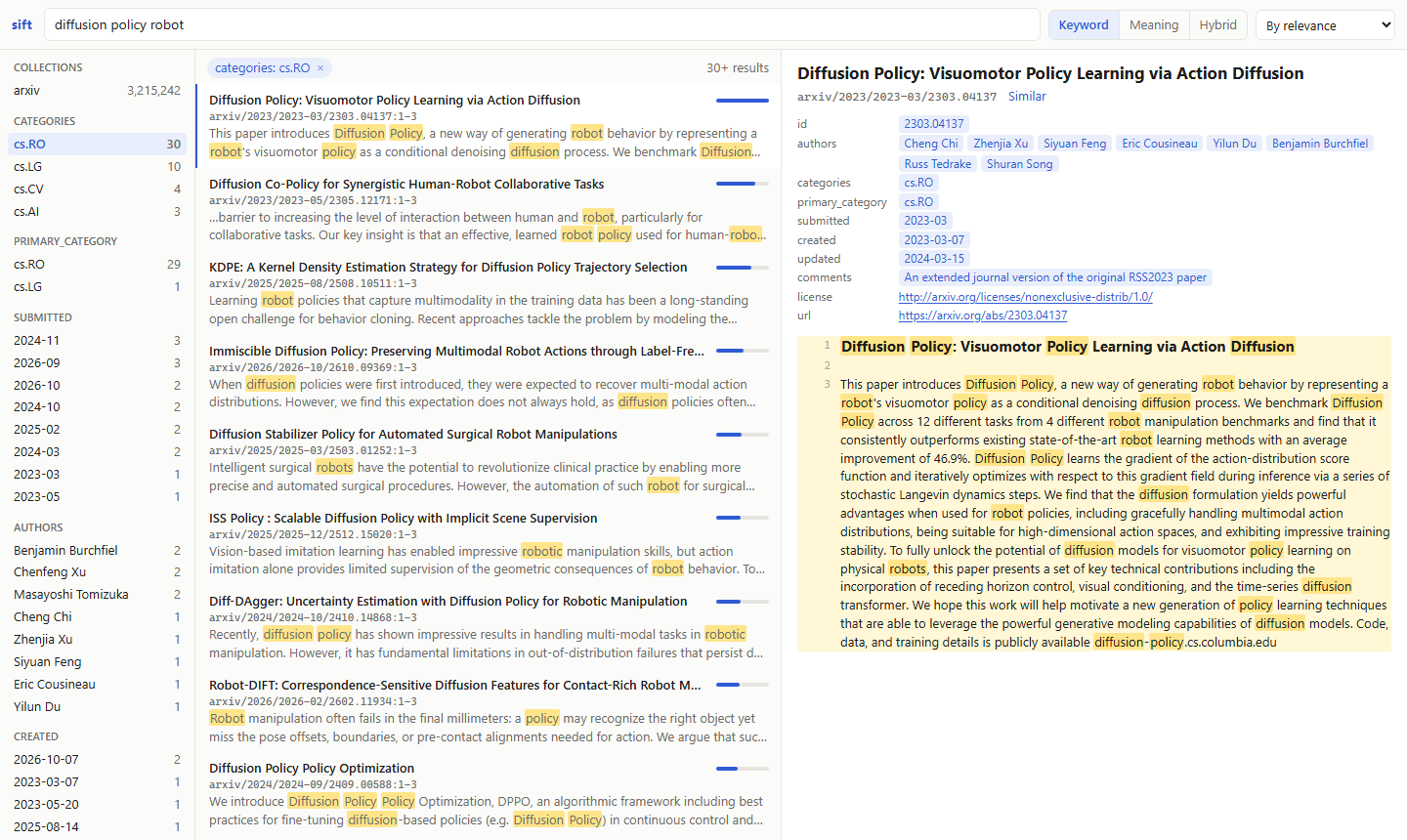
- Four kinds of search: exact keyword search (BM25, SQLite FTS5), semantic vector search, hybrid retrieval with cross-encoder reranking for RAG, and documents similar to a given one.
- Your files as they are: Markdown with YAML front matter (Obsidian notes too), text, PDF, Word, PowerPoint, Excel, OpenDocument, RTF, EPUB, HTML and JSON Lines, indexed incrementally.
- An MCP server for Claude Code and any other MCP client, with filters on front-matter fields, results that cite their source lines, and compact results that save an agent's context.
- A browser UI to search, browse and read the index yourself.
- Measured, not guessed: the default models and ranking were chosen on seven retrieval benchmarks, from BEIR's SciFact to long German documents (benchmarks).
- Runs on what you have: NVIDIA or Apple GPUs, or the CPU, or another machine's GPU through
sift worker, on Linux, macOS and Windows.
Install
Requires Python 3.11 or newer. With uv:
uv tool install --torch-backend auto sift-rag # installs the `sift` command
Or run it without installing: uvx --torch-backend auto sift-rag serve. With pip, in a virtual environment:
pip install sift-rag.
To upgrade later, see Updating.
On first use, sift downloads its two models from Hugging Face (about 2 GB).
GPU support
sift uses an NVIDIA GPU (CUDA) if there is one, else an Apple GPU, else the CPU, which works but embeds slowly.
query's reranker is slow there too: about 25 seconds per query on 8 CPU threads, against 0.3 seconds on an RTX
4090. A machine without a GPU can borrow one through a sift worker, which reranks
as well as embeds, or use search and vsearch, which need no reranker.
- Linux, macOS: nothing to do. PyTorch from PyPI includes CUDA on Linux and uses the Apple GPU on macOS.
- Windows: PyTorch from PyPI has no CUDA support. uv's
--torch-backend auto, used above, picks the CUDA build that matches your driver. With pip, install it afterwards:pip install --force-reinstall --no-deps torch torchvision --index-url https://download.pytorch.org/whl/cu128.
If an NVIDIA GPU sits unused, sift says so on start-up and prints the command that fixes it.
Usage
sift add ~/handbook --name handbook    # register a folder as a collection
sift index                             # scan files, chunk them, build the keyword index
sift embed                             # embed every chunk that has no vector yet
sift search '"notice period"'          # exact keyword search
sift vsearch "how much leave do new employees get"
sift query "who approves travel expenses abroad"
sift similar handbook/hr/leave.md      # documents like this one
sift get handbook/hr/leave.md          # full document
sift get handbook/hr/leave.md --lines 14-23   # only some lines, e.g. those of a search hit
sift get handbook/hr/leave.md --fields owner,modified   # front-matter fields first, then the text
sift status                            # collections and counts
sift bench questions.json              # how well each mode finds what you expect (see below)
sift rm handbook                       # remove a collection from the index; its files stay on disk
sift ui                                # search, browse and read the index in your browser (see below)
sift serve                             # MCP server on http://127.0.0.1:8765/mcp
sift worker                            # embed for other machines on this one's GPU (see below)
sift index and sift embed are incremental: run them again after files change, and only new or changed files are
processed. Deleted files are removed. An interrupted sift embed continues where it stopped. A running server picks up
new vectors on its own.
Search commands, similar included, return one result per document, with its best passage. They accept -k (number
of results), -c (collection), --path (glob within the collection, e.g. "2024/*"), -f (front-matter filter,
repeatable, see below), --fields (front-matter fields to show with each hit, e.g. url,created, or * for all),
--compact (no text), --all-passages (every matching passage, several per document), --sort=-created (order the
results by a front-matter field instead of score; - for descending) and --json.
search requires every term. If no chunk has them all and the query has no operators (AND, OR, NOT, NEAR),
it returns the chunks that have any of them, those with more terms first. Operators are written in capitals, and
parentheses group: '"notice period" AND (contract OR agreement)'. A query with operators is taken as it is; when
it finds nothing, drop terms.
Scores rank the results of one search, each kind on a scale of its own: BM25 for search (0 and up), cosine
similarity for vsearch and similar (-1 to 1), and for query the reranker's score, nudged by the passage's
cosine. query's scores also compare across queries: with the default reranker, close matches score about 2.5 to 4,
and unrelated results below 2.
Browsing the index
sift ui opens the index in your browser, at http://127.0.0.1:8765/ui/, to look through the sources yourself. It
uses the sift serve that runs on that port, or starts one, which then serves agents too.
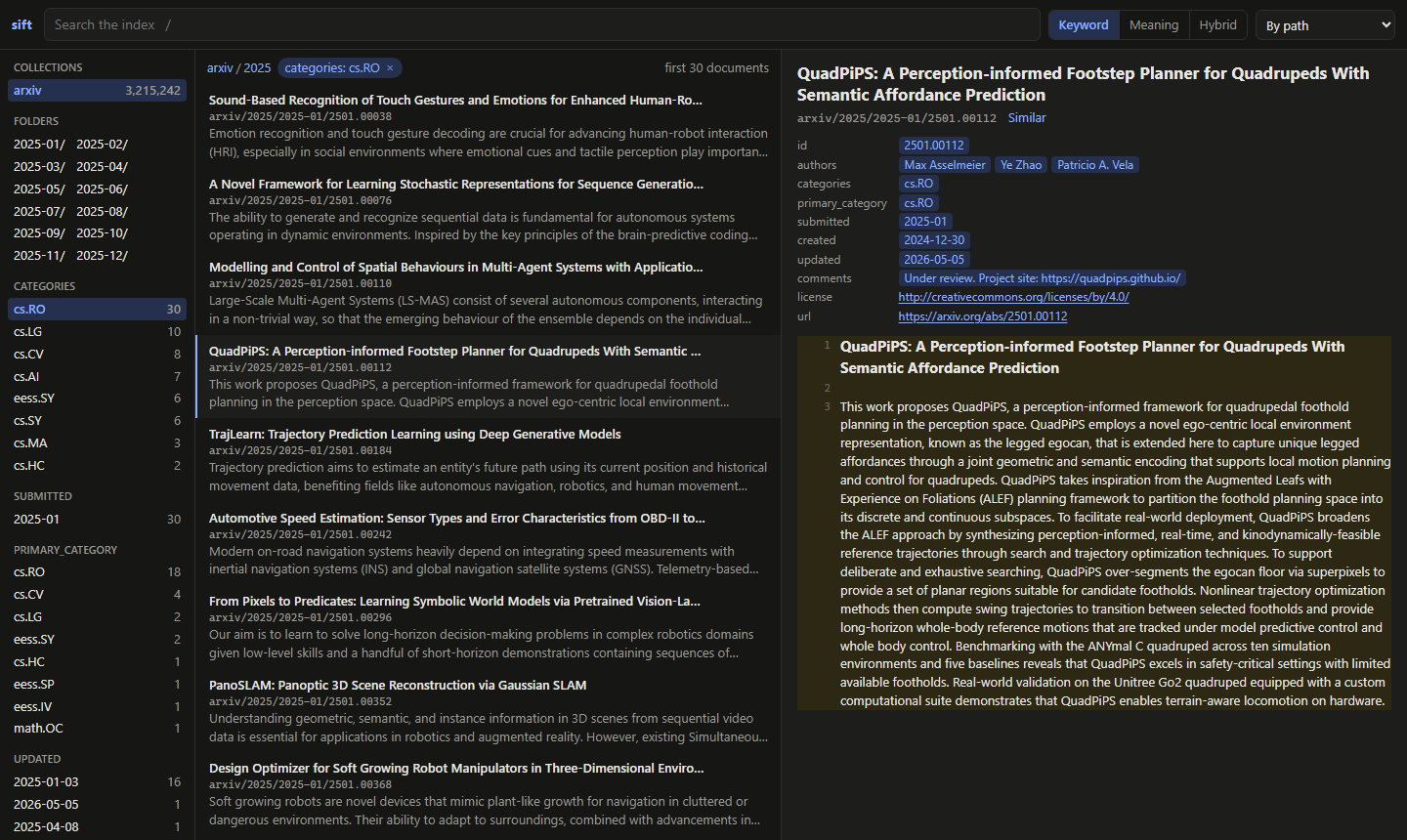
- Search in three modes: Keyword as you type, Meaning and Hybrid (
vsearchandquery) on Enter. The words found are marked in each passage, and a bar shows each result's score. - Drill down without typing: collections and their folders, and the front-matter values of the results with their counts (authors, categories, years), each a click to filter by. Filters show as chips; click one to remove it. Results can also be sorted by any front-matter field.
- Read a result next to the list: the whole document, its passage marked and scrolled to, and its front matter, whose values filter too, and whose links open. A long document shows 2,000 lines at a time. Similar lists documents like it, and Open file opens the original file: a PDF shows in the browser's viewer, and other files open without running any script they hold.
- Keys:
/to search,↑↓to move through results,Enterto open one. - Every view has its own address, so reloading, the back button and links work.
Measuring search on your own documents
sift bench runs each search mode over questions whose answers you know and reports nDCG@10, MRR@10 and Recall@10,
the measures of the BEIR and TREC benchmarks, and the time per query. Write the questions as an agent would ask
them, with the ids of the documents that answer them, as search results show them:
[
  {"query": "Which supplier terms changed in 2025?", "relevant": ["work/contracts/supplier-2025.docx"]},
  {"query": "onboarding checklist for new hires", "relevant": {"work/hr/onboarding.pdf": 2, "work/hr/it-setup.md": 1}}
]
A few dozen questions are enough to compare modes and to see whether a change helps your documents. Grades are optional: 2 for the answer, 1 for a useful one, and 0, as in TREC's judgements, for one read and found irrelevant.
Front matter
YAML front matter with flat key: value lines becomes filterable metadata; lists can be inline or one - item per
line. A list field matches when it contains the value:
---
title: "Travel expenses"
departments: ["finance", "hr"]
year: 2025
tags:
  - travel
  - expenses
---
sift query "per diem abroad" -f departments=finance -f year=2025
sift search policy -f departments=finance -f departments=legal   # in either department
sift search policy -f departments!=legal                         # not in legal
Filters on different fields must all hold. Repeated for one field, = matches any of the values, and != leaves out
documents with any of them; documents without the field stay in. Fields go by the names the front matter gives them,
e.g. -f journal-ref=Nature or -f "date created>=2024".
Filters can also be ranges, with >, >=, < and <=. Dates compare at the precision given, so created<=2024
includes all of 2024 and created>2024 starts in 2025; a number compares with the number a date starts with:
sift search invoice -f "created>=2024-06" -f "created<2025"
The title field, or else the first heading outside code blocks, or else the file name, becomes the document title.
Keyword search covers the front matter too, so an author's name or an id finds its documents, in search and in
query. meta: limits a term to the front matter, e.g. sift search "meta: Smith".
JSON Lines
A .jsonl (or .ndjson) file holds one document per line, as a JSON object. sift finds the fields by name:
| Part | Field |
|---|---|
| id | id or _id, else the line number |
| title | title, name, headline or subject |
| text | the first of text, content, body, abstract, description and summary, else the longest string; a list of strings becomes paragraphs |
| metadata | every other field, for filters and fields, as front matter is for Markdown |
A record's id is its file's path plus its id: line {"id": "T-1042", ...} of 2025/tickets.jsonl in the collection
support becomes support/2025/tickets/T-1042, which get also finds as support/T-1042. Other field names can be
chosen when adding the collection:
sift add ~/qa --id key --title question --text question,answer
Lines that aren't JSON objects, have no text or repeat an id are skipped and reported.
Documents
PDF, Word (.docx), PowerPoint (.pptx), Excel (.xlsx), OpenDocument (.odt, .odp, .ods), RTF, EPUB and HTML
files are converted to Markdown by Xberg. Headings stay headings, slides
become sections and sheets become tables, and get returns that Markdown. The document's properties become metadata
as far as the file has them: title, authors, subject, keywords, language, created and modified. The
title is the document's own, else the first heading, else the file name.
sift runs no OCR, so a scanned PDF without a text layer has no text. Such files are skipped and reported, as are
damaged ones, until they change. Older binary Office files (.doc, .ppt, .xls) aren't read.
MCP
sift serve runs an MCP server that agents search through:
| Tool | Purpose |
|---|---|
search |
Exact keyword search, ranked by BM25. Supports "phrases", prefix*, AND, OR, NOT and parentheses. |
vsearch |
Semantic search. |
query |
Hybrid search for RAG: keyword and semantic candidates, reranked by a cross-encoder. |
similar |
Documents like a given one, by its id: more documents like one already found. |
get |
Text of an indexed document by its id: all of it, or only lines such as a hit's "17-26". With fields, it returns the document with those front-matter fields. An id may leave out folders if the file name is unique. |
status |
Collections, counts and front-matter fields. |
The search tools take query (similar: id), k, collection, path, filters, fields, compact,
all_passages and sort, as the commands above do. Every result carries id (collection/path), title, lines,
score and the passage's text, so agents can cite their sources. fields adds front-matter fields to each result,
e.g. ["url", "created"], and compact: true leaves out the text, so an agent can survey many results without
filling its context and then read the ones that matter. Filters take a value, a list for any of its values,
{"not": ...}, or ranges, e.g. {"created": {">=": "2024-06", "<": "2025"}}. Every parameter is described in the
tools' schemas, and the server tells agents when they connect which collections there are and which front-matter
fields each has.
Setting up
-
Start the server, and leave it running:
sift serve # prints: sift MCP server on http://127.0.0.1:8765/mcp
-
Register it with Claude Code, once, for all your projects:
claude mcp add --scope user --transport http sift http://127.0.0.1:8765/mcp
Keep
--scope user. Without it,claude mcp addregisters sift for the current folder only, and sessions started anywhere else don't see it, including those in the Claude desktop app's Code tab. -
Start a new Claude Code session: running sessions don't pick up new servers.
claude mcp listshould now show sift as connected, and an agent asked for sift's status gets your collections.
One server serves any number of agents, with the models loaded once. Other MCP clients, such as Cursor, VS Code or
Windsurf, connect the same way, to the streamable HTTP endpoint http://127.0.0.1:8765/mcp. The same server shows the index to you at
http://127.0.0.1:8765/ui/ (see Browsing the index).
Or let every session start a server of its own over stdio; then each session loads the models into memory itself:
claude mcp add --scope user sift -- sift serve --stdio
A registration made without --scope user can be removed in the folder where it was made, with
claude mcp remove sift --scope local.
Connectors in claude.ai and in the Chat tab of the Claude apps can't use sift: claude.ai reaches connectors from Anthropic's servers, which can't reach a server on your computer.
Updating
A running sift keeps the version it started with, so an update takes an upgrade and a restart of each part:
-
Upgrade on every machine that runs sift; a machine that embeds through a
sift workerneeds the same major version as the worker (see Versioning):uv tool upgrade sift-rag # with pip: pip install -U sift-rag sift --version
-
Restart what runs: stop
sift serveandsift workerwith Ctrl+C and start them again. A server registered with--stdiostarts anew with each session. -
Start new agent sessions. An MCP client reads sift's tools and their parameters when a session starts, and may keep that list even after reconnecting: a running session then misses new tools and parameters, and its calls with them fail or lose arguments. In Claude Code, start a new session; the registration stays as it is.
The index and the vectors carry over. When a new version changes how the keyword index is laid out, the first command rebuilds it, once, and says so: a few minutes for millions of documents; nothing gets embedded again. The changelog lists what changed.
Embedding on another machine
A machine without a GPU, such as a notebook, can borrow another machine's. Run sift worker on the one with the GPU:
sift worker # listens on port 8766 and prints the address to use, with its key
It prints a line such as SIFT_EMBED_REMOTE=https://<key>@workstation:8766. Set that on the other machine, e.g. in
PowerShell (setx keeps it for new terminals; bash: export SIFT_EMBED_REMOTE=...):
setx SIFT_EMBED_REMOTE https://<key>@workstation:8766
sift embed then sends the chunks to the worker, 256 at a time, and stores the vectors it gets back, without loading
the model itself. Searches embed their queries and rerank there too, in the CLI and in sift serve, so the machine
searching never loads PyTorch: vsearch and query answer in a fraction of a second, even on a light notebook.
Both machines need the same major version of sift; sift refuses a worker of another one, and says which runs where.
The worker only computes: it sees the texts it embeds and reranks, but no index and no files. It sizes its batches to
its GPU and gives the GPU back after 5 idle minutes, like sift serve. The worker's SIFT_EMBED_MODEL decides the
model, and sift refuses a worker whose model differs from the one the index was embedded with.
The texts travel encrypted, over HTTPS. On its first start the worker makes a certificate of its own and an access
token, kept in ~/.sift/worker (readable by you only), and the key it prints holds both: the token, and the
certificate's fingerprint. sift checks the worker's certificate against that fingerprint before it sends anything,
so no other machine can pose as the worker, and the worker answers only requests that carry the token. Keep the key
private, like a password; sift never shows it in its output. To make a new key, delete ~/.sift/worker and restart
the worker; machines with the old key are then refused.
To let the worker through the Windows firewall from your own subnet only, in PowerShell as administrator:
New-NetFirewallRule -DisplayName "sift worker" -Direction Inbound -Protocol TCP -LocalPort 8766 -Action Allow -RemoteAddress LocalSubnet
If Windows asks whether to let Python through the firewall, allow it: cancelling adds a rule that blocks Python, and
blocking rules win over allowing ones. On Linux with ufw: sudo ufw allow from 192.168.1.0/24 to any port 8766 proto tcp, with your network's range.
Configuration
None needed: sift picks the device, the GPU memory budget, the batch size and the number of worker processes itself. Four optional settings exist for special cases:
| Variable | Default | Purpose |
|---|---|---|
SIFT_HOME |
~/.sift |
Where the index lives |
SIFT_EMBED_MODEL |
google/embeddinggemma-2 |
Any Sentence Transformers embedding model |
SIFT_RERANK_MODEL |
Alibaba-NLP/gte-reranker-modernbert-base |
Any Sentence Transformers cross-encoder |
SIFT_EMBED_REMOTE |
none | A sift worker to embed on: the https://<key>@workstation:8766 it prints |
After changing the embedding model, run sift embed --reset. Models are downloaded from Hugging Face on first use.
For a new index of business documents, Snowflake/snowflake-arctic-embed-l-v2.0 is a good alternative embedding
model. On sift's benchmarks it ties
EmbeddingGemma-2 on average. It's better on financial questions and long German documents, worse on scientific
claims, and it embeds 1.6 times as fast.
How it works
- Indexing: worker processes read and parse files in parallel while the previous batch is written; small updates skip the process start-up. Files are compared by modification time and size, so unchanged files cost nothing, and documents by content hash, so a changed JSON Lines file re-indexes only its changed records. Text files are read as UTF-8, or as UTF-16 when they start with its byte order mark (Windows PowerShell 5.1 writes those). Each kind of file has a reader, chosen by extension, that turns it into documents; adding a format means adding a reader. Markdown, including documents converted to it, is split into chunks of about 3,000 characters (about 750 tokens) on line boundaries, preferring headings, with a small overlap.
- Remote embedding: HTTPS with the worker's self-made certificate (EC P-256), pinned by its SHA-256 in the key,
and a bearer token of 32 random bytes.
GET /names the worker's models, vector length and sift version;POST /embedtakes{"texts": [...], "query": false}as JSON and returns the vectors as raw fp16, one row per text;POST /reranktakes{"query": "...", "texts": [...]}and returns the raw scores,{"scores": [...]}. The worker runs one request at a time on the GPU. Through a worker, the vectors are searched with NumPy, in RAM. - Storage: one SQLite database in WAL mode holds every document's text, metadata, the FTS5 keyword index and
the vectors (fp16). The text is stored once: chunks are spans of it, and the keyword index reads it through a view.
Searching and
getnever touch the files, so results and documents always agree, until the nextsift index. - Embedding: PyTorch on the GPU (NVIDIA, else Apple), in batches sorted by length to keep padding low. The models compute in bfloat16 on NVIDIA GPUs that have it and in float32 elsewhere, never in fp16, where EmbeddingGemma overflows now and then into broken (NaN) vectors. Vectors are stored in fp16, and broken ones are never stored. Each slab of 20,000 chunks is committed, so progress is never lost.
- GPU memory: sift shares the GPU with other programs. On NVIDIA GPUs it caps itself at the memory that is free when it starts, minus headroom (10% of the GPU, at least 1 GB), asking NVML as well as CUDA, since on Windows CUDA counts memory held by other programs as free. It then measures how much memory its longest text needs at growing batch sizes and uses the largest batch that fills 90% of that budget; if a batch still doesn't fit, it is halved. With less than 2 GB to spare, sift uses the CPU instead.
- Idle GPU: models and vectors wait in RAM and move to the GPU when a search needs them. After 5 minutes
without GPU use,
sift servemoves them back to RAM and hands the memory back; only CUDA's own context (about 0.3 GB) stays. The first search afterwards takes about a second longer; if other programs have taken the memory meanwhile, sift stays on the CPU rather than squeeze them. Keyword search never uses the GPU. search: SQLite FTS5 with BM25, over three columns weighted alike: every passage is indexed with its document's title (the first passage holds it as its heading too) and its front-matter values. Matches are grouped by document in SQL, each represented by its best passage. Input that isn't valid FTS5 syntax is treated as exact phrases.vsearch: exact nearest-neighbour search as one matrix multiply over all vectors on the GPU. No approximate index, so nothing to tune and no recall loss; a million 768-dimensional vectors take about 1.5 GB of VRAM. When the best passages come from a few documents, it looks further down until it haskdocuments.query: the top 40 (ork, if larger) keyword and semantic candidates are reranked together, in one GPU batch. The reranker reads each candidate's title, the front-matter values that share a word with the query (an author's name, an id; all of them would dilute the passage), and the passage.- Scoring. A candidate's score is the reranker's, plus half its cosine with the query, measured in units of the reranker's spread over the candidates. One weight thus fits any reranker, and the scores keep the reranker's scale. A reranker alone ranked scientific claims worse than the embedding did. Candidates whose front matter the query names keep the best cosine, since the embedding never sees front matter.
- The evidence is in docs/benchmarks.md: rerankers, embedding models and blends on seven datasets, from scientific claims to long German documents. Scores are raw: a sigmoid saturates, at 0.9999 for every good match.
similar: the mean of a document's passage vectors, scored against every passage asvsearchscores a query. No model runs, so it takes half a second over 3 million passages, with or without a GPU.- Server:
sift serveloads models and vectors once and keeps them in memory. - UI: pages rendered on the server with Jinja2, whose panes htmx swaps in place: no build step and no Node, and the UI is tested with the rest. It runs on the server's event loop, as the MCP tools do. Browsing a folder jumps through the index folder by folder, so it stays quick in collections of millions of documents, and the collections are counted once per change of the index.
Scope
In scope: text, Markdown and JSON Lines files, PDF, office documents, e-books and web pages; Linux, macOS and Windows; NVIDIA GPUs (CUDA) and Apple GPUs (MPS), otherwise CPU; one user, any number of local agents.
Out of scope for now: OCR of scans and images; answer generation (sift retrieves, the agent writes); approximate nearest-neighbour indexes; live file watching; remote access and authentication.
Versioning
sift follows semantic versioning. Within a major version, such as 1.x, these stay compatible:
- the commands, their options and their JSON output (
--json,sift status); - the MCP tools and their parameters;
- the four settings;
- the index: one made by 1.x opens in every later 1.x, which updates its layout on first use if it must;
- the worker protocol: every 1.x embeds through every 1.x worker.
sift's Python modules are its own: they may change in any release.
Development
git clone https://github.com/tobiaswuerth/sift
cd sift
uv venv && uv pip install --torch-backend auto -e ".[dev]"   # or with pip: pip install -r requirements.txt -e ".[dev]"
pre-commit install      # lint, format and config checks on every commit
pytest --cov            # 100% line and branch coverage is required
The tests replace the embedding and reranking models with small deterministic fakes, so they need no GPU and no model downloads; everything else, including the MCP server, runs for real. See CONTRIBUTING.md for how changes and releases work.
License
1 maintainer

Metadata
1 maintainer
Release files for sift-rag 1.0.0
For a detailed explanation of source distributions (sdists) and built distributions (wheels), please see the package formats documentation.
Source distribution (sdist)
| File | Size | Uploaded | Provenance | |
|---|---|---|---|---|
| sift_rag-1.0.0.tar.gz | 240.8 kB | With provenance | Details |
Built distribution (wheel)
| File | Interpreter | ABI | Platform | Reset |
|---|---|---|---|---|
| sift_rag-1.0.0-py3-none-any.whl | Python 3 | none | any | Details |
Total release size: 337.3 kB
Release files / sift_rag-1.0.0.tar.gz
| Download URL | sift_rag-1.0.0.tar.gz |
|---|---|
| Size | 240.8 kB |
| Tags | Source |
|
SHA-256 checksum How to use checksums |
ded90a163e62cf4df016ee9fea3150e2d05ebbccdd5b1565e06c1f0d3d27f8df
|
|
BLAKE2b-256 checksum How to use checksums |
52de9699763443d6a76cbb3220fb1eb0221c3069d2acb8518f7a59c74d55c956
|
| Upload date | |
|
Uploaded using Trusted Publishing? What is trusted publishing? |
Yes |
| Uploaded via |
twine/7.0.0 CPython/3.13.16
|
Provenance
Provenance describes where a file came from. On PyPI, provenance is shared via attestations, which provide a verifiable record of the build or publishing details. View details, limitations and caveats.


PyPI Publish Attestation
PyPI verified that this artifact, at this checksum, originated from the publisher listed below.
Signed by GitHub Actions, verified by PyPI on Oct 21, 2026.
Transparency logRelease files / sift_rag-1.0.0-py3-none-any.whl
| Download URL | sift_rag-1.0.0-py3-none-any.whl |
|---|---|
| Size | 96.6 kB |
| Tags | Python 3 |
|
SHA-256 checksum How to use checksums |
d4ebf1bbf8fe399beea3e54649146dfc6d338e676fc906c497ab609af795a03a
|
|
BLAKE2b-256 checksum How to use checksums |
3a22ea30b7a7c418458e799738906e7ac82681d694654d7eafaf96f0b9d226bf
|
| Upload date | |
|
Uploaded using Trusted Publishing? What is trusted publishing? |
Yes |
| Uploaded via |
twine/7.0.0 CPython/3.13.16
|
Provenance
Provenance describes where a file came from. On PyPI, provenance is shared via attestations, which provide a verifiable record of the build or publishing details. View details, limitations and caveats.
PyPI Publish Attestation
PyPI verified that this artifact, at this checksum, originated from the publisher listed below.
Signed by GitHub Actions, verified by PyPI on Oct 21, 2026.
Transparency logSecurity for sift-rag 1.0.0
Provenance
Provenance describes where a file came from. On PyPI, provenance is shared via attestations, which provide a verifiable record of the build or publishing details. View details, limitations and caveats.
Full provenance
All 2 files in this release have been uploaded with provenance metadata.
Attestation for sift_rag-1.0.0.tar.gz
PyPI Publish Attestation
PyPI verified that this artifact, at this checksum, originated from the publisher listed below.
Signed by GitHub Actions, verified by PyPI on Oct 21, 2026.
Transparency logA note on package security
PyPI is a repository for distributing packages, not a service for auditing them. While third-party security researchers and our staff do their best to detect and remove malicious packages, PyPI cannot guarantee the quality, security or suitability of any given package.














