
Siftcode
Local LLM-powered code analysis and developer guide generator.
Siftcode analyzes software projects using a locally-running language model (via Ollama) and produces:
- Per-file summaries — what each file does, its functions, and how it fits
- Per-directory summaries — how files work together
- A comprehensive Markdown developer guide — architecture, setup, API reference, and examples
Everything runs on your own hardware. No code leaves your machine.
Why Siftcode?
Reading an unfamiliar codebase is slow. Documentation is often outdated or missing entirely. Existing AI tools send your code to a cloud service, which is a non-starter for proprietary or sensitive projects.
Siftcode combines three things that no other tool offers together:
- 100 % local — your code never leaves your machine
- Project-wide context — each file is analyzed with the project's structure and sibling files already in view
- A cache — re-analysis skips files that haven't changed, making iterative work fast
The result is a well-organized developer guide you can actually use, generated in minutes.
Features
- Local-first: runs entirely on your hardware via Ollama
- Cache-aware: unchanged files are never re-analyzed — second runs are up to 10× faster
- Project-wide context: file analyses see the root summary and sibling files, producing coherent guides
- Progress feedback: a live progress bar and log during analysis
- Cancellable: stop an analysis mid-run without losing your work
- Configurable per project: model, context size, temperature, file exclusions, and cache settings are all saved per project
- Two front-ends: a modern GTK4 + libadwaita GUI and a scriptable CLI
- Tested: 200+ unit tests, ~95 % coverage in the core
Screenshots
Project list
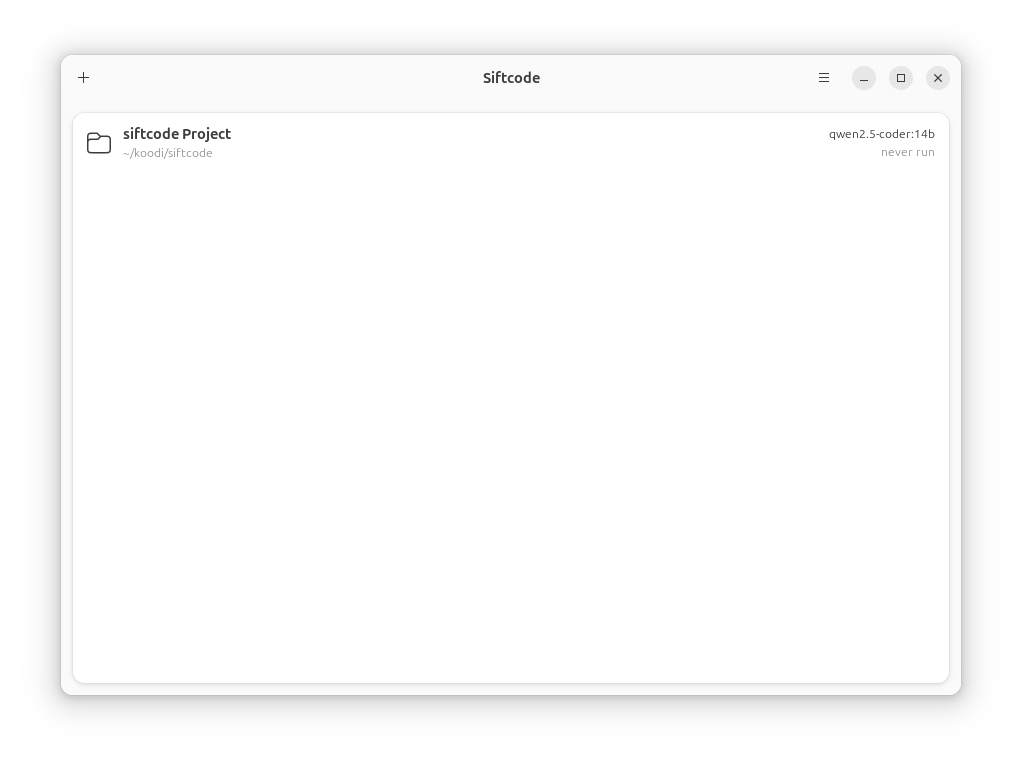
Settings
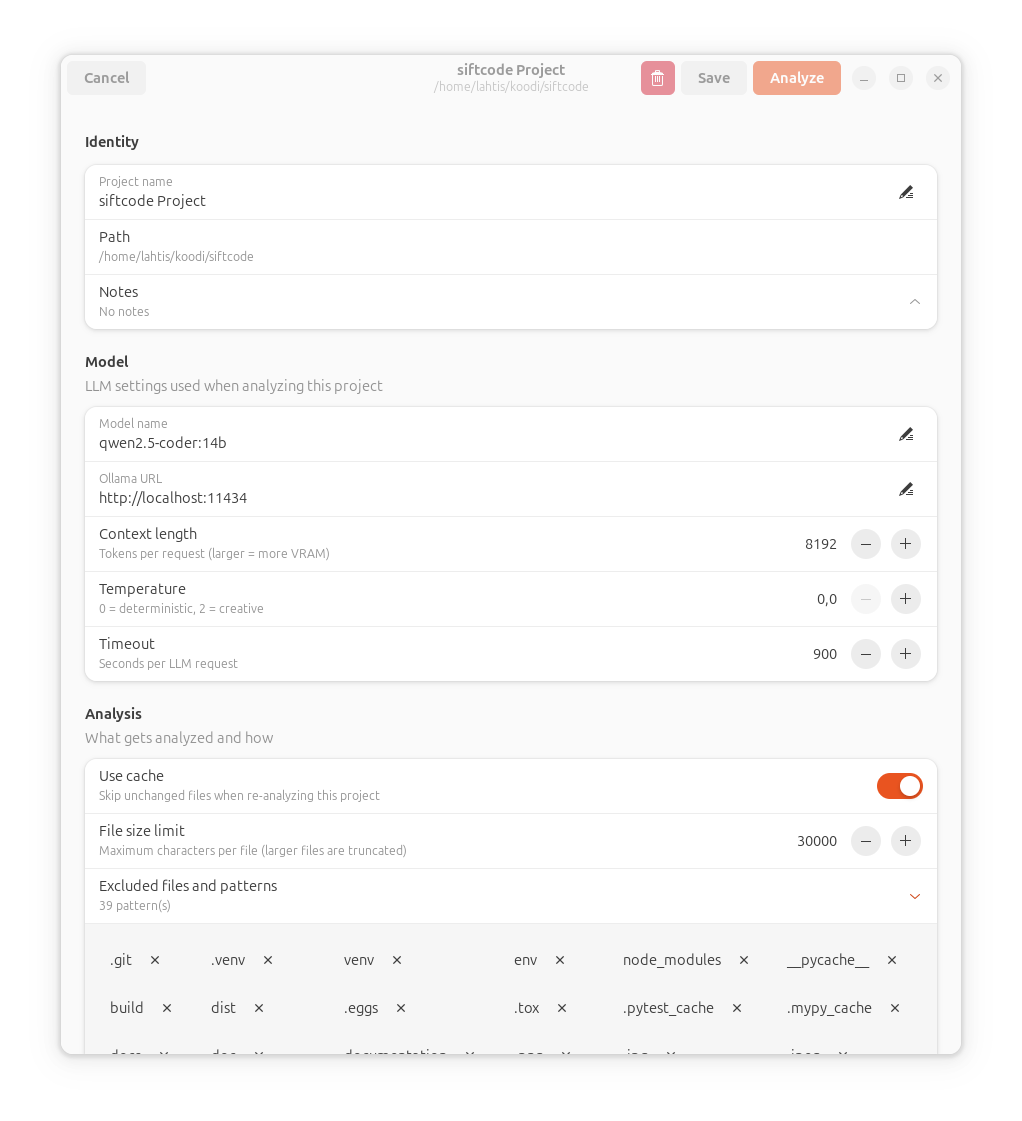
Analysis in progress
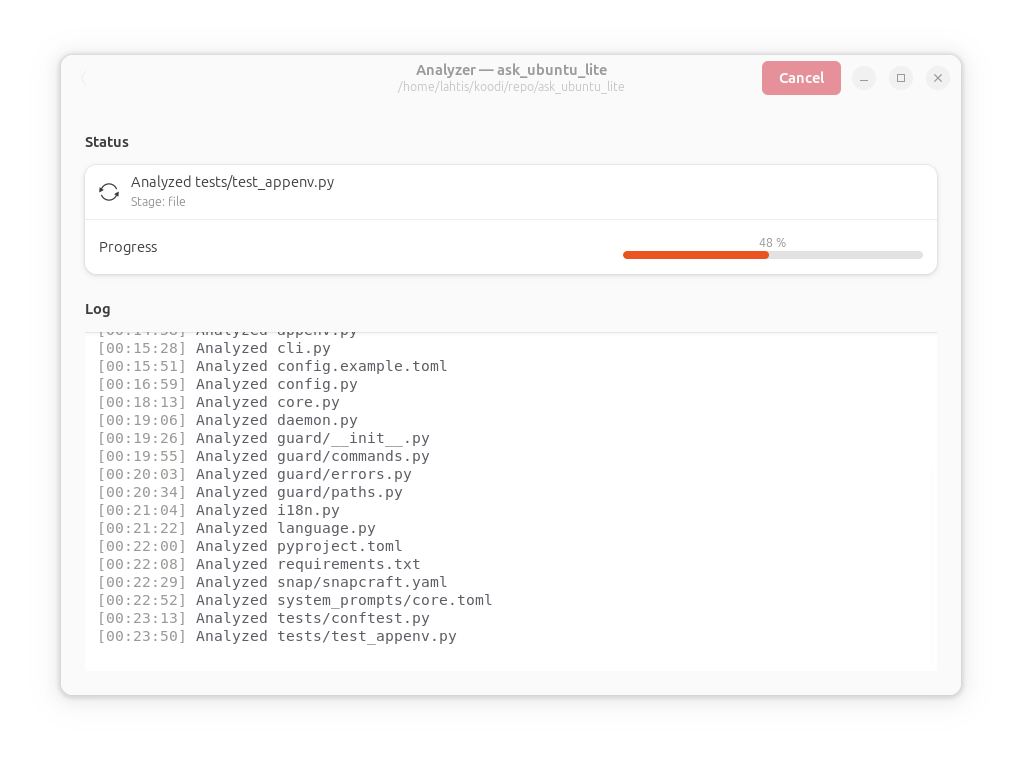
Generated developer guide
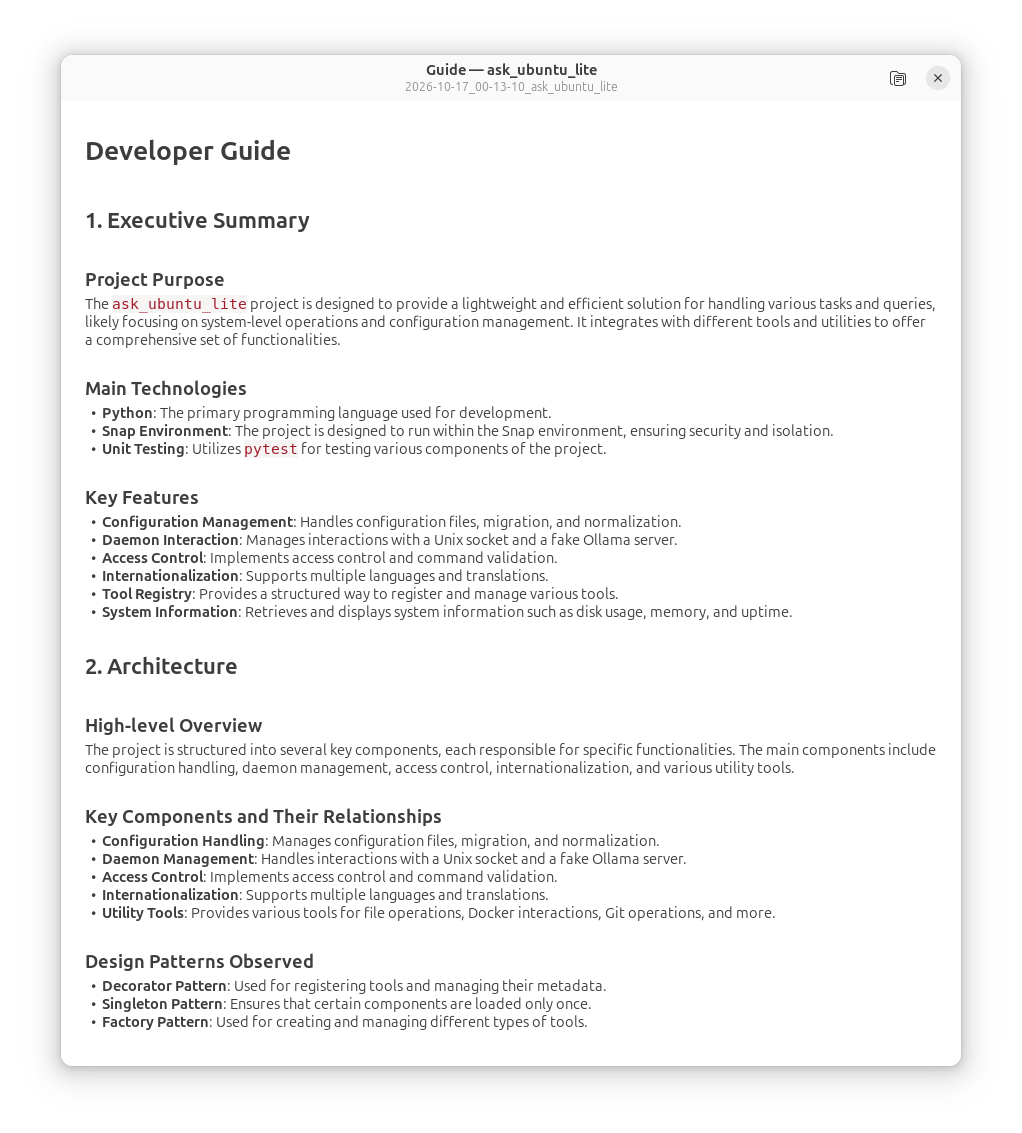
Requirements
-
Linux (X11 or Wayland)
-
Python 3.11 or newer
-
GTK 4.10+ and libadwaita 1.4+
-
Ollama running locally
-
A code-capable LLM installed via Ollama, for example:
ollama pull qwen2.5-coder:14b
Hardware
Siftcode runs on modest hardware, but quality and speed depend on your GPU and the model you choose.
| Model | VRAM (Q4) | ~42-file run | Quality | Best for |
|---|---|---|---|---|
qwen2.5-coder:7b |
~5 GB | ~3 min | Basic | Small projects, laptops |
qwen2.5-coder:14b |
~10 GB | ~7 min | Good | Recommended default |
qwen2.5-coder:32b |
~22 GB | ~33 min | Excellent | Workstations, best quality |
For CUDA GPUs, ensure your driver is recent enough for your Ollama build. CPU-only operation works but is slow (expect 5–15× longer runs).
Observations from real runs:
- 14B produces a comprehensive guide in ~7 minutes. It occasionally
mentions files that don't exist (e.g.
setup.pyin a modernpyproject.tomlproject). These are easy to spot and correct. - 32B is ~4.5× slower but produces a more accurate guide — notably
it no longer invents
setup.py. However, its output is more concise and may skip smaller files. - 7B is useful for small projects or when you need a quick pass.
Tip: With 32 GB+ RAM and a workstation-class GPU, you can keep both 14B and 32B loaded at the same time:
export OLLAMA_MAX_LOADED_MODELS=2
export OLLAMA_KV_CACHE_TYPE=q8_0
This lets you use 14B for quick iterations and 32B for the final guide without reloading models from disk.
For CUDA GPUs, ensure your driver is recent enough for your Ollama build. CPU-only operation works but is slow (expect 5–15× longer runs).
Recommended context length
The default num_ctx has been increased from 8192 to 32768
tokens.
Why: The guide generation prompt includes the root summary,
all directory summaries, and all file summaries. For a 40-file
project, this is roughly 23,000 tokens. With num_ctx=8192,
Ollama truncates the context and the model never sees most of
the files — the guide ends up mentioning only a handful of
modules.
Verification: A real-world 40-file Python project required
23,575 tokens for complete context. With num_ctx=32768, the
generated guide mentions 20+ modules including analyzer.py,
cache.py, cli.py, and all GUI views.
VRAM: With 14B Q4_K_M + OLLAMA_KV_CACHE_TYPE=q8_0, VRAM
usage is ~13 GB. Comfortably within 24 GB.
Installation
From source (recommended for now)
git clone https://codeberg.org/lahtis/siftcode.git
cd siftcode
python3 -m venv .venv
source .venv/bin/activate
pip install -e ".[dev]"
Verify installation
siftcode --version
# → siftcode 0.3.0

siftcode about
# → prints version, author, and license
System dependencies (Ubuntu / Debian)
sudo apt install \
    python3-dev python3-gi python3-gi-cairo \
    gir1.2-gtk-4.0 libadwaita-1-0 gir1.2-adw-1 \
    libgirepository1.0-dev libcairo2-dev pkg-config
System dependencies (Fedora)
sudo dnf install \
    python3-devel python3-gobject gtk4 libadwaita \
    gobject-introspection-devel cairo-devel pkg-config
Usage
GUI
siftcode-gui
- Click the + button to add a project directory.
- Double-click the project to open its settings.
- Adjust the model, context size, and exclusions if needed.
- Click Analyze to start.
- When finished, click Open guide to view the generated Markdown.
CLI
# Register a project under a friendly name
siftcode add /path/to/project --name "My Project"

# List saved projects
siftcode list

# Show a project's configuration
siftcode show "My Project"

# Analyze it (standard run)
siftcode analyze "My Project" --output ~/siftcode-output

# Analyze it with advanced per-file technical specifications
siftcode analyze "My Project" --output ~/siftcode-output --advanced

# Delete a project
siftcode delete "My Project"
The CLI also works without registering:
siftcode analyze /path/to/project --output ./docs
siftcode analyze /path/to/project --output ./docs --advanced
Cache management
siftcode cache stats                # show entry counts and sizes
siftcode cache clear                # remove everything
siftcode cache clear --model qwen2.5-coder:14b
siftcode cache gc --days 30         # prune entries unused for 30 days
Output
Analysis produces two files in the output directory:
findings.json— raw structured findings (root, directories, files, errors)guide.md— the generated developer guidedocs/specs/— advanced per-file technical specifications (when--advancedis used)
Configuration
Siftcode stores project configurations in the standard XDG config directory:
~/.config/siftcode/projects/<slug>.toml
Each project's TOML file records:
- Project name, path, and notes
- Model name, Ollama URL, context size, temperature, timeout
- File exclusion patterns
- Cache settings
- Last run timestamp
Cache data lives in:
~/.cache/siftcode/
The GUI exposes all of these settings; the TOML file is human-readable and can be edited by hand if you prefer.
How it works
- Root analysis — the LLM sees the project tree and infers the main language(s), purpose, and architecture.
- File analysis — each file is analyzed with the root summary and the summaries of sibling files already in view.
- Directory summaries — the LLM summarizes each directory based on the file summaries it contains.
- Guide generation — all of the above is composed into a structured Markdown developer guide.
- Advanced specs (optional) — when
--advancedis used, individual per-file technical specifications are generated and stored indocs/specs/.
Each step is cached by SHA-256 hash of the input. When you re-run on an unchanged project, only the guide is regenerated.
Development
# Clone and install with dev dependencies
git clone https://codeberg.org/lahtis/siftcode.git
cd siftcode
python3 -m venv .venv
source .venv/bin/activate
pip install -e ".[dev]"

# Run the test suite
pytest --cov=siftcode --cov-report=term-missing

# Lint
ruff check src/ tests/

# Type-check
mypy src/
Project layout
siftcode/
├── src/siftcode/
│   ├── _version.py       # single source of truth for metadata
│   ├── cli.py            # command-line interface
│   ├── core/             # framework-agnostic logic
│   │   ├── analyzer.py   # analysis engine
│   │   ├── cache.py      # hash-based cache
│   │   ├── config.py     # project configuration
│   │   ├── llm.py        # Ollama client
│   │   ├── prompts.py    # prompt templates
│   │   └── manual.py     # Advanced Technical Analysis & Specification Generator
│   └── gui/              # GTK4 front-end
│       ├── app.py
│       ├── window.py
│       ├── project_list.py
│       ├── settings_view.py
│       ├── analyzer_view.py
│       └── widgets/
├── tests/                # unit tests
└── pyproject.toml
The core/ package has no GTK dependencies and is usable from any
Python program.
Contributing
Contributions are welcome! See CONTRIBUTING.md for guidelines on:
- Reporting bugs
- Suggesting features
- Submitting pull requests
- Coding style and testing
For translations, open an issue on Codeberg — the string table is not yet extracted, but that will come.
License
Siftcode is free software: you can redistribute it and/or modify it under the terms of the GNU General Public License as published by the Free Software Foundation, either version 3 of the License, or (at your option) any later version.
See LICENSE for the full text.
Copyright © 2026 Tuomas Lähteenmäki
Acknowledgements
Siftcode stands on the shoulders of excellent open-source projects:
- GTK 4 and libadwaita — the GUI toolkit
- Ollama — local LLM runtime
- Qwen2.5-Coder — the recommended model
- platformdirs — XDG directory handling
- tomli-w — TOML writing
Thank you to the maintainers of these projects.
1 maintainer

Metadata
1 maintainer
Release files for siftcode 0.3.0
For a detailed explanation of source distributions (sdists) and built distributions (wheels), please see the package formats documentation.
Source distribution (sdist)
| File | Size | Uploaded | Provenance | |
|---|---|---|---|---|
| siftcode-0.3.0.tar.gz | 471.4 kB | Without provenance | Details |
Built distribution (wheel)
| File | Interpreter | ABI | Platform | Reset |
|---|---|---|---|---|
| siftcode-0.3.0-py3-none-any.whl | Python 3 | none | any | Details |
Total release size: 931.9 kB
Release files / siftcode-0.3.0.tar.gz
| Download URL | siftcode-0.3.0.tar.gz |
|---|---|
| Size | 471.4 kB |
| Tags | Source |
|
SHA-256 checksum How to use checksums |
30fefda30e7dc0ee5c061501bf52d1506d0479b8e072581a6a2bb90ae3d4c341
|
|
BLAKE2b-256 checksum How to use checksums |
826f916b04f033d3cedbe738de6bb966249dda2b5188ba73cdcf16693b121374
|
| Upload date | |
|
Uploaded using Trusted Publishing? What is trusted publishing? |
No |
| Uploaded via |
twine/7.0.0 CPython/3.12.3
|
Release files / siftcode-0.3.0-py3-none-any.whl
| Download URL | siftcode-0.3.0-py3-none-any.whl |
|---|---|
| Size | 460.4 kB |
| Tags | Python 3 |
|
SHA-256 checksum How to use checksums |
bd2d4685b6a556e1cebe4ca8172107252ccd89507eadf904643da887f3f2b3b6
|
|
BLAKE2b-256 checksum How to use checksums |
abd99a3ab53c93b384748d50266e4f69152eb628bf585536eff5787550b96c85
|
| Upload date | |
|
Uploaded using Trusted Publishing? What is trusted publishing? |
No |
| Uploaded via |
twine/7.0.0 CPython/3.12.3
|
Security for siftcode 0.3.0
Provenance
Provenance describes where a file came from. On PyPI, provenance is shared via attestations, which provide a verifiable record of the build or publishing details. View details, limitations and caveats.
No provenance found
None of the files in this release were uploaded with provenance metadata.
A note on package security
PyPI is a repository for distributing packages, not a service for auditing them. While third-party security researchers and our staff do their best to detect and remove malicious packages, PyPI cannot guarantee the quality, security or suitability of any given package.














