
SightRAG
See. Search. Retrieve. Track.




A pluggable visual RAG system. Any detection model. Any embedding model. Any vector store. Any segmentor. Any tracker. Three lines of code.
Quick Start
from sightrag import SightRAG

rag = SightRAG()
rag.index("./photos/")
results = rag.query("find empty shelf")
rag.show(results)
Install
pip install sightrag
For faster inference:
pip install sightrag[onnx] # 2x faster (any CPU)
For v0.5 features:
pip install sightrag[sam2]               # SAM2 segmentation model
pip install sightrag[track]              # object tracking dependencies
pip install sightrag[ocr]               # reads text on images
pip install sightrag[multimodal]         # LLM understanding
pip install sightrag[grounding-dino]     # any domain detection
pip install sightrag[reid]               # person re-identification
pip install sightrag[cli]                # terminal commands
pip install sightrag[qdrant]             # large scale store
pip install sightrag[all]                # everything
What's New in v0.5
- Segmentation : pixel-level masks on any input (images, video, streams, cameras).
SightRAG(segment=True). Default segmentor works automatically; plug your own viaSegmentorBase. - Object Tracking : follow objects across frames with persistent identity.
SightRAG(track=True). Works on image folders (treated as frame sequences), video files, video streams, and CCTV cameras. Default tracker works automatically; plug your own viaTrackerBase. - Find + Track : one-call query and follow.
rag.find_and_track("person in red")returns full trajectories. - Timeline :
rag.timeline(track_id=3)returns complete movement history with timestamps, bounding boxes, and frame counts. - All features on all inputs : detection, segmentation, and tracking all work on images, video, streams, and cameras uniformly.
- Backward compatible : v0.1/v0.2/v0.3/v0.4 code works unchanged.
What Was New in v0.4
- OCR integration : reads text on products, signs, labels, documents during indexing. Zero query-time overhead.
- Multimodal LLM : optional semantic understanding at query time. Use
understand=Truefor deep queries. - Text + visual hybrid search : OCR text match boosts visual scores automatically.
- Grounding DINO, Person Re-ID, CLI, Qdrant, re-ranking.
What SightRAG Is
SightRAG is not a model. Not a wrapper. Not a framework plugin.
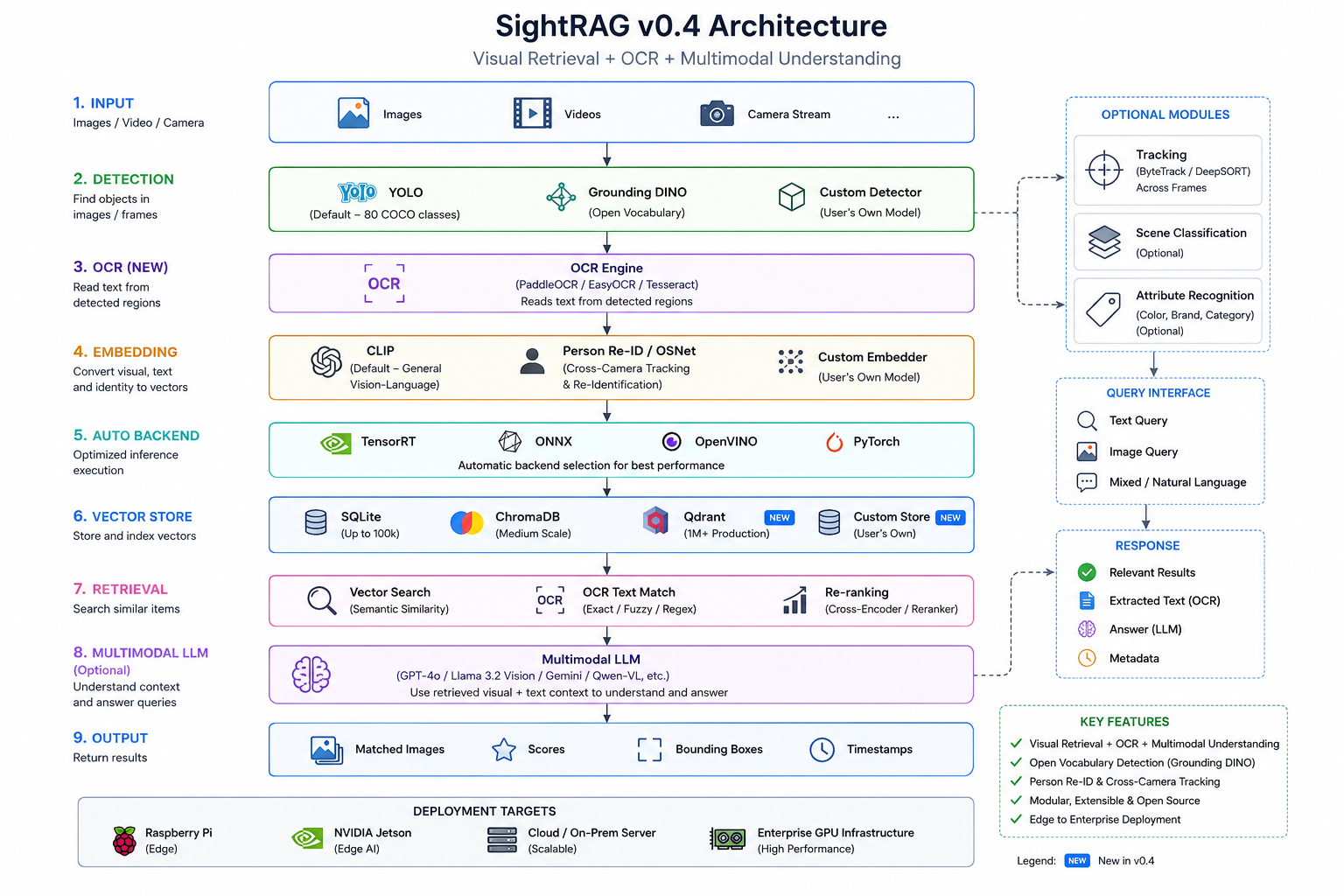
It is a complete visual retrieval system. You provide any detection model, any embedding model, any vector store, any segmentor, any tracker. SightRAG handles the pipeline: load, detect, segment, embed, index, track, retrieve.
All models and indexes are stored in ~/.sightrag/ : your project folder stays clean.
Project Structure
sightrag/
├── sightrag/
│   ├── core.py                  ← SightRAG main class
│   ├── backends/                ← auto-select fastest inference
│   │   ├── pytorch_backend.py   ← default (works everywhere)
│   │   ├── onnx_backend.py      ← 2x faster (any CPU)
│   │   ├── tensorrt_backend.py  ← fastest (NVIDIA GPU)
│   │   └── openvino_backend.py  ← Intel CPU optimized
│   ├── detectors/base.py        ← plug custom detection model
│   ├── embedders/base.py        ← plug custom embedding model
│   ├── segmentors/              ← v0.5: segmentation (plug custom)
│   │   ├── base.py              ← SegmentorBase interface
│   │   ├── yolo_segmentor.py    ← default segmentor
│   │   ├── sam2_segmentor.py    ← SAM2 segmentor (optional)
│   │   └── hf_segmentor.py      ← HuggingFace segmentor
│   ├── trackers/                ← v0.5: object tracking (plug custom)
│   │   ├── base.py              ← TrackerBase interface
│   │   ├── bytetrack.py         ← default tracker
│   │   └── botsort.py           ← Re-ID aware tracker
│   ├── store/                   ← SQLite (default) + ChromaDB
│   ├── visualizer.py            ← rag.show() + timeline visualization
│   ├── indexer.py               ← C++ core with Python fallback
│   ├── retriever.py             ← text + reference queries
│   ├── cli.py                   ← CLI commands
│   └── api.py                   ← REST API (FastAPI)
│
├── cpp/                         ← C++ speed core (optional)
├── demo_sightrag/               ← demo scripts + test data
│   ├── sightrag_images.py       ← image folder demo
│   ├── sightrag_video.py        ← video indexing demo
│   ├── sightrag_livecam.py      ← webcam demo
│   ├── sightrag_restapi.py      ← REST API demo
│   ├── input_images/            ← sample images
│   └── reference_images/        ← reference query images
├── notebooks/                   ← Colab notebook
├── tests/                       ← unit tests
└── docs/                        ← documentation
How To Test
# Quick test
python test_sightrag.py

# Demo scripts
python demo_sightrag/sightrag_images.py
python demo_sightrag/sightrag_video.py
python demo_sightrag/sightrag_livecam.py

# Colab
Upload notebooks/SightRAG_v0.2_Demo.ipynb → Run All

# Unit tests
python -m pytest tests/ -v
Usage
Image Folder
rag = SightRAG()
rag.index("./shelf_photos/")
results = rag.query("find empty shelf")
rag.show(results)
Video File
rag = SightRAG()
rag.index("./cctv_footage.mp4")
results = rag.query("person near exit door")
rag.show(results, save="./evidence/")
Mixed Folder (images + videos)
rag = SightRAG()
rag.index("./my_data/")
Live Camera
rag = SightRAG()
rag.index(source="camera")
results = rag.query("find person")
Reference Image Query
results = rag.query(reference="./sample_shelf.jpg")
rag.show(results)
Custom Domain
rag = SightRAG(domain_hint="pcb defect solder joint")
rag.index("./circuit_boards/")
results = rag.query("find defective solder joint")
Visualize Results
results = rag.query("find person")

# Display on screen
rag.show(results)

# Save annotated images with bounding boxes
rag.show(results, save="./output/")
Segmentation (NEW in v0.5)
Pixel-level masks on any input type. Default segmentor works automatically.
rag = SightRAG(segment=True)
rag.index("./photos/")                   # images with masks
rag.index("./video.mp4", fps=5)          # video with masks
rag.index(source="camera")               # live camera with masks

results = rag.query("find person", segment=True)
for r in results:
    mask = r.get("mask")                  # numpy array (H x W), or None
    if mask is not None:
        print(f"Mask area: {mask.sum()} pixels")

rag.show(results)  # displays masks overlaid on images
Object Tracking (NEW in v0.5)
Follow objects across frames with persistent identity. Works on image folders, video files, video streams, and cameras.
rag = SightRAG(track=True)

# Works on any input type
rag.index("./photos/")                   # image folder as frame sequence
rag.index("./footage.mp4", fps=5)        # video file
rag.index(source="camera")               # live camera / RTSP stream

# Query results include track_id
results = rag.query("find person")
for r in results:
    print(f"{r['label']} | Track#{r.get('track_id')}")

# List all tracked objects
all_tracks = rag.get_all_tracks()
for t in all_tracks:
    print(f"Track#{t['track_id']}: {t['label']} "
          f"({t['first_timestamp']}s to {t['last_timestamp']}s, "
          f"{t['frame_count']} frames)")
Find + Track (NEW in v0.5)
One-call query and follow. Describe what to find, get full trajectories.
rag = SightRAG(track=True)
rag.index("./footage.mp4", fps=5)

timelines = rag.find_and_track("person in red shirt", top_k=2)
for tl in timelines:
    print(f"Track#{tl['track_id']}: {tl['label']}")
    print(f"  First: {tl['first_timestamp']}s | Last: {tl['last_timestamp']}s")
    print(f"  Frames: {tl['frame_count']}")
Timeline (NEW in v0.5)
Full movement history for a tracked object.
tl = rag.timeline(track_id=3)
print(f"Track#{tl['track_id']}: {tl['label']}")
print(f"  {tl['first_timestamp']}s to {tl['last_timestamp']}s")
print(f"  {tl['frame_count']} frames, {len(tl['states'])} detections")

# Combine segmentation + tracking
rag = SightRAG(segment=True, track=True)
rag.index("./footage.mp4", fps=5)
results = rag.query("find person")
# Each result has both mask AND track_id
OCR Search : Read Text (v0.4)
SightRAG reads text on images during indexing. Query matches both visual features AND text content.
rag = SightRAG(ocr=True)
rag.index("./store_photos/")
results = rag.query("find Calgon")       # matches OCR text on packaging
results = rag.query("find EXIT sign")    # matches text on signs
results = rag.query("find plate AB1234") # matches license plate text
OCR runs at INDEX time only. Zero overhead at query time.
Multimodal Understanding (v0.4)
Optional LLM-powered semantic understanding. Runs on top candidates only, not all images.
# Local model (free, private)
rag = SightRAG(ocr=True, multimodal="qwen2-vl")
results = rag.query("find damaged product", understand=True)

# API model (most accurate)
rag = SightRAG(multimodal="gpt-4o", api_key="...")
results = rag.query("find suspicious activity", understand=True)

# Without understand=True, query is instant (no LLM call)
results = rag.query("find person")  # fast, no LLM
Grounding DINO : Any Domain
Detect ANY object by text description. No training needed.
rag = SightRAG(detector="grounding-dino")
rag.index("./circuit_boards/")
results = rag.query("find cracked solder joint")
rag.show(results)
Works on any domain: medical, industrial, satellite, retail : just type what to find.
Person Re-ID : Cross-Camera Tracking
Track same person across multiple cameras.
rag = SightRAG(embedder="reid")
rag.index("./camera_01/")
rag.index("./camera_02/")
results = rag.query(reference="./suspect.jpg")
rag.show(results)
Returns every camera and timestamp where that person appeared.
CLI Tool
pip install sightrag[cli]

sightrag index ./photos/
sightrag index ./video.mp4 --fps 2
sightrag index ./video.mp4 --fps 5 --track       # v0.5: with tracking
sightrag index ./photos/ --segment                # v0.5: with segmentation
sightrag query "find person near exit"
sightrag query --reference ./suspect.jpg --top-k 10
sightrag query "find person" --segment            # v0.5: include masks

# v0.5: Track commands
sightrag find-track "person in red" --video ./footage.mp4 --fps 5
sightrag tracks                                    # list all tracked objects
sightrag timeline 3                                # timeline for Track#3

sightrag show --query "find person" --save ./output/
sightrag status
sightrag clear
sightrag serve --port 8000
Re-ranking : Better Accuracy
Improves result quality on large similar datasets.
rag = SightRAG(rerank=True)
rag.index("./100k_shelf_images/")
results = rag.query("find empty shelf", top_k=5)
# Fetches top 100, re-ranks to best 5
Pluggable Components
Custom Detector
from sightrag import SightRAG
from sightrag.detectors.base import DetectorBase

class MyDetector(DetectorBase):
    def __init__(self):
        self.model = load_my_model()

    def detect(self, image, confidence=0.25):
        preds = self.model.predict(image)
        return [
            {"bbox": [p.x1, p.y1, p.x2, p.y2],
             "label": p.label,
             "confidence": p.score,
             "crop": image.crop((p.x1, p.y1, p.x2, p.y2))}
            for p in preds if p.score >= confidence
        ]

rag = SightRAG(detector=MyDetector())
Custom Embedder
from sightrag.embedders.base import EmbedderBase
import numpy as np

class MyEmbedder(EmbedderBase):
    embed_dim = 768

    def embed_image(self, image):
        vec = self.model.encode_image(image)
        return vec / np.linalg.norm(vec)

    def embed_text(self, text, domain_hint=None):
        vec = self.model.encode_text(text)
        return vec / np.linalg.norm(vec)

rag = SightRAG(embedder=MyEmbedder())
Custom Store
from sightrag.store.base import VectorStoreBase

class MyStore(VectorStoreBase):
    def add(self, id, embedding, metadata): ...
    def search(self, query_vector, top_k): ...
    def count(self): ...
    def clear(self): ...

rag = SightRAG(store=MyStore())
Custom Segmentor (v0.5)
from sightrag.segmentors.base import SegmentorBase

class MySegmentor(SegmentorBase):
    def segment(self, image):
        preds = self.model.predict(image)
        return [
            {"bbox": [p.x1, p.y1, p.x2, p.y2],
             "label": p.label,
             "confidence": p.score,
             "mask": p.binary_mask}    # numpy array (H x W)
            for p in preds
        ]

rag = SightRAG(segment=True, segmentor=MySegmentor())
Custom Tracker (v0.5)
from sightrag.trackers.base import TrackerBase

class MyTracker(TrackerBase):
    def update(self, detections, frame_idx, timestamp="0.00"):
        # Match detections to existing tracks, return TrackState list
        ...

    def get_tracks(self):
        # Return dict of {track_id: Track}
        ...

    def reset(self):
        # Reset tracker state for new sequence
        ...

rag = SightRAG(track=True, tracker=MyTracker())
Speed : Auto Backend Selection
SightRAG automatically picks the fastest available backend:
| Backend | Speed | Hardware | Install |
|---|---|---|---|
| PyTorch (default) | baseline | any | pip install sightrag |
| ONNX | ~2x faster | any CPU | pip install sightrag[onnx] |
| OpenVINO | ~1.5x faster | Intel CPU | pip install sightrag[openvino] |
| TensorRT | ~3-5x faster | NVIDIA GPU | pip install sightrag[tensorrt] |
No configuration needed. SightRAG auto-detects what's installed and picks the fastest.
REST API
pip install sightrag[api]
sightrag-server
| Method | Endpoint | Description |
|---|---|---|
| GET | / |
API info |
| GET | /status |
Index stats |
| POST | /index/folder |
Index images/videos |
| POST | /query/text |
Search with text |
| POST | /query/reference |
Search with image |
| DELETE | /index |
Clear index |
Result Format
{
    "image_path":  "./photos/shelf_042.jpg",
    "score":       0.9134,
    "label":       "bottle",
    "confidence":  0.8721,
    "bbox":        [120, 45, 380, 290],
    "timestamp":   "",
    "source_type": "image",

    # v0.5 - present when segment=True
    "mask":        np.array(...),   # pixel-level binary mask (H x W)

    # v0.5 - present when track=True
    "track_id":    3,               # unique object identity across frames
}
Storage
| Store | Scale | Install |
|---|---|---|
| SQLite (default) | up to 100k images | built-in |
| ChromaDB | medium scale | pip install sightrag[chroma] |
| Qdrant (NEW) | 1M+ images | pip install sightrag[qdrant] |
| Custom | any | implement VectorStoreBase |
rag = SightRAG(store="sqlite")    # default, up to 100k
rag = SightRAG(store="chroma")    # medium scale
rag = SightRAG(store="qdrant")    # production, 1M+
Architecture
Docker
docker-compose up
API at http://localhost:8000/docs
Ant Intelligence Ecosystem
Documentation: https://vk-ant.github.io/ant-intelligence-ecosystem/#home
Roadmap
| Version | Focus |
|---|---|
| v0.1 | Core pipeline : image, video, camera, REST API |
| v0.2 | Speed : C++ core, auto backends, pluggable models, rag.show() |
| v0.4 | Intelligence : Grounding DINO, Person Re-ID, CLI, Qdrant, re-ranking |
| v0.4 | Understanding : OCR reads text, multimodal LLM, hybrid search |
| v0.5 (current) | Tracking : segmentation, object tracking, find+track, timeline |
| v1.0 | Production : edge deployment, compliance, enterprise |
License
Apache 2.0
Author
Built by Venkatkumar Rajan
1 maintainer

Metadata
1 maintainer
Release files for sightrag 0.5.2
For a detailed explanation of source distributions (sdists) and built distributions (wheels), please see the package formats documentation.
Source distribution (sdist)
| File | Size | Uploaded | Provenance | |
|---|---|---|---|---|
| sightrag-0.5.2.tar.gz | 62.3 kB | Without provenance | Details |
Built distribution (wheel)
| File | Interpreter | ABI | Platform | Reset |
|---|---|---|---|---|
| sightrag-0.5.2-py3-none-any.whl | Python 3 | none | any | Details |
Total release size: 133.9 kB
Release files / sightrag-0.5.2.tar.gz
| Download URL | sightrag-0.5.2.tar.gz |
|---|---|
| Size | 62.3 kB |
| Tags | Source |
|
SHA-256 checksum How to use checksums |
cbedf7634754e9af5b16003aed8c0dab810e1fda04f2119272bcb0db326620aa
|
|
BLAKE2b-256 checksum How to use checksums |
5d30d8412e580f60c00d465072a0d5e2c0feeb9e13c81430c857a948a1512f0b
|
| Upload date | |
|
Uploaded using Trusted Publishing? What is trusted publishing? |
No |
| Uploaded via |
twine/7.0.0 CPython/3.12.0
|
Release files / sightrag-0.5.2-py3-none-any.whl
| Download URL | sightrag-0.5.2-py3-none-any.whl |
|---|---|
| Size | 71.6 kB |
| Tags | Python 3 |
|
SHA-256 checksum How to use checksums |
f45f82a67dea914bd8da60d231709552c3266fc3c94d67f280008c10fa35967a
|
|
BLAKE2b-256 checksum How to use checksums |
c03fced06b1699dc1a34716737b4b9812d5e908b4733716c34a8ba05dde08017
|
| Upload date | |
|
Uploaded using Trusted Publishing? What is trusted publishing? |
No |
| Uploaded via |
twine/7.0.0 CPython/3.12.0
|
Security for sightrag 0.5.2
Provenance
Provenance describes where a file came from. On PyPI, provenance is shared via attestations, which provide a verifiable record of the build or publishing details. View details, limitations and caveats.
No provenance found
None of the files in this release were uploaded with provenance metadata.
A note on package security
PyPI is a repository for distributing packages, not a service for auditing them. While third-party security researchers and our staff do their best to detect and remove malicious packages, PyPI cannot guarantee the quality, security or suitability of any given package.














