
A python package for checking the gaussian histogram of data array.

Project description
SigmaEx
SigmaEx is a Python package for analyzing and visualizing the Gaussian distribution of data arrays. It allows for sigma clipping, histogram analysis, and Gaussian fitting, with a variety of modes for customized data selection.
SigmaEx is optimized for the following cases:
- Estimate the global background of an astronomical image
- Estimate the pixel-to-pixel noise of an astronomical image
- Modeling the distribution of a series of Gaussian-like data
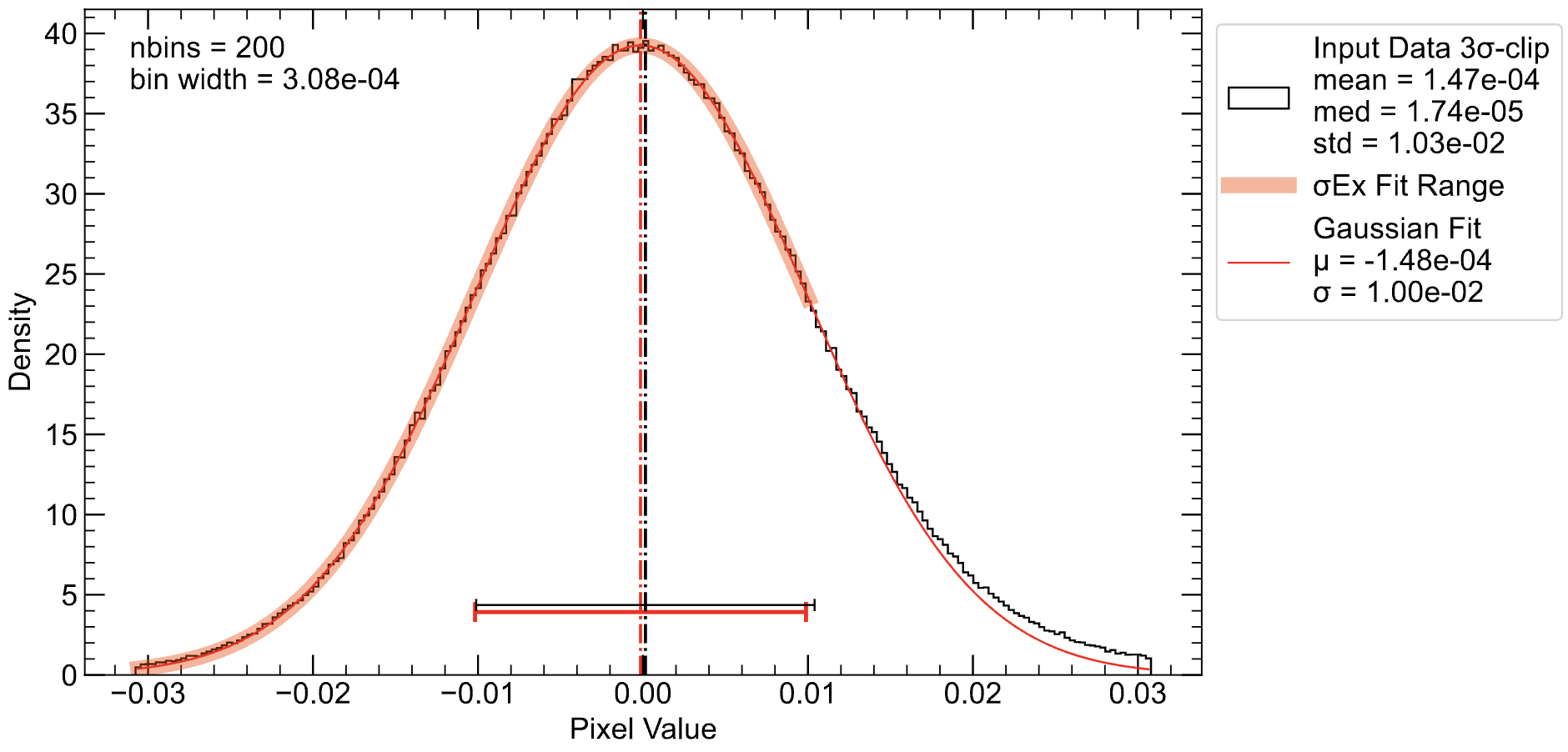
Features
- Sigma Clipping: Removes outliers from the data based on a given sigma threshold.
- Gaussian Fit: Fits a Gaussian distribution to the sigma-clipped data and extracts parameters like mean (μ), standard deviation (σ), and amplitude (A).
- Histogram Generation: Creates histograms of the data, with options for customized binning and selection modes.
- Customizable Modes: Choose from various modes for how the data should be processed, such as positive, negative, or based on mean/median/standard deviation thresholds.
- Support for FITS and TIFF files: Load data from FITS and TIFF files for analysis.
- Plotting: Generates publication-quality plots of the data histogram and fitted Gaussian.
Installation
You can install the required dependencies via pip:
pip install sigmaex
Usage
Overview
sigmaex is a Python package designed for analyzing and fitting Gaussian distributions to data arrays, with features like sigma clipping and customizable histogram analysis. This document outlines how to use the package via the command-line interface (CLI) and how to generate plots and statistics for your data.
Python Package
from sigmaex import SigmaEx

# read data from fits file
sigmx = SigmaEx.from_fits("test.fits", ext=0)
# Or load any numpy array data
sigmx = SigmaEx(array)

# Plot the result
sigmx.plot()
# Print the result
print(sigmx)
Command-Line Interface (CLI)
Syntax
To run the package from the command line, use the following syntax:
sigmaex <data_file> [options]
Where <data_file> is the path to the input data file (either .fits or .tiff format).
Available Options
-
-s, --sigma: The number of standard deviations for sigma clipping. Default is3.Example: -s 5
-
-m, --mode: The mode for sigma_ex. Options include:all: Use all data.positive: Use only positive values.negative: Use only negative values.le_mean: Values less than the sigma-clipped mean.ge_mean: Values greater than the sigma-clipped mean.le_median: Values less than the sigma-clipped median.ge_median: Values greater than the sigma-clipped median.le_std: Values less than the sigma-clipped standard deviation.ge_std: Values greater than the sigma-clipped standard deviation.custom: Custom range defined byxminandxmax.
Example: -m ge_mean
-
-n, --nbins: Number of bins for the histogram. Default is200.Example: -n 300
-
--xmin: Minimum value for the custom mode.Example: --xmin 0
-
--xmax: Maximum value for the custom mode.Example: --xmax 100
-
--sample: Sample size for large datasets. Default is1e7.Example: --sample 5000000
-
-o, --output: Output filename for the plot. Default issigmaex.Example: -o output
Example Commands
- Fitting a Gaussian to a FITS file:
sigmaex data.fits
This will:
- Read the data from
data.fits. - Apply
3σclipping. - Use all data for analysis.
- Generate a histogram with 200 bins.
- Fitting a Gaussian to a TIFF file with custom range:
sigmaex data.tiff
This will:
- Read the data from
data.tiff. - Apply
5σclipping. - Use the custom range between
0and100. - Generate a histogram with 200 bins.
- Save the plot as
sigmaex.pdf.
Plotting Output
-
PDF Plot: A high-resolution plot showing the histogram and the fitted Gaussian curve. The output file is saved as a
.pdffile (e.g.,sigmaex.pdf). -
Text Output: A text file (
sigmaex.txt) containing detailed statistics such as:- Raw statistics (mean, median, standard deviation, RMS).
- Sigma-clipped statistics (mean, median, standard deviation, RMS).
- Gaussian fit parameters (mean, standard deviation).
Example Output
------ σEx ------
file: test.fits
sigma=3, mode='all', nbins=200

-> bin width = 0.00030774250626564026


:::::: Data ::::::
Input Data Shape: (1136, 1137)
==flatten==> length: 1291632
==3σ-clip==> length: 1254351 (2.89% clipped)

:::::: Raw Statistics ::::::
mean   = 0.00163
median = 0.000331
std    = 0.0143
rms    = 0.0144

:::::: 3σ-clip Statistics ::::::
sigma_clipped_mean   = 0.000147
sigma_clipped_median = 1.74e-05
sigma_clipped_std    = 0.0103
sigma_clipped_rms    = 0.0103

:::::: σEx Fitting ::::::
X ~ N(μ, σ^2) --- fitting range: [-0.0306, 0.0306]
μ: gaussian_fit_mu    = -5.94e-05
σ: gaussian_fit_sigma = 0.0102


Download files
Download the file for your platform. If you're not sure which to choose, learn more about installing packages.
Source Distribution
Built Distribution
Filter files by name, interpreter, ABI, and platform.
If you're not sure about the file name format, learn more about wheel file names.
Copy a direct link to the current filters
File details
Details for the file sigmaex-0.1.2.tar.gz.
File metadata
- Download URL: sigmaex-0.1.2.tar.gz
- Upload date:
- Size: 361.3 kB
- Tags: Source
- Uploaded using Trusted Publishing? No
- Uploaded via: twine/5.1.1 CPython/3.9.13
File hashes
| Algorithm | Hash digest | |
|---|---|---|
| SHA256 |
00b1bfc4bfb56e10d0d1721d58e3fb9e19f50e92fb96dcd10030192f3b295399
|
|
| MD5 |
8b865c972c10d0766fb383cb44a7dbbc
|
|
| BLAKE2b-256 |
5ec24be2a2eca9f38309361c117c960c4ae59a2c3dbb8b737584d205b5060186
|
File details
Details for the file sigmaex-0.1.2-py3-none-any.whl.
File metadata
- Download URL: sigmaex-0.1.2-py3-none-any.whl
- Upload date:
- Size: 19.9 kB
- Tags: Python 3
- Uploaded using Trusted Publishing? No
- Uploaded via: twine/5.1.1 CPython/3.9.13
File hashes
| Algorithm | Hash digest | |
|---|---|---|
| SHA256 |
3392ff37a30b8284e57458e247f9ab5915f5ba935d104932a76f9f2d51cc4a08
|
|
| MD5 |
fbd7c2518df9b7334557b9d310453780
|
|
| BLAKE2b-256 |
d2f9e7f445cd166a094b3312fbb81b525ca5aa7c06e11be7140f1c42bbe5a460
|






