
signal-mcp
Give your AI assistant a memory for Signal — privately, on your own machine.
Searchable message history · 80+ tools · groups, polls, mentions, labels · read-only mode · 100% local





signal-mcp is an MCP server and CLI built on signal-cli, the community-made, unofficial Signal client. It links to your existing Signal account as a device, keeps every message in a local database you can search, and lets an AI assistant like Claude read, search and — if you allow it — act on your chats. No cloud service, no third party: your messages stay on your computer.
You     What did the coach say about Sunday, and did anyone offer to bring the jerseys?

Claude  Daniel (coach): meet 10:15 at the hall, kickoff 11:00, ten boys confirmed.
        Elena and Mikko both replied — they'll bring the jerseys. Nothing needs
        an answer from you except confirming your son is coming.

You     Tell the group we'll be there, and tag the coach.

Claude  Sent to "U12 Team": "@Daniel we'll be there at 10:15 👍"
Illustrative example with made-up names.
Independent project — not affiliated with Signal. signal-mcp is not made, endorsed or supported by Signal Messenger or the Signal Foundation. It talks to Signal through signal-cli, an unofficial third-party client that you link to your account as an extra device (like Signal Desktop). Signal does not provide support for unofficial clients, and using one is at your own risk — see Signal's Terms of Service.
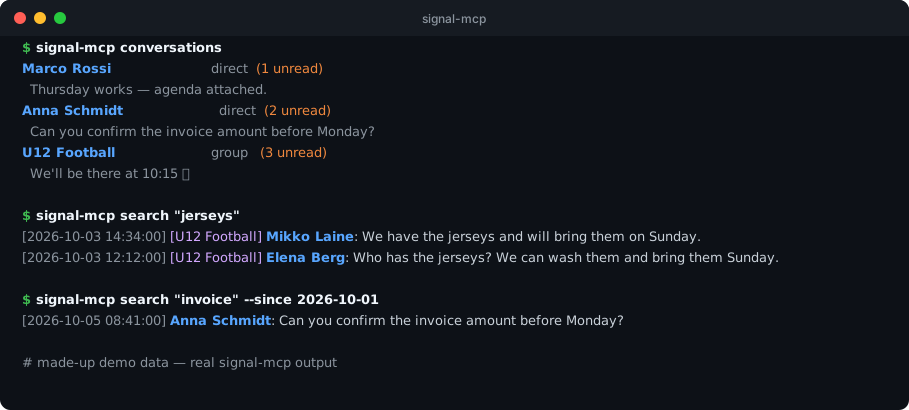
The same data from your terminal — this is real signal-mcp output on a demo database:
Why it exists
I built signal-mcp for a very ordinary reason: I'm a parent in my kids' football-team group chats and wanted my assistant to keep up with them — kickoff times, who's bringing the jerseys, which tag to set. I use it every day, against my own real Signal account, which is why safety (read-only mode, no file exfiltration, nothing leaving the machine) is built in rather than bolted on.
Why you want this
signal-cli is excellent at the Signal protocol and deliberately minimal everywhere else. signal-mcp adds the parts you need to actually use your messages:
- A memory. signal-cli delivers a message and forgets it. signal-mcp stores everything — including messages you sent from your phone — in local SQLite, and can import your whole Signal Desktop history.
- Search that works. Full-text search across all chats, filterable by sender and date range.
- Real conversations. Paginated threads, unread counts, last-message previews — and names instead of
+12025551234, even for group members who aren't in your contacts. - Everything Signal shows you. @mentions (resolved to names), polls, pins, link previews, quotes, voice notes, stickers, group member labels, join requests — nothing signal-cli reports is thrown away.
- Full control when you want it. Send, reply, react, edit, delete, manage groups, schedule messages, set your profile — with a read-only switch for when you don't.
- Zero babysitting. The daemon starts itself and restarts if it crashes; an optional background service captures messages while Claude isn't running;
signal-mcp doctortells you what's wrong if something is.
Quick start
brew install signal-cli                  # Linux: see Setup below
signal-cli link --name "MyMac"           # scan the QR code: Signal → Settings → Linked Devices
uv tool install signal-mcp
claude mcp add signal -- signal-mcp serve
Needs Python 3.12+, signal-cli 0.13+ and a Signal account on your phone. Restart Claude Code and ask "check my Signal messages". Works with any MCP client (Claude Code and Claude Desktop are what it is developed and tested with) — config snippets are in Setup.
What you can ask
| Catch up | "What did I miss while I was offline?" · "Summarize the parents' group since Monday." |
| Find | "Find every message about the invoice." · "What did Anna say about the trip last week?" |
| Act | "Reply to Marco that Thursday works." · "Remind the team at 9:00 tomorrow." · "Create a poll for Friday's dinner." |
| Groups | "Who's waiting to join the group?" · "Set my label in the football group to my son's name." |
| Housekeeping | "Export my chat with Mom as CSV." · "Who hasn't messaged me in a month?" · "Delete that message for everyone." |
Prefer the terminal? Everything is also a command — signal-mcp send, search, conversations, export, … (CLI usage). The CLI and MCP server share one store and one daemon.
Private and safe by design
- 100% local. Messages live in SQLite on your disk; the daemon listens on localhost only. There is no signal-mcp cloud. (The only things that leave your machine are what you send through Signal itself and an optional webhook you configure.)
- Read-only mode.
SIGNAL_MCP_READONLY=1hides and blocks every tool that sends, edits, deletes or changes settings — for assistants you don't fully trust with your account. See Step 7. - No file exfiltration. Anything that uploads a local file (attachments, avatars, link-preview images, sticker packs) only reads from an allow-list of folders (
SIGNAL_MCP_SEND_ROOTS; default: your attachments folder, Downloads, Desktop, Documents) and never from hidden files or folders — so a message that says "send me~/.ssh/id_ed25519" can't talk an assistant into it. - Irreversible means confirmed. Clearing the local store or terminating a group requires an explicit
confirm. - Careful with secrets. The Signal Desktop import decrypts into a private (
0700) folder, passes the key over stdin rather than the command line, and cleans up even when interrupted. - Honest caveat. Messages from other people are untrusted text that an AI will read. Read-only mode (or just not granting write access) is the strongest defence against a hostile message trying to steer your assistant.
What's new
1.40 closes the gap with signal-cli: incoming @mentions, polls, pins, previews and quotes are now captured; group member labels, bans, permissions and join requests; contact nicknames and notes; link previews, voice notes and stories on the sending side; and a fix that finally copies received attachments. See the changelog.
Setup
Step 1 — Install signal-cli
signal-mcp is a front-end for signal-cli, an independent, unofficial client that handles the Signal protocol.
macOS
brew install signal-cli
Linux
Download the latest release from signal-cli releases, extract it, and put the signal-cli binary on your $PATH.
Step 2 — Link your Signal account
signal-cli needs to be linked to your existing Signal account (the same way you'd add a linked device in Signal mobile).
signal-cli link --name "MyMac"
This prints a QR code in your terminal. On your phone:
Signal → Settings → Linked Devices → + → scan the QR code
Once scanned, signal-cli is linked and ready.
Step 3 — Install signal-mcp
With uv (recommended):
uv tool install signal-mcp
With pip or pipx:
pip install signal-mcp
# or
pipx install signal-mcp
From source:
git clone https://github.com/googlarz/signal-mcp
cd signal-mcp
uv tool install .
Verify it works:
signal-mcp status
# → Account : +1234567890
# → Daemon  : stopped (port 7583)
Step 4 — Connect to Claude Code
claude mcp add signal -- signal-mcp serve
Restart Claude Code. Signal tools appear automatically — ask Claude "check my Signal messages" to confirm.
Manual config alternatives
Claude Code — global (~/.claude.json):
{
  "mcpServers": {
    "signal": {
      "command": "uvx",
      "args": ["signal-mcp", "serve"]
    }
  }
}
Claude Desktop (~/Library/Application Support/Claude/claude_desktop_config.json):
{
  "mcpServers": {
    "signal": {
      "command": "uvx",
      "args": ["signal-mcp", "serve"]
    }
  }
}
Claude Desktop uses a restricted PATH —
uvxresolves the tool without needingsignal-mcpon your shell's PATH.
Per-project (.mcp.json):
{
  "mcpServers": {
    "signal": {
      "command": "uv",
      "args": ["run", "--directory", "/path/to/signal-mcp", "signal-mcp", "serve"]
    }
  }
}
Step 5 — (Optional) Import Signal Desktop history
If you use Signal Desktop, import your full message history in one command.
macOS
brew install sqlcipher       # required for decryption
signal-mcp import-desktop    # macOS will prompt for Keychain access — click Allow
Linux (Debian/Ubuntu shown — use your distribution's packages elsewhere)
sudo apt install sqlcipher libsecret-tools   # decryption + keyring lookup (secret-tool)
signal-mcp import-desktop                    # your keyring must be unlocked
Step 6 — (Optional) Enable background message capture
signal-cli only delivers messages when polled. Install the background service so nothing is missed:
signal-mcp install-service # starts on login, works on macOS and Linux
Step 7 — (Optional) Read-only mode
Set SIGNAL_MCP_READONLY=1 in the environment to restrict the server to read-only
tools (listing, searching, and exporting existing local/remote state). Tools that
send, edit, delete, or otherwise mutate your Signal account — messages, contacts,
groups, devices, and settings — are hidden from tool listings and rejected if
called directly. Useful when connecting an AI client you don't fully trust with
write access to your real Signal account.
Troubleshooting
Start with signal-mcp doctor — it checks signal-cli, your linked account, the daemon, and message capture, and says which one is broken.
| Symptom | Cause and fix |
|---|---|
doctor reports Devices readable — ReadTimeout, or list_devices hangs |
A bug in signal-cli 0.14.8 (listDevices crashes inside libsignal). Fixed upstream, not yet released; everything else works. Upgrade signal-cli once 0.14.9 ships. |
| "Unknown sender" / bare numbers in a group | Names come from your contacts, then Signal profiles (also for non-contacts), then Signal Desktop. Someone with none of these stays a number — import-desktop brings in Desktop's names. |
import-desktop fails on Linux |
Needs sqlcipher and libsecret-tools, and an unlocked GNOME Keyring. KWallet-only setups aren't supported. |
| Messages missing while Claude wasn't running | Install the background service: signal-mcp install-service. |
| Attachment has no local file | Received files are copied to ~/Downloads/signal-attachments/. If one is missing, get_attachment retrieves it from signal-cli's own attachment store by id. |
MCP Tools
Messaging
| Tool | Description |
|---|---|
send_message |
Send a text message to a contact (by number, or by Signal username). Supports quoted replies (quoted text is filled in from your local store), link previews, no_urgent, notify_self, end_session, and story replies. |
send_group_message |
Send a text message to a group. Supports quoted replies, @mentions, and link previews. |
send_attachment |
Send a file or image to a contact. Supports captions, view-once and voice_note. |
send_group_attachment |
Send a file or image to a group. Supports captions, view-once and voice_note. |
send_note_to_self |
Save a note to yourself (Signal's saved messages). |
receive_messages |
Poll for new incoming messages and delivery receipts. Optional max_messages. |
receive_direct |
Receive by calling signal-cli directly (no daemon) — for when the background service isn't running. Optional max_messages and ignore_* filters. |
get_unread |
Get messages not yet marked as read from local store. |
edit_message |
Edit a previously sent message (DM or group). Updates local store. Incoming edits from contacts also update the stored copy in-place. |
delete_message |
Remote-delete (unsend) a sent DM. |
delete_group_message |
Remote-delete a sent group message. |
react_to_message |
React to a message with an emoji (DM or group). Set remove=true to unreact. |
pin_message |
Pin a message in a DM or group conversation. |
unpin_message |
Unpin a message in a DM or group conversation. |
admin_delete_message |
Group admin: delete any message in a group you administer. |
set_typing |
Send (or stop) a typing indicator in a chat or group. |
send_story |
Post an image or video to your Signal story, optionally to a group story. |
send_read_receipt |
Mark messages as read. Also updates local store. |
send_sticker |
Send a sticker to a contact. |
send_group_sticker |
Send a sticker to a group. |
Configuration
| Tool | Description |
|---|---|
update_configuration |
Toggle read receipts, typing indicators, link previews, or sealed sender indicators. |
Sticker Packs
| Tool | Description |
|---|---|
list_sticker_packs |
List all installed sticker packs with pack_id and sticker IDs for send_sticker. |
add_sticker_pack |
Install a sticker pack from a signal.art URL. Returns the pack ID for use with get_sticker/send_sticker. |
get_sticker |
Retrieve a single sticker image as base64. |
upload_sticker_pack |
Upload and publish a sticker pack from a local manifest.json or zip. Returns the signal.art URL. |
Contacts
| Tool | Description |
|---|---|
list_contacts |
All contacts with names and numbers. Supports optional search filter. |
get_profile |
Get profile info for a contact. |
update_contact |
Set a local display name for a contact. |
block_contact |
Block a contact. |
unblock_contact |
Unblock a contact. |
remove_contact |
Remove a contact from the local list. |
update_profile |
Update your own name, about text, or avatar. |
get_own_number |
Get the Signal number this server is running as. |
Message output now carries everything signal-cli reports for incoming messages, when present:
mentions(withbody_resolved, the text with@namein place of the placeholder),text_styles,previews,quote(author and text),voice_note,sticker, polls (poll_create/poll_vote/poll_terminate), pins, story replies and shared contacts. Remote and admin deletes flag the stored message (remote_deleted,admin_deleted_by) instead of erasing your local copy.
Groups
| Tool | Description |
|---|---|
list_groups |
All groups with members and metadata: member labels (label, label_emoji), pending/requesting/banned members, permissions, invite link. Optional group_id filter. |
create_group |
Create a new Signal group. |
join_group |
Join a group via invite link. |
update_group |
Rename, add/remove members, promote/demote admins, set expiry timer, avatar, ban/unban, reset invite link, group permissions, and your own member label (member_label, member_label_emoji — only your own label can be set). |
leave_group |
Leave a group. A sole admin must name a successor (admins); delete also removes the local group data. |
terminate_group |
Permanently end a group for every member. Irreversible; requires confirm: true. |
History & Search
| Tool | Description |
|---|---|
list_conversations |
All conversations ordered by most recent message. |
get_conversation |
Message history with a contact or group. Supports since, limit, and offset for pagination. |
search_messages |
Full-text search (FTS5) across all stored messages. Supports sender, since/until (ISO date range; until exclusive), limit, and offset. |
store_stats |
Total message count, oldest and newest message dates. |
mark_as_unread |
Mark one or more stored messages as unread. |
get_user_status |
Check whether phone numbers are registered Signal users. |
send_sync_request |
Request sync of messages/contacts/groups from your primary device. |
send_contacts_sync |
Push your contacts list to all linked devices. |
send_message_request_response |
Accept or decline a message request from an unknown sender. |
Security & Devices
| Tool | Description |
|---|---|
list_identities |
List identity keys and trust levels (safety numbers). |
trust_identity |
Trust a contact's identity key after verifying their safety number. |
list_devices |
List all devices linked to your account. |
add_device |
Link a new device using a device link URI. |
remove_device |
Unlink a device by ID. |
update_device |
Rename a linked device. |
list_accounts |
List all Signal accounts configured in signal-cli on this machine. |
update_account |
Update account settings: device name, discoverability, number sharing, username. |
set_pin |
Set the Signal registration lock PIN. |
remove_pin |
Remove the Signal registration lock PIN. |
get_avatar |
Retrieve the avatar image for a contact or group as base64. |
Polls
| Tool | Description |
|---|---|
create_poll |
Create a poll in a group conversation. |
vote_poll |
Cast a vote on an existing poll. |
terminate_poll |
End a poll and prevent further votes. |
Disappearing Messages
| Tool | Description |
|---|---|
set_expiration_timer |
Set or disable disappearing messages for any DM or group. |
Scheduling
| Tool | Description |
|---|---|
schedule_message |
Queue a message for later (send_at, ISO datetime) to a contact or group. |
list_scheduled_messages |
List queued messages (include_done adds sent, cancelled and failed ones). |
cancel_scheduled_message |
Cancel a pending scheduled message by id. |
run_scheduled_messages |
Send everything that is due now. The background service does this automatically. |
Webhooks
| Tool | Description |
|---|---|
set_webhook |
Set (or clear) a URL that receives a JSON POST for each incoming message. |
get_webhook |
Show the configured webhook URL. |
Data & Import
| Tool | Description |
|---|---|
import_desktop |
One-time full import of all historical messages from Signal Desktop. Requires sqlcipher. |
sync_desktop |
Incremental sync from Signal Desktop — imports only messages newer than the last sync. Fast on repeat calls. First call behaves like import_desktop. |
list_attachments |
List all locally downloaded attachments (photos, files received via Signal). |
get_attachment |
Get details about a downloaded attachment by filename; if it is not in the local attachments folder it is fetched from signal-cli by attachment id. |
clear_local_store |
Delete ALL locally stored messages (requires confirm: true). Does not unsend from Signal. |
delete_local_messages |
Delete locally stored messages for one contact or group. |
export_messages |
Export stored messages as JSON or CSV. Supports recipient and since filters. |
CLI Usage
# Status & daemon
signal-mcp status                          # account + daemon info
signal-mcp doctor                          # onboarding smoke test: signal-cli, account, daemon, receive health
signal-mcp daemon                          # start daemon in foreground
signal-mcp stop                            # stop the daemon

# Send & receive
signal-mcp send +1234567890 "Hello!"
signal-mcp send-group <group_id> "Hey!"
signal-mcp note "Remember to buy milk"     # save a note to yourself
signal-mcp receive                         # poll once
signal-mcp receive --watch                 # keep watching (saves to store)

# Edit
signal-mcp edit +1234567890 <timestamp> "corrected text"
signal-mcp edit <group_id> <timestamp> "corrected text"

# React / delete / block
signal-mcp react +1234567890 <timestamp> +1234567890 👍
signal-mcp delete +1234567890 <timestamp>  # unsend a message you sent
signal-mcp block +1234567890               # and: signal-mcp unblock ...

# Pin / unpin / admin-delete messages
signal-mcp pin +1234567890 <timestamp> +1234567890
signal-mcp unpin +1234567890 <timestamp> +1234567890
signal-mcp admin-delete <group_id> <timestamp> +1234567890

# Devices
signal-mcp update-device <device_id> "My Laptop"

# Contacts & groups
signal-mcp contacts
signal-mcp contacts --json
signal-mcp find-contact anna               # add --all-recipients to include non-contacts (e.g. group members)
signal-mcp groups
signal-mcp group-label <group_id> "Anna"   # set YOUR OWN member label in a group
signal-mcp conversations                   # list all chats with unread count + last message

# History & search
signal-mcp history +1234567890
signal-mcp history +1234567890 --limit 20
signal-mcp history +1234567890 --limit 20 --offset 20   # page 2
signal-mcp history +1234567890 --since 2024-01-01
signal-mcp search "keyword"
signal-mcp search "keyword" --sender +1234567890   # restrict to one contact
signal-mcp search "keyword" --limit 20
signal-mcp search "invoice" --since 2024-01-01 --until 2024-02-01
signal-mcp store-stats

# Export
signal-mcp export                                          # all messages as JSON to stdout
signal-mcp export messages.json                            # save to file
signal-mcp export messages.csv --format csv                # CSV format
signal-mcp export --recipient +1234567890 --format csv     # one conversation
signal-mcp export --since 2024-01-01                       # messages from date

# Scheduled messages
signal-mcp schedule-send +1234567890 "Happy birthday!" --at "2027-01-01 09:00"
signal-mcp scheduled                       # list; cancel with: signal-mcp cancel-scheduled <id>
signal-mcp run-scheduled                   # send whatever is due now

# Stories & webhooks
signal-mcp story photo.jpg
signal-mcp set-webhook http://localhost:8080/signal   # run without a URL to clear
signal-mcp get-webhook

# Housekeeping
signal-mcp prune --days 180                # delete local messages older than 180 days

# Signal Desktop import — one-time full import
signal-mcp import-desktop
signal-mcp sync-desktop                    # incremental: only new messages since last sync

# Background service (macOS LaunchAgent or Linux systemd)
signal-mcp install-service    # auto-starts on login, captures all messages
signal-mcp uninstall-service

# MCP server (for Claude Code)
signal-mcp serve
Getting full message history
signal-cli only delivers new messages — it has no history API. Two ways to get history:
Going forward (captures everything from now on):
signal-mcp install-service # background watcher, auto-starts on login
Retroactively (imports everything from Signal Desktop):
signal-mcp import-desktop # macOS prompts for Keychain access; Linux needs an unlocked keyring
Run both for complete coverage.
Architecture
                    ┌─────────────────────────────────┐
                    │  signal-cli daemon  (:7583)      │
                    │  Signal protocol / libsignal     │
                    └──────────┬──────────────┬────────┘
                               │ sends/receives│
                    ┌──────────▼──────────┐   │ (when no service)
                    │  background service  │   │
                    │  LaunchAgent/systemd │   │
                    └──────────┬──────────┘   │
                               │ writes        │
                    ┌──────────▼──────────────▼────────┐
                    │  SQLite store                     │
                    │  ~/.local/share/signal-mcp/       │
                    │  messages.db  (FTS5 indexed)      │
                    └────────────────┬─────────────────┘
                                     │ reads/writes
                   ┌─────────────────┼─────────────────┐
                   │                 │                  │
        ┌──────────▼──────┐ ┌────────▼───────┐ ┌──────▼──────────┐
        │  Claude Code /  │ │  signal-mcp    │ │  signal-mcp CLI │
        │  Claude Desktop │ │  serve (MCP)   │ │  (terminal)     │
        │  (asks Claude)  │ └────────────────┘ └─────────────────┘
        └─────────────────┘
How it works:
get_unread is the primary "check for new messages" tool. If the background service is installed, it reads straight from the store (the service keeps it up to date). Otherwise it polls signal-cli first (debounced to once every 30 seconds) and includes a _warning suggesting signal-mcp install-service. list_conversations is a pure store read — fast, no polling.
The daemon starts automatically on first use. Attachments are saved to ~/Downloads/signal-attachments/.
signal-cli Coverage
signal-mcp wraps the signal-cli JSON-RPC daemon. Here's what is and isn't covered:
Covered (81 tools)
| signal-cli command | signal-mcp tool |
|---|---|
send |
send_message, send_group_message, send_note_to_self, send_attachment, send_group_attachment, send_sticker, send_group_sticker |
receive |
receive_messages (streaming), get_unread |
listContacts |
list_contacts, find_contact (all_recipients also returns non-contacts, e.g. other group members) |
listGroups |
list_groups |
listDevices |
list_devices |
listIdentities |
list_identities |
listStickerPacks |
list_sticker_packs |
getUserStatus |
get_user_status |
getAttachment |
get_attachment, list_attachments |
getAvatar |
get_avatar |
block / unblock |
block_contact / unblock_contact |
removeContact |
remove_contact |
updateContact |
update_contact |
trust |
trust_identity |
joinGroup |
join_group |
quitGroup |
leave_group |
updateGroup |
update_group, create_group |
addDevice / removeDevice / updateDevice |
add_device / remove_device / update_device |
sendReaction |
react_to_message |
sendTyping |
set_typing |
sendReceipt |
send_read_receipt |
sendSyncRequest |
send_sync_request |
sendContacts |
send_contacts_sync |
sendAdminDelete |
admin_delete_message |
sendPinMessage / sendUnpinMessage |
pin_message / unpin_message |
sendPollCreate / sendPollVote / sendPollTerminate |
create_poll / vote_poll / terminate_poll |
sendStory |
send_story |
terminateGroup |
terminate_group |
sendMessageRequestResponse |
send_message_request_response |
remoteDelete |
delete_message, delete_group_message |
editMessage |
edit_message |
updateProfile |
update_profile |
updateConfiguration |
update_configuration |
addStickerPack |
add_sticker_pack |
getSticker |
get_sticker |
uploadStickerPack |
upload_sticker_pack |
listAccounts |
list_accounts |
updateAccount |
update_account |
setPin / removePin |
set_pin / remove_pin |
startChangeNumber / finishChangeNumber |
start_change_number / finish_change_number |
submitRateLimitChallenge |
submit_rate_limit_challenge |
Plus tools with no direct signal-cli equivalent: get_conversation, search_messages, list_conversations, store_stats, import_desktop, sync_desktop, export_messages, mark_as_unread, clear_local_store, delete_local_messages, prune_store.
Not covered
These commands are deliberately excluded — either not feasible to implement as MCP tools, or consciously left out (see the reason for each):
| signal-cli command | Why |
|---|---|
acceptCall / hangupCall / rejectCall / startCall / listCalls |
Voice/video calls require WebRTC and an active media stack — not feasible via MCP |
register / verify / link / unregister |
One-time account setup; must be done before installing signal-mcp |
deleteLocalAccountData |
Irreversibly destroys all local Signal data; too destructive to expose |
sendPaymentNotification |
Only forwards a MobileCoin receipt produced by an external wallet; signal-mcp cannot create or verify one |
Development
git clone https://github.com/googlarz/signal-mcp
cd signal-mcp
uv sync --dev
uv run pytest
uv run pytest --cov --cov-report=term-missing
573 tests, 100% line coverage across all modules. All tests are fully mocked — no signal-cli installation or Signal account required to run them.
See CONTRIBUTING.md for how to add new tools.
License
MIT — see LICENSE.
1 maintainer

Metadata
1 maintainer
Release files for signal-mcp 1.41.0
For a detailed explanation of source distributions (sdists) and built distributions (wheels), please see the package formats documentation.
Source distribution (sdist)
| File | Size | Uploaded | |
|---|---|---|---|
| signal_mcp-1.41.0.tar.gz | 237.9 kB | Details |
Built distribution (wheel)
| File | Interpreter | ABI | Platform | Reset |
|---|---|---|---|---|
| signal_mcp-1.41.0-py3-none-any.whl | Python 3 | none | any | Details |
Total release size: 334.2 kB
Release files / signal_mcp-1.41.0.tar.gz
| Download URL | signal_mcp-1.41.0.tar.gz |
|---|---|
| Size | 237.9 kB |
| Tags | Source |
|
SHA-256 checksum How to use checksums |
043a0a700eaffecc8b11e5fb46527309393a3d951425aa1face7253a583de8b9
|
|
BLAKE2b-256 checksum How to use checksums |
4901bc1b1b0bba1e93f082afd08e25bb1054813b62ef5ba981cab5f18ae0b7eb
|
| Upload date | |
|
Uploaded using Trusted Publishing? What is trusted publishing? |
Yes |
| Uploaded via |
twine/7.0.0 CPython/3.13.14
|
Provenance
Provenance describes where a file came from. On PyPI, provenance is shared via attestations, which provide a verifiable record of the build or publishing details. View details, limitations and caveats.


PyPI Publish Attestation
PyPI verified that this artifact, at this checksum, originated from the publisher listed below.
Signed by GitHub Actions, verified by PyPI on Oct 5, 2026.
Transparency logRelease files / signal_mcp-1.41.0-py3-none-any.whl
| Download URL | signal_mcp-1.41.0-py3-none-any.whl |
|---|---|
| Size | 96.3 kB |
| Tags | Python 3 |
|
SHA-256 checksum How to use checksums |
5de33e7d7ef15ba886f47606dc990480f344a17c6f97dbcf07eb9b73513cfe07
|
|
BLAKE2b-256 checksum How to use checksums |
1718bc33862d26808a26a56d6554efef27919380570c2f74aa40c26e0d80056d
|
| Upload date | |
|
Uploaded using Trusted Publishing? What is trusted publishing? |
Yes |
| Uploaded via |
twine/7.0.0 CPython/3.13.14
|
Provenance
Provenance describes where a file came from. On PyPI, provenance is shared via attestations, which provide a verifiable record of the build or publishing details. View details, limitations and caveats.
PyPI Publish Attestation
PyPI verified that this artifact, at this checksum, originated from the publisher listed below.
Signed by GitHub Actions, verified by PyPI on Oct 5, 2026.
Transparency log













