
Signal Viewer
Signal Viewer – offline flight log & test data analysis
CSV · Parquet · MATLAB .mat · ArduPilot .bin · MAVLink .tlog · PX4 .ulg · ROS 2 .mcap · HDF5 · CAN + .dbc








⬇ Download for Windows
· pip install signalviewer
· Documentation
· מדריך בעברית
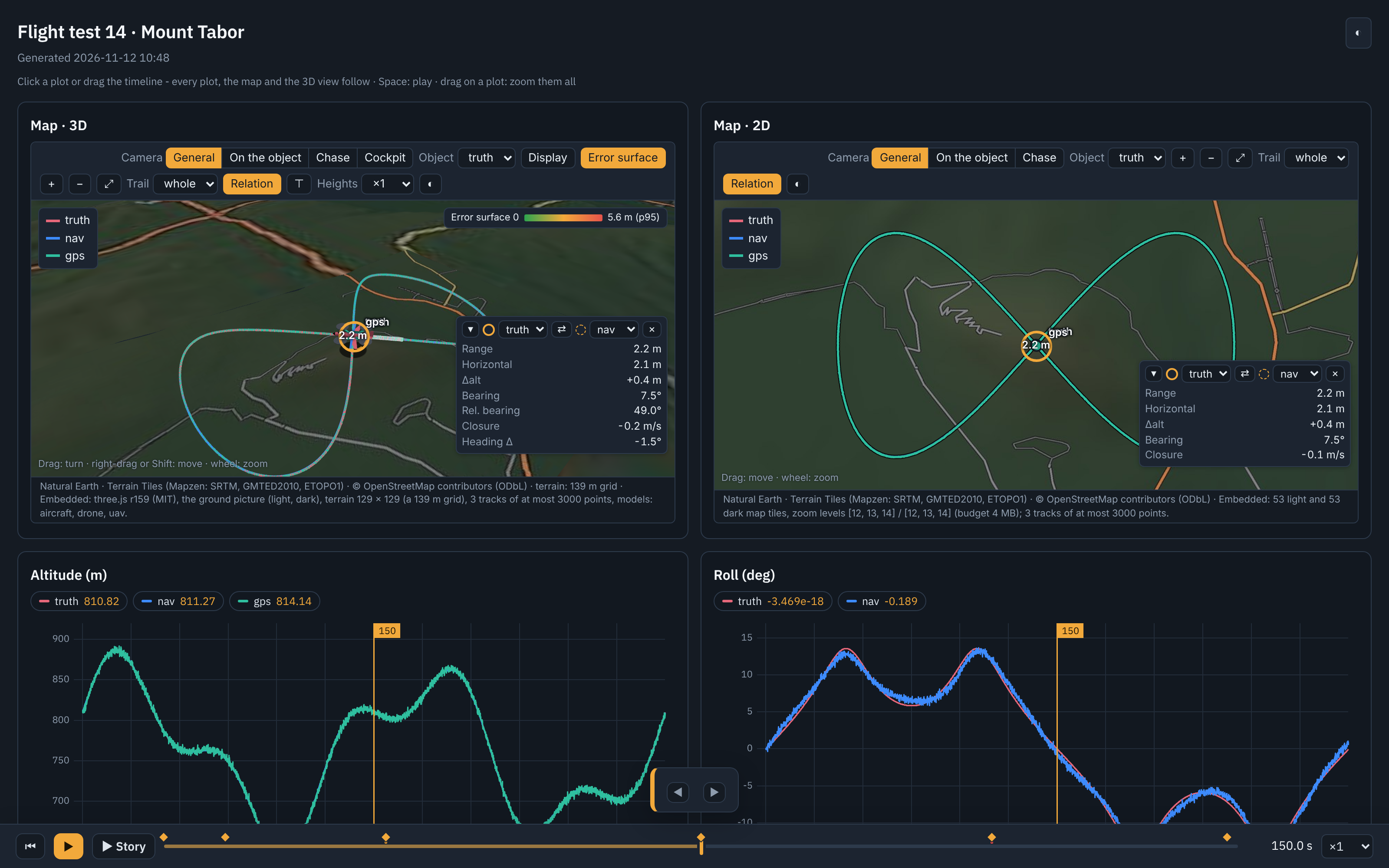
Open a flight log or a test run, see what went wrong, judge it against a golden run – and send the answer as one live page. All offline.
Why engineers use it
- Opens anything, fast. A 1.2 GB ArduPilot log in seconds, every sample at full resolution – CSV, MATLAB,
.bin,.tlog,.ulg, ROS 2, HDF5, Parquet, CAN +.dbc, or your own format in a few lines of Python. - Points at the problem. An ArduPilot log gets a health check as it opens – vibration, GPS, battery, EKF, motors – and each finding takes you to its moment.
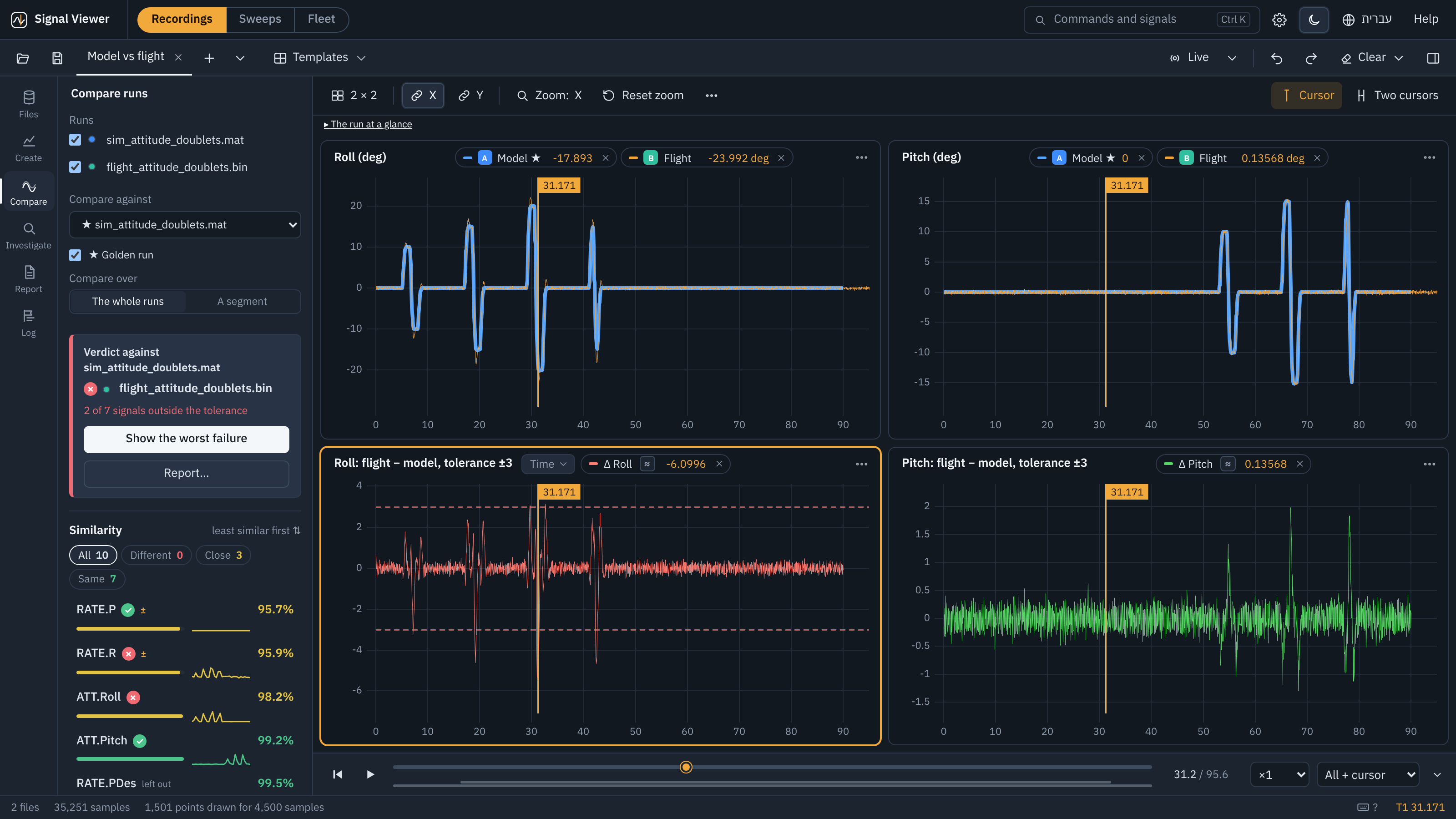
- Pass or fail, not "looks about right". A golden run with a tolerance per signal judges the next recording – and gives CI the same answer.
- Every object on the map and in 3D. Truth, each navigation solution, each GPS, each EKF lane – found by name, added in one click, compared in position, velocity and attitude.
- Send the answer, not a screenshot. One HTML file: plots, map and 3D on one time bar, with Play. Opens in any browser – no install, no network.
- Nothing leaves the PC. No account, no telemetry; maps and terrain built in. English and Hebrew.
New in 1.26 – the report is alive
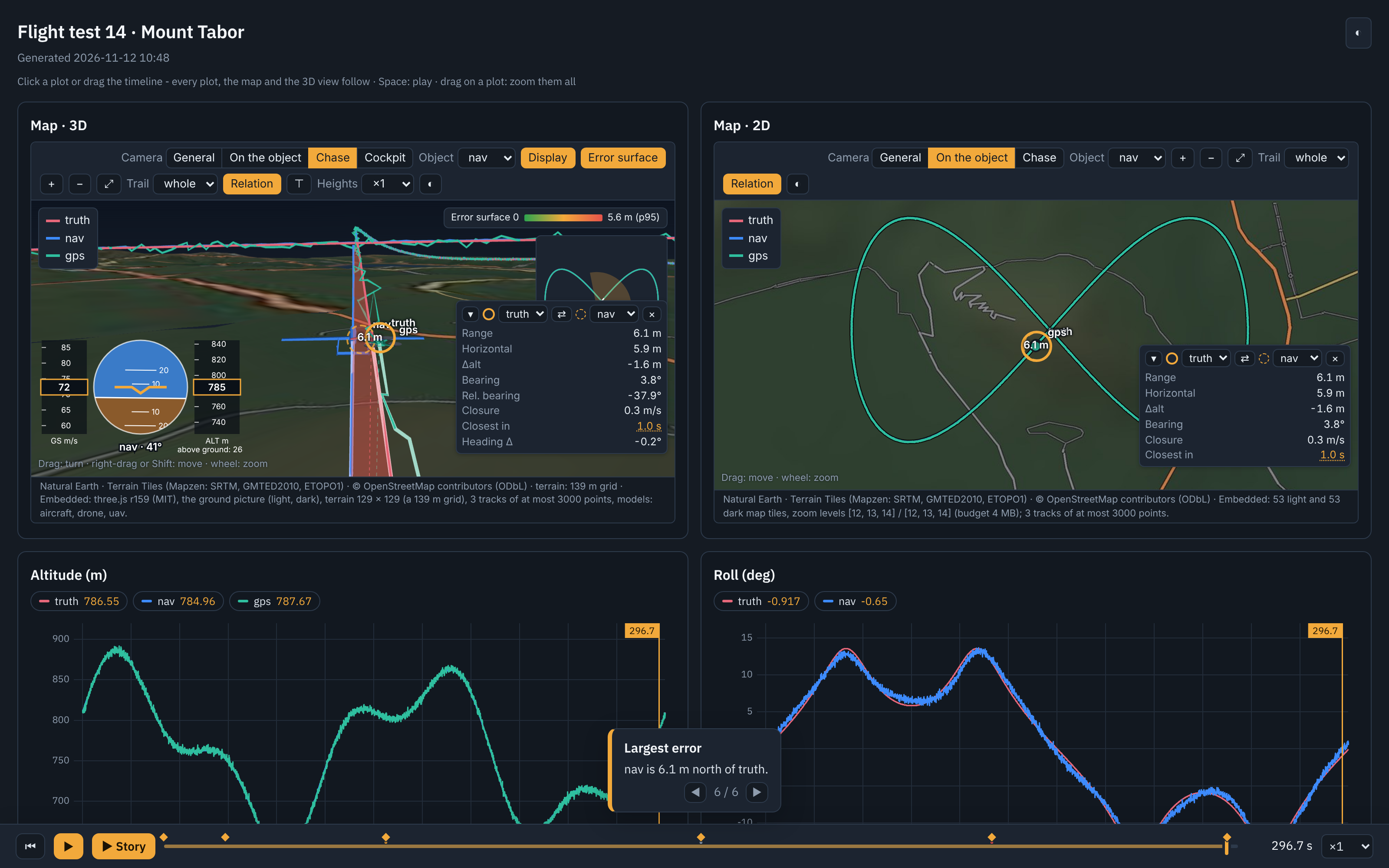
- One live page. An HTML report's time bar moves every plot and the Map together – Play, ×0.5 – ×30, and the log's errors, warnings and your notes as marks to jump to.
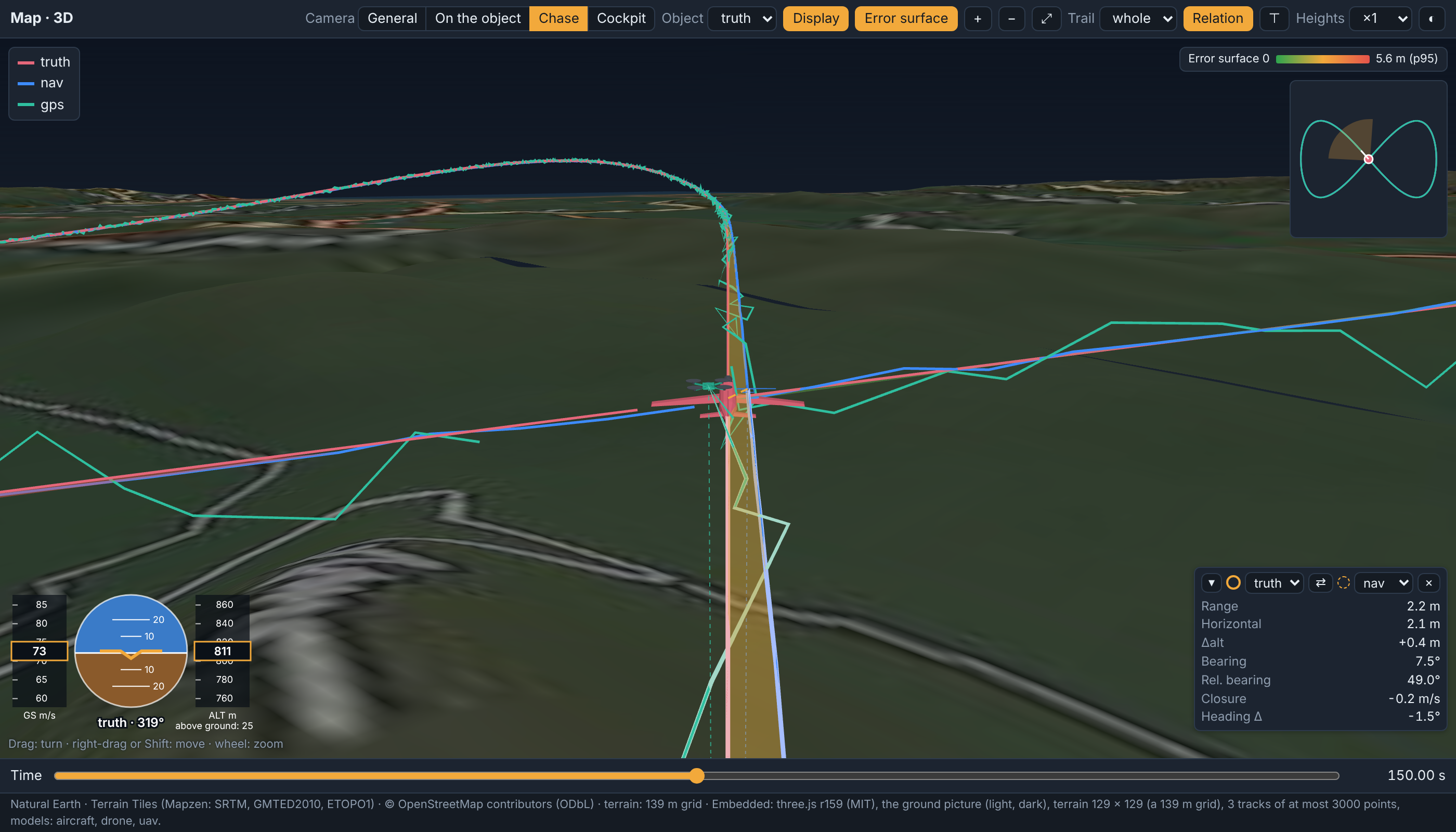
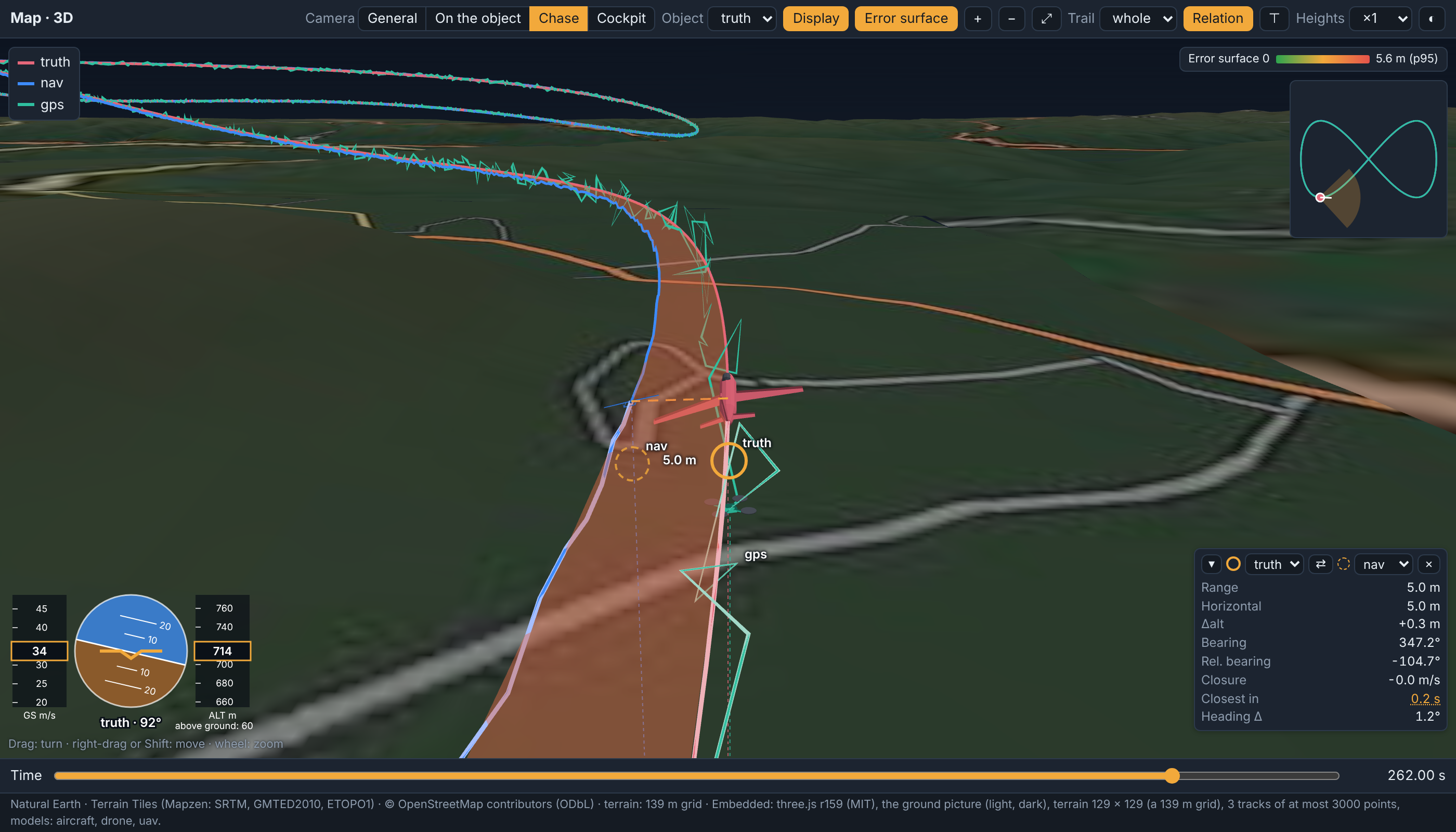
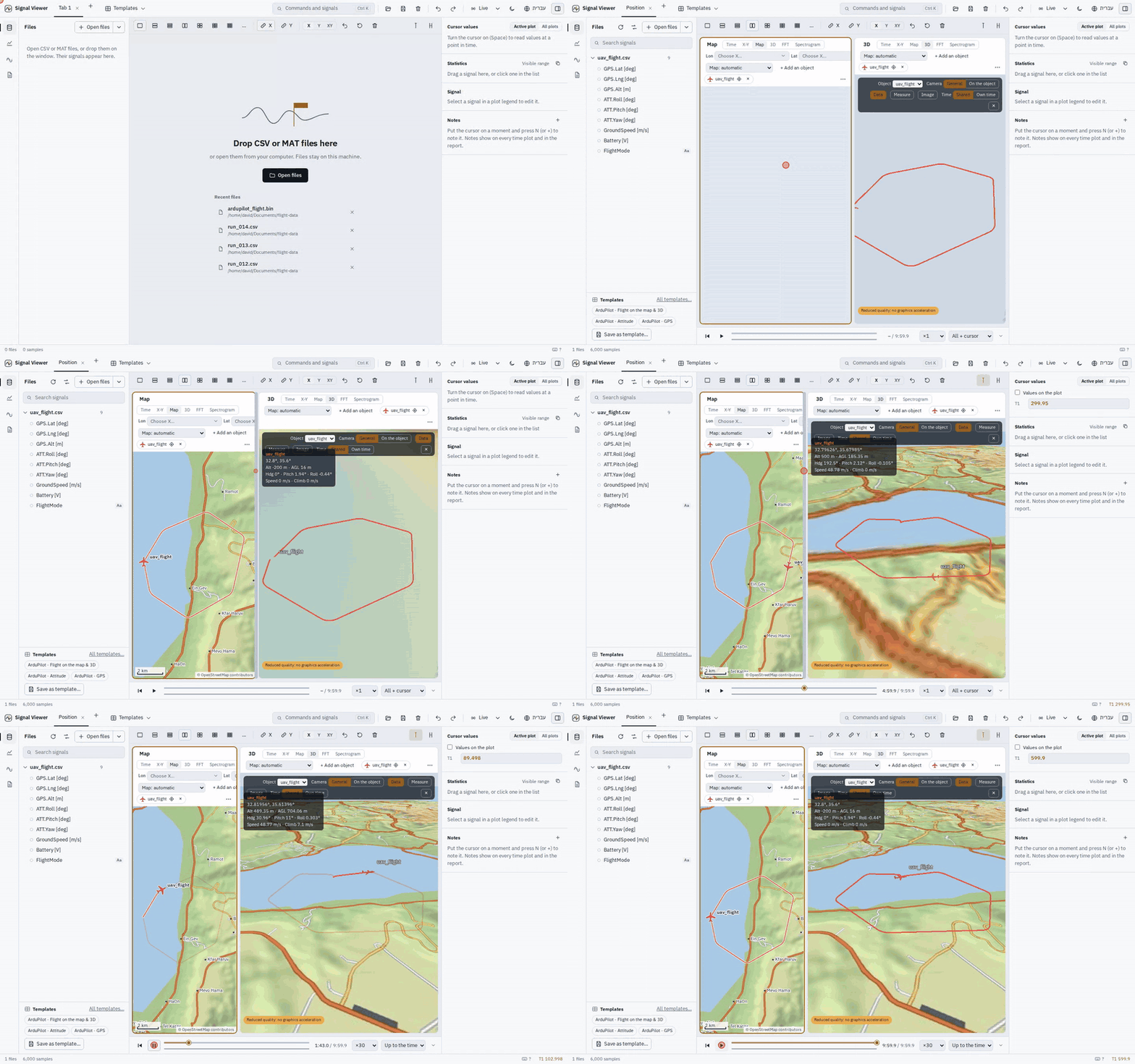
- 3D in the report. Turn, zoom and follow any object over the real terrain, with its model's heading, pitch and roll. PDF and Word get the same view as a picture.
- One Map, in 3D. The earth with its terrain; From above is the old 2D view. 3D (XYZ) is the plot for any three signals.
- A Map worth stopping for. The sun where it was, drop lines, a cockpit camera, a flight display, and the error between truth and the navigation solution drawn as a coloured surface.
- Story mode. ▶ Story plays the flight as a short guided film – the camera flies to each moment that matters, and a card says what happened.

Get started
- Windows: the installer or the portable
.zipfrom the latest release – no administrator rights. Linux / macOS: the-portable.7z. - Python 3.9+:
pip install signalviewer, thensignalviewer.
Six examples open in one click from the welcome screen.
In CI and in your scripts
signalviewer-cli check   runs/*.csv --checks checks.json --junit results.xml      # limits: exit 1 when one breaks
signalviewer-cli compare-objects flight.bin --ref POS --tolerance position=2m     # every EKF lane against POS
signalviewer-cli map     flight.bin --3d --out flight.html                        # the flight in 3D, one offline page
import signalviewer as sv
rec = sv.load("flight.bin")
sv.scene_html(rec, path="flight-3d.html")      # the live 3D page
Command line and Python · Scripting API · Everything it does · CHANGELOG
Where it fits
| You mostly… | Also used | What Signal Viewer adds |
|---|---|---|
| stream ROS topics live | PlotJuggler, Foxglove | recorded runs compared, pass / fail, live reports |
| work in MATLAB / Simulink | Simulation Data Inspector | no licence; flight logs and CAN next to the .mat |
| review one flight online | UAV Log Viewer, PX4 Flight Review | offline, many flights side by side, your limits in CI |
בעברית בקצרה
Signal Viewer – פותחים לוג טיסה או ריצת ניסוי, רואים מה השתבש, בודקים מול ריצת ייחוס, ושולחים את התשובה כדף חי אחד. הכול בלי אינטרנט.
- חדש ב־1.26: דוח HTML הוא דף חי – סרגל זמן אחד מזיז את כל הגרפים, את המפה ואת התלת־ממד יחד, עם ניגון. התלת־ממד בתוך הדוח: סיבוב, זום ומעקב אחרי אובייקט מעל פני השטח. ב־PDF וב־Word – תמונה.
- מפה אחת, דו־ממד או תלת־ממד – מתג אחד. תלת־ממד (XYZ) הוא הגרף לכל שלושה סיגנלים.
- פותח הכול, מהר: ArduPilot, PX4, MAVLink, MATLAB, CSV, ROS 2, CAN. בדיקת תקינות ללוג, עבר / נכשל מול ריצת ייחוס, ו־CI עם אותה תשובה.
התקנה: מ־השחרור האחרון, או pip install signalviewer. מדריך: docs/GUIDE.he.md.
License
MIT – free to use, change and ship, also commercially. Third-party parts keep their own licences: uPlot (MIT), three.js (MIT), the report fonts (SIL OFL), CesiumJS (Apache-2.0), map data from OpenStreetMap (ODbL), Natural Earth and the AWS Terrain Tiles (details).
1 maintainer

Metadata
1 maintainer
Release files for signalviewer 1.26.0
For a detailed explanation of source distributions (sdists) and built distributions (wheels), please see the package formats documentation.
Source distribution (sdist)
| File | Size | Uploaded | Provenance | Actions |
|---|---|---|---|---|
| signalviewer-1.26.0.tar.gz | 26.9 MB | With provenance | Details for signalviewer-1.26.0.tar.gz |
Built distribution (wheel)
| File | Interpreter | ABI | Platform | Actions Reset |
|---|---|---|---|---|
| signalviewer-1.26.0-py3-none-any.whl | Python 3 | none | any | Details for signalviewer-1.26.0-py3-none-any.whl |
Total release size: 54.1 MB
Release files / signalviewer-1.26.0.tar.gz
| Download URL | signalviewer-1.26.0.tar.gz |
|---|---|
| Size | 26.9 MB |
| Tags | Source |
|
SHA-256 checksum How to use checksums |
bed831909389bfae228984cc48be09f28305900b99d49bfe0eea0cc355bc6bbb
|
|
BLAKE2b-256 checksum How to use checksums |
878b645919ff57261a997877f922ed89f1ace3ddbd44501b9f2e8c257a931c92
|
| Upload date | |
|
Uploaded using Trusted Publishing? What is trusted publishing? |
Yes |
| Uploaded via |
twine/7.0.0 CPython/3.13.16
|
Provenance
Provenance describes where a file came from. On PyPI, provenance is shared via attestations, which provide a verifiable record of the build or publishing details. View details, limitations and caveats.


PyPI Publish Attestation
PyPI verified that this artifact, at this checksum, originated from the publisher listed below.
Signed by GitHub Actions, verified by PyPI on Nov 12, 2026.
Transparency logRelease files / signalviewer-1.26.0-py3-none-any.whl
| Download URL | signalviewer-1.26.0-py3-none-any.whl |
|---|---|
| Size | 27.2 MB |
| Tags | Python 3 |
|
SHA-256 checksum How to use checksums |
e9c4f6d31649b9ad4f14e25299fffe3648d22193da6b2006f3e2dfa663ec7399
|
|
BLAKE2b-256 checksum How to use checksums |
77b2ffe39ced05b7730fea4a313c8802b32cd73214944d8897a6c223f02f06ea
|
| Upload date | |
|
Uploaded using Trusted Publishing? What is trusted publishing? |
Yes |
| Uploaded via |
twine/7.0.0 CPython/3.13.16
|
Provenance
Provenance describes where a file came from. On PyPI, provenance is shared via attestations, which provide a verifiable record of the build or publishing details. View details, limitations and caveats.
PyPI Publish Attestation
PyPI verified that this artifact, at this checksum, originated from the publisher listed below.
Signed by GitHub Actions, verified by PyPI on Nov 12, 2026.
Transparency logSecurity for signalviewer 1.26.0
Provenance
Provenance describes where a file came from. On PyPI, provenance is shared via attestations, which provide a verifiable record of the build or publishing details. View details, limitations and caveats.
Full provenance
Both files in this release have been uploaded with provenance metadata.
Attestation for signalviewer-1.26.0.tar.gz
PyPI Publish Attestation
PyPI verified that this artifact, at this checksum, originated from the publisher listed below.
Signed by GitHub Actions, verified by PyPI on Nov 12, 2026.
Transparency logA note on package security
PyPI is a repository for distributing packages, not a service for auditing them. While third-party security researchers and our staff do their best to detect and remove malicious packages, PyPI cannot guarantee the quality, security or suitability of any given package.
To learn more about protecting yourself from malicious actors, visit our package security documentation.














