


SigProfilerPlotting
SigProfilerPlotting provides a standard tool for displaying all types of mutational signatures as well as all types of mutational patterns in cancer genomes. The tool seamlessly integrates with other SigProfiler tools.
INTRODUCTION
The purpose of this document is to provide a guide for using the SigProfilerPlotting framework and associated functions/tools to visualize the output from SigProfilerExtraction and SigProfilerSimulator. The primary documentation is available at https://sigprofilersuite.github.io/SigProfilerPlotting/.
For users that prefer working in an R environment, a wrapper package is provided and can be found and installed from: https://github.com/SigProfilerSuite/SigProfilerPlottingR

PREREQUISITES
The framework is written in PYTHON, however, it also requires the following software with the given versions (or newer):
- PYTHON version 3.9 or newer
- SigProfilerMatrixGenerator (recommended)
QUICK START GUIDE
This section will guide you through the minimum steps required to plot mutational matrices:
- Install the python package using pip:
pip install SigProfilerPlotting
- Plot mutational matrices from a Python session or using the Command Line Interface (CLI) as follows:
Using the Python session, the command is as follows:
$ python3
>> import sigProfilerPlotting as sigPlt
>> sigPlt.plotSBS(matrix_path, output_path, project, plot_type, percentage=None)
The required parameters are:
sigPlt.plotSBS(matrix_path, output_path, project, plot_type)
Using the CLI, the command is as follows:
SigProfilerPlotting plotSBS <matrix_path> <output_path> <project> <plot_type>
- The final plots are saved into the user-provided output folder.
Single Base Substitution, Double Base Substitution, and Indel Plotting
AVAILABLE FUNCTIONS
import sigProfilerPlotting as sigPlt

sigPlt.plotSBS(matrix_path, output_path, project, plot_type, percentage=None)
sigPlt.plotDBS(matrix_path, output_path, project, plot_type, percentage=False)
sigPlt.plotID(matrix_path, output_path, project, plot_type, percentage=False)
Supported plots
| Mutation class | Function | Supported contexts |
|---|---|---|
| Single-base substitutions | plotSBS() |
SBS6, SBS24, SBS96, SBS192/384, SBS288, SBS1536, SBS4608 |
| Double-base substitutions | plotDBS() |
DBS78 and DBS186/312 |
| Small insertions/deletions | plotID() |
ID28, ID83, ID89, ID476, ID415 |
| Copy-number alterations | plotCNV() |
CNV48 |
| Structural variants | plotSV() |
SV32 |
| Combined sample summary | samplePortrait() |
SBS, DBS, and ID matrices for one project |
The local interactive dashboard recognizes the complete matrix definitions
shipped in sigProfilerPlotting/reference_formats. It has dedicated layouts
for SBS96, SBS288, SBS1536, SBS4608, DBS78, ID83, ID89, ID476, CNV48, and
SV32, and a generic interactive layout for the remaining recognized
contexts. See Interactive Dashboard.
SBS4608 plotting
Strand-tagged pentanucleotide matrices can be rendered as a self-contained
interactive HTML report or as a multi-page static PDF via plotSBS(..., "4608", ...). The input must contain all 4,608 MutationType rows (T,
U, and N strands) for each selected sample or signature, for example
T:AA[C>A]AA.
When percentage is omitted, SBS4608 defaults to percentages because its
input is a signature/profile matrix. Other SBS contexts retain their existing
numerical default. Pass percentage=False for SBS4608 raw signature
contributions (these are not labeled as mutation counts).
import sigProfilerPlotting as sigPlt

sigPlt.plotInteractive(
    "example.SBS4608.all",
    "example",
    output_path="plots",
)
sigPlt.plotSBS(
    "example.SBS4608.all", "plots", "example", "4608",
)
plotInteractive() embeds Plotly in the HTML file, so the report works
offline. The static plotSBS(..., "4608", ...) path renders each page as a
validated high-resolution raster before assembling the PDF, avoiding
renderer-dependent clipping. It uses Kaleido and requires a local Chrome or
Chromium installation; run plotly_get_chrome if Kaleido cannot find one.
There is no separate plotStatic() API. See
Plotting SBS4608 for the full parameter list
(including percentage, signatures, and the
custom_text_upper/middle/bottom annotations).
ID89 and ID476 (Koh et al.) indel plotting
plotID() and the interactive dashboard also support the Koh et al. ID89
(89-category) and ID476 (476-category) indel classification schemes,
alongside the existing ID83 scheme:
sigPlt.plotID(matrix_path, output_path, project, "89", percentage=False) # or "476"
See Plotting ID89/ID476 for the input format, supported output formats, and attribution.
Copy Number and Structural Variant Plotting
import sigProfilerPlotting as sigPlt

matrix_path = "./sigProfilerPlotting/examples/input/breast_cancer_samples_example.CNV48.all" #Output of CNVMatrixGenerator
output_path = "./sigProfilerPlotting/examples/output/"
project = "Breast"
AVAILABLE FUNCTIONS
Multi-page pdf of CNV or SV signatures
sigPlt.plotCNV(matrix_path, output_path, project, percentage=True, aggregate=False) #plotting of CNV signatures
sigPlt.plotSV(matrix_path, output_path, project, percentage=True, aggregate=False) #plotting of SV signatures
Multi-page pdf of CNV or SV counts
sigPlt.plotCNV(matrix_path, output_path, project, percentage=False, aggregate=False) #plotting of CNV counts
sigPlt.plotSV(matrix_path, output_path, project,percentage=False, aggregate=False) #plotting of SV counts
Single pdf of CNV or SV counts per sample for a given cancer type/project
sigPlt.plotCNV(matrix_path, output_path, project, percentage=False, aggregate=True) #plotting of CNV counts
sigPlt.plotSV(matrix_path, output_path, project, percentage, aggregate=True) #plotting of SV counts
matrix_path -> path to the mutational matrix of interest
output_path -> desired output path
project -> name of unique sample set
plot_type -> context of the mutational matrix (96, 192, 78, 94, etc.)
percentage -> Boolean: plot the mutational matrix as percentages of the sample's total mutation count. Default is False
To create a sample portrait, ensure that you have a matrix for all required contexts (SBS-6, SBS-24, SBS-96, SBS-384, SBS-1536, DBS-78, DBS-312, ID-83, ID-28, ID-96)
from sigProfilerPlotting import sample_portrait as sP
sP.samplePortrait(sample_matrices_path, output_path, project, percentage=False)
Interactive Dashboard
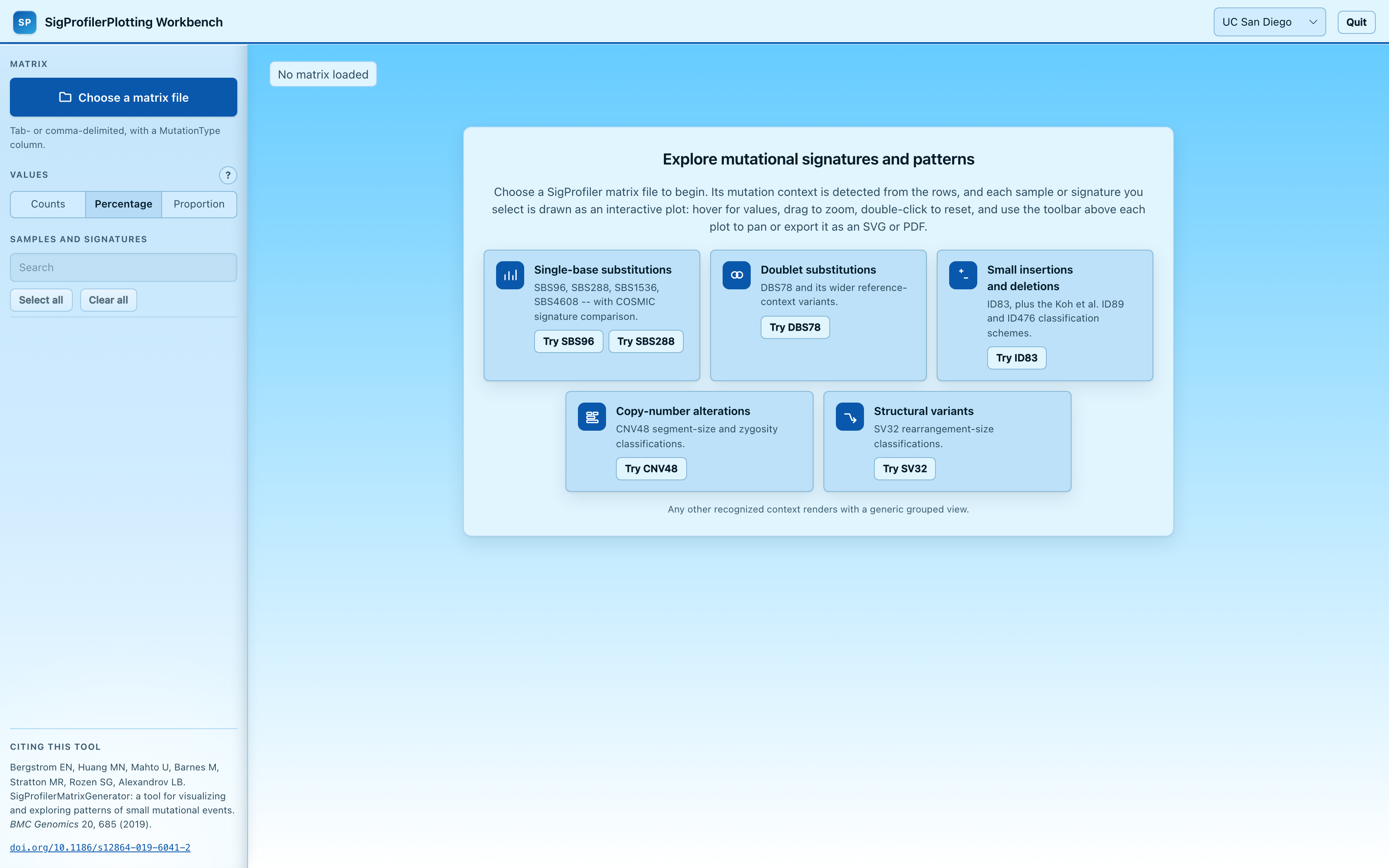
A local, browser-based dashboard lets you upload any supported matrix and
explore it interactively (search/select samples, switch between
percentage/proportion/counts, hover/zoom/pan/export as SVG or PDF) without
writing any Python. Not ready with your own data yet? Its home screen offers
a handful of bundled example matrices to try with one click. It shares its
look with the other SigProfiler Suite workbenches, including a choice of
four themes. For SBS96, SBS288,
SBS1536, or SBS4608 matrices, selecting a
single sample or signature also lets you compare it against COSMIC
reference signatures and see the 5 best cosine-similarity matches. This
needs your own authorized local copy of COSMIC's data -- SigProfilerPlotting
does not bundle or redistribute it (see
the dashboard docs).
It runs entirely on your machine and never sends data anywhere else.
How to launch it:
-
Already have the repo cloned? Open a terminal in the repository root and run the launcher for your platform -- no setup needed, it creates its own isolated environment and installs everything the first time it runs:
Platform Command macOS ./launch_dashboard.sh(or double-clicklaunch_dashboard.commandin Finder)Linux ./launch_dashboard.shWindows Double-click launch_dashboard.bat, or runlaunch_dashboard.batfrom a terminal -
Installed via
pipinstead? Use the console command that comes with the package:pip install SigProfilerPlotting sigprofilerplotting-web
Either way, your default browser opens to the dashboard automatically once
the server is ready. To stop it, press Ctrl+C in that terminal, click the
Quit button in the dashboard itself, or run the same command again with
--stop from another terminal.
See the full dashboard documentation for every command-line flag, supported mutation contexts, and troubleshooting.
Release and publication
Package versions are derived from Git tags through setuptools-scm. A
maintainer can run the Create version tag GitHub Actions workflow with an
x.y.z version and target branch. The resulting vX.Y.Z tag builds and
checks the source/wheel distributions and publishes them to TestPyPI through
trusted publishing. Publishing the corresponding GitHub Release runs the
same verified build and publishes it to PyPI. See
Release and publication for the complete
checklist and required GitHub/PyPI environments.
EXAMPLE
This package comes with an example test for each plot type. Run the script plot_example.py from within the examples directory in the downloaded repo after installation:
python3 sigProfilerPlotting/examples/plot_example.py
This example will create plots for each context for each of the included four samples. These plots will be saved within the sigProfilerPlotting/examples/output/ folder.
CITATION
Bergstrom EN, Huang MN, Mahto U, Barnes M, Stratton MR, Rozen SG, Alexandrov LB: SigProfilerMatrixGenerator: a tool for visualizing and exploring patterns of small mutational events. BMC Genomics 2019, 20:685 https://bmcgenomics.biomedcentral.com/articles/10.1186/s12864-019-6041-2
COPYRIGHT
Copyright (c) 2020, Erik Bergstrom [Alexandrov Lab] All rights reserved.
Redistribution and use in source and binary forms, with or without modification, are permitted provided that the following conditions are met:
Redistributions of source code must retain the above copyright notice, this list of conditions and the following disclaimer.
Redistributions in binary form must reproduce the above copyright notice, this list of conditions and the following disclaimer in the documentation and/or other materials provided with the distribution.
THIS SOFTWARE IS PROVIDED BY THE COPYRIGHT HOLDERS AND CONTRIBUTORS "AS IS" AND ANY EXPRESS OR IMPLIED WARRANTIES, INCLUDING, BUT NOT LIMITED TO, THE IMPLIED WARRANTIES OF MERCHANTABILITY AND FITNESS FOR A PARTICULAR PURPOSE ARE DISCLAIMED. IN NO EVENT SHALL THE COPYRIGHT HOLDER OR CONTRIBUTORS BE LIABLE FOR ANY DIRECT, INDIRECT, INCIDENTAL, SPECIAL, EXEMPLARY, OR CONSEQUENTIAL DAMAGES (INCLUDING, BUT NOT LIMITED TO, PROCUREMENT OF SUBSTITUTE GOODS OR SERVICES; LOSS OF USE, DATA, OR PROFITS; OR BUSINESS INTERRUPTION) HOWEVER CAUSED AND ON ANY THEORY OF LIABILITY, WHETHER IN CONTRACT, STRICT LIABILITY, OR TORT (INCLUDING NEGLIGENCE OR OTHERWISE) ARISING IN ANY WAY OUT OF THE USE OF THIS SOFTWARE, EVEN IF ADVISED OF THE POSSIBILITY OF SUCH DAMAGE.
CONTACT INFORMATION
Please address any queries or bug reports to S M Ashiqul Islam at sislam6@albany.edu
3 maintainers


Metadata
3 maintainers
Release files for sigProfilerPlotting 1.6.0
For a detailed explanation of source distributions (sdists) and built distributions (wheels), please see the package formats documentation.
Source distribution (sdist)
| File | Size | Uploaded | Provenance | Actions |
|---|---|---|---|---|
| sigprofilerplotting-1.6.0.tar.gz | 10.7 MB | With provenance | Details for sigprofilerplotting-1.6.0.tar.gz |
Built distribution (wheel)
| File | Interpreter | ABI | Platform | Actions Reset |
|---|---|---|---|---|
| sigprofilerplotting-1.6.0-py3-none-any.whl | Python 3 | none | any | Details for sigprofilerplotting-1.6.0-py3-none-any.whl |
Total release size: 13.6 MB
Release files / sigprofilerplotting-1.6.0.tar.gz
| Download URL | sigprofilerplotting-1.6.0.tar.gz |
|---|---|
| Size | 10.7 MB |
| Tags | Source |
|
SHA-256 checksum How to use checksums |
b36a228cfe7e9c137b4291a90512a0dd86db0be6f4934e532b380a887cf67a3b
|
|
BLAKE2b-256 checksum How to use checksums |
d4278ae945f88549de4d419987622aadbf5ad9b1ec6c23dab3891d70c35f4348
|
| Upload date | |
|
Uploaded using Trusted Publishing? What is trusted publishing? |
Yes |
| Uploaded via |
twine/7.0.0 CPython/3.13.16
|
Provenance
Provenance describes where a file came from. On PyPI, provenance is shared via attestations, which provide a verifiable record of the build or publishing details. View details, limitations and caveats.


PyPI Publish Attestation
PyPI verified that this artifact, at this checksum, originated from the publisher listed below.
Signed by GitHub Actions, verified by PyPI on Nov 12, 2026.
Transparency logRelease files / sigprofilerplotting-1.6.0-py3-none-any.whl
| Download URL | sigprofilerplotting-1.6.0-py3-none-any.whl |
|---|---|
| Size | 2.9 MB |
| Tags | Python 3 |
|
SHA-256 checksum How to use checksums |
d513dc606cba2cf676aad147af5852a1e80229cc538459eef3ccfa5b5bc25ae1
|
|
BLAKE2b-256 checksum How to use checksums |
938a9cdc32722390622e89332df28449230bded4e0c5d28053552986aa90fd0c
|
| Upload date | |
|
Uploaded using Trusted Publishing? What is trusted publishing? |
Yes |
| Uploaded via |
twine/7.0.0 CPython/3.13.16
|
Provenance
Provenance describes where a file came from. On PyPI, provenance is shared via attestations, which provide a verifiable record of the build or publishing details. View details, limitations and caveats.
PyPI Publish Attestation
PyPI verified that this artifact, at this checksum, originated from the publisher listed below.
Signed by GitHub Actions, verified by PyPI on Nov 12, 2026.
Transparency logSecurity for sigProfilerPlotting 1.6.0
Provenance
Provenance describes where a file came from. On PyPI, provenance is shared via attestations, which provide a verifiable record of the build or publishing details. View details, limitations and caveats.
Full provenance
Both files in this release have been uploaded with provenance metadata.
Attestation for sigprofilerplotting-1.6.0.tar.gz
PyPI Publish Attestation
PyPI verified that this artifact, at this checksum, originated from the publisher listed below.
Signed by GitHub Actions, verified by PyPI on Nov 12, 2026.
Transparency logA note on package security
PyPI is a repository for distributing packages, not a service for auditing them. While third-party security researchers and our staff do their best to detect and remove malicious packages, PyPI cannot guarantee the quality, security or suitability of any given package.
To learn more about protecting yourself from malicious actors, visit our package security documentation.














