

Let an LLM read, write and organize your Markdown notes, and take back any edit it gets wrong.
Point Silica at a folder of notes, PDFs or code. It answers from what is there, brings new material in,
and checks every write it makes: parsed, validated, read back, and reverted if it does not hold.


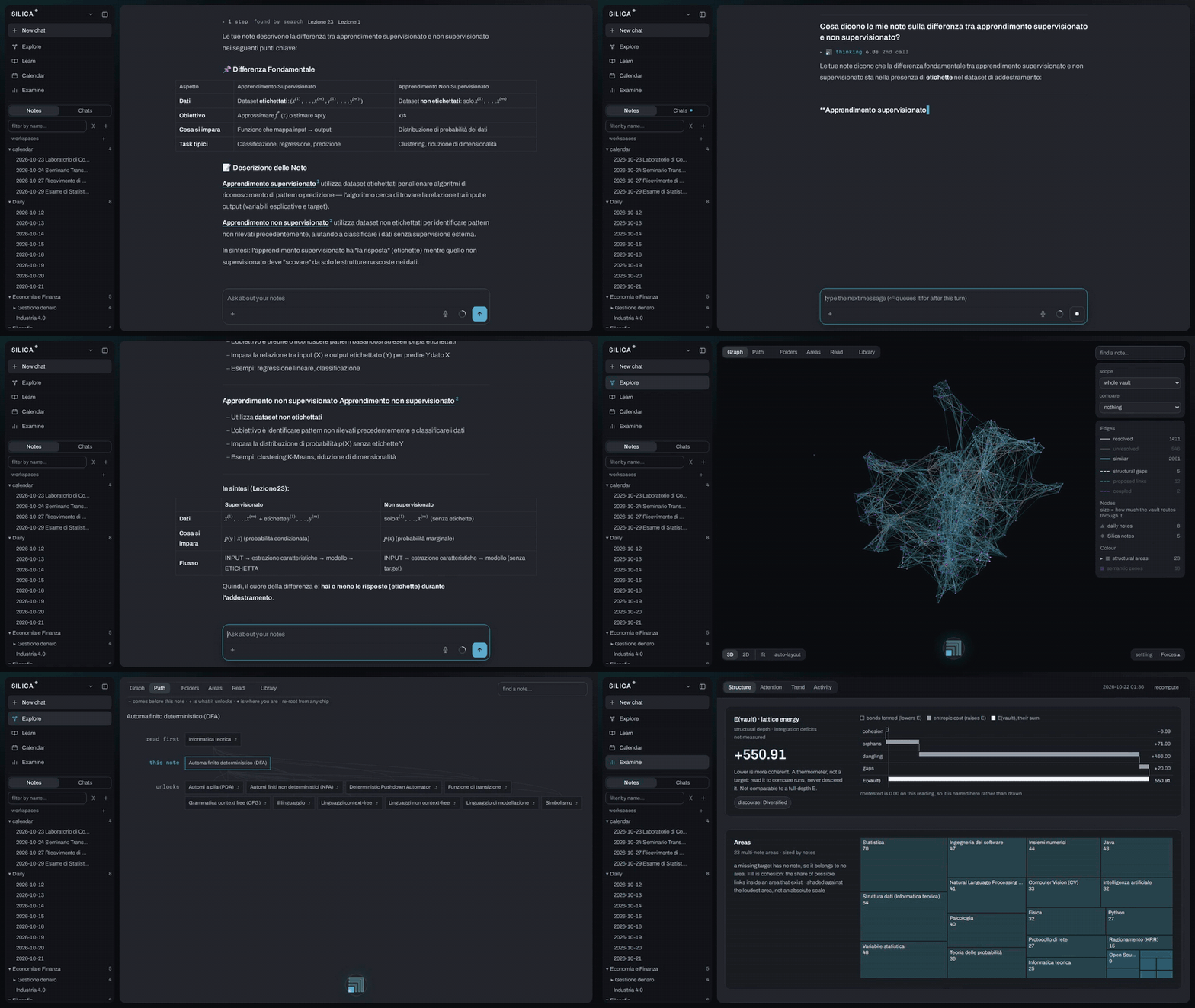
A real 748-note vault, written in Italian, so the answers are too: a question answered from the notes it found,
then the vault as a graph, one note's reading path, the study queue, and the audit. Recorded with Qwen3.5-9B.
Install
uv tool install "silica-agent[gui,mcp]"
Needs Python 3.11+ and uv. With pipx: pipx install "silica-agent[gui,mcp]".
Quickstart
cd ~/notes        # any folder of .md files, adopted as it is
silica init       # pick a model: a hosted API key, or a local LM Studio / Ollama model
silica --gui      # opens http://localhost:8765; plain `silica` opens the terminal instead
Then type /report. It is read-only: it writes one file, GRAPH_REPORT.md, and shows the hubs, bridges and orphans already in your vault. Search and the graph work with no model at all.
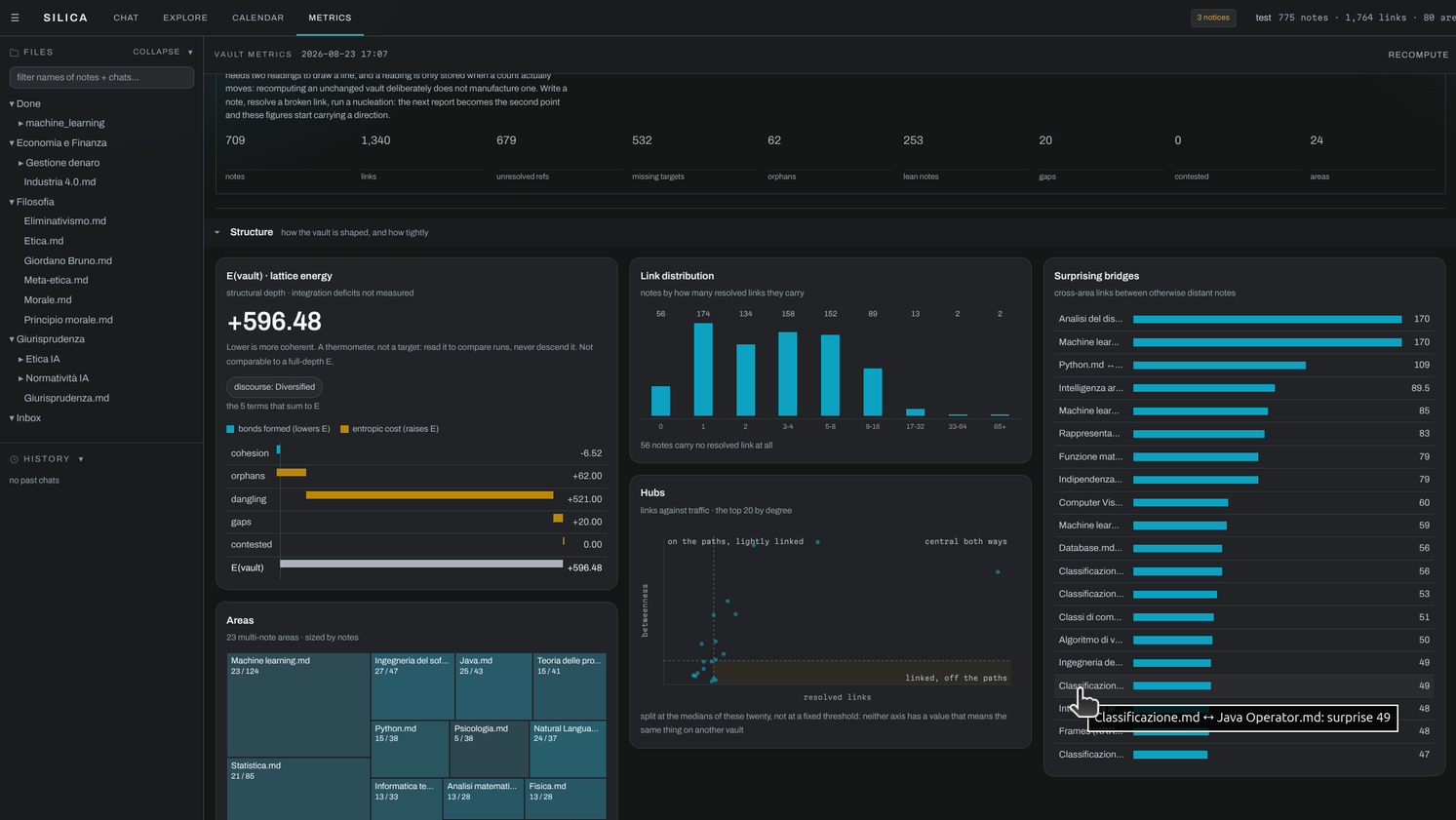
The audit as a tab: what holds the vault together, the areas it sorts itself into, and how its links are spread.
What you can do
Silica is single-user: one person, one vault. There are no per-person permissions and no vault shared between people.
Bring documents in. Slides, case files, papers and mail become notes in the source's own words, not a summary of them.
/nucleate Inbox/takes a folder, a glob or one file (PDF, DOCX, EPUB, PPTX, notebooks). Each file is one transaction, checked against what you already have. Stop it whenever; it resumes.- The vault's
+imports files, a whole folder or a link intoInbox/with no chat turn; a YouTube link gives the video's transcript, and/fetch <url>does the same from the chat. A file dropped on the chat stays that chat's until you press "add to vault". - A long document is split at its headings into parts of at most 40,000 characters. A PDF page with no text, or with formulas its text layer loses, is read from its image by the model, up to 60 pages a file.
- A note keeps its source's DOI, arXiv id, authors and title, so it can be cited without reopening the document. With Zotero linked, a paper's note opens under its byline, with links to Zotero, the PDF and the DOI.
/mail importkeeps only the threads you took part in, from a mail client's export or Google Takeout, and writes nothing until--apply.- In a git repository,
/wikiwrites anARCHITECTURE.mdplus a note per subsystem underdocs/silica/, and/staleflags the notes whose code changed shape since.
Ask, with the sources in view. An answer comes from your notes and shows which ones.
-
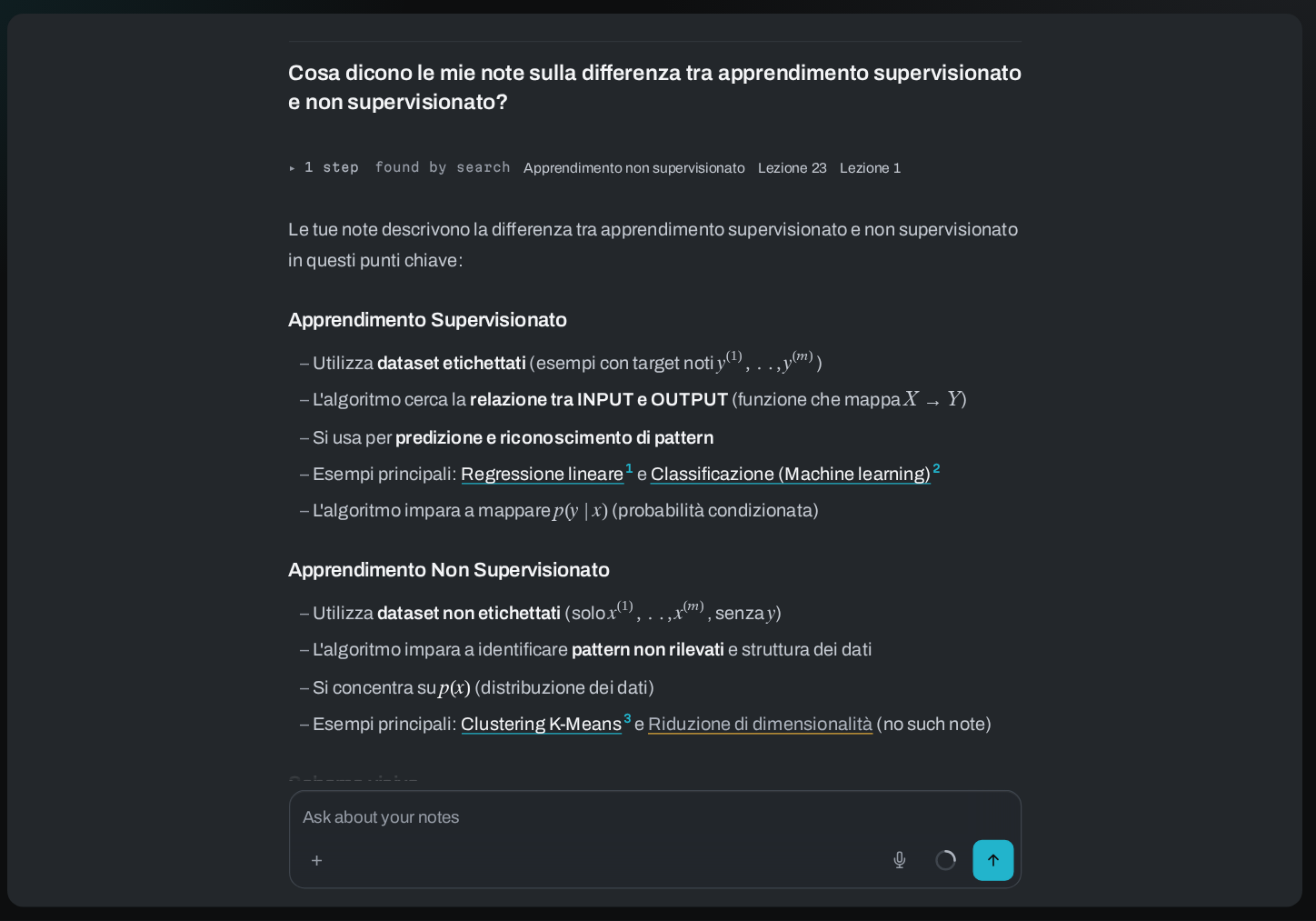
/explain,/compare,/summarizeand the chat answer from your notes and cite them. What the vault does not hold is refused, not filled in;/webis the explicit way out, cited from the pages it actually opened. -
Each cited note gets a number. Clicking it opens the note at the line closest to the paragraph that cites it, when enough of their words match; pointing at it lights every paragraph that cites the same note.
-
A line under the answer counts the notes read, the steps and the seconds, and lists under "not cited" the notes it read and did not cite.
-
A number in the answer that is in no note the chat read and in nothing you typed is listed under it: "numbers not in what this turn read".
-
Each note
/nucleatewrites carries a## Sourcesblock that leads to the source's verbatim copy insources/. Search leaves those copies out, so a source never competes with the notes made from it. -
Ask the last question again, or edit it. The chat also searches your earlier chats for what was asked and answered.
Every claim links to the note it came from; a link with no note behind it says so.
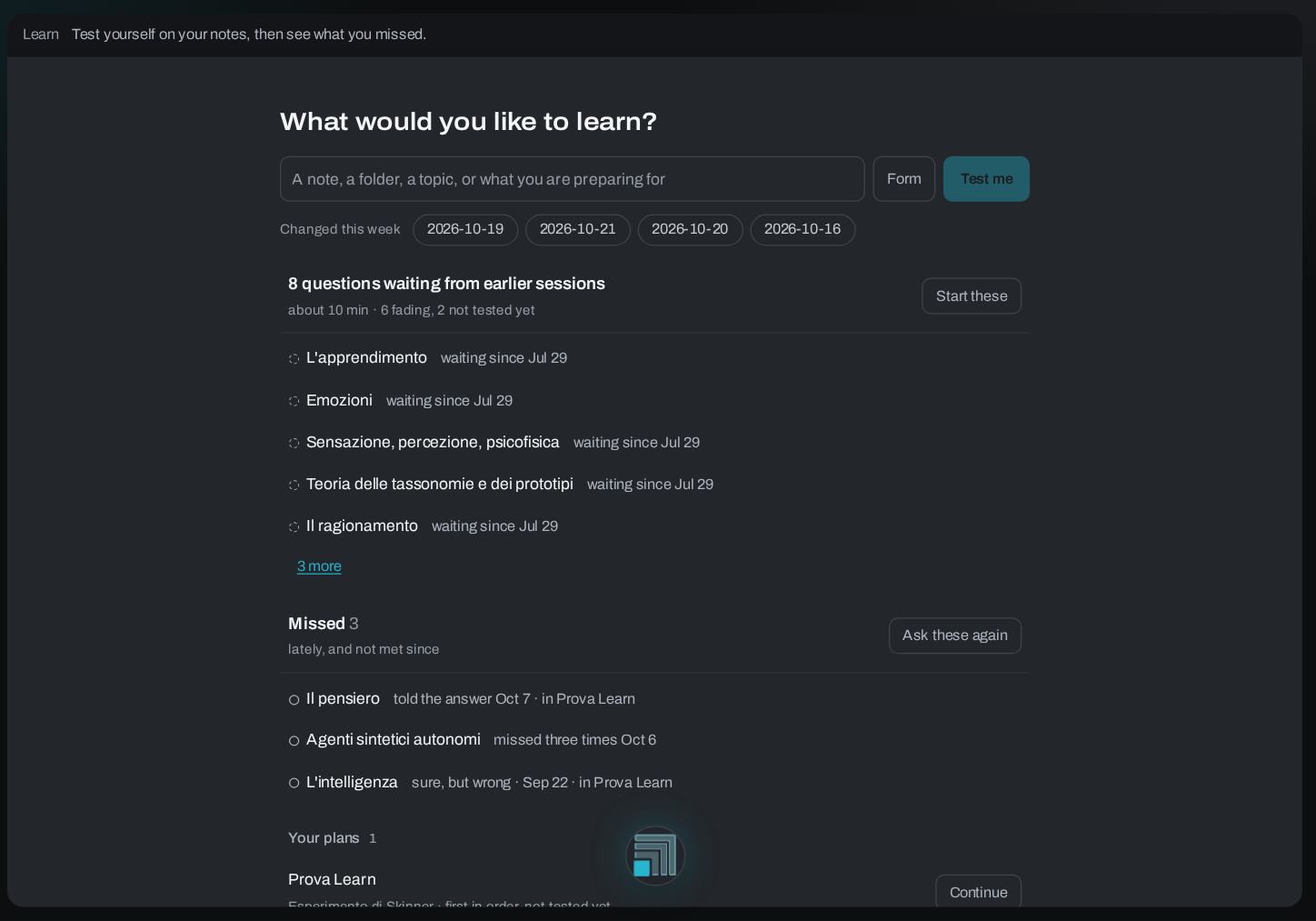
Study (Learn). Questions on your notes, graded against the source each note rests on.
-
/learnand the Learn tab ask ten kinds of question, from recall and cloze to transfer and contradiction, and correct you by quoting the source line the note rests on. When the note says more than its source, the answer reads "Source mismatch" and is not scored./quizre-tests what is fading, scheduled with FSRS-6. -
Before the reveal you say how sure you are: certain (90), pretty sure (70), half unsure (50), guessing (25), or skip. The grader never sees it, nor the session or the chat. Caps come after, in code: a hint or "Just tell me" caps the rating at Hard, and a right answer given while guessing caps at Good.
-
After 10 unassisted answers with a confidence, Calibration sets what you said against how often you met the criteria, level by level.
-
"Explain it" closes the book: you explain a note in your own words, a student who has not read it asks 4 questions, and your explanation is then checked against the note and its source.
-
No single score: estimated retention, depth (Facts, Parts, Mechanisms, New contexts), the relations you answered on and the misconceptions noted are shown apart. A note never asked counts as never practised, not as failed.
-
3 misses in a row on a note put a worked example from it one click away; it never appears unasked. A plan over a folder, some notes or a topic paces you to its date, and that day shows in the Calendar.
Questions waiting from earlier sessions, the ones you missed, and your plans.
See how notes connect. The vault as a map: what sits together, what joins it, and what to read first.
-
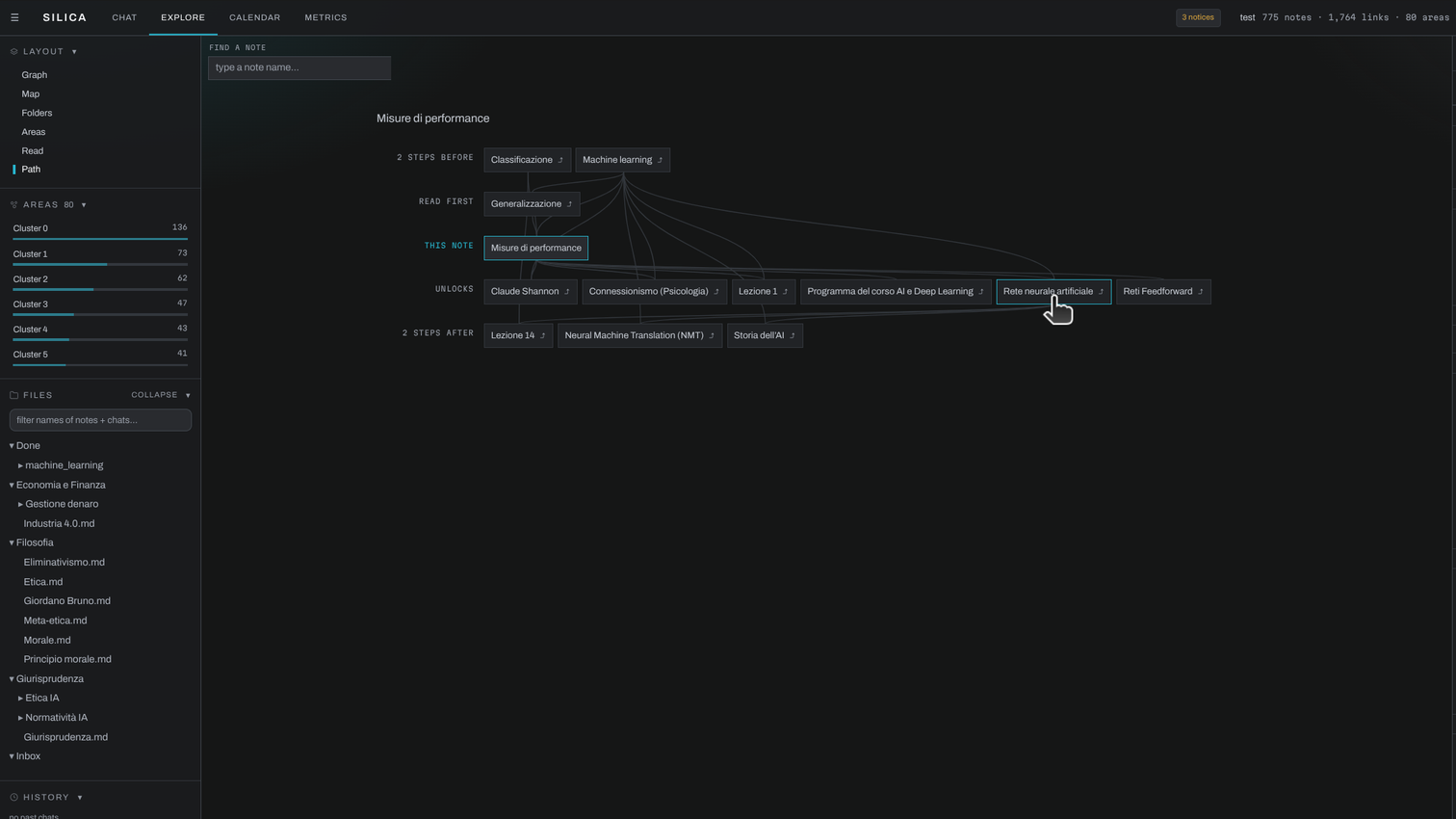
/path "RAG" "Transformers"walks the reading path between two notes over your wikilinks and the concept graph,/relatenames the kind of each link,/graphand/mapdraw it.
One note in its reading order: what to read first, and what it unlocks. -
On the graph, a click makes a note the centre of its own map. In 2D the areas can be drawn as blobs, one ribbon standing for the links between two of them, and the semantic zones, notes grouped by meaning rather than by links, as outlines over them.
-
In Explore, Folders shades each folder by how much it mixes areas. Areas shows one area and the links to its neighbours over the coupling of every pair, each link with the sentence that carries it. Read gives the whole vault a reading order from its hubs.
-
Compare one folder, area or zone with another: the panel says what characterises each and quotes the links that join them.
-
Click a concept to light the notes that treat it; a second concept narrows them to the notes that treat both, and the panel quotes the lines.
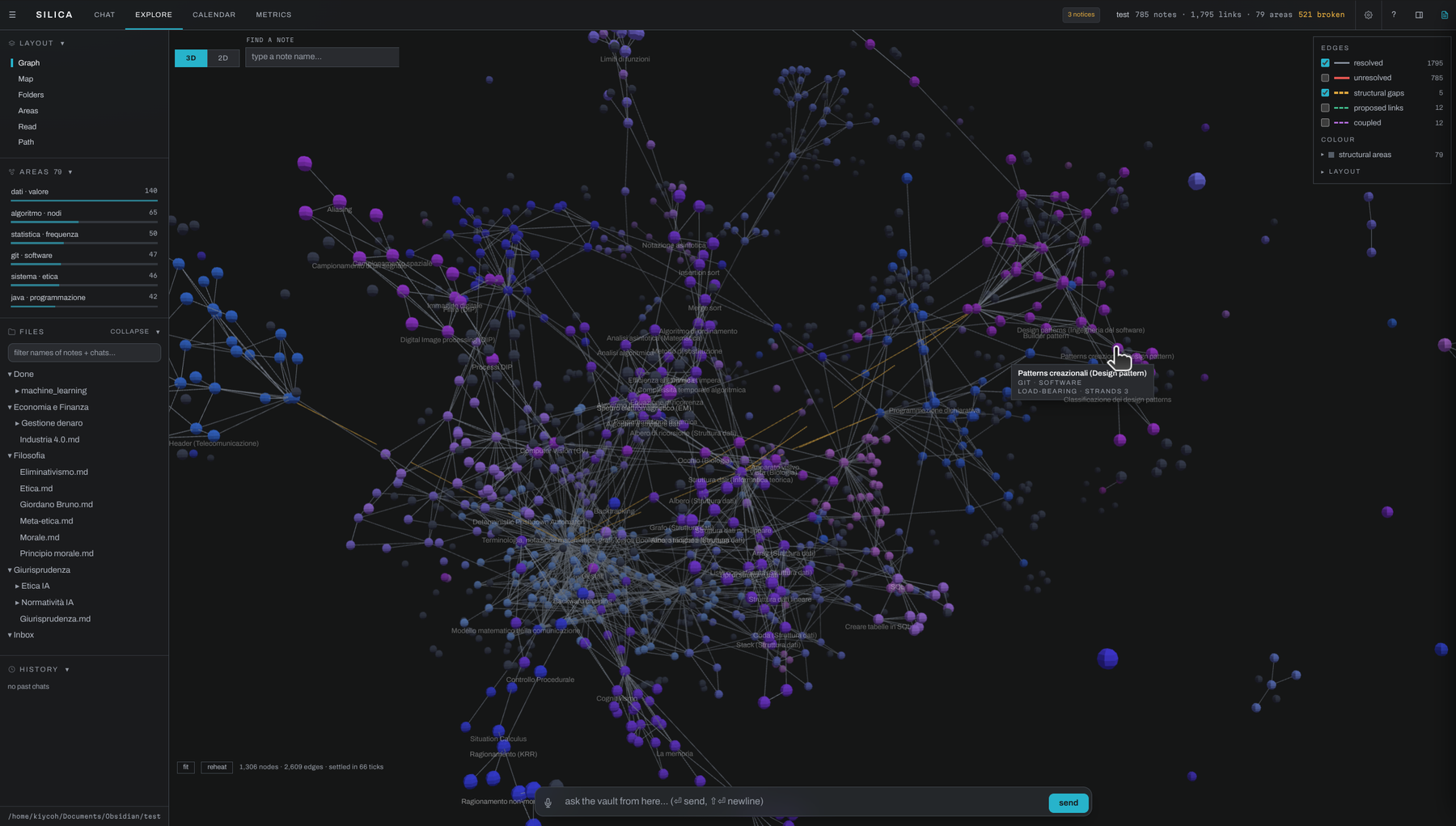
The same vault in 3D, coloured by the 23 areas it sorts itself into. A note's size is how much the vault routes through it.
Trust what it writes. Every write is checked, shown to you and reversible.
- Each write is a card in the chat with its revert. When the check is unsure, the card says why, shows the changed lines and asks you to keep or revert it.
/undoone note,/revert <run-id>one run,/revert --source paper.pdfeverything one document produced, however far it spread. A deleted note waits in the trash until you bring it back or delete it for good.- When a new source contradicts a note, the contradiction stays written on the note until you resolve it;
/contestedlists them. - A flashcard whose answer is not in the note it cites is dropped before you see it; a slide point that is not in its note is named under the deck.
/verifyvouches for a note as you, bound to its text./stalelists the notes whose source changed and the notes Silica wrote that were since edited by hand.
Organise without moving files. Files stay where you put them; Silica groups and remembers around them.
- A workspace is a note that gathers notes and folders from anywhere in the vault, by list, by folder or by a frontmatter value, plus the notes made from them. A chat opened in it searches only there and reads the workspace's text as standing instructions.
- Vault instructions, written once in Settings, are read by every chat over the vault.
- Silica keeps what a later chat will need and says so in the answer, unless the chat has brought in outside text such as a web page or a file.
/memoryshows what it holds,/remembersaves your words as typed,/incognitokeeps a chat off the record. - The Calendar holds events, deadlines and the day each study plan is due; click or drag an empty time to add an event, with a reminder if you want one.
/agendalists a day or a week. - A request you make in 3 separate chats, never undone, becomes a proposed skill drafted from your own words. It runs only once you install it from Settings › Skills.
/curateplans links, orphans and duplicates, and/aliasesproposes other names for note titles; both write only with--apply.
How a write is checked
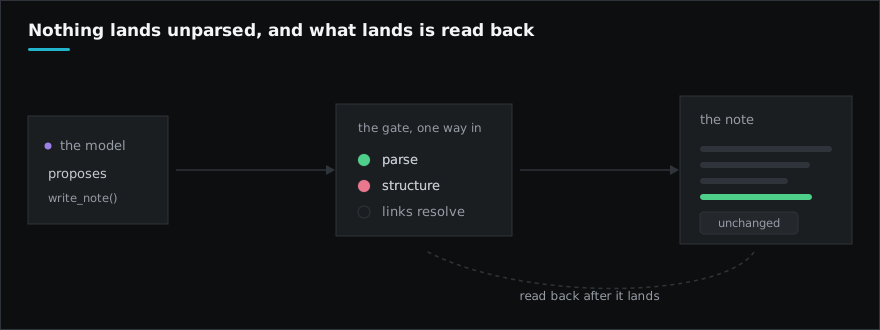
The model never touches a file. It proposes; a parser and a state machine decide.
| You already let a tool... | Silica does the same by... |
|---|---|
| a compiler reject source that does not build | refusing to commit a note that fails its structural checks |
| a test suite block a merge that breaks behavior | reverting any write that breaks the vault's links or structure |
| git roll back a bad commit | /undo and /revert, per note, per run, or per source document |
Benchmarks
Every number comes from a committed result file in evals/, run on the product path.
| Measured | Result |
|---|---|
| LoCoMo, answerable questions | 82.1% and 83.2% accuracy (2 conversations, 302 questions) |
| LoCoMo, questions it should refuse | 87.2% and 82.1% correctly refused (87 questions) |
| Keeping the source's words vs summarizing, same pipeline | +16.5 and +14.7 points of accuracy |
| FActScore, facts in a written note its source supports | 0.961 to 0.999 across three write paths (5,855 facts) |
| Write integrity on a real 796-note Obsidian vault | 796 of 796 notes left with no new structural violation |
| MuSiQue multi-hop retrieval, 11,654-note vault | 61.3% recall@10, 0.83 MRR |
Small samples, a flash-class judge, 2 of LoCoMo's 10 conversations: not comparable to vendor numbers, but re-runnable on your machine. The unflattering rows ship too: /organize agrees with a human's folders 32% of the time.
Use it from
| Where | Command |
|---|---|
| Browser | silica --gui |
| Terminal | silica |
| Obsidian desktop | silica connect, with the obsidian-silica plugin |
Coding agents (Claude Code, Codex, any MCP client) use silica-core, the retrieval engine Silica is built on, with no model in the loop.
All 63 commands
Workflow: the ones that plan, read widely, or write
| Command | What it does |
|---|---|
/report [folder] [--top-k=N] [--embeddings] |
structural audit of the vault -> steering loop |
/nucleate <file...> [--target=DIR] [--hub=H] |
bring files in: notes via Injector FSM, code as skeleton stubs |
/promote [<key>] |
session memory -> a note: list what keeps recurring, promote one through the gate |
/web [keywords] |
answer from the web instead of the vault, cited; bare /web re-asks your last question |
/organize "<intent>" [--scope=FOLDER] [--file=taxonomy.yaml] [--merge] [--move-uncategorized] [--apply] |
classify and reorganize vault notes according to a taxonomy |
| `/summarize <note | folder...>` |
| `/explain "" [--level=intro | expert]` |
/compare "<A>" "<B>" [...] |
comparison table of notes/concepts; surfaces contradictions |
| `/quiz [note | folder] [--n=10]` |
| `/flashcards <note | folder> [--n=12] [--save= |
| `/slides <note | folder> [--save= |
| `/learn [plan] [--n=8] [--plan --scope=<folder | note,note |
/relate <note> [--n=8] |
typed relationship map: how/why one note relates to its vault neighbors |
| `/schematize <note | folder |
| `/diagram <note | folder |
/summarize, /explain, /compare, /relate, /schematize and /diagram are skills: one SKILL.md each, shipped in silica-core, in the Agent Skills format with arguments filled the way Claude Code fills them ($ARGUMENTS, $0). Any folder holding a SKILL.md under <vault>/.silica/skills/ (this vault) or ~/.silica/skills/ (every vault) becomes a command the same way, and one named like a built-in skill replaces it. Nothing in a skill folder is executed.
Direct: one action, no agent loop
| Command | What it does |
|---|---|
/episodes [--save=<path>] |
show what session memory holds: live chains, dated, grouped by key; writes nothing |
/remember [text] |
save your text as typed to this vault's memory, no model involved; bare, asks silica to keep what you just said |
/memory |
show what silica remembers about you and this vault, with file paths and budgets |
| `/agenda [today | week |
/convert <file...> [--target=DIR] |
transcode a non-.md file (PDF) into a markdown note in the inbox |
/web-search "<concept>" [--max-searches=N] |
research a concept on the web -> cited findings note in the Inbox (then /nucleate) |
/keep |
save the last /web answer as a cited note in the Inbox (then /nucleate) |
/fetch <url> |
read one URL (YouTube gives its transcript) -> verbatim note in the Inbox |
/status [run_id] |
progress digest of the last run |
/embed [folder] [--force] |
build/update embedding index |
/cooccur [folder] [--force] |
build/update co-occurrence index (without embedder) |
/lexical [folder] [--force] |
build/update lexical (BM25/fuzzy) index |
| `/wiki [folder | path] [--overview-only] [--force]` |
/graph [out.html] [folder] |
export knowledge graph |
/map <note> [--force] |
radial mind-map rooted on a note -> maps/.canvas |
/find <query> [--k=N] [--min-trust=T] [--lifecycle=L] |
semantic search; the two epistemic flags filter after the search, so the count says what they cost |
/changes |
notes this session wrote to, with added/removed line counts |
/undo [note-path] |
undo the last patch on a note |
/delete <path> |
delete a note, even one other notes link to; says which links it left pointing nowhere, /undo brings it back |
| `/trash [restore | erase |
/review [--flush=HASH] |
inspect the async review queue (deferred ops) |
/anneal [--steer] [--limit=N] |
retry every deferred bundle against the current vault; --steer escalates what still fails |
| `/revert [run-id | --source ]` |
| `/zotero [file | group |
| `/mail [import <file.mbox | file.eml> [--label=X] [--me=ADDR] [--all] [--limit=N] [--apply]]` |
| `/connect [list | add |
/dedup [folder] |
deduplicate (sub-agent) |
/curate [folder] [--apply] |
curate the vault: plan autolink/orphan/dedup work (dry-run; --apply executes) |
/aliases [folder] [--apply] |
propose frontmatter aliases for note titles (abbreviations, spellings); dry-run, --apply writes |
/enrich [folder] |
add what lean notes are missing, as an appended section (sub-agent) |
/stale [--all] | --stamp [folder] [--write] |
notes whose documents: sources changed structurally (--all includes cosmetic), attested notes whose body moved on, gate-written notes edited by hand; --stamp derives documents:/code_ref for unbound notes, --write stamps them |
/migrate [folder] [--write] |
notes Silica wrote in an older shape, rewritten through today's writer; a list until --write, then one revertible run |
/impact [<git-range>] |
changed files -> affected notes (documenting + 1-hop import neighbors); no range = uncommitted changes |
/plans |
list plans/ notes grouped by status: (todo|in-progress|blocked|done) |
/path <noteA> <noteB> |
shortest reading path between two notes (wikilinks + co-occurrence) |
/contested |
list notes flagged contested: true with their unresolved contradictions |
/verify <note> [--clear] [--as "<name>"] |
vouch for a note as a person (OKF verified, bound to the body); --clear withdraws, --as signs with a name |
/check <note> |
read a note you wrote against the vault, block by block: what a source contradicts or overstates, links, identifiers, dates and quotations, by grade; never edits it. In the app, check sources in the note's menu underlines the text |
Session and settings
| Command | What it does |
|---|---|
/sessions [prune <days>d] |
list saved conversations (narration + legacy); prune deletes old ones |
| `/resume <n | id>` |
/new |
start a fresh conversation (same as /clear); the old one stays resumable |
/vault [path] |
show the active vault, or switch to another for this session |
| `/settings [ <value | none>]` |
/help |
show this help |
/model |
show the current LLM model |
/tools |
list registered tools |
/clear |
reset conversation history |
/verbose |
cycle tool progress: off -> new -> all -> verbose |
/thinking |
toggle display of the reasoning block |
/incognito |
toggle this session off the record: not captured, memory neither shown nor saved |
/persona [name|off] |
the persona this conversation wears: list them, put one on, take it off. A persona is a skill whose frontmatter says metadata: {persona: true} |
/exit |
exit silica |
Docker, optional extras, configuration
Docker
git clone https://github.com/kiycoh/silica-agent && cd silica-agent
SILICA_VAULT_HOST=~/notes docker compose up -d gui   # http://localhost:8765; your OPENROUTER_API_KEY passes through
Extras, combined like "silica-agent[gui,mcp]": gui (web GUI), mcp (MCP client for /connect), connect (Obsidian bridge), rerank (local cross-encoder, pulls torch), stt (local dictation), all. Scanned PDFs need OCR through MinerU, installed separately: pip install 'mineru[pipeline]', then SILICA_PDF_PROVIDER=mineru.
Configuration lives in ~/.silica/.env, written by silica init; every variable and its default is in .env.example. silica doctor --live checks the whole setup with one real request.
License
AGPL-3.0-or-later. A commercial license covers proprietary embedding or a modified hosted service without releasing source. Contributing: CONTRIBUTING.md.
1 maintainer

Metadata
1 maintainer
Release files for silica-agent 0.24.0
For a detailed explanation of source distributions (sdists) and built distributions (wheels), please see the package formats documentation.
Source distribution (sdist)
| File | Size | Uploaded | Provenance | |
|---|---|---|---|---|
| silica_agent-0.24.0.tar.gz | 41.4 MB | With provenance | Details |
Built distribution (wheel)
| File | Interpreter | ABI | Platform | Reset |
|---|---|---|---|---|
| silica_agent-0.24.0-py3-none-any.whl | Python 3 | none | any | Details |
Total release size: 45.6 MB
Release files / silica_agent-0.24.0.tar.gz
| Download URL | silica_agent-0.24.0.tar.gz |
|---|---|
| Size | 41.4 MB |
| Tags | Source |
|
SHA-256 checksum How to use checksums |
a1525ccb4bcb1c95e8c7787d5e7006711a5591241a62c9e7eb574caf793a26fe
|
|
BLAKE2b-256 checksum How to use checksums |
c5884a035f792419707a39797e2e436f162dde0a218ebb9be1aedecac59b043f
|
| Upload date | |
|
Uploaded using Trusted Publishing? What is trusted publishing? |
Yes |
| Uploaded via |
twine/7.0.0 CPython/3.13.14
|
Provenance
Provenance describes where a file came from. On PyPI, provenance is shared via attestations, which provide a verifiable record of the build or publishing details. View details, limitations and caveats.


PyPI Publish Attestation
PyPI verified that this artifact, at this checksum, originated from the publisher listed below.
Signed by GitHub Actions, verified by PyPI on Oct 27, 2026.
Transparency logRelease files / silica_agent-0.24.0-py3-none-any.whl
| Download URL | silica_agent-0.24.0-py3-none-any.whl |
|---|---|
| Size | 4.2 MB |
| Tags | Python 3 |
|
SHA-256 checksum How to use checksums |
1c005a35b28c40a5ee295458fca1781ab9f7b854fdfdd7d8a0139114d7af6c48
|
|
BLAKE2b-256 checksum How to use checksums |
60316344298e6c44c8318cec95233fb9e9829e921b67834f4e208bf44494b8a6
|
| Upload date | |
|
Uploaded using Trusted Publishing? What is trusted publishing? |
Yes |
| Uploaded via |
twine/7.0.0 CPython/3.13.14
|
Provenance
Provenance describes where a file came from. On PyPI, provenance is shared via attestations, which provide a verifiable record of the build or publishing details. View details, limitations and caveats.
PyPI Publish Attestation
PyPI verified that this artifact, at this checksum, originated from the publisher listed below.
Signed by GitHub Actions, verified by PyPI on Oct 27, 2026.
Transparency logSecurity for silica-agent 0.24.0
Provenance
Provenance describes where a file came from. On PyPI, provenance is shared via attestations, which provide a verifiable record of the build or publishing details. View details, limitations and caveats.
Full provenance
All 2 files in this release have been uploaded with provenance metadata.
Attestation for silica_agent-0.24.0.tar.gz
PyPI Publish Attestation
PyPI verified that this artifact, at this checksum, originated from the publisher listed below.
Signed by GitHub Actions, verified by PyPI on Oct 27, 2026.
Transparency logA note on package security
PyPI is a repository for distributing packages, not a service for auditing them. While third-party security researchers and our staff do their best to detect and remove malicious packages, PyPI cannot guarantee the quality, security or suitability of any given package.
To learn more about protecting yourself from malicious actors, visit our package security documentation.














