
helps to analyse integrated circuit die images (for example from siliconpr0n.org) with the help of ai.

Project description
Installation
Install from source:
pip install --upgrade .
Install from pip:
pip install --upgrade silicon-analyser
Information
Side note
Bad project name decisions might lead people to this project.
Maybe you are looking for SiliconAnalysis instead?
I'm sorry for that but I can't figure out any new project name (yet).
Acceleration
The code will use your graphic card for acceleration. (but only if correct pytorch is installed, see "Additional info" below)
Frameworks/Libraries used:
Small example
- start
- select image
- add grid
- press mouse down on image and drag your rectangle for your grid
- adjust x,y,cols,rows,width,height manualy to fit
- add label (while grid is selected)
- give it a random name
- with that label selected, select cells for that label (for example cells that mark a "1")
- select grid (for example "grid_0" again)
- add another label (while grid is selected)
- give it a random name
- with that label selected, select cells for that label (for example cells that mark a "0")
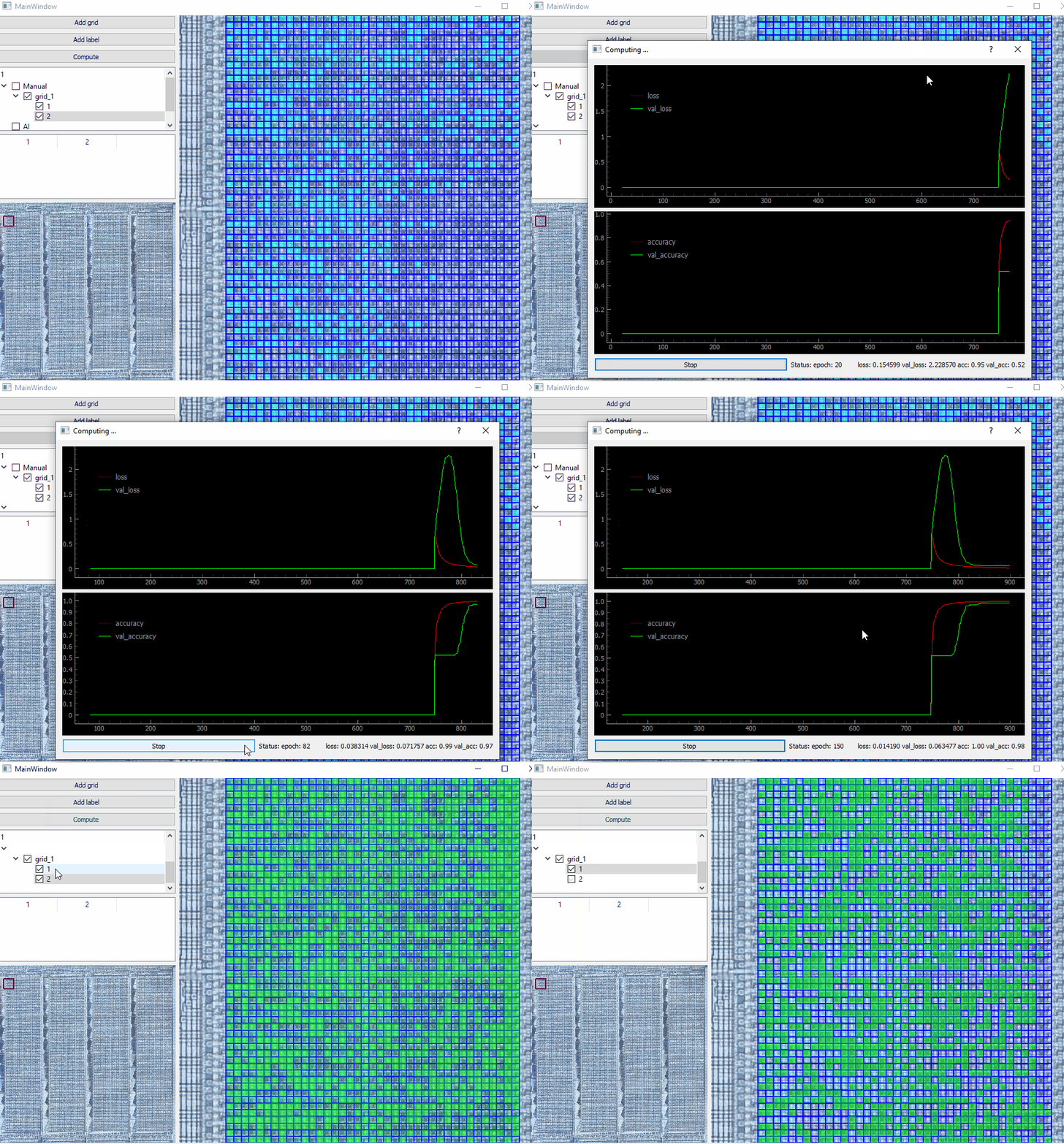
- with enough "1" and "0" labels drawn, click the "Compute" button
- ai will find images in the grid that have the same properties
- click "stop" once the results are satisfied
- maximum for "acc" and "val_acc" is 1.00, the closer you are to those values, the better are the results
- results depend on many factors:
- the amount of cells you selected
- how good your grid matches the current image
- the quality of your image
- ...
- "acc" stands for "accuracy", "val" for "validation"
- found ai-cells will be drawn green
Additional info
- you might need to install cuda-specific PyTorch for accelerated computing
- check your graphic driver version for compatible cuda version!
- Computation (currently) only happens based on active/visible grid cells (don't be fooled by accuracy of 1 just because you have only 1 label active - just activate all and use compute)
Command line
For automatically opening a file, you can pass the filepath as a filename. For example: silicon-analyser c:\my_files\image.png But keep in mind, that the program currently needs to create files in its current working directory (grid.json, rect.json).
Keys
- Use up/down/left/right to navigate
- Hold shift to move faster
- Scroll-wheel to zoom out
- Click on minimap to get directly to a position
- Right click on tree-items (left navigation menu) for additional options
- Hold down middle mouse button, to move across the screen
- (behaviour might change in future, currently it does not behave as expected)
TODO
- undo option
- maybe use a real db in background
- some method to autofit grid
- performance improvements
- option for compute to continue from last training (currently starts fresh training)
- show loading screen on start (pytorch with cuda support takes a bit to load)
- ai-model configuration
- project management (project-file/-folder)
- possibility to rotate grid
- maybe store your model on a public place? (for others to use)
Release history Release notifications | RSS feed


Download files
Download the file for your platform. If you're not sure which to choose, learn more about installing packages.
Source Distribution
Built Distribution
Filter files by name, interpreter, ABI, and platform.
If you're not sure about the file name format, learn more about wheel file names.
Copy a direct link to the current filters
File details
Details for the file silicon_analyser-1.1.1.tar.gz.
File metadata
- Download URL: silicon_analyser-1.1.1.tar.gz
- Upload date:
- Size: 32.6 kB
- Tags: Source
- Uploaded using Trusted Publishing? No
- Uploaded via: twine/5.0.0 CPython/3.11.4
File hashes
| Algorithm | Hash digest | |
|---|---|---|
| SHA256 |
947df055404aad5aefd7cf3f3eed6d434d262d31e4a0a472647523b76422481a
|
|
| MD5 |
f3431844978d994d1e898b421eb606f9
|
|
| BLAKE2b-256 |
efc6c5480ce1154ef0c097810a52144ae9e551cf2a0ae1e50fc0f45d156a0ee8
|
File details
Details for the file silicon_analyser-1.1.1-py3-none-any.whl.
File metadata
- Download URL: silicon_analyser-1.1.1-py3-none-any.whl
- Upload date:
- Size: 41.2 kB
- Tags: Python 3
- Uploaded using Trusted Publishing? No
- Uploaded via: twine/5.0.0 CPython/3.11.4
File hashes
| Algorithm | Hash digest | |
|---|---|---|
| SHA256 |
8dcb66805fd043b9fcbc91fb9c916a66c10ec8c2ebddc83e39ed72f970183122
|
|
| MD5 |
1838373481c7e90ee9cf95e81c2e3cee
|
|
| BLAKE2b-256 |
f399baa019acef51b07f877e034058d86e84dec4dc3e04565965ab2a4d3abb61
|






