
SiloPrompts - Personal AI Prompt Database
In the GenAI era, every ask, every query, and every search is a prompt.
The ones that actually work — refined through trial and error, containing your proprietary workflows — those are valuable. And most people store them in scattered notes, buried chat histories, or nowhere at all.
Cloud prompt managers exist, but they require uploading your prompts to someone else's server. Your sensitive instructions and strategies sitting on a platform you don't control.
SiloPrompts is a private, self-hosted prompt library. Open source. No cloud. No accounts. No data leaving your machine.
A lightweight, self-hosted web application for storing, searching, and managing your AI prompts across different platforms (ChatGPT, Claude, Perplexity, Gemini, etc.).
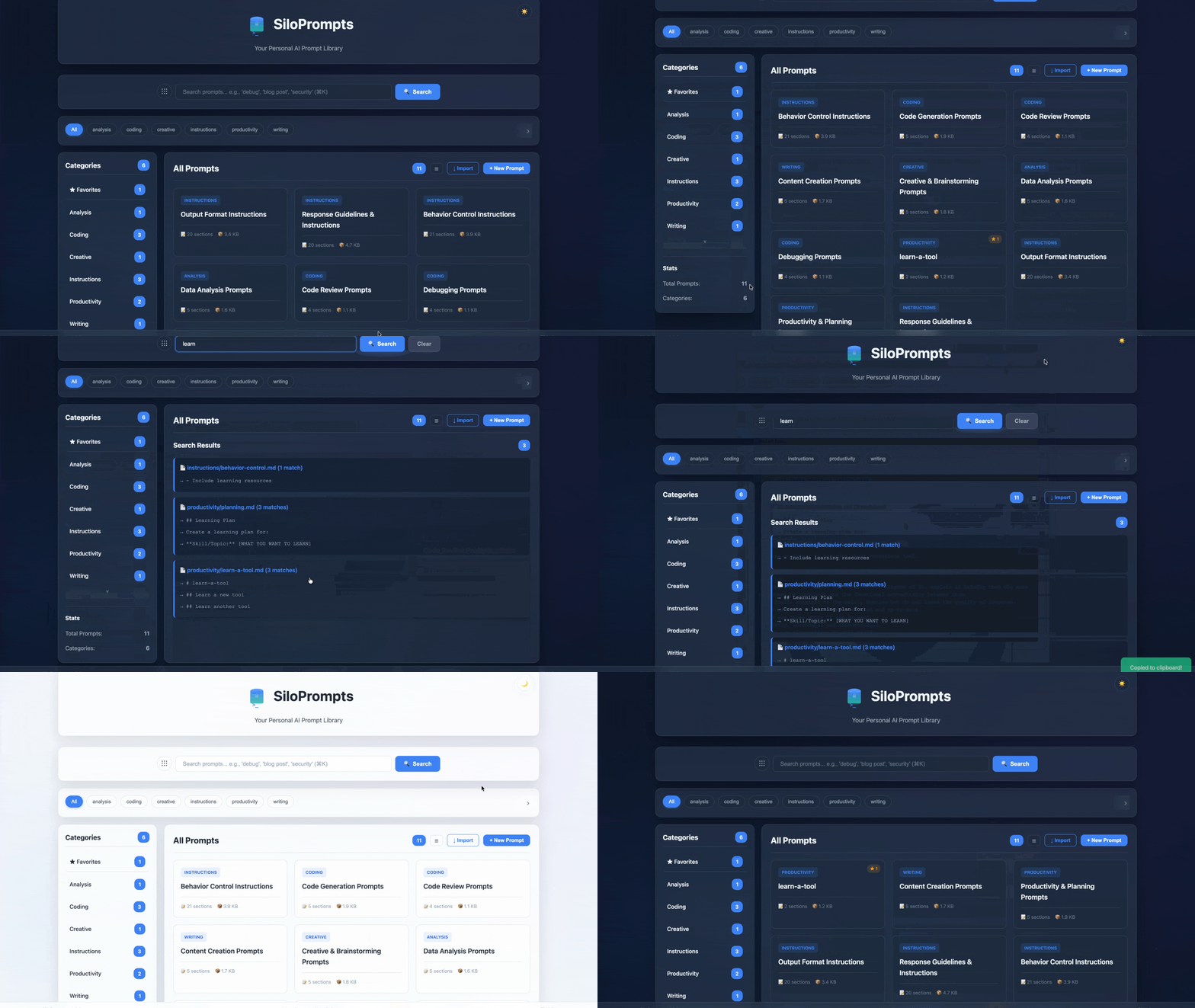
Features
- ✏️ Full CRUD — Create, edit, delete prompts from the web UI
- 🔍 Full-text search with real-time results (⌘K shortcut)
- 📋 One-click copy to clipboard
- 🏷️ Tags — Cross-category organization with multi-select filtering
- ⭐ Section-level favorites — Bookmark specific prompts, not just files
- 🔄 Sort — By name, date modified, or size
- 📥 Import/Export — Upload and download
.mdprompt files - 🌗 Dark/Light mode with glassmorphism theme
- 🐳 Docker-ready with Kubernetes/Helm support
- 🔐 Secure — Path traversal protection, XSS escaping
- 💾 100% local — Markdown files, git-friendly, no database
Quick Start
pip (Simplest)
pip install siloprompts
siloprompts
Access at http://localhost:5000
Prompts are stored in ~/.siloprompts/prompts/ by default.
# Custom port and prompts directory
siloprompts --port 5002 --prompts /path/to/prompts

# Open browser automatically
siloprompts --open

# Show version
siloprompts --version
Docker
docker run -d -p 5002:5000 bdharavathu/siloprompts
Access at http://localhost:5002
Optional: Mount your own prompts folder for persistence
docker run -d -p 5002:5000 -v ./prompts:/app/prompts bdharavathu/siloprompts
Docker Compose
git clone https://github.com/bdharavathu/siloprompts.git
cd siloprompts
docker-compose up -d

# Access at http://localhost:5002
From Source
git clone https://github.com/bdharavathu/siloprompts.git
cd siloprompts
pip install -e ".[dev,server]"
siloprompts --port 5000 --prompts ./prompts --open
Usage
- Browse prompts by category in the sidebar or filter by tags
- Search using keywords — press
⌘Kto focus search instantly - Click a prompt card → view sections → Copy with one click
- Favorite individual sections with ☆ for quick access later
- Create new prompts with "+ New Prompt" or Import existing
.mdfiles - Edit prompts — add, remove, reorder sections, manage tags
- Export any prompt as a
.mdfile to share or backup - Sort prompts by name, date modified, or size
- Paste into ChatGPT, Claude, Gemini, Perplexity, or any AI platform
Adding Prompts
Via Web UI
Click "+ New Prompt", fill in the title, category, tags, and sections.
Via Import
Click "↓ Import", select a .md file, choose a category, and upload.
Via File System
Create a .md file in prompts/<category>/:
# My Custom Prompts
Tags: python, debugging
## Prompt Name
```
Your prompt text here with [PLACEHOLDERS] for variables.
```
## Another Prompt
```
Another prompt...
```
API
GET    /api/prompts                      # List all prompts
GET    /api/prompts/<path>               # Get prompt details
POST   /api/prompts                      # Create prompt
PUT    /api/prompts/<path>               # Update prompt
DELETE /api/prompts/<path>               # Delete prompt
GET    /api/prompts/<path>/download      # Download .md file
POST   /api/prompts/import              # Import .md file
GET    /api/categories                   # List categories
GET    /api/tags                         # List tags with counts
GET    /api/search?q=<query>             # Search prompts
GET    /health                           # Health check
Kubernetes Deployment
helm install siloprompts ./helm/siloprompts
helm upgrade siloprompts ./helm/siloprompts
See helm/siloprompts/values.yaml for configuration: replicas, resources, ingress, TLS, persistent volumes.
Configuration
Environment Variables
| Variable | Default | Description |
|---|---|---|
PROMPTS_DIR |
~/.siloprompts/prompts (pip) / /app/prompts (Docker) |
Prompts storage directory |
DATA_DIR |
~/.siloprompts/data (pip) / /app/data (Docker) |
Application data directory |
FLASK_ENV |
production |
Flask environment |
SECRET_KEY |
dev-key-change-in-production |
Flask secret key |
PORT |
5000 |
Server port |
CLI Options
siloprompts [OPTIONS]

  --port PORT       Port to listen on (default: 5000)
  --host HOST       Host to bind to (default: 127.0.0.1)
  --prompts PATH    Prompts directory path
  --open            Open browser on start
  --version         Show version and exit
Project Structure
siloprompts/
├── src/siloprompts/       # Python package
│   ├── __init__.py        # Package entry point, version
│   ├── manager.py         # PromptManager class
│   ├── web.py             # Flask app factory and API routes
│   ├── cli.py             # CLI entry point
│   ├── __main__.py        # python -m siloprompts support
│   ├── templates/         # HTML templates
│   └── static/            # CSS, JS, images
├── prompts/               # Default prompt library
├── tests/                 # Test suite
├── helm/                  # Kubernetes Helm chart
├── pyproject.toml         # Package metadata
├── Dockerfile             # Container build
└── docker-compose.yml     # Local Docker setup
Technology Stack
- Backend: Python 3.11, Flask 3.0, Gunicorn
- Frontend: Vanilla JavaScript, HTML5, CSS3
- Storage: Markdown files (no database)
- Container: Docker, Kubernetes with Helm
- Package: pip installable via PyPI
Roadmap
- Prompt CRUD from web UI
- Dark/Light mode
- Tags for cross-category organization
- Section-level favorites
- Sort, Import/Export
- pip installable package
- Usage analytics
- Browser extension
License
MIT License
Happy Prompting! 🚀
1 maintainer

Metadata
1 maintainer
Release files for siloprompts 1.0.4.post1
For a detailed explanation of source distributions (sdists) and built distributions (wheels), please see the package formats documentation.
Source distribution (sdist)
| File | Size | Uploaded | |
|---|---|---|---|
| siloprompts-1.0.4.post1.tar.gz | 45.6 kB | Details |
Built distribution (wheel)
| File | Interpreter | ABI | Platform | Reset |
|---|---|---|---|---|
| siloprompts-1.0.4.post1-py3-none-any.whl | Python 3 | none | any | Details |
Total release size: 89.8 kB
Release files / siloprompts-1.0.4.post1.tar.gz
| Download URL | siloprompts-1.0.4.post1.tar.gz |
|---|---|
| Size | 45.6 kB |
| Tags | Source |
|
SHA-256 checksum How to use checksums |
79b6cbf72dbf71d8bb0f8ad09a6042656ec9ad7cff3a8f83568ac73823e55153
|
|
BLAKE2b-256 checksum How to use checksums |
811cbaf63d77f324d1f5806a0723be7f89f0428d88842de4e2b38bf6576b6119
|
| Upload date | |
|
Uploaded using Trusted Publishing? What is trusted publishing? |
No |
| Uploaded via |
twine/6.2.0 CPython/3.13.12
|
Release files / siloprompts-1.0.4.post1-py3-none-any.whl
| Download URL | siloprompts-1.0.4.post1-py3-none-any.whl |
|---|---|
| Size | 44.1 kB |
| Tags | Python 3 |
|
SHA-256 checksum How to use checksums |
071579cb08c8587580f563934a0d9fbde23c5def37d5777468f2eed851500e75
|
|
BLAKE2b-256 checksum How to use checksums |
b80bb2a30bf5fa3419b04077d341b93b86d9fa827df6c1f3c9cd5654bd3f85f2
|
| Upload date | |
|
Uploaded using Trusted Publishing? What is trusted publishing? |
No |
| Uploaded via |
twine/6.2.0 CPython/3.13.12
|













