





Synthetic Images Metrics Toolkit (SIM Toolkit)

The Synthetic Images Metrics (SIM) Toolkit is a Python library for evaluating the quality of 2D and 3D synthetic images.
It provides metrics to assess:
- Fidelity: how realistic synthetic images are;
- Diversity: how well they cover the real data distribution ;
- Generalization: whether the model generates new samples instead of memorizing the training set.
The toolkit automatically generates a PDF report with metric values, plots, and qualitative analyses.
📄 Example report:
report_metrics_toolkit.pdf
Installation
🐍 Python and compatibility
- Tested / supported: Python 3.10 – 3.12
- Recommended: Python 3.10 or 3.11 (most robust with deep learning dependencies).
- Works on CPU and GPU.
For GPU acceleration, install a compatible CUDA version (CUDA ≥ 11 recommended) and use the matching PyTorch wheels.
🔧 Basic install
pip install sim_toolkit
This installs the core library (no heavy backends).
➕ Optional extras
Install only what you need:
- PyTorch backend (required for core metrics):
pip install "sim_toolkit[torch]"
- TensorFlow backend (only needed for 2D
pr_auth,prdc, andknn):pip install "sim_toolkit[tf]"
⚠️ Officially supported on Python 3.10–3.11.
On Python 3.12, this extra may not resolve a compatible TF wheel; if TF is already installed and working (e.g. Colab), SIM Toolkit will detect and use it. - File format / dataset support:
pip install "sim_toolkit[nifti]"        # NIfTI (.nii/.nii.gz)
pip install "sim_toolkit[dcm]"          # DICOM (.dcm)
pip install "sim_toolkit[tiff]"         # TIFF
pip install "sim_toolkit[opencv]"       # JPEG/PNG via OpenCV, etc.
pip install "sim_toolkit[csv]"          # CSV-based labels/metadata
You can combine extras, for example:
pip install "sim_toolkit[torch,nifti]"
If a required backend is missing at runtime, SIM Toolkit will raise a clear, short error with the exact pip install command to run.
🐳 Docker
You can run the SIM Toolkit in a fully isolated, ready-to-use Docker environment.
-
Pull the image:
docker pull aiformedresearch/metrics_toolkit:4.0.1
-
Run the Docker container
docker run -it --gpus all \ -v /absolute/path/to/real_data:/workspace/data/real \ -v /absolute/path/to/synt_data:/workspace/data/synt \ -v /absolute/path/to/runs:/workspace/runs \ aiformedresearch/metrics_toolkit:4.0.1- The
--gpus allflag enables GPU support. Specify a GPU if needed, e.g.,--gpus 0. - The
-v host/containermount the local directories to the working directory/workspaceinside the container.
- The
Refer to the Usage section for detailed instructions about running the main script.
Usage (Python API)
🚀 Last Update: No config file needed — everything is passed as function arguments via
sim.compute(...).
To run SIM Toolkit you only need to define how to load:
- Real data → choose a built-in dataset tag or define a small custom loader (👉 A).
- Synthetic data:
- from files → same as real data (👉 A);
- from a pretrained generator → on-the-fly synthesis (👉 B).
A) From image files
Load and evaluate synthetic images directly from files or directories.
Supported built-in dataset tags: nifti, dcm, tiff, jpeg, png, or auto (infers format from path_data).
Custom format or custom folder structure?
You can plug in your own loader without modifying SIM Toolkit:
- define a small dataset class inheriting from
sim_toolkit.datasets.base.BaseDataset - then either:
- pass the class directly:
real_dataset=MyDataset, or - point to a file:
real_dataset="path/to/my_dataset.py:MyDataset"
- pass the class directly:
📄 See: sim_toolkit/datasets
Basic example
import sim_toolkit as sim

sim.compute(
    metrics=["fid", "kid", "is_", "prdc", "pr_auth", "knn"],
    run_dir="./runs/exp1",
    num_gpus=1,              # set 0 to force CPU
    batch_size=64,
    data_type="2D",          # or "3D"
    use_cache=True,
    padding=False,

    ## Real data
    real_dataset="auto",     # "nifti" | "dcm" | "tiff" | "jpeg" | "png" | "auto"
    real_params={
        "path_data": "data/real_images",
        "path_labels": None,
        "use_labels": False,
        "size_dataset": None # (int) if None, using all
        },

    ## Synthetic data (from files)
    synth_dataset="auto",    # "nifti" | "dcm" | "tiff" | "jpeg" | "png" | "auto"
    synth_params={
        "path_data": "data/synt_images",
        "path_labels": None,
        "use_labels": False,
        "size_dataset": None # (int) if None, using all
        },
    )
📖 Tutorial (file-based usage):
Colab – SIM Toolkit with your data
B) From a pre-trained generator (no synthetic files)
Generate synthetic images on-the-fly using a pretrained generative model.
You provide:
load_network(network_path)→ loads your pretrained modelrun_generator(z, c, opts)→ uses that model to generate a batch of images
Real data loading is identical to section A (built-in or custom dataset).
import sim_toolkit as sim

def load_network(network_path):
    # user-provided loader returning a torch.nn.Module (G)
    ...

def run_generator(z, c, opts):
    """
    Args:
    - z:    Latent input for the generator.
              - For GANs: typically a tensor of shape (N, latent_dim).
              - For diffusion / other models: can be any shape your model expects.
    - c:    (optional) class labels, for conditional generation.
    - opts:  Helper object from the SIM Toolkit.
              - opts.G :      the loaded generator/model (e.g., torch.nn.Module)
              - opts.device : torch.device to run generation on

    Must return a tensor of shape:
      - (N, C, H, W)    for 2D data
      - (N, C, H, W, D) for 3D data
    """
    ## Example:
    # img = opts.G(z, c)
    # return img
    ...

sim.compute(
    metrics=["fid", "kid", "is_", "prdc", "pr_auth", "knn"],
    run_dir="./runs/gen",

    ## Real data
    real_dataset="auto", # "nifti" | "dcm" | "tiff" | "jpeg" | "png" | "auto"
    real_params={"path_data": "data/real_images_simulation.nii.gz"},

    ## Synthetic data (from pre-trained generator)
    use_pretrained_generator=True,
    network_path="checkpoints/G.pkl",
    load_network=load_network,
    run_generator=run_generator,
    num_gen=50000, # how many synthetic images to generate
)
📖 Tutorial (generator-based usage):
Colab – SIM Toolkit with your pre-trained model
All metric values, plots, and the final PDF report are saved under: run_dir/.
Metrics
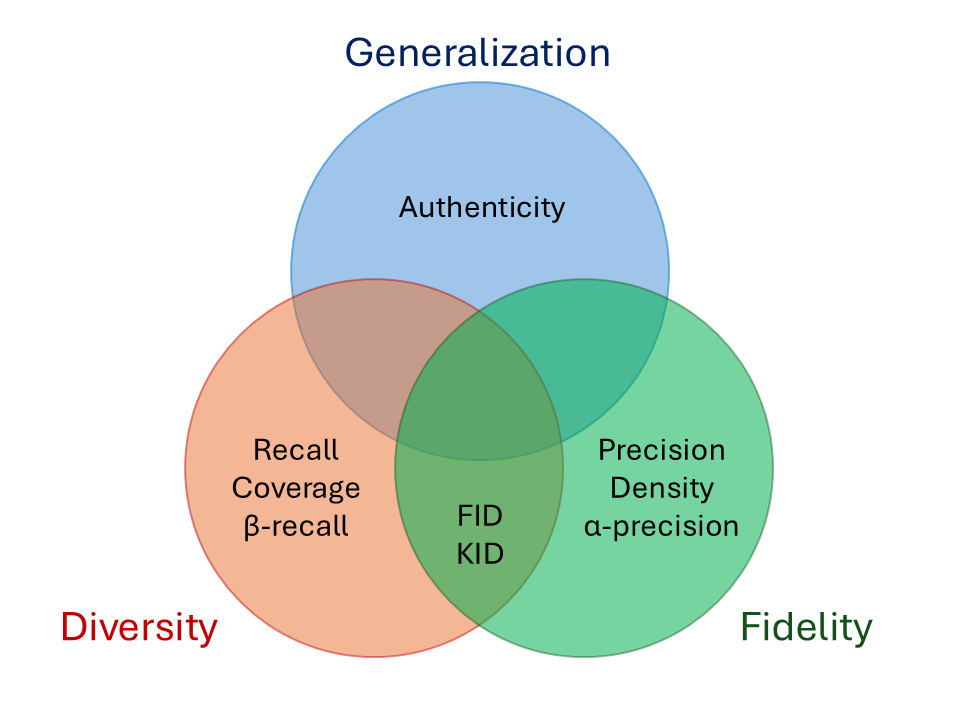
Quantitative
| Flag | Description | Source | Reference |
|---|---|---|---|
fid |
Fréchet inception distance against the full dataset | Karras et al. | Heusel et al. 2017 |
kid |
Kernel inception distance against the full dataset | Karras et al. | Bińkowski et al. 2018 |
is_ |
Inception score against the full dataset (only 2D) | Karras et al. | Salimans et al. 2016 |
prdc |
Precision, recall, density, and coverage against the full dataset | Naeem et al. | Kynkäänniemi et al. 2019; Naeem et al., 2020 |
pr_auth |
$\alpha$-precision, $\beta$-recall, and authenticity against the full dataset | Alaa et al. | Alaa et al., 2022 |
⚠️ 3D setup 3D metrics use a 3D-ResNet50 feature extractor from MedicalNet, pre-trained on 23 medical imaging datasets. Ensure your domain is compatible; otherwise embeddings (and thus metrics) may not be meaningful.
Qualitative
The toolkit automatically generates:
- Grids of real and synthetic samples
- PCA and t-SNE visualizations of real vs. synthetic embeddings
- Summary plots embedded into the final PDF report
Additionally, you can enable:
-
k-NN analysis (
knnflag):The k-nearest neighbour (k-NN) visualization shows:
- The
knn_num_realreal images most similar to any synthetic image (default:knn_num_real=3). - For each of those real images, the
knn_num_synthmost similar synthetic samples, ranked by their cosine similarity (default:knn_num_synth=5).
These can be configured directly in
sim.compute(...):sim.compute( metrics=["knn"], run_dir="./runs/knn_example", knn_num_real=3, knn_num_synth=5, # other args... )
- The
📄 Example report:
report_sim_toolkit.pdf
Licenses
This project complies with the REUSE Specification. All source files are annotated with SPDX license identifiers, and full license texts are included in the LICENSES directory.
- LicenseRef-NVIDIA-1.0: Applies to code reused from NVIDIA's StyleGAN2-ADA repository: https://github.com/NVlabs/stylegan2-ada-pytorch, under the NVIDIA Source Code License.
- MIT: For code reused from:
- BSD-3-Clause: Applies to two scripts reused from https://github.com/vanderschaarlab/evaluating-generative-models;
- NPOSL-3.0: Applies to the code developed specifically for this repository.
For detailed license texts, see the LICENSES directory.
Aknowledgments
This toolkit builds upon and adapts components from:
- NVIDIA StyleGAN2-ADA – core project layout,
dnnlibutilities, dataset and metric infrastructure, and metric implementations (used under the NVIDIA Source Code License). - evaluating-generative-models – metric implementations.
- generative-evaluation-prdc – metric implementations.
- MedicalNet – pre-trained 3D feature extractor.
Citation
If you use the SIM Toolkit in your research or publications, please cite:
@article{lai25,
  title   = {Generating Brain MRI with StyleGAN2-ADA: The Effect of the Training Set Size on the Quality of Synthetic Images},
  author = {Lai, Matteo and Mascalchi, Mario and Tessa, Carlo and Diciotti, Stefano},
  journal = {Journal of Imaging Informatics in Medicine},
  year    = {2025},
  issn = {2948-2933},
  url = {https://doi.org/10.1007/s10278-025-01536-0},
  doi = {10.1007/s10278-025-01536-0},
}
1 maintainer

Metadata
1 maintainer
Release files for sim-toolkit 4.1.1
For a detailed explanation of source distributions (sdists) and built distributions (wheels), please see the package formats documentation.
Source distribution (sdist)
| File | Size | Uploaded | |
|---|---|---|---|
| sim_toolkit-4.1.1.tar.gz | 246.5 kB | Details |
Built distribution (wheel)
| File | Interpreter | ABI | Platform | Reset |
|---|---|---|---|---|
| sim_toolkit-4.1.1-py3-none-any.whl | Python 3 | none | any | Details |
Total release size: 514.2 kB
Release files / sim_toolkit-4.1.1.tar.gz
| Download URL | sim_toolkit-4.1.1.tar.gz |
|---|---|
| Size | 246.5 kB |
| Tags | Source |
|
SHA-256 checksum How to use checksums |
773940c94314e2152b3f10b396390eef38f4c3e90a2e631751c23451b2e80715
|
|
BLAKE2b-256 checksum How to use checksums |
86388c7f1b2d076dc4d2c06bb16d6856f5b3a2e65eeb3dd46b8f4c62fae8d6cc
|
| Upload date | |
|
Uploaded using Trusted Publishing? What is trusted publishing? |
No |
| Uploaded via |
twine/6.2.0 CPython/3.12.8
|
Release files / sim_toolkit-4.1.1-py3-none-any.whl
| Download URL | sim_toolkit-4.1.1-py3-none-any.whl |
|---|---|
| Size | 267.7 kB |
| Tags | Python 3 |
|
SHA-256 checksum How to use checksums |
e67c53c16568b9cf6a38b5a367f67b9af998525aca1bf66042ff1fdbaad75951
|
|
BLAKE2b-256 checksum How to use checksums |
09f84703a2600723defdf20a7d81a691d7d4cf58ec0e12e983620b45d63eb6be
|
| Upload date | |
|
Uploaded using Trusted Publishing? What is trusted publishing? |
No |
| Uploaded via |
twine/6.2.0 CPython/3.12.8
|














