
Built Environmenta Data (BED) - SimDesign Framework





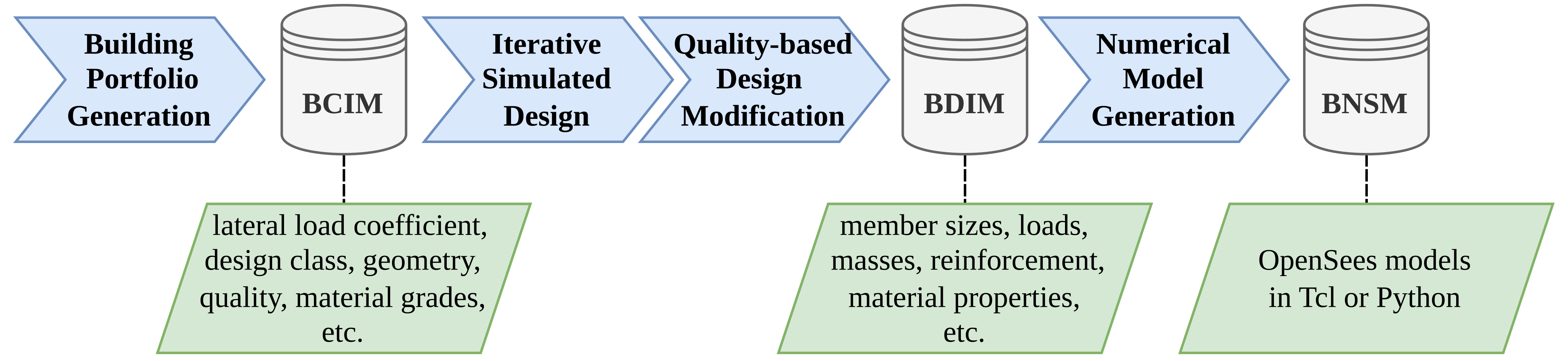
A Python package for the modeling the seismic vulnerability of buildings using the simulated design. Currently, it focuses on Reinforced Concrete (RC) Moment Resisting Frames (MRFs), but the workflow is adaptable to other structural systems. To ensure modularity and scalability for future extensions, the rcmrf framework is integrated within the broader simdesign library. The framework can accommodate the design of buildings using both historical and modern seismic design procedures and regulations, while capturing building-to-building variability. It generates Building Class Information Models (BCIM), Building Design Information Models (BDIM), and Building Nonlinear Structural Models (BNSM) that are analyzable in OpenSees.
Installation
Follow the steps below to install the simdesign package.
Note: Python 3.12 is required. Ensure that correct version is installed:
python --version # should be 3.12.x
Create a Virtual Environment (Recommended)
Create a virtual environment to manage dependencies:
python -m venv .venv
Activate the virtual environment:
.venv\Scripts\activate     # On Windows
source .venv/bin/activate  # Linux / macOS
Option 1: Install via PyPI
Open the terminal and simply run:
pip install simdesign
Option 2: Install from Source
Clone the repository:
git clone https://github.com/builtenvdata/simulated-design.git
cd simulated-design
Install the simdesign package:
pip install .
Alternatively, to install in editable mode (useful for development), run:
pip install -e .
Usage
Once installed, you can import and use the package in Python:
# Example usage
from simdesign import rcmrf

# The main inputs for each design class
inputs = {
    "bcim": {
        "design_class": "eu_cdl",
        "sample_size": 30,
        "num_storeys": 4,
        "beta": 0.1,
        "seed": 2
    },
    "bnsm": {
        "model": "DP01",
        "scheme": "EQL",
        "dincr": 1e-3,
        "max_drift": 0.1,
        "opensees": "py",
        "include_infills": False
    }
}
# Run the bed-workflow for rcmrf systems and save the outputs
bcim, bdim, bnsm = rcmrf.generate(inputs=inputs, outdir="Outputs")
For more examples please see the scripts folder or see full documentation for advanced use.
It is also possible to visualise and design buildings with specific geometries. See an example of a specific design.
Contributing
Contributions are welcome! If you’d like to contribute, follow these steps:
- Fork the repository.
- Create a new branch (
git checkout -b feature-branch). - Make your changes.
- Update the test files (
test_rcmrf.py) for new features. - Run pytest and check if all tests pass (
pytest tests). - Commit the changes (
git commit -m 'Add new feature'). - Push to the branch (
git push origin feature-branch). - Open a pull request.
References
If you use the SimDesign tool, please be sure to cite the reference publication:
Ozsarac, V., Pereira, N., Mohamed, H., Romão, X., & O’Reilly, G. J. (2025). The Built Environment Data Framework for Simulated Design and Vulnerability Modelling in Earthquake Engineering. Earthquake Engineering & Structural Dynamics, 54(11), 2651-2670. https://doi.org/10.1002/eqe.4378
Hasanoğlu, S., Ozsarac, V., & O’Reilly, G. J. (2025). A model for the simulated design of Turkish RC frame buildings in seismic vulnerability analysis. Bulletin of Earthquake Engineering, 23(15), 6829-6856. https://doi.org/10.1007/s10518-025-02301-y
License
This project is licensed under the AGPL-3.0 license. See the LICENSE file for details.
1 maintainer

Metadata
1 maintainer
Release files for simdesign 1.1.0
For a detailed explanation of source distributions (sdists) and built distributions (wheels), please see the package formats documentation.
Source distribution (sdist)
| File | Size | Uploaded | |
|---|---|---|---|
| simdesign-1.1.0.tar.gz | 377.7 kB | Details |
Built distribution (wheel)
| File | Interpreter | ABI | Platform | Reset |
|---|---|---|---|---|
| simdesign-1.1.0-py3-none-any.whl | Python 3 | none | any | Details |
Total release size: 898.3 kB
Release files / simdesign-1.1.0.tar.gz
| Download URL | simdesign-1.1.0.tar.gz |
|---|---|
| Size | 377.7 kB |
| Tags | Source |
|
SHA-256 checksum How to use checksums |
2ab9a9db64df5a6a4e7e8fcc4fcb2524337892bb35b1a05ee3e5d3324aaf8936
|
|
BLAKE2b-256 checksum How to use checksums |
fb07fdc22a1216d91a78a5286c778dabb3405d248cf487cf7938c8bd7ce5ba25
|
| Upload date | |
|
Uploaded using Trusted Publishing? What is trusted publishing? |
No |
| Uploaded via |
poetry/2.2.1 CPython/3.12.10 Windows/11
|
Release files / simdesign-1.1.0-py3-none-any.whl
| Download URL | simdesign-1.1.0-py3-none-any.whl |
|---|---|
| Size | 520.6 kB |
| Tags | Python 3 |
|
SHA-256 checksum How to use checksums |
ff20cf271e63267296ba156438d01c7c6e0a880e5859459fb65e7b5becb18350
|
|
BLAKE2b-256 checksum How to use checksums |
57da29de244d68546c8d9b0afcf7093497c6e95f86e0a7e936d4f81fd1017575
|
| Upload date | |
|
Uploaded using Trusted Publishing? What is trusted publishing? |
No |
| Uploaded via |
poetry/2.2.1 CPython/3.12.10 Windows/11
|














