
Simjecture



Try online · Documentation · Research loop · Recorded studies · Contributing
Hypothesize. Simulate. Falsify.
Simjecture runs autonomous numerical investigations from a human-defined scientific question. An agent designs experiments, searches for counterexamples and tests revised hypotheses. The evidence system preserves what ran and a separate reviewer examines whether the results justify the conclusion.
You set the question, physical scope and budget. The agent chooses how to work. You can inspect intermediate results, steer the investigation and continue it in a new phase. The result is a research record you can follow from hypothesis to code, measurements, counterexamples and review.
The research loop
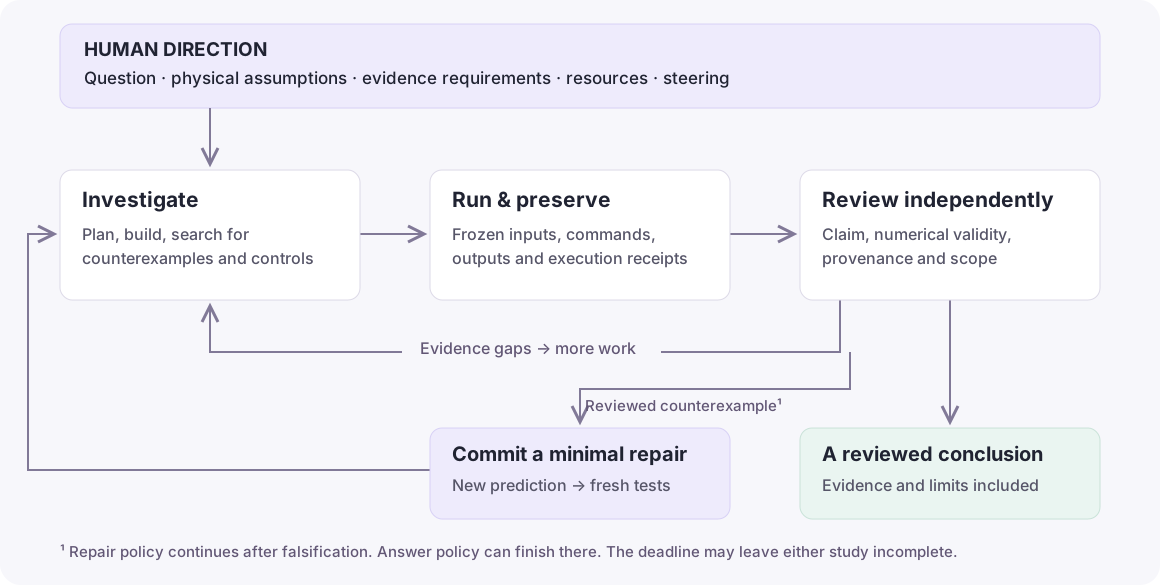
A counterexample must survive the relevant numerical controls. Under the repair completion policy, the agent then proposes the smallest justified change to the hypothesis, commits its predictions before testing them, and collects fresh validation evidence. Missing evidence sends the work back through the loop.
The answer policy can also finish with a reviewed falsification of the original claim. New browser studies default to answer; the CLI defaults to repair. Both use minimal mode by default: flexible agent strategy, recorded experiments and explicit scientific acceptance. A deadline can leave the question unresolved.
Read how the loop works or how evidence is checked.
Follow a real investigation
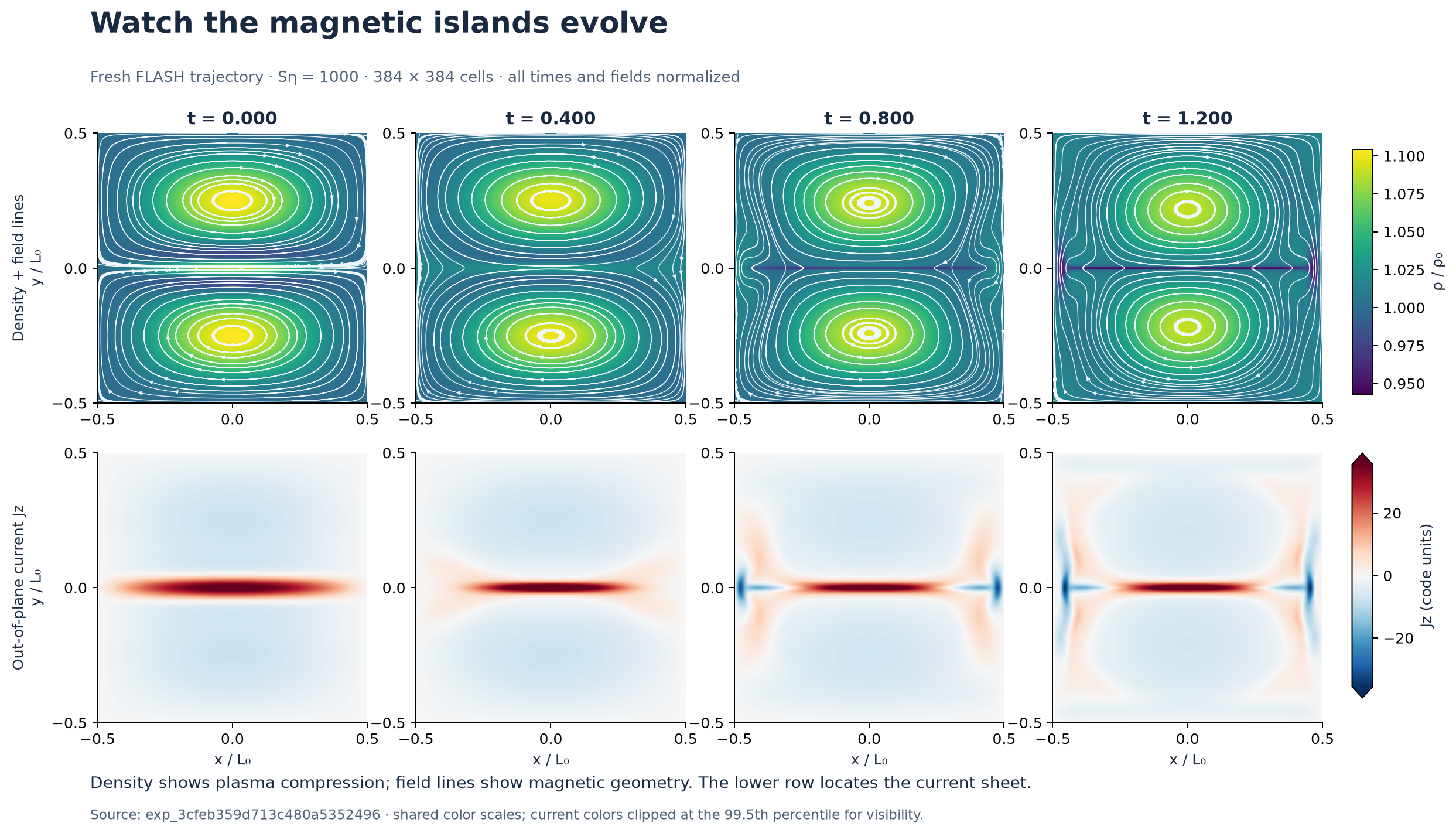
Magnetic-island coalescence with FLASH shows density, magnetic geometry and a current sheet evolving in a real MHD calculation. Follow five resistivity cases, two refinements and their evidence map to see what was measured and why the full-range question remains open. The classic campaign and subsequent diagnostic audits remain available.
FLASH → WarpX kinetic follow-up follows an actual MHD current sheet into a kinetic particle simulation. The visual walkthrough locates the patch, opens its pressure-measurement region, and connects field maps and numerical controls to the unresolved scientific claim.
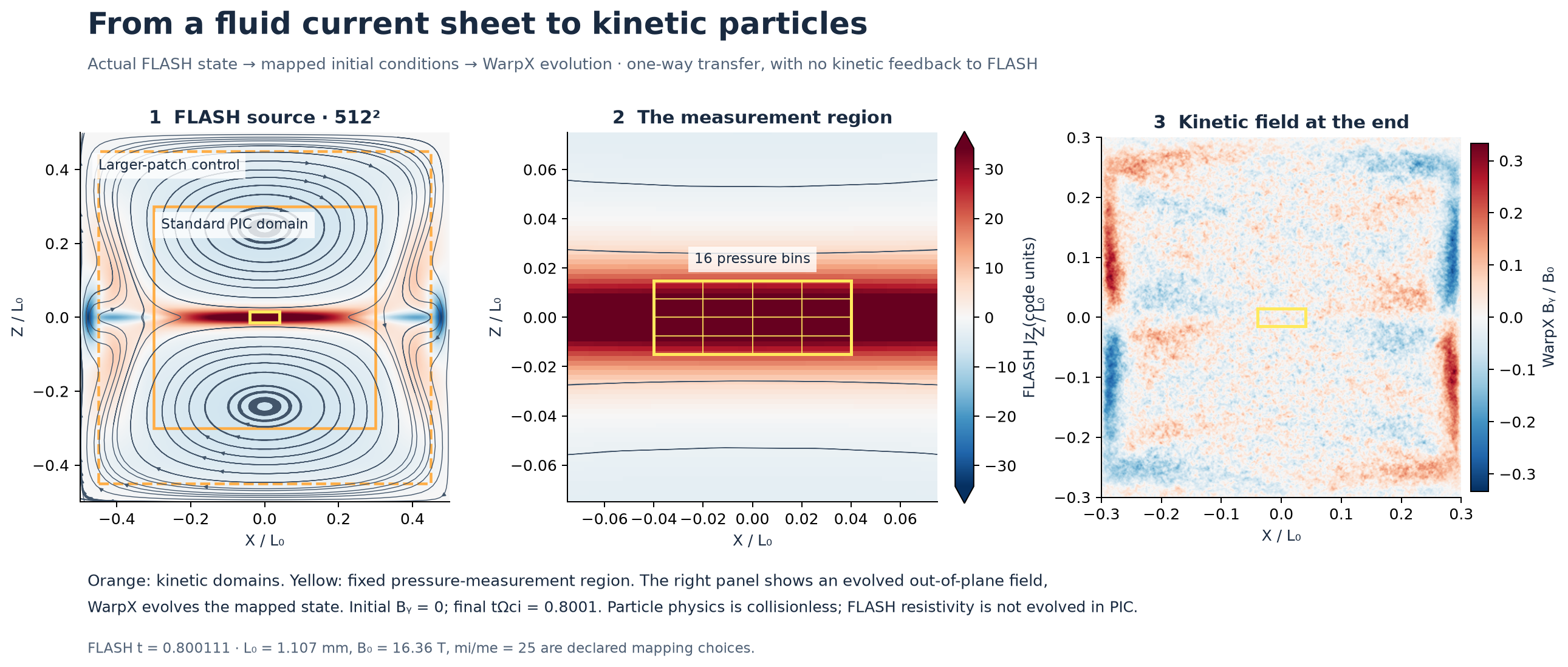
Both plasma investigations include preserved continuation records, downloadable figures and explicit distinctions between a completed simulation, an approved method and an accepted scientific conclusion.
The orbital-accuracy walkthrough uses the current minimal workflow to investigate a concrete question: does small energy error imply an accurate trajectory? It connects the operator's brief, actual numerical experiments, hypothesis revisions and independent review. It found five counterexamples in the original case matrix, then supported a four-case repair using fresh simulations and independent review. The retained record can be verified without a model call.
Earlier records remain available. In the historical Gray–Scott study, the harness rejected an attempt to close a claim using evidence commissioned for a different claim. The agent registered the missing contract and ran fresh experiments before closing it. That record documents the classic workflow; it is not presented as a new-version run.
What the evidence system preserves
| Question you should be able to ask | Recorded material |
|---|---|
| What was being tested? | Original hypothesis, operator requirements and committed repairs |
| What actually ran? | Frozen source and inputs, command, runtime identity and execution receipt |
| Where did this number come from? | Output files, hashes and the experiment cited by the claim |
| What challenged the result? | Counterexamples, controls, failed attempts and review gaps |
| Why did the investigation finish? | Independent review, completion policy and budget or stop reason |
A repaired claim cannot reuse old exploratory results as fresh validation. Changed committed source, missing committed cases and altered recorded outputs are checked by the service. Numerical adequacy and scientific interpretation remain review judgments. See the evidence guide.
Try it
Open simjecture.com for the hosted workspace with supplied inference and compute within usage limits. Signed-in visitors can upload files and retain projects. Guest conversations and artifacts are temporary.
For your own Linux or WSL machine, install the latest stable release:
curl -fsSL https://github.com/tomzhu0225/simjecture/releases/latest/download/install.sh | bash
The installer verifies the release bundle and prepares Python and the browser
workspace. Reopen it with ~/simjecture/start-workspace. Research files live under
~/simjecture/artifacts/projects. See installation options.
- Choose a compatible API model or an authenticated native agent in the workspace.
- Discuss your question and prepare a study brief with Autonomous research.
- Review its hypothesis, evidence requirements, completion policy and budget.
- Start the investigation and follow its experiments and Evidence & review.
The first-study tutorial walks through the full counterexample-and-repair workflow. Headless studies cover terminal launches and automation.
Bring your instruments and compute
Ordinary Python studies work without an external solver. Optional capabilities include WarpX, operator-supplied FLASH, EOS/opacity tools, ITER diagnostics and GPU cylinder flow. The cylinder solver and its validation records were contributed by Zifei Meng.
- Commission a scientific instrument or add your own capability.
- Run experiments on local or SSH workers.
- Steer or continue an investigation.
- Compare agents on recorded diagnostic tasks.
- Operate a hosted service.
Native agents retain their existing tools and run with their host-account access. Numerical experiments use the selected execution backend, Bubblewrap by default. Read security guidance and restricted-host setup when deploying workers.
Contribute
Help us test the research process on meaningful questions. Contributions can add scientific instruments, validated diagnostics, reproducible studies, numerical review, documentation or infrastructure. Start with CONTRIBUTING.md or open an issue to discuss a study or a substantial change.
Release notes · Release checks · Research status · Historical records
Citation and license
Use CITATION.cff and identify the exact version and Git commit used for a result. The concept DOI identifies the release series.
Copyright 2026 Bowen Zhu and contributors. Licensed under Apache 2.0. See third-party notices for upstream attribution and redistribution requirements.
1 maintainer

Metadata
1 maintainer
Release files for simjecture 0.6.1
For a detailed explanation of source distributions (sdists) and built distributions (wheels), please see the package formats documentation.
Source distribution (sdist)
| File | Size | Uploaded | |
|---|---|---|---|
| simjecture-0.6.1.tar.gz | 11.9 MB | Details |
Built distribution (wheel)
| File | Interpreter | ABI | Platform | Reset |
|---|---|---|---|---|
| simjecture-0.6.1-py3-none-any.whl | Python 3 | none | any | Details |
Total release size: 22.1 MB
Release files / simjecture-0.6.1.tar.gz
| Download URL | simjecture-0.6.1.tar.gz |
|---|---|
| Size | 11.9 MB |
| Tags | Source |
|
SHA-256 checksum How to use checksums |
a011ed075a47a2d636ab0f018db53a92456b6110778710b7fdc087ad8333bae5
|
|
BLAKE2b-256 checksum How to use checksums |
f01b1bbe861719d7fc3bbe0d7a391869af8accafc2b036e409e25ee268b3f503
|
| Upload date | |
|
Uploaded using Trusted Publishing? What is trusted publishing? |
Yes |
| Uploaded via |
twine/7.0.0 CPython/3.13.14
|
Provenance
Provenance describes where a file came from. On PyPI, provenance is shared via attestations, which provide a verifiable record of the build or publishing details. View details, limitations and caveats.


PyPI Publish Attestation
PyPI verified that this artifact, at this checksum, originated from the publisher listed below.
Signed by GitHub Actions, verified by PyPI on Oct 8, 2026.
Transparency logRelease files / simjecture-0.6.1-py3-none-any.whl
| Download URL | simjecture-0.6.1-py3-none-any.whl |
|---|---|
| Size | 10.3 MB |
| Tags | Python 3 |
|
SHA-256 checksum How to use checksums |
f6a07bf23b4281ea6e154ad01cb0a099d67fbcd1b4fdc2d8491359a26ad2216b
|
|
BLAKE2b-256 checksum How to use checksums |
2f1a1766c8f6a11a4cfbe62581508b38a7cc67a896f7a6e1d351f98eb4620bad
|
| Upload date | |
|
Uploaded using Trusted Publishing? What is trusted publishing? |
Yes |
| Uploaded via |
twine/7.0.0 CPython/3.13.14
|
Provenance
Provenance describes where a file came from. On PyPI, provenance is shared via attestations, which provide a verifiable record of the build or publishing details. View details, limitations and caveats.
PyPI Publish Attestation
PyPI verified that this artifact, at this checksum, originated from the publisher listed below.
Signed by GitHub Actions, verified by PyPI on Oct 8, 2026.
Transparency log













