
simple_camera_capture
Very simple recording tool using only OpenCV. Automatically record the camera capture to mp4, press C key or left mouse button click to take a still image.
Environment
- opencv-python==4.1.2.30
Usage
1. Start of Recording
$ simpcamcap
or
$ xhost +local: && \
docker run --rm -it \
-v `pwd`:/workdir \
-w /workdir \
-v /tmp/.X11-unix/:/tmp/.X11-unix:rw \
-e DISPLAY=$DISPLAY \
-e QT_X11_NO_MITSHM=1 \
--device /dev/video0:/dev/video0 \
ghcr.io/pinto0309/simple_camera_capture:latest simpcamcap
usage: simpcamcap
[-h]
[-cn CAMERA_NO]
[-cw CAMERA_CAP_WIDTH]
[-ch CAMERA_CAP_HEIGHT]
[-mi MOVIE_OR_IMAGE_PATH]
[-dvr]
[-dcr]
[-V]

optional arguments:
  -h, --help
    show this help message and exit.
  -cn CAMERA_NO, --camera_no CAMERA_NO
  -cw CAMERA_CAP_WIDTH, --camera_cap_width CAMERA_CAP_WIDTH
  -ch CAMERA_CAP_HEIGHT, --camera_cap_height CAMERA_CAP_HEIGHT
  -mi MOVIE_OR_IMAGE_PATH, --movie_or_image_path MOVIE_OR_IMAGE_PATH
  -dvr, --disable_video_recording
  -dcr, --display_camera_resolutions
    Displays a list of resolutions supported by the camera.
    Cannot be used in conjunction with other options other than -cn.
    Linux only option.
    sudo apt update && sudo apt install v4l-utils
  -V, --version
    Show version and exit.
2. Saving a still image
Press C key on the keyboard or left mouse button click.
3. End of Recording
Press the Q key or ESC key on the keyboard or right mouse button click.
4. Sample
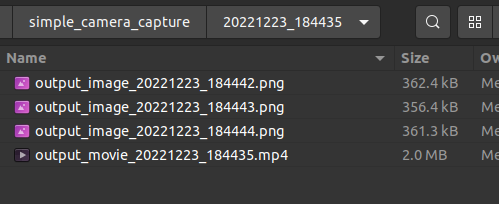
1 maintainer

Release files for simpcamcap 1.0.0
For a detailed explanation of source distributions (sdists) and built distributions (wheels), please see the package formats documentation.
Source distribution (sdist)
| File | Size | Uploaded | |
|---|---|---|---|
| simpcamcap-1.0.0.tar.gz | 4.6 kB | Details |
Built distribution (wheel)
| File | Interpreter | ABI | Platform | Reset |
|---|---|---|---|---|
| simpcamcap-1.0.0-py3-none-any.whl | Python 3 | none | any | Details |
Total release size: 10.1 kB
Release files / simpcamcap-1.0.0.tar.gz
| Download URL | simpcamcap-1.0.0.tar.gz |
|---|---|
| Size | 4.6 kB |
| Tags | Source |
|
SHA-256 checksum How to use checksums |
40caa0eafd569edca252f4237912a02b0a12d06f4a75f8f6bb99edd640001cca
|
|
BLAKE2b-256 checksum How to use checksums |
041cbb5a9ada21fd650666a5b67c952c24068c7b265b680faf7962cb74ff2220
|
| Upload date | |
|
Uploaded using Trusted Publishing? What is trusted publishing? |
No |
| Uploaded via |
twine/4.0.2 CPython/3.9.16
|
Release files / simpcamcap-1.0.0-py3-none-any.whl
| Download URL | simpcamcap-1.0.0-py3-none-any.whl |
|---|---|
| Size | 5.5 kB |
| Tags | Python 3 |
|
SHA-256 checksum How to use checksums |
c3f68ace44ff2de2a22719c10328e6dd04e5b1c387d4a1bc88744583f681a491
|
|
BLAKE2b-256 checksum How to use checksums |
614ac154b8352455121815214f9971db1621cec09ede1e36f85f882fca2493c8
|
| Upload date | |
|
Uploaded using Trusted Publishing? What is trusted publishing? |
No |
| Uploaded via |
twine/4.0.2 CPython/3.9.16
|














