
simple-clip
Simple implementation of CLIP (Contrastive Language-Image Pretraining) in PyTorch.
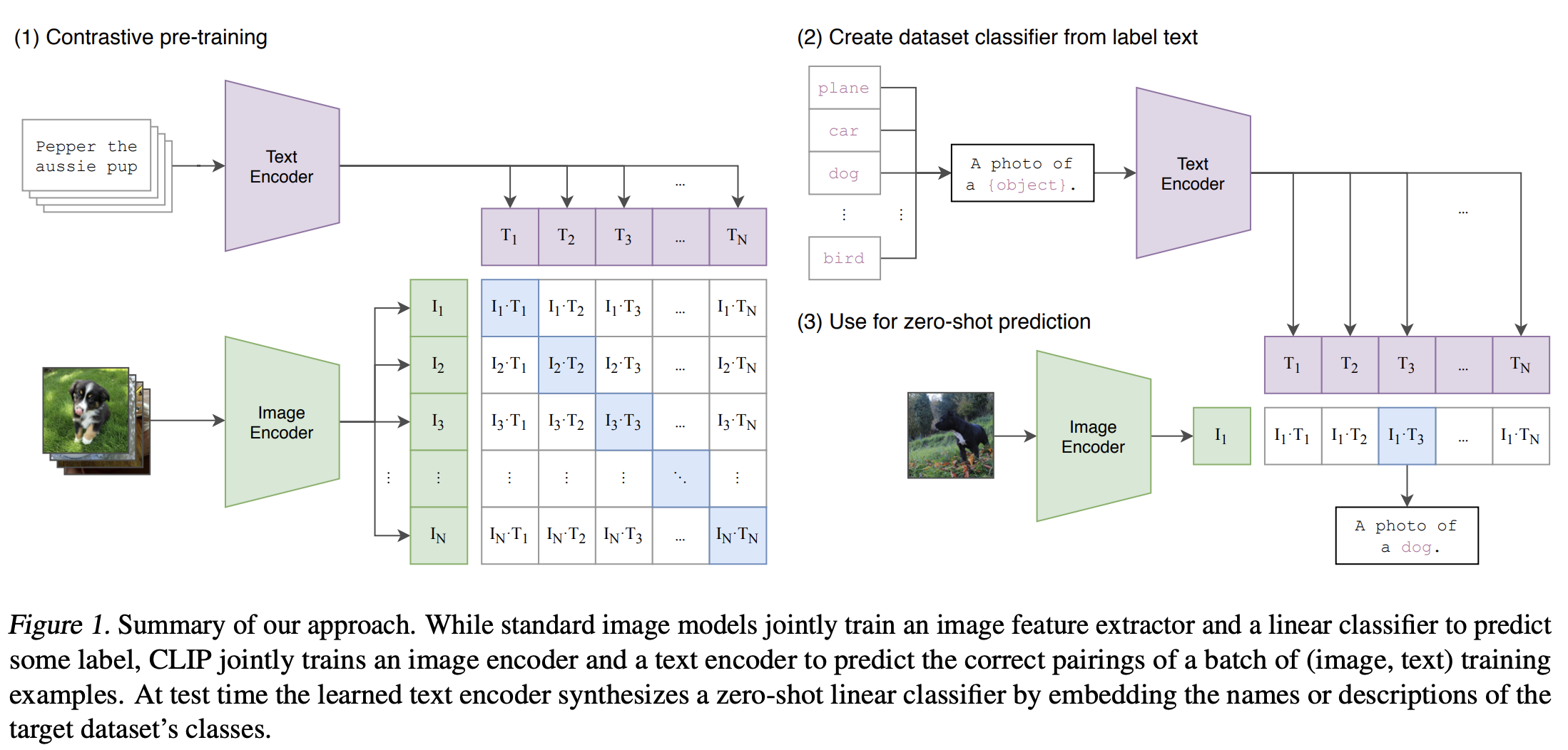
CLIP
CLIP (Contrastive Language-Image Pretraining) by OpenAI is a model that unifies text and image understanding through a contrastive learning approach. It employs two neural networks, one for image processing and another for text processing, which are jointly trained on a large dataset of images and their corresponding textual descriptions. This training enables the model to understand and link visual content with natural language. CLIP's distinctive feature is its zero-shot learning capability, allowing it to generalize across various visual tasks without task-specific training, solely based on textual prompts. This makes it highly adaptable for diverse applications in AI, from image classification to complex visual reasoning tasks.
Also has a support for the sigmoid pairwise loss, from the SigLIP paper. Using this loss, the model seems to converge slower, but eventually reaches similar results as the contrastive loss. To use the SigLIP loss, specify -- use_siglip when running the train_clip command.
Results
All experiments used ResNet50 and Distill BERT as respectively image and text encoders. Models were first trained on smaller datasets, such as COCO to validate the approach. Later on, they were trained on combined COCO and sbucaptions data and a yfcc7m subset.
Models were evaluated in zero-shot fashion, where text queries were constructed as "a photo of {label_name}". For ImageNet, we used the 50k validation dataset.
ImageNet results surpassed the zero-shot scaling trend, by a few points, signalling a potential for smaller but more diverse and information dense datasets. This is in line with https://arxiv.org/abs/2205.01397, where authors determined that the main contributing factor in model quality and robustness for the CLIP objective are more diverse training distribution. In other words, data quality and diversity >> data quantity.
| Training Datasets | Training steps | Text Encoder | Image Encoder | Eval dataset | Top1 % | Top5 % | Top10 % |
|---|---|---|---|---|---|---|---|
| yfcc7m + coco + sbucaptions | 57,800 | distilbert-base-uncased | ResNet-50 | STL-10 | 93.75 | - | - |
| yfcc7m + coco + sbucaptions | 57,800 | distilbert-base-uncased | ResNet-50 | ImageNet | 37.10 | 63.04 | 71.70 |
Trained CLIP model can be found here.
The yfcc7m + coco + sbucaptions dataset has around 8M samples in total, where 7M comes from yfcc7m, 810k from sbucaptions and 110k from coco.
Links to notebooks with ImageNet and STL results.
Usage
Instalation
$ pip install simple-clip
Code currently supports ResNet18, ResNet50 and an experimental version of the EfficientNet model as image encoders. Resnet50 was used in all experiments as the image encoder.
Distill BERT (distilbert-base-uncased) was used as the text encoder in all experiments.
Supported datasets are textcap, coco, sbucaptions and yfcc7m.
Examples
yfcc7m CLIP was trained with this command (around 7M samples):
train_clip --dataset_name yfcc7m --fp16_precision --batch_size 256 --log_every_n_steps 50 --image_size 224 --learning_rate 1e-4 --imagenet_eval
Combined coco + textcaptions + sbucaptions CLIP was trained using (around 1M samples):
train_clip --dataset_name combined --fp16_precision --batch_size 256 --log_every_n_steps 50 --image_size 224 --learning_rate 1e-4 --imagenet_eval
Detailed options
Once the code is setup, run the following command with optinos listed below:
train_clip [args...]⬇️
options:
  -h, --help            show this help message and exit
  --dataset_path DATASET_PATH
                        Path where datasets will be saved
  --dataset_name {textcap,coco,sbucaptions,combined,yfcc7m}
                        Dataset name
  --image_encoder_name {resnet18,resnet50,efficientnet}
                        image model architecture: resnet18, resnet50 or efficientnet (default: resnet50)
  --text_encoder_name {distilbert-base-uncased}
                        text model architecture: distilbert-base-uncased (default: distilbert-base-uncased)
  -save_model_dir SAVE_MODEL_DIR
                        Path where models
  --num_epochs NUM_EPOCHS
                        Number of epochs for training
  --image_size IMAGE_SIZE
                        Image size
  -b BATCH_SIZE, --batch_size BATCH_SIZE
                        Batch size
  -lr LEARNING_RATE, --learning_rate LEARNING_RATE
  -wd WEIGHT_DECAY, --weight_decay WEIGHT_DECAY
  --fp16_precision      Whether to use 16-bit precision for GPU training
  --imagenet_eval       Whether to evaluate on imagenet validation dataset. Required huggingface imagenet-1k dataset.
  --imagenet_eval_steps IMAGENET_EVAL_STEPS
                        Evaluate on imagenet every N steps
  --log_every_n_steps LOG_EVERY_N_STEPS
                        Log every n steps
  --ckpt_path CKPT_PATH
                        Specify path to relic_model.pth to resume training
  --use_siglip          Whether to use the SigLIP loss
Citation
@misc{radford2021learning,
      title={Learning Transferable Visual Models From Natural Language Supervision},
      author={Alec Radford and Jong Wook Kim and Chris Hallacy and Aditya Ramesh and Gabriel Goh and Sandhini Agarwal and Girish Sastry and Amanda Askell and Pamela Mishkin and Jack Clark and Gretchen Krueger and Ilya Sutskever},
      year={2021},
      eprint={2103.00020},
      archivePrefix={arXiv},
      primaryClass={cs.CV}
}

@misc{zhai2023sigmoid,
      title={Sigmoid Loss for Language Image Pre-Training},
      author={Xiaohua Zhai and Basil Mustafa and Alexander Kolesnikov and Lucas Beyer},
      year={2023},
      eprint={2303.15343},
      archivePrefix={arXiv},
      primaryClass={cs.CV}
}
1 maintainer

Release files for simple-clip 0.2.0
For a detailed explanation of source distributions (sdists) and built distributions (wheels), please see the package formats documentation.
Source distribution (sdist)
| File | Size | Uploaded | |
|---|---|---|---|
| simple-clip-0.2.0.tar.gz | 14.3 kB | Details |
Built distribution (wheel)
| File | Interpreter | ABI | Platform | Reset |
|---|---|---|---|---|
| simple_clip-0.2.0-py3-none-any.whl | Python 3 | none | any | Details |
Total release size: 29.0 kB
Release files / simple-clip-0.2.0.tar.gz
| Download URL | simple-clip-0.2.0.tar.gz |
|---|---|
| Size | 14.3 kB |
| Tags | Source |
|
SHA-256 checksum How to use checksums |
55070f3e4b2f211195e1198e82d732b135a5c5087cbb787747f84ec9aaa714ce
|
|
BLAKE2b-256 checksum How to use checksums |
62a2933060c2ca17637bb9f8115865bbde40660366ec48216924119ee9ba5311
|
| Upload date | |
|
Uploaded using Trusted Publishing? What is trusted publishing? |
No |
| Uploaded via |
twine/4.0.2 CPython/3.10.13
|
Release files / simple_clip-0.2.0-py3-none-any.whl
| Download URL | simple_clip-0.2.0-py3-none-any.whl |
|---|---|
| Size | 14.6 kB |
| Tags | Python 3 |
|
SHA-256 checksum How to use checksums |
7d28fd79f248fa469a84a9aae9aa371d4afc0c161abab662ebcc7cefd02dd68d
|
|
BLAKE2b-256 checksum How to use checksums |
5105aa77dfa34cb0c3269547057e6c256b90781070a8a0e5696539b5798352a3
|
| Upload date | |
|
Uploaded using Trusted Publishing? What is trusted publishing? |
No |
| Uploaded via |
twine/4.0.2 CPython/3.10.13
|














