
🎯 simple_dag


Welcome to simple_dag! Here, we provide the easiest way to create a pipeline in an orchestration-agnostic manner. Just decorate your functions with our @transform decorator! 🎉
- Free software: MIT license
🚀 Getting Started
git clone https://github.com/leokster/simple_dag.git
cd simple_dag
python3.10 -m venv venv
source venv/bin/activate
pip install simple_dag
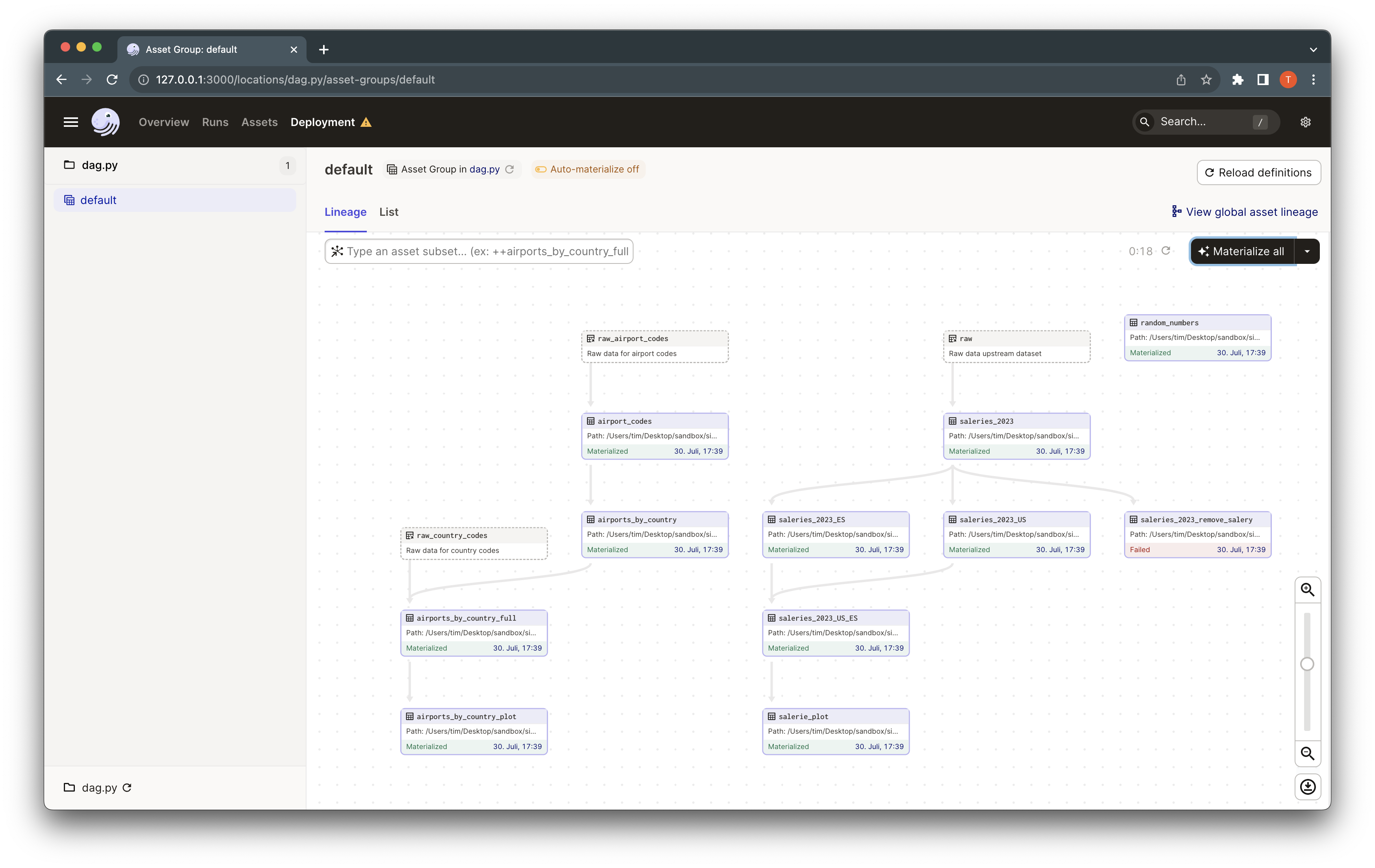
venv/bin/dagit -f examples/dag.py
💡 The Main Ideas
What is a DAG? 🤔:
A DAG, or Directed Acyclic Graph, represents a set of functions (the nodes) and their dependencies (the edges). It allows us to execute many functions, which depend on each other, in a specific order.
Aren't there already many DAG libraries?:
Absolutely, but most of them are tightly coupled to specific orchestration frameworks and require a very specific way to define a DAG. This makes it challenging to switch between frameworks. Our library, however, is different! 🎈
What is the goal of this library?:
Our library aims to offer a simple and streamlined way to define a DAG in a framework-agnostic manner. This means you can switch between frameworks without having to rewrite your DAG. As of now, we support Dagster and direct execution. 🎯
What is a transform?:
In the context of a data pipeline, a transform is a function that takes some data as input and produces some new data as output. It's like the magic wand in your data pipeline. 🪄
Show me some code! 👩💻:
Imagine we have a transformation where we read a CSV file, filter the data, and write it to a new CSV file. The @transform decorator marks a function as a transformation function. PandasDFInput and PandasDFOutput prepare the data for the transformation and write the post-transformation data, respectively. df is the input data and output is the output data.
import os
from simple_dag import transform, PandasDFInput, PandasDFOutput

@transform(
        df=PandasDFInput(
                os.path.join("data/curated/ds_salaries_2023.csv"),
        ),
        output=PandasDFOutput(
                os.path.join("data/curated/ds_salaries_2023_ES.csv"),
        ),
)
def create_2023_salaries_ES(df, output: PandasDFOutput):
df = df[df["company_location"] == "ES"]
output.write_data(df, index=False)
@transform:
This decorator indicates that a function is a transformation. It accepts Input and Output arguments. Please note, the Output arguments are passed directly to your function, while the Input arguments are processed by the Input class and then the resultant data is passed to your function.
Input:
Inputs prepare the data for your function. Currently, we support the following inputs:
PandasDFInput: Reads a pandas dataframe from a CSV file. The function receives this data as a pandas dataframe.BinaryInput: Reads a binary file. The function receives this data as a bytes object.SparkDFInput: Reads a Spark dataframe from a parquet file (Experimental). The function receives this data as a Spark dataframe.
Output:
Outputs write the data after your function has processed it. The Output objects have a write_data method, which can be used in your function to write the data. Currently, we support the following outputs:
PandasDFOutput: Writes a pandas dataframe to a CSV file.BinaryOutput: Writes a binary file.SparkDFOutput: Writes a Spark dataframe to a parquet file (Experimental).
1 maintainer

Metadata
1 maintainer
Release files for simple-dag 1.0.5
For a detailed explanation of source distributions (sdists) and built distributions (wheels), please see the package formats documentation.
Source distribution (sdist)
| File | Size | Uploaded | |
|---|---|---|---|
| simple_dag-1.0.5.tar.gz | 1.4 MB | Details |
Built distribution (wheel)
| File | Interpreter | ABI | Platform | Reset |
|---|---|---|---|---|
| simple_dag-1.0.5-py3-none-any.whl | Python 3 | none | any | Details |
Total release size: 1.4 MB
Release files / simple_dag-1.0.5.tar.gz
| Download URL | simple_dag-1.0.5.tar.gz |
|---|---|
| Size | 1.4 MB |
| Tags | Source |
|
SHA-256 checksum How to use checksums |
c9d69a9c199269ce84dc08c6ffa29bb73a69cf29305ef20284a98019d73187b2
|
|
BLAKE2b-256 checksum How to use checksums |
0bf3c1030e43b71acb638f94ab9c12116b52d31c2819c66c5c56cf4f14c7c44d
|
| Upload date | |
|
Uploaded using Trusted Publishing? What is trusted publishing? |
No |
| Uploaded via |
twine/6.1.0 CPython/3.11.10
|
Release files / simple_dag-1.0.5-py3-none-any.whl
| Download URL | simple_dag-1.0.5-py3-none-any.whl |
|---|---|
| Size | 16.2 kB |
| Tags | Python 3 |
|
SHA-256 checksum How to use checksums |
19dbddff25a4284860b2f131c3bce461f038eb7ba4ea22210e0d1b382e82d753
|
|
BLAKE2b-256 checksum How to use checksums |
f27f966f8348a1b309626d7328915cce44607d4542ee7357a64317352134c6cd
|
| Upload date | |
|
Uploaded using Trusted Publishing? What is trusted publishing? |
No |
| Uploaded via |
twine/6.1.0 CPython/3.11.10
|














