
My pypi project generator

Project description
simple-project-generator
My pypi project generator
1. Installing
To install the package from PyPI, follow the instructions below:
With pip
pip install --upgrade simple_project_generator
Execute which simple-project-generator to see where it was installed, probably in /home/USERNAME/.local/bin/simple-project-generator.
With pipx (recommended for desktop applications)
pipx install simple_project_generator
If you need to upgrade later: pipx upgrade simple_project_generator
Using
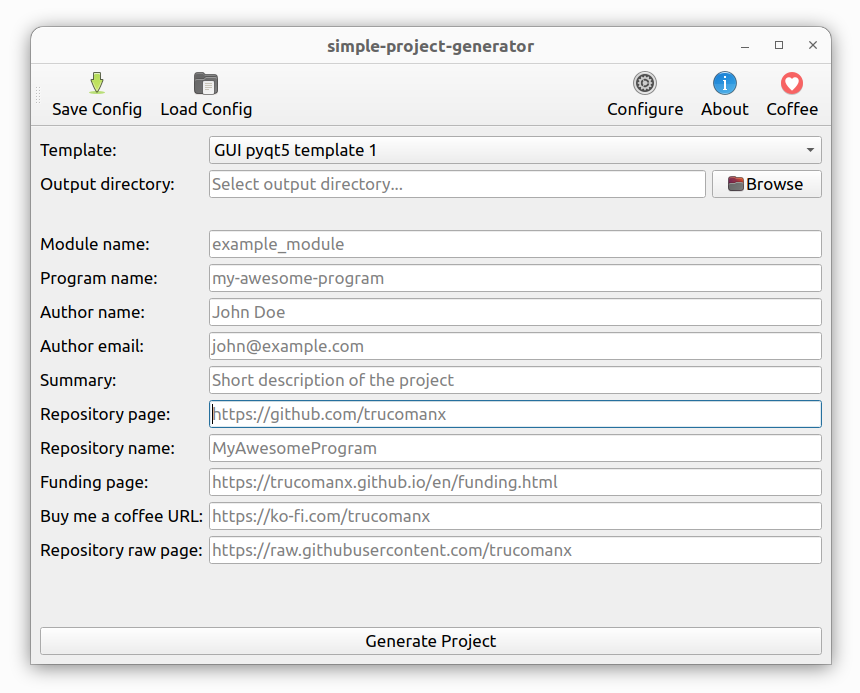
To start, use the command below:
simple-project-generator
2. More information
If you want more information go to doc directory.
3. Buy me a coffee
If you find this tool useful and would like to support its development, you can buy me a coffee!
Your donations help keep the project running and improve future updates.
4. License
This project is licensed under the GPL license. See the LICENSE file for more details.
Release history Release notifications | RSS feed


Download files
Download the file for your platform. If you're not sure which to choose, learn more about installing packages.
Source Distribution
Built Distribution
Filter files by name, interpreter, ABI, and platform.
If you're not sure about the file name format, learn more about wheel file names.
Copy a direct link to the current filters
File details
Details for the file simple_project_generator-0.1.18.tar.gz.
File metadata
- Download URL: simple_project_generator-0.1.18.tar.gz
- Upload date:
- Size: 339.2 kB
- Tags: Source
- Uploaded using Trusted Publishing? No
- Uploaded via: twine/6.2.0 CPython/3.14.4
File hashes
| Algorithm | Hash digest | |
|---|---|---|
| SHA256 |
c3afb174763d8468df6f60a26e1bc267b29484dd3ed1375248814b72b746365d
|
|
| MD5 |
99807446e4f15f397d043b330c4faa76
|
|
| BLAKE2b-256 |
5a7a66591c70df1b817544b96098a4bcef7a88bb606aaaae2175728fde06ec71
|
File details
Details for the file simple_project_generator-0.1.18-py3-none-any.whl.
File metadata
- Download URL: simple_project_generator-0.1.18-py3-none-any.whl
- Upload date:
- Size: 394.8 kB
- Tags: Python 3
- Uploaded using Trusted Publishing? No
- Uploaded via: twine/6.2.0 CPython/3.14.4
File hashes
| Algorithm | Hash digest | |
|---|---|---|
| SHA256 |
938d42c63d59ab0f26b00decd56d7e671e4a890d41e2000023c0376458cd39bd
|
|
| MD5 |
aeb48019faaed7042430d9ed0037a524
|
|
| BLAKE2b-256 |
0213593acb4f9f441d41ed4eeba150410473dee539071bb2e25725e603146bd3
|






