
Simple Slurm
A simple Python wrapper for Slurm with flexibility in mind




import datetime

from simple_slurm import Slurm

slurm = Slurm(
    array=range(3, 12),
    cpus_per_task=15,
    dependency=dict(after=65541, afterok=34987),
    gres=["gpu:kepler:2", "gpu:tesla:2", "mps:400"],
    ignore_pbs=True,
    job_name="name",
    output=f"{Slurm.JOB_ARRAY_MASTER_ID}_{Slurm.JOB_ARRAY_ID}.out",
    time=datetime.timedelta(days=1, hours=2, minutes=3, seconds=4),
)
slurm.add_cmd("module load python")
slurm.sbatch("python demo.py", Slurm.SLURM_ARRAY_TASK_ID)
The above snippet is equivalent to running the following command:
sbatch << EOF
#!/bin/sh

#SBATCH --array               3-11
#SBATCH --cpus-per-task       15
#SBATCH --dependency          after:65541,afterok:34987
#SBATCH --gres                gpu:kepler:2,gpu:tesla:2,mps:400
#SBATCH --ignore-pbs
#SBATCH --job-name            name
#SBATCH --output              %A_%a.out
#SBATCH --time                1-02:03:04

module load python
python demo.py \$SLURM_ARRAY_TASK_ID

EOF
Contents
- Installation
- Introduction
- Core Features
- Pythonic Slurm Syntax (was "Many syntaxes available")
- Adding Commands with
add_cmd - Job Dependencies
- Advanced Features
- Job Management
- Error Handling
- Project Growth
Installation
The source code is currently hosted : https://github.com/amq92/simple_slurm
Install the latest simple_slurm version with:
pip install simple_slurm
or using conda
conda install -c conda-forge simple_slurm
Introduction
The sbatch and srun commands in Slurm allow submitting parallel jobs into a Linux cluster in the form of batch scripts that follow a certain structure.
The goal of this library is to provide a simple wrapper for these core functions so that Python code can be used for constructing and launching the aforementioned batch script.
Indeed, the generated batch script can be shown by printing the Slurm object:
from simple_slurm import Slurm

slurm = Slurm(array=range(3, 12), job_name="name")
print(slurm)
>> #!/bin/sh
>>
>> #SBATCH --array               3-11
>> #SBATCH --job-name            name
Then, the job can be launched with either command:
slurm.srun("echo hello!")
slurm.sbatch("echo hello!")
>> Submitted batch job 34987
While both commands are quite similar, srun will wait for the job completion, while sbatch will launch and disconnect from the jobs.
More information can be found in Slurm's Quick Start Guide and in here.
Core Features
Pythonic Slurm Syntax
slurm = Slurm("-a", "3-11")
slurm = Slurm("--array", "3-11")
slurm = Slurm("array", "3-11")
slurm = Slurm(array="3-11")
slurm = Slurm(array=range(3, 12))
slurm.add_arguments(array=range(3, 12))
slurm.set_array(range(3, 12))
All these arguments are equivalent! It's up to you to choose the one(s) that best suits you needs.
"With great flexibility comes great responsability"
You can either keep a command-line-like syntax or a more Python-like one.
slurm = Slurm()
slurm.set_dependency("after:65541,afterok:34987")
slurm.set_dependency(["after:65541", "afterok:34987"])
slurm.set_dependency(dict(after=65541, afterok=34987))
All the possible arguments have their own setter methods
(ex. set_array, set_dependency, set_job_name).
Please note that hyphenated arguments, such as --job-name, need to be underscored
(so to comply with Python syntax and be coherent).
slurm = Slurm("--job_name", "name")
slurm = Slurm(job_name="name")

# slurm = Slurm("--job-name", "name")  # NOT VALID
# slurm = Slurm(job-name="name")       # NOT VALID
Moreover, boolean arguments such as --contiguous, --ignore_pbs or --overcommit
can be activated with True or an empty string.
slurm = Slurm("--contiguous", True)
slurm.add_arguments(ignore_pbs="")
slurm.set_wait(False)
print(slurm)
#!/bin/sh

#SBATCH --contiguous
#SBATCH --ignore-pbs
Adding Commands with add_cmd
The add_cmd method allows you to add multiple commands to the Slurm job script. These commands will be executed in the order they are added before the main command specified in sbatch or srun directive.
from simple_slurm import Slurm

slurm = Slurm(job_name="my_job", output="output.log")

# Add multiple commands
slurm.add_cmd("module load python")
slurm.add_cmd("export PYTHONPATH=/path/to/my/module")
slurm.add_cmd('echo "Environment setup complete"')

# Submit the job with the main command
slurm.sbatch("python my_script.py")
This will generate a Slurm job script like:
#!/bin/sh

#SBATCH --job-name            my_job
#SBATCH --output              output.log

module load python
export PYTHONPATH=/path/to/my/module
echo "Environment setup complete"
python my_script.py
You can reset the list of commands using the reset_cmd method:
slurm.reset_cmd() # Clears all previously added commands
Job dependencies
The sbatch call prints a message if successful and returns the corresponding job_id
job_id = slurm.sbatch("python demo.py " + Slurm.SLURM_ARRAY_TAKSK_ID)
If the job submission was successful, it prints:
Submitted batch job 34987
And returns the variable job_id = 34987, which can be used for setting dependencies on subsequent jobs
slurm_after = Slurm(dependency=dict(afterok=job_id)))
Advanced Features
Command-Line Interface (CLI)
For simpler dispatch jobs, a command line entry point is also made available.
simple_slurm [OPTIONS] "COMMAND_TO_RUN_WITH_SBATCH"
As such, both of these python and bash calls are equivalent.
slurm = Slurm(partition="compute.p", output="slurm.log", ignore_pbs=True)
slurm.sbatch("echo \$HOSTNAME")
simple_slurm --partition=compute.p --output slurm.log --ignore_pbs "echo \$HOSTNAME"
Using Configuration Files
Let's define the static components of a job definition in a YAML file slurm_default.yml
cpus_per_task: 15
job_name: "name"
output: "%A_%a.out"
Including these options with the using the yaml package is very simple
import yaml

from simple_slurm import Slurm

slurm = Slurm(**yaml.load(open("slurm_default.yml", "r")))

...

slurm.set_array(range(NUMBER_OF_SIMULATIONS))
The job can be updated according to the dynamic project needs (ex. NUMBER_OF_SIMULATIONS).
Filename Patterns and Environment Variables
For convenience, Filename Patterns and Output Environment Variables are available as attributes of the Simple Slurm object.
See https://slurm.schedmd.com/sbatch.html for details on the commands.
from slurm import Slurm

slurm = Slurm(output=('{}_{}.out'.format(
    Slurm.JOB_ARRAY_MASTER_ID,
    Slurm.JOB_ARRAY_ID))
slurm.sbatch('python demo.py ' + slurm.SLURM_ARRAY_JOB_ID)
This example would result in output files of the form 65541_15.out.
Here the job submission ID is 65541, and this output file corresponds to the submission number 15 in the job array. Moreover, this index is passed to the Python code demo.py as an argument.
sbatch allows for a filename pattern to contain one or more replacement symbols. They can be accessed with Slurm.<name>
| name | value | description |
|---|---|---|
| JOB_ARRAY_MASTER_ID | %A | job array's master job allocation number |
| JOB_ARRAY_ID | %a | job array id (index) number |
| JOB_ID_STEP_ID | %J | jobid.stepid of the running job. (e.g. "128.0") |
| JOB_ID | %j | jobid of the running job |
| HOSTNAME | %N | short hostname. this will create a separate io file per node |
| NODE_IDENTIFIER | %n | node identifier relative to current job (e.g. "0" is the first node of the running job) this will create a separate io file per node |
| STEP_ID | %s | stepid of the running job |
| TASK_IDENTIFIER | %t | task identifier (rank) relative to current job. this will create a separate io file per task |
| USER_NAME | %u | user name |
| JOB_NAME | %x | job name |
| PERCENTAGE | %% | the character "%" |
| DO_NOT_PROCESS | \\ | do not process any of the replacement symbols |
The Slurm controller will set the following variables in the environment of the batch script. They can be accessed with Slurm.<name>.
| name | description |
|---|---|
| SLURM_ARRAY_TASK_COUNT | total number of tasks in a job array |
| SLURM_ARRAY_TASK_ID | job array id (index) number |
| SLURM_ARRAY_TASK_MAX | job array's maximum id (index) number |
| SLURM_ARRAY_TASK_MIN | job array's minimum id (index) number |
| SLURM_ARRAY_TASK_STEP | job array's index step size |
| SLURM_ARRAY_JOB_ID | job array's master job id number |
| ... | ... |
Change execution shell
/bin/sh is the default shell path used in the script's first line.
It can be modified with :
slurm.set_shell("/bin/sh")
slurm.sbatch("/bin/sh")
In both cases, the default shell is modified in the Slurm object (i.e. applicable to successive sbatch calls).
Job Management
Simple Slurm provides a simple interface to Slurm's job management tools (squeue and scancel) to let you monitor and control running jobs.
Monitoring Jobs with squeue
Retrieve and display job information for the current user:
from simple_slurm import Slurm

slurm = Slurm()
slurm.squeue.update_squeue()  # Fetch latest job data
slurm.squeue.display_jobs()

# Get the jobs as a dictionary
jobs = slurm.squeue.jobs

for job_id, job in jobs.items():
    print(job)
Canceling Jobs with scancel
Cancel single jobs or entire job arrays:
from simple_slurm import Slurm

slurm = Slurm()

# Cancel a specific job
slurm.scancel.cancel_job(34987)

# Cancel multiple jobs
for job_id in [34987, 34988, 34989]:
    slurm.scancel.cancel_job(job_id)

# Send SIGTERM before canceling (graceful termination)
slurm.scancel.signal_job(34987)
slurm.scancel.cancel_job(34987)
Error Handling
The library does not raise specific exceptions for invalid Slurm arguments or job submission failures. Instead, it relies on the underlying Slurm commands (sbatch, srun, etc.) to handle errors. If a job submission fails, the error message from Slurm will be printed to the console.
Additionally, if invalid arguments are passed to the Slurm object, the library uses argparse to validate them. If an argument is invalid, argparse will raise an error and print a helpful message.
For example:
simple_slurm --invalid_argument=value "echo \$HOSTNAME"
This will result in an error like:
usage: simple_slurm [OPTIONS] "COMMAND_TO_RUN_WITH_SBATCH"
simple_slurm: error: unrecognized arguments: --invalid_argument=value
Project growth
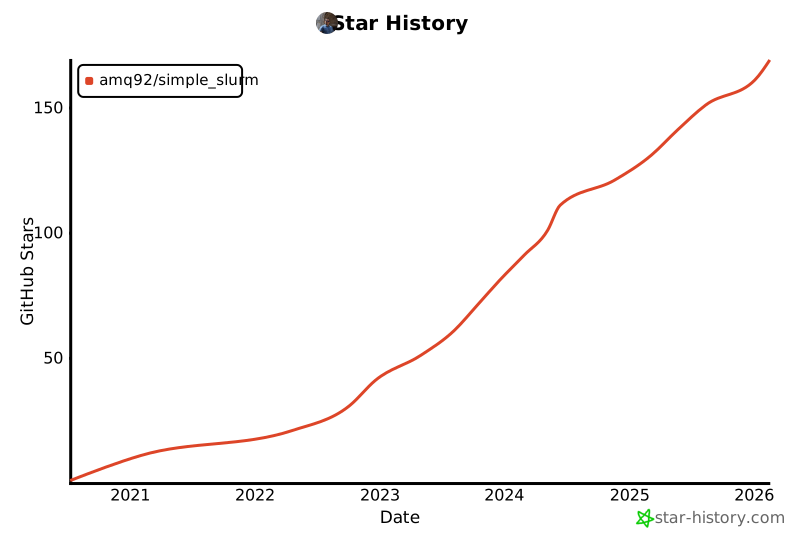
1 maintainer

Metadata
1 maintainer
Release files for simple-slurm 0.3.6
For a detailed explanation of source distributions (sdists) and built distributions (wheels), please see the package formats documentation.
Source distribution (sdist)
| File | Size | Uploaded | |
|---|---|---|---|
| simple_slurm-0.3.6.tar.gz | 31.4 kB | Details |
Built distribution (wheel)
| File | Interpreter | ABI | Platform | Reset |
|---|---|---|---|---|
| simple_slurm-0.3.6-py3-none-any.whl | Python 3 | none | any | Details |
Total release size: 61.6 kB
Release files / simple_slurm-0.3.6.tar.gz
| Download URL | simple_slurm-0.3.6.tar.gz |
|---|---|
| Size | 31.4 kB |
| Tags | Source |
|
SHA-256 checksum How to use checksums |
0f88cac96b39d7d7e34c5a124919cebb41eb8a8ef2ff4fb65c363d940ff8551e
|
|
BLAKE2b-256 checksum How to use checksums |
da445766806362384bab6153df22f77eea21c9f8757a869e91868b98c8c328eb
|
| Upload date | |
|
Uploaded using Trusted Publishing? What is trusted publishing? |
No |
| Uploaded via |
twine/6.1.0 CPython/3.9.22
|
Release files / simple_slurm-0.3.6-py3-none-any.whl
| Download URL | simple_slurm-0.3.6-py3-none-any.whl |
|---|---|
| Size | 30.2 kB |
| Tags | Python 3 |
|
SHA-256 checksum How to use checksums |
d40bcca57cce034d7765a132c38c1c90ae6219f02e2ddae8d64b57c4e8256a1f
|
|
BLAKE2b-256 checksum How to use checksums |
5a82a706a7256cce3c3813badd0521d71794a21ce422b21b45a84c74fa9837ba
|
| Upload date | |
|
Uploaded using Trusted Publishing? What is trusted publishing? |
No |
| Uploaded via |
twine/6.1.0 CPython/3.9.22
|














