
A Python package which creates simple interactive menus on the command line.

Project description
Simple Terminal Menu
Overview
simple-term-menu creates simple menus for interactive command line programs. It can be used to offer a choice of
different options to the user. Menu entries can be selected with the arrow or j/k keys. The module uses the terminfo
database to detect terminal features automatically and disables styles that are not available.
Currently, Linux and macOS are supported.
Installation
simple-term-menu is available on PyPI for Python 3.3+ and can be installed with pip:
python3 -m pip install simple-term-menu
Usage
Create a menu with the default style
Create an instance of the class TerminalMenu and pass the menu entries as a list of strings to the constructor. Call
the show method to output the menu and wait for keyboard input:
#!/usr/bin/env python3

from simple_term_menu import TerminalMenu


def main():
    terminal_menu = TerminalMenu(["entry 1", "entry 2", "entry 3"])
    terminal_menu.show()


if __name__ == "__main__":
    main()
You will get an output like:
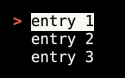
You can now select a menu entry and accept your choice by hitting enter or cancel the menu with escape or <Ctrl>-C.
show returns the selected menu entry index or None if the menu was canceled.
Styling
You can pass styling arguments to the TerminalMenu constructor. Each style is a tuple of keyword strings. Currently
the following keywords are accepted:
bg_blackbg_bluebg_cyanbg_graybg_greenbg_purplebg_redbg_yellowfg_blackfg_bluefg_cyanfg_grayfg_greenfg_purplefg_redfg_yellowbolditalicsstandoutunderline
You can alter the following styles:
-
menu_cursor_style: The style of the shown cursor. The default style is("fg_red", "bold"). -
menu_highlight_style: The style of the selected menu entry. The default style is("standout",)
By setting menu_cursor you can define another cursor or disable it (None). The default cursor is "> ".
Command line program
simple-term-menu can be used as a terminal program in shell scripts. The exit code of the script is the 1-based index
of the selected menu entry. The exit code 0 reports the cancel action. The following command line arguments are
supported:
usage: simple-term-menu [-h] [-c CURSOR] [-s CURSOR_STYLE]
                        [-m HIGHLIGHT_STYLE] [-C] [-V]
                        entries [entries ...]

simple-term-menu creates simple interactive menus in the terminal and returns the selected entry as exit code.

positional arguments:
  entries               the menu entries to show

optional arguments:
  -h, --help            show this help message and exit
  -c CURSOR, --cursor CURSOR
                        menu cursor (default: > )
  -s CURSOR_STYLE, --cursor_style CURSOR_STYLE
                        style for the menu cursor as comma separated list
                        (default: fg_red,bold)
  -m HIGHLIGHT_STYLE, --highlight_style HIGHLIGHT_STYLE
                        style for the selected menu entry as comma separated
                        list (default: standout)
  -C, --no-cycle        do not cycle the menu selection
  -V, --version         print the version number and exit
Release history Release notifications | RSS feed


Download files
Download the file for your platform. If you're not sure which to choose, learn more about installing packages.
Source Distribution
Built Distribution
Filter files by name, interpreter, ABI, and platform.
If you're not sure about the file name format, learn more about wheel file names.
Copy a direct link to the current filters






