
A captcha solver for number captchas
pip install simplecaptchasolver
Converts this kind of capture
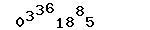
into
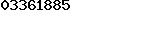
and performs a OCR
How to use
from simplecaptchasolver import adjust_and_ocr
import cv2

# adjust_and_ocr(
#     img: Any,
#     thresh: int = 150,
#     maxval: int = 255,
#     cv2_type: int = cv2.THRESH_BINARY_INV,
#     noise_width: int = 5,
#     noise_height: int = 5,
# ) -> str:
#     """
#     Perform the following steps:
#     1. Read the image (any format that can be read by PIL or OpenCV)
#     2. Convert the image to grayscale
#     3. Apply a binary threshold to the grayscale image using OpenCV's `cv2.threshold` with the given arguments
#     4. Find contours using OpenCV's `cv2.findContours` and sort them by x-coordinate
#     5. Create a new image with the same shape as the original, and iterate over the contours
#     6. For each contour, if its width and height are both greater than the given noise width and height, copy the corresponding region from the original image to the new image, and increment the x-coordinate by the contour's width
#     7. OCR the new image using EasyOCR and return the text

#     :param img: The image to process
#     :param thresh: The value to use for the binary threshold
#     :param maxval: The maximum value to use for the binary threshold
#     :param cv2_type: The type of thresholding to use (see OpenCV's `cv2.threshold` documentation)
#     :param noise_width: The minimum width of a contour to consider it not noise
#     :param noise_height: The minimum height of a contour to consider it not noise
#     :return: The text that was extracted from the image
#     """

text=adjust_and_ocr(
    img="https://github.com/hansalemaos/simplecaptchasolver/blob/main/captcha.jpg?raw=true",
    thresh=150,
    maxval=255,
    cv2_type=cv2.THRESH_BINARY_INV,
    noise_width=5,
    noise_height=5,
)
print(text)
# 03361885
1 maintainer

Download files
Download the file for your platform. If you're not sure which to choose, learn more about installing packages.
Source Distribution
simplecaptchasolver-1.0.0.tar.gz
(145.4 kB
view details)
Built Distribution
Filter files by name, interpreter, ABI, and platform.
If you're not sure about the file name format, learn more about wheel file names.
Copy a direct link to the current filters
File details
Details for the file simplecaptchasolver-1.0.0.tar.gz.
File metadata
- Download URL: simplecaptchasolver-1.0.0.tar.gz
- Upload date:
- Size: 145.4 kB
- Tags: Source
- Uploaded using Trusted Publishing? No
- Uploaded via:
twine/4.0.2 CPython/3.12.9
File hashes
| Algorithm | Hash digest | |
|---|---|---|
| SHA256 |
f752d80570e486a0042a08fd349f8806c1c03757258f6924e86dcb60b1a69922
|
|
| MD5 |
16fa3eb4da19bf9c2606fba34b9888d1
|
|
| BLAKE2b-256 |
9fcf6d61ab42065cc9f1ec247a80a890bdd59b5be949f68d7bc853d9fa10beb1
|
File details
Details for the file simplecaptchasolver-1.0.0-py3-none-any.whl.
File metadata
- Download URL: simplecaptchasolver-1.0.0-py3-none-any.whl
- Upload date:
- Size: 147.9 kB
- Tags: Python 3
- Uploaded using Trusted Publishing? No
- Uploaded via:
twine/4.0.2 CPython/3.12.9
File hashes
| Algorithm | Hash digest | |
|---|---|---|
| SHA256 |
d64f9581b78261c8446de1320def667077b3c3965b3d98041cc357e5ae6ed8fe
|
|
| MD5 |
7b89247c2d95998f70da8110a0092d7b
|
|
| BLAKE2b-256 |
d44fa2ca0d42a1160de0fe992de83ee8ab2dfe4e70cdbdd2e19365e003602b91
|













