

SimplerKokoro
Effortless speech synthesis with Kokoro, with subtitle support, in Python.





📚 Table of Contents
- Features
- Requirements
- Installation
- Examples
- Usage
- Command Line Interface (CLI)
- Example Output Files
- Build from Source
- API
- License
✨ Features
- Simple interface for generating speech audio and subtitles
- Supports all Kokoro voices
- Outputs valid SRT subtitles
- Automatic Model Management
📦 Requirements
- Python 3.10+
- torch
- kokoro
- soundfile
All dependencies except Python are installed automatically.
🚀 Installation
From PyPI:
pip install Simpler-Kokoro
Or clone the repo and install locally:
git clone https://github.com/WilleIshere/SimplerKokoro.git
cd SimplerKokoro
pip install .
🧑💻 Examples
You can find runnable example scripts in the examples/ folder:
basic_example.py: Basic usage, generate speech from text.subtitles_example.py: Generate speech with SRT subtitles.custom_speed_example.py: Generate speech with custom speed.custom_models_dir_example.py: Specify a custom directory for model downloads.
🛠️ Usage
Basic Example
from Simpler_Kokoro import SimplerKokoro

# Create an instance
sk = SimplerKokoro()

# Load the available voices
voices = sk.list_voices()

# (optional) Print out the voices
for voice in voices:
    print(voice) # Print out the voice object

# Use the first voice as example
selected_voice = voices[0]

# Generate speech
sk.generate(
    text='Hello, this is a test of the Simpler Kokoro voice synthesis.', # Text to generate
    voice=selected_voice.name, # Grab the name from the selected voice
    output_path='output.wav' # Select the output path.
)
Generate Speech with Subtitles
from Simpler_Kokoro import SimplerKokoro

# Create an instance
sk = SimplerKokoro()

# Load the available voices
voices = sk.list_voices()

# Use the first voice as example
selected_voice = voices[0]

# Generate speech
sk.generate(
    text='Hello, this will generate a subtitles.srt file along with output.wav', # Text to generate
    voice=selected_voice.name, # Grab the name from the selected voice
    output_path='output.wav', # Select the output path
    write_subtitles=True, # Enable subtitle generation
    subtitles_path='subtitles.srt', # (optional) Specify the subtitle .srt filename
    subtitles_word_level=True # (optional) Enable word level timestamps
)
Generate Speech with Custom Speed
from Simpler_Kokoro import SimplerKokoro

# Create an instance
sk = SimplerKokoro()

# Load the available voices
voices = sk.list_voices()

# Use the first voice as example
selected_voice = voices[0]

# Generate speech
sk.generate(
    text='Hello, this is a test of the Simpler Kokoro voice synthesis.', # Text to generate
    voice=selected_voice.name, # Grab the name from the selected voice
    output_path='output.wav', # Select the output path
    speed=1.5 # This represents 150% Speed. 1 means 100% and 0.5 means 50%
)
Specify a Path to Download Models
from Simpler_Kokoro import SimplerKokoro

# Create an instance
sk = SimplerKokoro(models_dir='<PATH TO PUT MODELS>') # Put in the path where you want the models to be saved here

# Load the available voices
voices = sk.list_voices()

# Use the first voice as example
selected_voice = voices[0]

# Generate speech
sk.generate(
    text='Select a custom directory for the models!', # Text to generate
    voice=selected_voice.name, # Grab the name from the selected voice
    output_path='output.wav' # Select the output path.
)
🖥️ Command Line Interface (CLI)
You can use the library in the command line too.
Example:
python -m Simpler_Kokoro <command> [options]
Commands and Options
| Command | Description | Options |
|---|---|---|
| list-voices | List available Kokoro voices | --repo, --models_dir, --log_level |
| generate | Generate speech audio from text | --text (required), --voice (required), --output (required), --speed, --write_subtitles, --subtitles_path, --subtitles_word_level, --repo, --models_dir, --log_level |
Global options:
| Option | Description | Default |
|---|---|---|
| --repo | HuggingFace repo to use for models | hexgrad/Kokoro-82M |
| --models_dir | Directory to store model files | models |
| --log_level | Logging level (DEBUG, INFO, WARNING, ERROR, CRITICAL) | INFO |
Generate command options:
| Option | Description | Default |
|---|---|---|
| --text | Text to synthesize (required) | |
| --voice | Voice name to use (required) | |
| --output | Output WAV file path (required) | |
| --speed | Speech speed multiplier | 1.0 |
| --write_subtitles | Write SRT subtitles | False |
| --subtitles_path | Path to save subtitles | subtitles.srt |
| --subtitles_word_level | Word-level subtitles | False |
📂 Example Output Files
output.wav: The synthesized speech audio file.output.srt: Subtitles in SRT format (ifwrite_subtitles=True).
Sample SRT output
1
00:00:00,000 --> 00:00:01,200
Hello,

2
00:00:01,200 --> 00:00:02,500
this is a test.

3
00:00:02,500 --> 00:00:04,000
This is another sentence.
🏗️ Build from Source
To build the package from source:
git clone https://github.com/WilleIshere/SimplerKokoro.git
cd SimplerKokoro
pip install build
python -m build
This will create distribution files in the dist/ directory:
.whl(wheel) file for pip installation.tar.gzsource archive
To install the built wheel locally:
pip install dist/Simpler_Kokoro-*.whl
You can now use the package as described in the usage section.
📖 API
SimplerKokoro
Methods
list_voices(): Returns a list of available voices with metadata.generate(text, voice, output_path, speed=1.0, write_subtitles=False, subtitles_path='subtitles.srt', subtititles_word_level=False): Generates speech audio and optional subtitles.
📄 License
This project is licensed under the GPL-3.0 license.
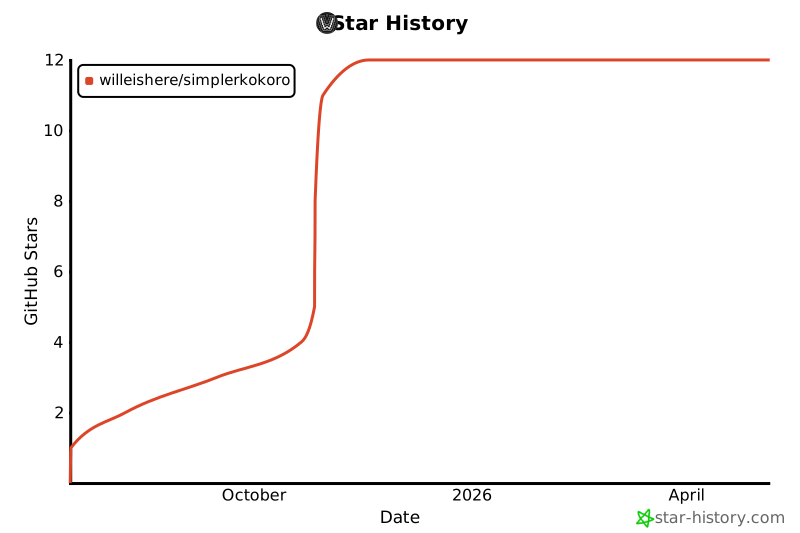
⭐ Star History
1 maintainer

Release files for Simpler-Kokoro 1.3.0
For a detailed explanation of source distributions (sdists) and built distributions (wheels), please see the package formats documentation.
Source distribution (sdist)
| File | Size | Uploaded | |
|---|---|---|---|
| simpler_kokoro-1.3.0.tar.gz | 31.1 kB | Details |
Built distribution (wheel)
| File | Interpreter | ABI | Platform | Reset |
|---|---|---|---|---|
| simpler_kokoro-1.3.0-py3-none-any.whl | Python 3 | none | any | Details |
Total release size: 53.6 kB
Release files / simpler_kokoro-1.3.0.tar.gz
| Download URL | simpler_kokoro-1.3.0.tar.gz |
|---|---|
| Size | 31.1 kB |
| Tags | Source |
|
SHA-256 checksum How to use checksums |
c2332d104bdc69383b94c8be3c93e4d924147bb856a77f0597b647816ede2c13
|
|
BLAKE2b-256 checksum How to use checksums |
3eaa90178f896abc928af6a4973238efcda14e47ee6332aa57149f3a8e04c353
|
| Upload date | |
|
Uploaded using Trusted Publishing? What is trusted publishing? |
No |
| Uploaded via |
twine/6.2.0 CPython/3.12.5
|
Release files / simpler_kokoro-1.3.0-py3-none-any.whl
| Download URL | simpler_kokoro-1.3.0-py3-none-any.whl |
|---|---|
| Size | 22.5 kB |
| Tags | Python 3 |
|
SHA-256 checksum How to use checksums |
027dfe04ddcd98ac653e2377df5a3fa780e1830c6915738608727f13dbc85523
|
|
BLAKE2b-256 checksum How to use checksums |
22566004e00f73770763c2b9837323d3de6339716fbc51503dc3279ce670067c
|
| Upload date | |
|
Uploaded using Trusted Publishing? What is trusted publishing? |
No |
| Uploaded via |
twine/6.2.0 CPython/3.12.5
|














