
Stable Diffusion 2.x and XL tuner.

Project description
SimpleTuner 💹
ℹ️ No data is sent to any third parties except through opt-in flag
report_to,push_to_hub, or webhooks which must be manually configured.
SimpleTuner is geared towards simplicity, with a focus on making the code easily understood. This codebase serves as a shared academic exercise, and contributions are welcome.
If you'd like to join our community, we can be found on Discord via Terminus Research Group. If you have any questions, please feel free to reach out to us there.
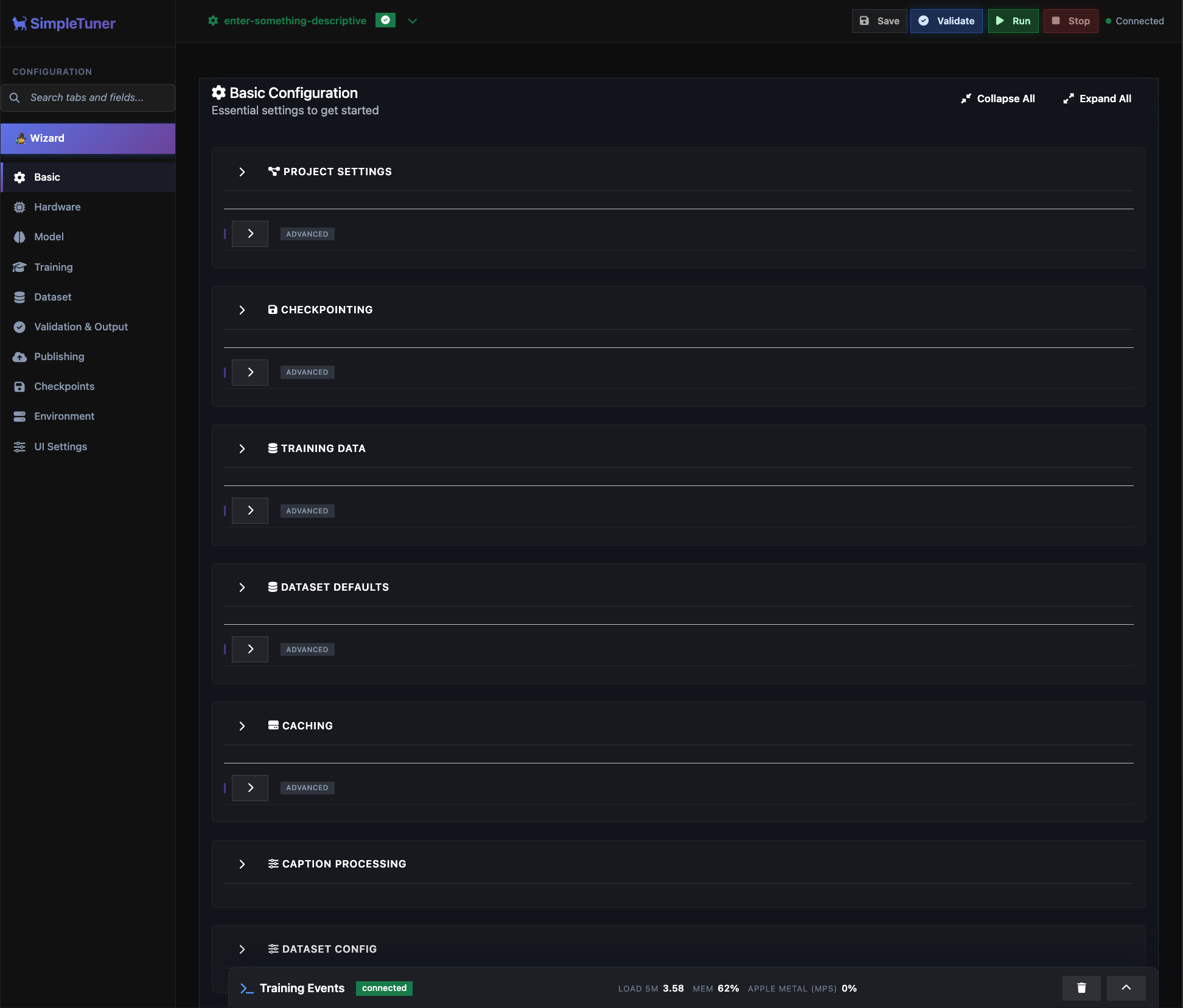
Table of Contents
Design Philosophy
- Simplicity: Aiming to have good default settings for most use cases, so less tinkering is required.
- Versatility: Designed to handle a wide range of image quantities - from small datasets to extensive collections.
- Cutting-Edge Features: Only incorporates features that have proven efficacy, avoiding the addition of untested options.
Tutorial
Please fully explore this README before embarking on the new web UI tutorial or the class command-line tutorial, as this document contains vital information that you might need to know first.
For a manually configured quick start without reading the full documentation or using any web interfaces, you can use the Quick Start guide.
For memory-constrained systems, see the DeepSpeed document which explains how to use 🤗Accelerate to configure Microsoft's DeepSpeed for optimiser state offload. For DTensor-based sharding and context parallelism, read the FSDP2 guide which covers the new FullyShardedDataParallel v2 workflow inside SimpleTuner.
For multi-node distributed training, this guide will help tweak the configurations from the INSTALL and Quickstart guides to be suitable for multi-node training, and optimising for image datasets numbering in the billions of samples.
Features
SimpleTuner provides comprehensive training support across multiple diffusion model architectures with consistent feature availability:
Core Training Features
- User-friendly web UI - Manage your entire training lifecycle through a sleek dashboard
- Multi-modal training - Unified pipeline for Image, Video, and Audio generative models
- Multi-GPU training - Distributed training across multiple GPUs with automatic optimization
- Advanced caching - Image, video, audio, and caption embeddings cached to disk for faster training
- Aspect bucketing - Support for varied image/video sizes and aspect ratios
- Concept sliders - Slider-friendly targeting for LoRA/LyCORIS/full (via LyCORIS
full) with positive/negative/neutral sampling and per-prompt strength; see Slider LoRA guide - Memory optimization - Most models trainable on 24G GPU, many on 16G with optimizations
- DeepSpeed & FSDP2 integration - Train large models on smaller GPUs with optim/grad/parameter sharding, context parallel attention, gradient checkpointing, and optimizer state offload
- S3 training - Train directly from cloud storage (Cloudflare R2, Wasabi S3)
- EMA support - Exponential moving average weights for improved stability and quality
- Custom experiment trackers - Drop an
accelerate.GeneralTrackerintosimpletuner/custom-trackersand use--report_to=custom-tracker --custom_tracker=<name> - Custom experiment trackers - Drop an
accelerate.GeneralTrackerintosimpletuner/custom-trackersand use--report_to=custom-tracker --custom_tracker=<name>
Model Architecture Support
| Model | Parameters | PEFT LoRA | Lycoris | Full-Rank | ControlNet | Quantization | Flow Matching | Text Encoders |
|---|---|---|---|---|---|---|---|---|
| Stable Diffusion XL | 3.5B | ✓ | ✓ | ✓ | ✓ | int8/nf4 | ✗ | CLIP-L/G |
| Stable Diffusion 3 | 2B-8B | ✓ | ✓ | ✓* | ✓ | int8/fp8/nf4 | ✓ | CLIP-L/G + T5-XXL |
| Flux.1 | 12B | ✓ | ✓ | ✓* | ✓ | int8/fp8/nf4 | ✓ | CLIP-L + T5-XXL |
| Flux.2 | 32B | ✓ | ✓ | ✓* | ✗ | int8/fp8/nf4 | ✓ | Mistral-3 Small |
| ACE-Step | 3.5B | ✓ | ✓ | ✓* | ✗ | int8 | ✓ | UMT5 |
| Chroma 1 | 8.9B | ✓ | ✓ | ✓* | ✗ | int8/fp8/nf4 | ✓ | T5-XXL |
| Auraflow | 6.8B | ✓ | ✓ | ✓* | ✓ | int8/fp8/nf4 | ✓ | UMT5-XXL |
| PixArt Sigma | 0.6B-0.9B | ✗ | ✓ | ✓ | ✓ | int8 | ✗ | T5-XXL |
| Sana | 0.6B-4.8B | ✗ | ✓ | ✓ | ✗ | int8 | ✓ | Gemma2-2B |
| Lumina2 | 2B | ✓ | ✓ | ✓ | ✗ | int8 | ✓ | Gemma2 |
| Kwai Kolors | 5B | ✓ | ✓ | ✓ | ✗ | ✗ | ✗ | ChatGLM-6B |
| LTX Video | 5B | ✓ | ✓ | ✓ | ✗ | int8/fp8 | ✓ | T5-XXL |
| Wan Video | 1.3B-14B | ✓ | ✓ | ✓* | ✗ | int8 | ✓ | UMT5 |
| HiDream | 17B (8.5B MoE) | ✓ | ✓ | ✓* | ✓ | int8/fp8/nf4 | ✓ | CLIP-L + T5-XXL + Llama |
| Cosmos2 | 2B-14B | ✗ | ✓ | ✓ | ✗ | int8 | ✓ | T5-XXL |
| OmniGen | 3.8B | ✓ | ✓ | ✓ | ✗ | int8/fp8 | ✓ | T5-XXL |
| Qwen Image | 20B | ✓ | ✓ | ✓* | ✗ | int8/nf4 (req.) | ✓ | T5-XXL |
| SD 1.x/2.x (Legacy) | 0.9B | ✓ | ✓ | ✓ | ✓ | int8/nf4 | ✗ | CLIP-L |
✓ = Supported, ✗ = Not supported, * = Requires DeepSpeed for full-rank training
Advanced Training Techniques
- TREAD - Token-wise dropout for transformer models, including Kontext training
- Masked loss training - Superior convergence with segmentation/depth guidance
- Prior regularization - Enhanced training stability for character consistency
- Gradient checkpointing - Configurable intervals for memory/speed optimization
- Loss functions - L2, Huber, Smooth L1 with scheduling support
- SNR weighting - Min-SNR gamma weighting for improved training dynamics
- Group offloading - Diffusers v0.33+ module-group CPU/disk staging with optional CUDA streams
- Validation adapter sweeps - Temporarily attach LoRA adapters (single or JSON presets) during validation to measure adapter-only or comparison renders without touching the training loop
- External validation hooks - Swap the built-in validation pipeline or post-upload steps for your own scripts, so you can run checks on another GPU or forward artifacts to any cloud provider of your choice (details)
- CREPA regularization - Cross-frame representation alignment for video DiTs (guide)
- LoRA I/O formats - Load/save PEFT LoRAs in standard Diffusers layout or ComfyUI-style
diffusion_model.*keys (Flux/Flux2/Lumina2/Z-Image auto-detect ComfyUI inputs)
Model-Specific Features
- Flux Kontext - Edit conditioning and image-to-image training for Flux models
- PixArt two-stage - eDiff training pipeline support for PixArt Sigma
- Flow matching models - Advanced scheduling with beta/uniform distributions
- HiDream MoE - Mixture of Experts gate loss augmentation
- T5 masked training - Enhanced fine details for Flux and compatible models
- QKV fusion - Memory and speed optimizations (Flux, Lumina2)
- TREAD integration - Selective token routing for most models
- Wan 2.x I2V - High/low stage presets plus a 2.1 time-embedding fallback (see Wan quickstart)
- Classifier-free guidance - Optional CFG reintroduction for distilled models
Quickstart Guides
Detailed quickstart guides are available for all supported models:
- Flux.1 Guide - Includes Kontext editing support and QKV fusion
- Flux.2 Guide - NEW! Latest enormous Flux model with Mistral-3 text encoder
- Z-Image Guide - Base/Turbo LoRA with assistant adapter + TREAD acceleration
- ACE-Step Guide - NEW! Audio generation model training (text-to-music)
- Chroma Guide - Lodestone's flow-matching transformer with Chroma-specific schedules
- Stable Diffusion 3 Guide - Full and LoRA training with ControlNet
- Stable Diffusion XL Guide - Complete SDXL training pipeline
- Auraflow Guide - Flow-matching model training
- PixArt Sigma Guide - DiT model with two-stage support
- Sana Guide - Lightweight flow-matching model
- Lumina2 Guide - 2B parameter flow-matching model
- Kwai Kolors Guide - SDXL-based with ChatGLM encoder
- LongCat-Video Guide - Flow-matching text-to-video and image-to-video with Qwen-2.5-VL
- LongCat-Video Edit Guide - Conditioning-first flavour (image-to-video)
- LongCat-Image Guide - 6B bilingual flow-matching model with Qwen-2.5-VL encoder
- LongCat-Image Edit Guide - Image editing flavour requiring reference latents
- LTX Video Guide - Video diffusion training
- Hunyuan Video 1.5 Guide - 8.3B flow-matching T2V/I2V with SR stages
- Wan Video Guide - Video flow-matching with TREAD support
- HiDream Guide - MoE model with advanced features
- Cosmos2 Guide - Multi-modal image generation
- OmniGen Guide - Unified image generation model
- Qwen Image Guide - 20B parameter large-scale training
- Stable Cascade Stage C Guide - Prior LoRAs with combined prior+decoder validation
- Kandinsky 5.0 Image Guide - Image generation with Qwen2.5-VL + Flux VAE
- Kandinsky 5.0 Video Guide - Video generation with HunyuanVideo VAE
Hardware Requirements
General Requirements
- NVIDIA: RTX 3080+ recommended (tested up to H200)
- AMD: 7900 XTX 24GB and MI300X verified (higher memory usage vs NVIDIA)
- Apple: M3 Max+ with 24GB+ unified memory for LoRA training
Memory Guidelines by Model Size
- Large models (12B+): A100-80G for full-rank, 24G+ for LoRA/Lycoris
- Medium models (2B-8B): 16G+ for LoRA, 40G+ for full-rank training
- Small models (<2B): 12G+ sufficient for most training types
Note: Quantization (int8/fp8/nf4) significantly reduces memory requirements. See individual quickstart guides for model-specific requirements.
Setup
SimpleTuner can be installed via pip for most users:
# Base installation (CPU-only PyTorch)
pip install simpletuner

# CUDA users (NVIDIA GPUs)
pip install simpletuner[cuda]

# ROCm users (AMD GPUs)
pip install simpletuner[rocm]

# Apple Silicon users (M1/M2/M3/M4 Macs)
pip install simpletuner[apple]
For manual installation or development setup, see the installation documentation.
Troubleshooting
Enable debug logs for a more detailed insight by adding export SIMPLETUNER_LOG_LEVEL=DEBUG to your environment (config/config.env) file.
For performance analysis of the training loop, setting SIMPLETUNER_TRAINING_LOOP_LOG_LEVEL=DEBUG will have timestamps that highlight any issues in your configuration.
For a comprehensive list of options available, consult this documentation.
Release history Release notifications | RSS feed


Download files
Download the file for your platform. If you're not sure which to choose, learn more about installing packages.
Source Distribution
Built Distribution
Filter files by name, interpreter, ABI, and platform.
If you're not sure about the file name format, learn more about wheel file names.
Copy a direct link to the current filters
File details
Details for the file simpletuner-3.2.3.tar.gz.
File metadata
- Download URL: simpletuner-3.2.3.tar.gz
- Upload date:
- Size: 2.6 MB
- Tags: Source
- Uploaded using Trusted Publishing? No
- Uploaded via: twine/6.1.0 CPython/3.13.7
File hashes
| Algorithm | Hash digest | |
|---|---|---|
| SHA256 |
58fb2974bcf0cd612921e34ac3f597896c2cdfd1dc2e6fbb621d8d2ddfaebdba
|
|
| MD5 |
dbb5f1835e2189974fa15fa8bc2f54ed
|
|
| BLAKE2b-256 |
3d3aaa04821cbe85160895c946f3f13c8f21d2e2cd11f1cd907ac2c5c5257831
|
File details
Details for the file simpletuner-3.2.3-py3-none-any.whl.
File metadata
- Download URL: simpletuner-3.2.3-py3-none-any.whl
- Upload date:
- Size: 2.7 MB
- Tags: Python 3
- Uploaded using Trusted Publishing? No
- Uploaded via: twine/6.1.0 CPython/3.13.7
File hashes
| Algorithm | Hash digest | |
|---|---|---|
| SHA256 |
32bd9cd0887d8e27834442b78ca89fcca4d7e0cabde1fc3ebeb3deb30141a344
|
|
| MD5 |
be8b8c1754b74bfa1bf672cd279ba5ca
|
|
| BLAKE2b-256 |
8654394ce0fac5711a8e07f867b4e4660d17b8fb7ee2eed32f749bf1b4413b4f
|






