
This package can be used to make your own twitter bot with less code
import the package using pip install
pip install simpletwitter
PyPi Link : https://pypi.org/project/simpletwitter/
Google Groups Link: https://groups.google.com/g/simpletwitter




usage:
from simpletwitter import SimpleTwitter
bot = SimpleTwitter(email, password, no_of_tweets, username)
bot.login()
bot.like_tweet(hashtags) #like the twitte
bot.unlike_liked_tweets(5) #unlike the liked tweet
bot.tweet(tweetmessage) #put some tweet
Users Currently Using as of (03-10-2023):
| Total Downloads | Monthly Downloads | Weekly Downloads |
|---|---|---|
| 16,455 | 279 | 169 |
Current Version 1.3.1
Users Graph
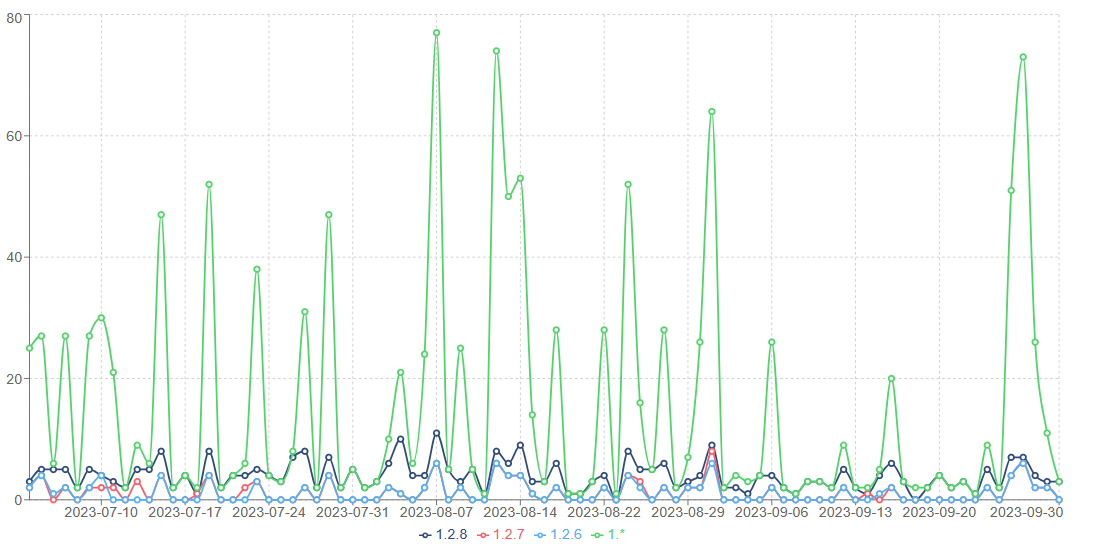
Packages used
| Tool Name | Purpose |
|---|---|
| Selenium | Chrome Automation |
| Feature Update | 3 feature update added on 3rd October 2023 |
|---|---|
| Update 1 | Added function to retweet |
| Update 2 | Added feature to like the top tweets of the particular hash tags |
| Update 3 | Added Tech News feature to post news on twitter account |
| Update 4 | Can able to post Linked in content into a tweet using AI summarizer tool from **Hugging Face.io** |
Code Usage of Updates
Update 1
from simpletwitter import SimpleTwitter
bot = SimpleTwitter(email, password, no_of_tweets, username)
bot.login()
hashtags = ["#reactjs", "abipravi"]
bot.only_like_top_tweet(hashtags)
Update 2
from simpletwitter import SimpleTwitter
bot = SimpleTwitter(email, password, no_of_tweets, username)
bot.login()
hashtags = ["#reactjs", "abipravi"]
bot.retweet(hashtags)
Update 3
Post Tech News from NEWSAPI
from simpletwitter import SimpleTwitter
bot = SimpleTwitter(email, password, no_of_tweets, username)
bot.login()
no_of_news_to_be_posted = 1
# if no of tweets to be posted ==> 1 {Post 12 news} it will post '12' news for value =>> 1 <<=
x = bot.post_tech_news(no_of_news_to_be_posted)
Update 4
Post LinkedIn Content from URL into Twitter Tweet
from simpletwitter import SimpleTwitter
bot = SimpleTwitter(email, password, no_of_tweets, username)
bot.login()
bot.postLinkedIn(Url)
Features
- Scrape Data for analytics
- Tech News post in Twitter
- Twitter APi also using Twitter API keys
- Create a web Admin Dashboard for the Twitter Automation
- Linked in to Twitter Post
1 maintainer

Metadata
1 maintainer
Release files for simpletwitter 1.3.1
For a detailed explanation of source distributions (sdists) and built distributions (wheels), please see the package formats documentation.
Source distribution (sdist)
| File | Size | Uploaded | Provenance | Actions |
|---|---|---|---|---|
| simpletwitter-1.3.1.tar.gz | 7.7 kB | Without provenance | Details for simpletwitter-1.3.1.tar.gz |
Release files / simpletwitter-1.3.1.tar.gz
| Download URL | simpletwitter-1.3.1.tar.gz |
|---|---|
| Size | 7.7 kB |
| Tags | Source |
|
SHA-256 checksum How to use checksums |
1e91806544ef01f5750e2784b05997d1bba1b2e55128306ebe050e17daa4e858
|
|
BLAKE2b-256 checksum How to use checksums |
11d0598ac186ce2d24b01b8de4cbf2bc5005924e3aea5650b3b8c7786e56d9ab
|
| Upload date | |
|
Uploaded using Trusted Publishing? What is trusted publishing? |
No |
| Uploaded via |
twine/4.0.2 CPython/3.8.10
|
Security for simpletwitter 1.3.1
Provenance
Provenance describes where a file came from. On PyPI, provenance is shared via attestations, which provide a verifiable record of the build or publishing details. View details, limitations and caveats.
No provenance found
None of the files in this release were uploaded with provenance metadata.
A note on package security
PyPI is a repository for distributing packages, not a service for auditing them. While third-party security researchers and our staff do their best to detect and remove malicious packages, PyPI cannot guarantee the quality, security or suitability of any given package.
To learn more about protecting yourself from malicious actors, visit our package security documentation.














