
SimplEx - Explaining Latent Representations with a Corpus of Examples



Code Author: Jonathan Crabbé (jc2133@cam.ac.uk)
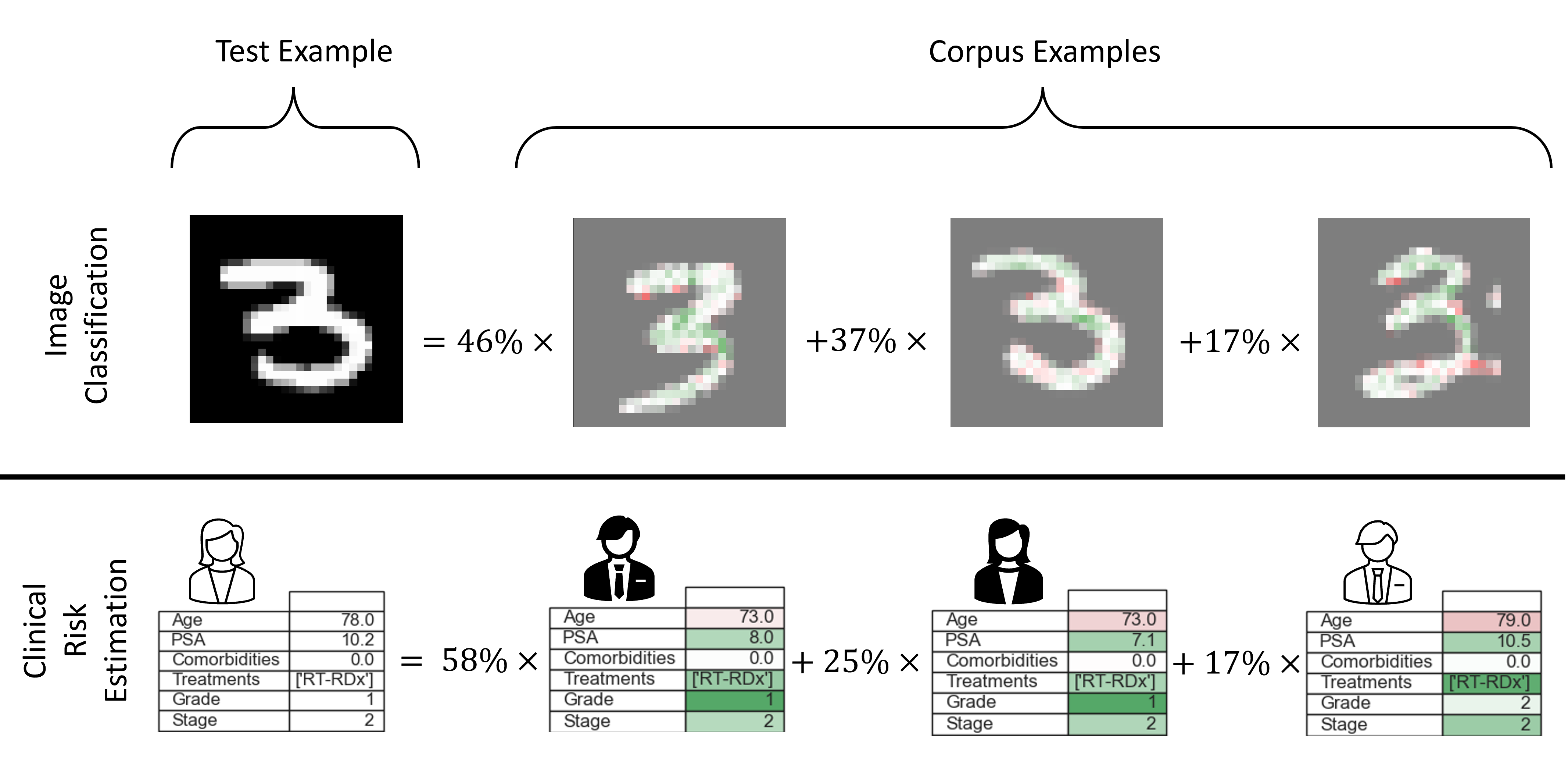
This repository contains the implementation of SimplEx, a method to explain the latent representations of black-box models with the help of a corpus of examples. For more details, please read our NeurIPS 2021 paper: 'Explaining Latent Representations with a Corpus of Examples'.
🚀 Installation
The library can be installed from PyPI using
$ pip install simplexai
or from source, using
$ pip install .
Toy example
Bellow, you can find a toy demonstration where we make a corpus decomposition of test examples representations. All the relevant code can be found in the file simplex.
from simplexai.explainers.simplex import Simplex
from simplexai.models.image_recognition import MnistClassifier
from simplexai.experiments.mnist import load_mnist

# Get a model
model = MnistClassifier() # Model should have the BlackBox interface

# Load corpus and test inputs
corpus_loader = load_mnist(subset_size=100, train=True, batch_size=100) # MNIST train loader
test_loader = load_mnist(subset_size=10, train=True, batch_size=10) # MNIST test loader
corpus_inputs, _ = next(iter(corpus_loader)) # A tensor of corpus inputs
test_inputs, _ = next(iter(test_loader)) # A set of inputs to explain

# Compute the corpus and test latent representations
corpus_latents = model.latent_representation(corpus_inputs).detach()
test_latents = model.latent_representation(test_inputs).detach()

# Initialize SimplEX, fit it on test examples
simplex = Simplex(corpus_examples=corpus_inputs,
                  corpus_latent_reps=corpus_latents)
simplex.fit(test_examples=test_inputs,
            test_latent_reps=test_latents,
            reg_factor=0)

# Get the weights of each corpus decomposition
weights = simplex.weights
We get a tensor weights that can be interpreted as follows:
weights[i,c] = weight of corpus example c in the decomposition of example i.
We can get the importance of each corpus feature for the decomposition
of a given example i in the following way:
import torch

# Compute the Integrated Jacobian for a particular example
i = 4
input_baseline = torch.zeros(corpus_inputs.shape) # Baseline tensor of the same shape as corpus_inputs
simplex.jacobian_projection(test_id=i, model=model, input_baseline=input_baseline)
result = simplex.decompose(i)
We get a list result where each element of the list corresponds to a corpus example.
This list is sorted by decreasing order of importance in the corpus decomposition.
Each element of the list is a tuple structured as follows:
w_c, x_c, proj_jacobian_c = result[c]
Where w_c corresponds to the weight weights[i,c], x_c corresponds to corpus_inputs[c]
and proj_jacobian is a tensor such that proj_jacobian_c[k] is the Projected Jacobian
of feature k from corpus example c.
Reproducing the paper results
Reproducing MNIST Approximation Quality Experiment
- Run the following script for different values of CV (the results from the paper were obtained by taking all integer CV between 0 and 9)
python -m simplexai.experiments.mnist -experiment "approximation_quality" -cv CV
- Run the following script by adding all the values of CV from the previous step
python -m simplexai.experiments.results.mnist.quality.plot_results -cv_list CV1 CV2 CV3 ...
- The resulting plots and data are saved here.
Reproducing Prostate Cancer Approximation Quality Experiment
This experiment requires the access to the private datasets CUTRACT and SEER decribed in the paper.
- Copy the files
cutract_internal_all.csvandseer_external_imputed_new.csvare in the folderdata/Prostate Cancer - Run the following script for different values of CV (the results from the paper were obtained by taking all integer CV between 0 and 9)
python -m simplexai.experiments.prostate_cancer -experiment "approximation_quality" -cv CV
- Run the following script by adding all the values of CV from the previous step
python -m simplexai.experiments.results.prostate.quality.plot_results -cv_list CV1 CV2 CV3 ...
- The resulting plots are saved here.
Reproducing Prostate Cancer Outlier Experiment
This experiment requires the access to the private datasets CUTRACT and SEER decribed in the paper.
- Make sure that the files
cutract_internal_all.csvandseer_external_imputed_new.csvare in the folderdata/Prostate Cancer - Run the following script for different values of CV (the results from the paper were obtained by taking all integer CV between 0 and 9)
python -m simplexai.experiments.prostate_cancer -experiment "outlier_detection" -cv CV
- Run the following script by adding all the values of CV from the previous step
python -m simplexai.experiments.results.prostate.outlier.plot_results -cv_list CV1 CV2 CV3 ...
- The resulting plots are saved here.
Reproducing MNIST Jacobian Projection Significance Experiment
- Run the following script
python -m simplexai.experiments.mnist -experiment "jacobian_corruption"
2.The resulting plots and data are saved here.
Reproducing MNIST Outlier Detection Experiment
- Run the following script for different values of CV (the results from the paper were obtained by taking all integer CV between 0 and 9)
python -m simplexai.experiments.mnist -experiment "outlier_detection" -cv CV
- Run the following script by adding all the values of CV from the previous step
python -m simplexai.experiments.results.mnist.outlier.plot_results -cv_list CV1 CV2 CV3 ...
- The resulting plots and data are saved here.
Reproducing MNIST Influence Function Experiment
- Run the following script for different values of CV (the results from the paper were obtained by taking all integer CV between 0 and 4)
python -m simplexai.experiments.mnist -experiment "influence" -cv CV
- Run the following script by adding all the values of CV from the previous step
python -m simplexai.experiments.results.mnist.influence.plot_results -cv_list CV1 CV2 CV3 ...
- The resulting plots and data are saved here.
Note: some problems can appear with the package
Pytorch Influence Functions.
If this is the case, please change calc_influence_function.py in the following way:
343: influences.append(tmp_influence) ==> influences.append(tmp_influence.cpu())
438: influences_meta['test_sample_index_list'] = sample_list ==> #influences_meta['test_sample_index_list'] = sample_list
Reproducing AR Approximation Quality Experiment
- Run the following script for different values of CV (the results from the paper were obtained by taking all integer CV between 0 and 4)
python -m simplexai.experiments.time_series -experiment "approximation_quality" -cv CV
- Run the following script by adding all the values of CV from the previous step
python -m simplexai.experiments.results.ar.quality.plot_results -cv_list CV1 CV2 CV3 ...
- The resulting plots and data are saved here.
Reproducing AR Outlier Detection Experiment
- Run the following script for different values of CV (the results from the paper were obtained by taking all integer CV between 0 and 4)
python -m simplexai.experiments.time_series -experiment "outlier_detection" -cv CV
- Run the following script by adding all the values of CV from the previous step
python -m simplexai.experiments.results.ar.outlier.plot_results -cv_list CV1 CV2 CV3 ...
- The resulting plots and data are saved here.
🔨 Tests
Install the testing dependencies using
pip install .[testing]
The tests can be executed using
pytest -vsx
Citing
If you use this code, please cite the associated paper:
@inproceedings{Crabbe2021Simplex,
 author = {Crabbe, Jonathan and Qian, Zhaozhi and Imrie, Fergus and van der Schaar, Mihaela},
 booktitle = {Advances in Neural Information Processing Systems},
 editor = {M. Ranzato and A. Beygelzimer and Y. Dauphin and P.S. Liang and J. Wortman Vaughan},
 pages = {12154--12166},
 publisher = {Curran Associates, Inc.},
 title = {Explaining Latent Representations with a Corpus of Examples},
 url = {https://proceedings.neurips.cc/paper/2021/file/65658fde58ab3c2b6e5132a39fae7cb9-Paper.pdf},
 volume = {34},
 year = {2021}
}
2 maintainers


Metadata
2 maintainers
Release files for simplexai 0.0.3
For a detailed explanation of source distributions (sdists) and built distributions (wheels), please see the package formats documentation.
Built distributions (wheels)
| File | Interpreter | ABI | Platform | Actions Reset |
|---|---|---|---|---|
| simplexai-0.0.3-py3-none-macosx_10_14_x86_64.whl | Python 3 | none | macOS 10.14+ x86-64 | Details for simplexai-0.0.3-py3-none-macosx_10_14_x86_64.whl |
| simplexai-0.0.3-py3-none-any.whl | Python 3 | none | any | Details for simplexai-0.0.3-py3-none-any.whl |
Total release size: 105.4 kB
Release files / simplexai-0.0.3-py3-none-macosx_10_14_x86_64.whl
| Download URL | simplexai-0.0.3-py3-none-macosx_10_14_x86_64.whl |
|---|---|
| Size | 52.5 kB |
| Tags | Python 3 macOS 10.14+ x86-64 |
|
SHA-256 checksum How to use checksums |
f1276f6c70bf30347a38e8894d686b2a998e74a941973eecaa9c271a7befb585
|
|
BLAKE2b-256 checksum How to use checksums |
31b5cb3de02db70c321f6813e2ebff9a88ac0d31193b0319d1f698ea06af7c0f
|
| Upload date | |
|
Uploaded using Trusted Publishing? What is trusted publishing? |
No |
| Uploaded via |
twine/4.0.2 CPython/3.9.16
|
Release files / simplexai-0.0.3-py3-none-any.whl
| Download URL | simplexai-0.0.3-py3-none-any.whl |
|---|---|
| Size | 52.9 kB |
| Tags | Python 3 |
|
SHA-256 checksum How to use checksums |
513fb49a0b78ea60eeb989b4ed4f7808d98612c2816e1a4bbb67863ab953a6d9
|
|
BLAKE2b-256 checksum How to use checksums |
2355bacfc067b20c90ece9ae7f27cf9210b602f2f5787581b7169e8e06609abb
|
| Upload date | |
|
Uploaded using Trusted Publishing? What is trusted publishing? |
No |
| Uploaded via |
twine/4.0.2 CPython/3.8.10
|
Security for simplexai 0.0.3
Provenance
Provenance describes where a file came from. On PyPI, provenance is shared via attestations, which provide a verifiable record of the build or publishing details. View details, limitations and caveats.
No provenance found
None of the files in this release were uploaded with provenance metadata.
A note on package security
PyPI is a repository for distributing packages, not a service for auditing them. While third-party security researchers and our staff do their best to detect and remove malicious packages, PyPI cannot guarantee the quality, security or suitability of any given package.
To learn more about protecting yourself from malicious actors, visit our package security documentation.














