
SIMSPY is an 8-function package that can only solve single machine scheduling problems

Project description
This package is specifically designed for solving single-machine scheduling problems. It comprises a total of 8 functions, including 7 heuristic functions and 1 metaheuristic function.
Heuristic Method
- Earliest Due Date (EDD) Rule
- Shortest Processing Time (SPT) Rule
- Largest Penalty per Unit Length (LPUL) Rule
- Shortest Processing Time and LPUL Rule
- Shortest Weighted Processing Time (SWPT) Rule
- Largest Weight (WT) and LPUL Rule
- Critical Ratio (CR) Rule
Metaheuristic Method
- Genetic Algorithm (GA)
Data Input
This package requires 3 essential data inputs: Processing Time, Due Date, and Penalty.
| Function | Description |
|---|---|
fc_edd |
Sort the job sequences using the Earliest Due Date Rule by arranging the jobs in ascending order based on their due dates. |
fc_spt |
Sort the job sequences using the Shortest Processing Time Rule by arranging the jobs in ascending order based on their processing times. |
fc_lpul |
Sort the job sequences using the Largest Penalty per Unit Length Rule by arranging the jobs in descending order based on their U value, which is obtained by dividing the penalty by the processing time. |
fc_spt_lpul |
Sort the job sequences using the Shortest Processing Time and LPUL Rule by arranging the jobs in ascending order based on their processing times. In case of a tie, use the LPUL Rule. |
fc_swpt |
Sort the job sequences using the Shortest Weighted Processing Time Rule by arranging the jobs in ascending order based on their S value, which is obtained by dividing the processing time by the penalty. |
fc_wt_lpul |
Sort jobs using the Largest Weight and LPUL Rule by arranging the jobs in ascending order based on their penalty. In case of a tie, use the LPUL Rule. |
fc_cr |
Sort the job sequences using the Critical Ratio Rule by arranging the jobs in ascending order based on their CR value, which is obtained by subtracting T (the sum of processing times for all the jobs that have been scheduled) from the due date and dividing by the processing time. |
fc_ga |
Sort the job sequences using the Genetic Algorithm by arranging the jobs in a way that minimizes the total penalty. |
How to install
- To install the package, execute the following command:
pip install simspy
- To import the package, execute the following command:
import simspy
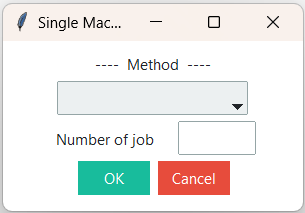
- Click on the "Run" button. The package will display a window where you can select the method and specify the number of jobs, as well as an empty box to input the data.
How to use
Input parameters of the package.
-
After importing the package, a window will appear for selecting the method and entering the required number of job schedules.
-
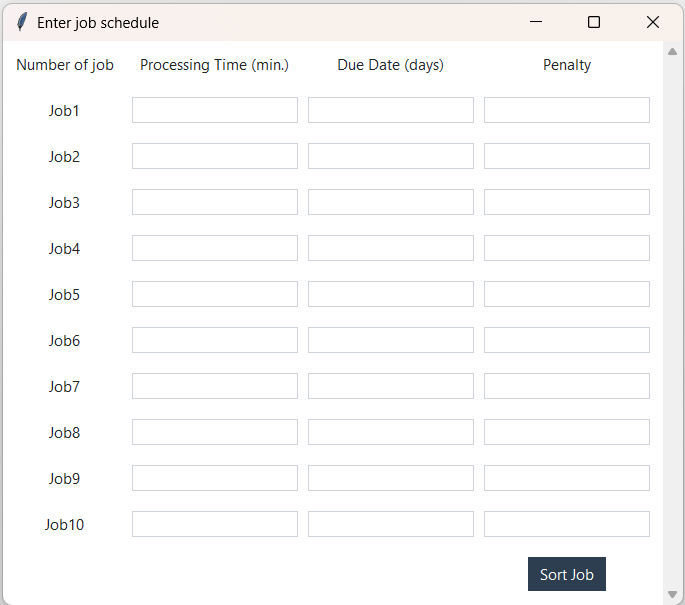
Upon clicking the "OK" button, a window will appear for entering job data for each schedule. After entering the data, click the "Sort Job" button to proceed.
Output results of the package.
-
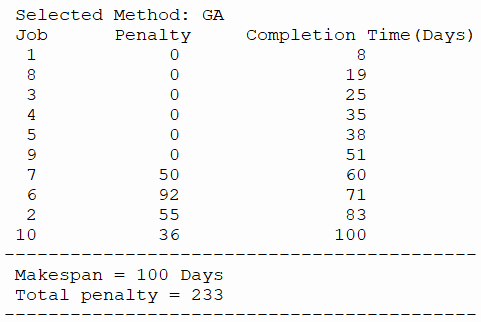
The result will be displayed in the terminal window, as shown in the image below.


Download files
Download the file for your platform. If you're not sure which to choose, learn more about installing packages.
Source Distribution
Built Distribution
Filter files by name, interpreter, ABI, and platform.
If you're not sure about the file name format, learn more about wheel file names.
Copy a direct link to the current filters
File details
Details for the file simspy-1.2.0.tar.gz.
File metadata
- Download URL: simspy-1.2.0.tar.gz
- Upload date:
- Size: 6.8 kB
- Tags: Source
- Uploaded using Trusted Publishing? No
- Uploaded via: twine/4.0.2 CPython/3.9.13
File hashes
| Algorithm | Hash digest | |
|---|---|---|
| SHA256 |
ddc7cc1904ab673003f0197b5411190e6ae178e7a6de8efa3acc361371e786c1
|
|
| MD5 |
cbeee9251247bec767d136a4730887fb
|
|
| BLAKE2b-256 |
dc4b6c67dc105a79c8e27f7fd47ea1b1c5211b646b0aabd5b871e5df26414c68
|
File details
Details for the file simspy-1.2.0-py3-none-any.whl.
File metadata
- Download URL: simspy-1.2.0-py3-none-any.whl
- Upload date:
- Size: 6.2 kB
- Tags: Python 3
- Uploaded using Trusted Publishing? No
- Uploaded via: twine/4.0.2 CPython/3.9.13
File hashes
| Algorithm | Hash digest | |
|---|---|---|
| SHA256 |
0c56da642af96722901dddd723078313933c1ddc7f69f229ca20e1427aab6779
|
|
| MD5 |
22b8a10312f6ff1eaf60b9ac2f56137a
|
|
| BLAKE2b-256 |
f473249a31d1954b2eede3265aff3a8eaf810a10197b58f1945894bf869925f5
|






