
SIMURG PPP
SIMURG PPP is a Python client for running Precise Point Positioning workflows with SIMURG RINEX sources and a PPP processing service. It provides small command-line commands for individual PPP tasks, workflow commands for site/date processing, and an interactive terminal UI for selecting SIMURG sites and running batches.
The package is published as simurg-ppp and imports as ppp_client.
pip install simurg-ppp
TUI
Run simurg-ppp with no subcommand to launch the interactive terminal UI:
simurg-ppp
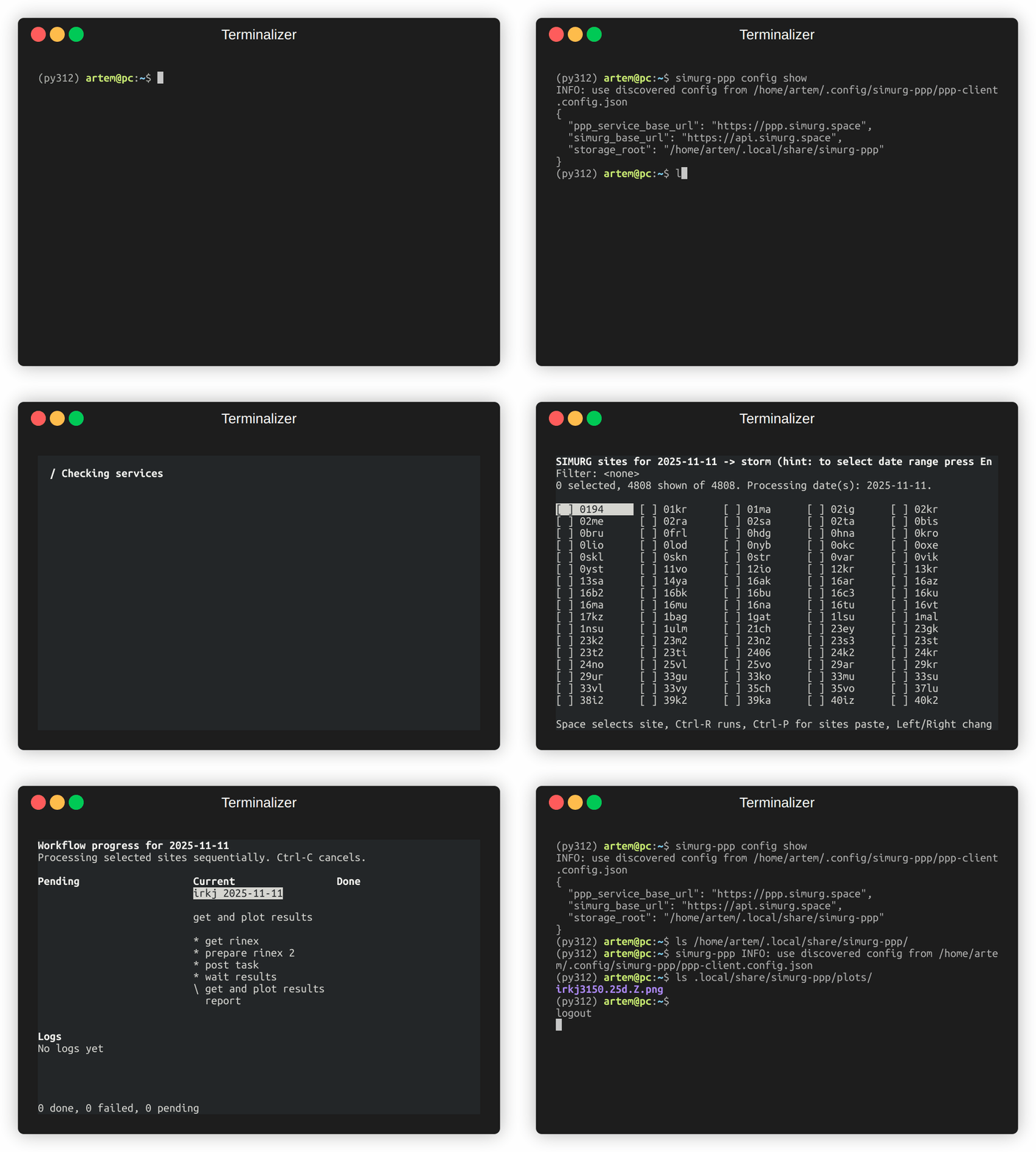
The TUI guides the SIMURG PPP workflow from the terminal. It can check service availability, verify external RINEX tools, select stored groups, choose dates, load processed SIMURG sites, select sites manually or from pasted input, and run workflow batches while showing progress and logs. Launching the TUI also creates config automatically on first run when no standard config exists; feel free to change it if needed.
Useful TUI options:
simurg-ppp --skip-startup
simurg-ppp --date 2025-11-11
simurg-ppp --storage-root workflow-data
simurg-ppp --select-only
For non-interactive site/date processing, use workflow commands:
simurg-ppp workflow start irkj 2025-11-11
simurg-ppp workflow proceed irkj 2025-11-11
simurg-ppp workflow status irkj 2025-11-11
simurg-ppp workflow report irkj 2025-11-11
CLI
Use the atomic commands when you already have a local RINEX file or a PPP task id.
Create configuration first if it is fresh installation and you didn't run TUI app.
simurg-ppp config init
config init creates the runtime config file and workflow storage layout in
standard system locations when permissions allow it, or in standard per-user
locations otherwise. Use --storage-root when you need a one-off storage
override.
Atomic Commands
Verify optional external runtime tools:
simurg-ppp tools verify
Run the existing setup helpers through the installed CLI:
simurg-ppp tools install rtklib
simurg-ppp tools install hatanaka
Native Windows Setup
Native Windows installs include the terminal UI dependency automatically:
python -m pip install simurg-ppp
simurg-ppp config init
simurg-ppp config show
simurg-ppp tools verify
Windows machine-wide config and workflow storage are created under
%ProgramData%\SIMURG\PPP when writable. Otherwise, per-user config and
storage are created under %LOCALAPPDATA%\SIMURG\PPP. The config file is named
ppp-client.config.json, and workflow files live below the configured
storage directory.
Install external RINEX tools explicitly:
simurg-ppp tools install rtklib
simurg-ppp tools install hatanaka
simurg-ppp tools verify
If you manage tools yourself, set PowerShell environment variables to the executable paths:
$env:PPP_CLIENT_CONVBIN = 'C:\tools\rtklib\bin\convbin.exe'
$env:PPP_CLIENT_CRX2RNX = 'C:\tools\rnxcmp\CRX2RNX.exe'
simurg-ppp tools verify
.gz compressed RINEX files use Python's standard library, and .Z
compressed RINEX files use the package's pure-Python unlzw3 dependency.
WSL remains a supported alternative when you prefer the existing Linux
package-manager path for RTKLIB and RNXCMP.
Create a PPP task from a RINEX file:
simurg-ppp calculate irkj3150.25o
Check a PPP task status:
simurg-ppp check 0934dd49-0e75-47c9-a447-3728094929d7
Plot result series to a PNG. The default view is LLE: latitude with North/South error, longitude with East/West error, elevation with Up/Down error, and 3D error:
simurg-ppp plot 0934dd49-0e75-47c9-a447-3728094929d7 results.png
Use --xyz for the XYZ coordinate view:
simurg-ppp plot 0934dd49-0e75-47c9-a447-3728094929d7 results.png --xyz
Python Usage (API)
Run a single SIMURG site/date workflow from Python:
from pathlib import Path

from ppp_client.tui.workflow_runner import (
    WorkflowRunOptions,
    configure_logging,
    run_site_date_workflow,
)

configure_logging()
result = run_site_date_workflow(
    "irkj",
    "2025-11-11",
    WorkflowRunOptions(
        storage_root=Path("workflow-data"),
        force_start=False,
        poll_seconds=60.0,
        timeout_seconds=3600.0,
    ),
)

if not result.ok:
    raise RuntimeError(result.error)

print(result.report)
Use lower-level helpers directly when you want to compose your own flow:
from ppp_client import check_task, create_task, plot_result_points
from ppp_client.results import collect_result_points

task = create_task("irkj3150.25o")
details = check_task(task["id"])
points = collect_result_points(details)
plot_result_points(points, "results.png")
SIMURG Ecosystem
This package does not install a root simurg command. It exposes a future plugin entry point named ppp, so a later umbrella package can provide:
simurg ppp
simurg ppp workflow status irkj 2025-11-11
Development
Install the package in editable mode, then install development tools:
python -m venv .venv
. .venv/bin/activate
pip install -e .
pip install pytest twine build
Run checks:
python -m pytest -q
poetry check
Build release artifacts:
poetry build
python -m twine check dist/*
See CONTRIBUTING.md and docs/release.md for maintainer workflows.
1 maintainer

Metadata
1 maintainer
Release files for simurg-ppp 0.3.0
For a detailed explanation of source distributions (sdists) and built distributions (wheels), please see the package formats documentation.
Source distribution (sdist)
| File | Size | Uploaded | |
|---|---|---|---|
| simurg_ppp-0.3.0.tar.gz | 4.8 MB | Details |
Built distribution (wheel)
| File | Interpreter | ABI | Platform | Reset |
|---|---|---|---|---|
| simurg_ppp-0.3.0-py3-none-any.whl | Python 3 | none | any | Details |
Total release size: 4.9 MB
Release files / simurg_ppp-0.3.0.tar.gz
| Download URL | simurg_ppp-0.3.0.tar.gz |
|---|---|
| Size | 4.8 MB |
| Tags | Source |
|
SHA-256 checksum How to use checksums |
4517411c4bbb7041960023cfbdd892cdbe7f5f5b246a4ea3c7fe559839bdeb1b
|
|
BLAKE2b-256 checksum How to use checksums |
664e3e6cc7305b7c583bc3a53b12e17dde064b76a57a1bcbd575400c564bf06b
|
| Upload date | |
|
Uploaded using Trusted Publishing? What is trusted publishing? |
No |
| Uploaded via |
poetry/1.8.4 CPython/3.10.12 Linux/6.8.0-136-generic
|
Release files / simurg_ppp-0.3.0-py3-none-any.whl
| Download URL | simurg_ppp-0.3.0-py3-none-any.whl |
|---|---|
| Size | 74.4 kB |
| Tags | Python 3 |
|
SHA-256 checksum How to use checksums |
717ac1d75ae1c53a5a79542dac14a4c81747215e2c2cd4a2cddf0926e45ccbcd
|
|
BLAKE2b-256 checksum How to use checksums |
e32cdadb06fc5049c4820ad2a57450850b49b0efd36b47d4dea4fed21d1f9520
|
| Upload date | |
|
Uploaded using Trusted Publishing? What is trusted publishing? |
No |
| Uploaded via |
poetry/1.8.4 CPython/3.10.12 Linux/6.8.0-136-generic
|














