

Singul
Connect to anything with a Singul line of code. Now open source (in Beta)!
Usage
Before starting, set the OPENAI_API_KEY environment variable. Other LLM's work as well - check out LLM Controls further down for more information.
export OPENAI_API_KEY=key
Examples
CLI
singul --help

# List tickets in the OCSF format
singul list_tickets jira
singul list_tickets service_now

# Send mail in the same format
singul send_mail outlook --subject="hoy" --data="hello world" --to="test@example.com"
singul send_mail gmail --subject="hoy" --data="hello world" --to="test@example.com"
Code (python): Install the library
pip install singul
Use it locally
import singul

# List tickets in the OCSF format
tickets = singul.run("jira", action="list_tickets", max_items=10)
tickets = singul.run("service_now", action="list_tickets", max_items=10)

# Send mail in the same format
send_mail_response = singul.run("outlook", action="send_mail", subject="hoy", data="hello world" to="test@example.com")
send_mail_response = singul.run("gmail", action="send_mail", subject="hoy", data="hello world" to="test@example.com")
API: singul.io API with curl This requires an API key from shuffler.io, which is used for storing authentication.
# List tickets in the OCSF format
curl https://singul.io/api/list_tickets -d '{"app": "jira"}'
curl https://singul.io/api/list_tickets -d '{"app": "service_now"}'

# Send mail in the same format
curl https://singul.io/api/send_mail -d '{"app": "gmail", "subject": "hoy", data="hello world", to="test@example.com"}'
curl https://singul.io/api/send_mail -d '{"app": "outlook", "subject": "hoy", data="hello world", to="test@example.com"}'
Why Singul
APIs and AI Agents should be easier to use and build. Singul solves both by being easy to use, deterministic and controllable. This reduces the barrier to entry for multi-tool development and allows you to build your own AI agents with ease.
Deterministic because:
- LLMs can be unpredictable and unreliable
- Singul stores translations after the first use, and we have a global library for known translations
- You have full control of all translations
- It has a source of truth for APIs, and is not "guessing"
Reliable Translations:
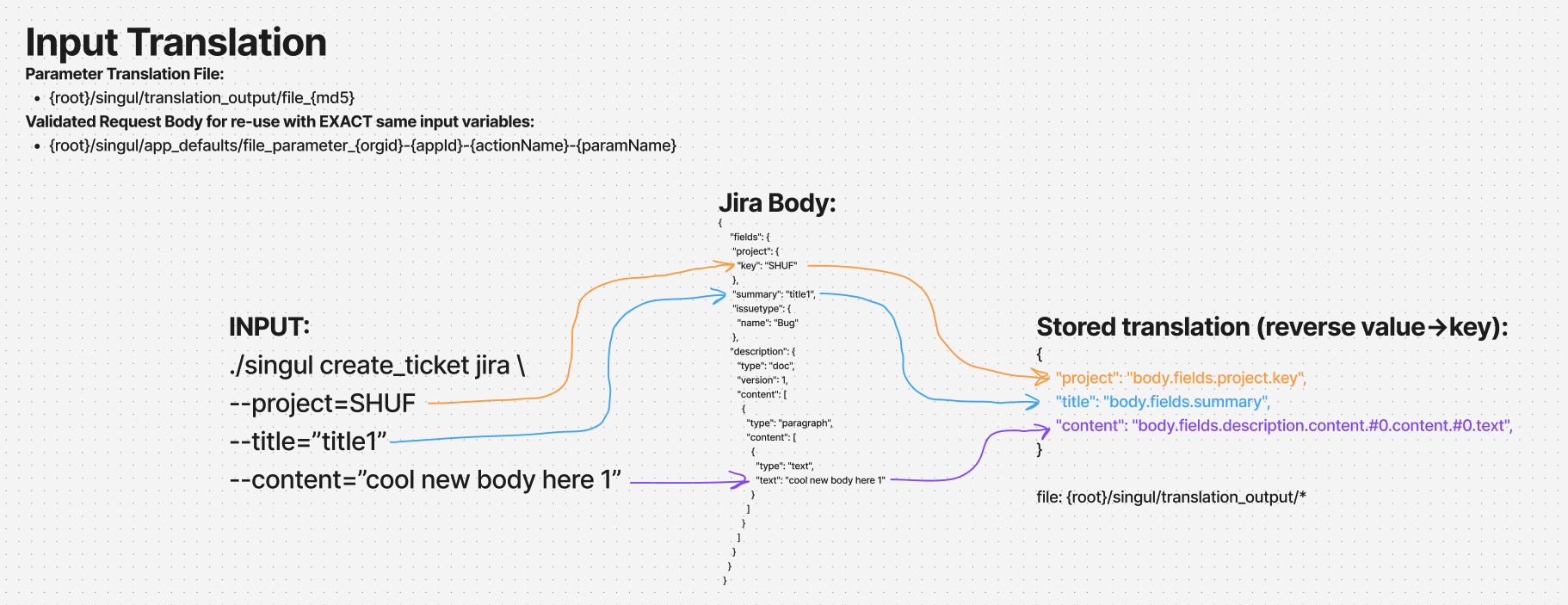
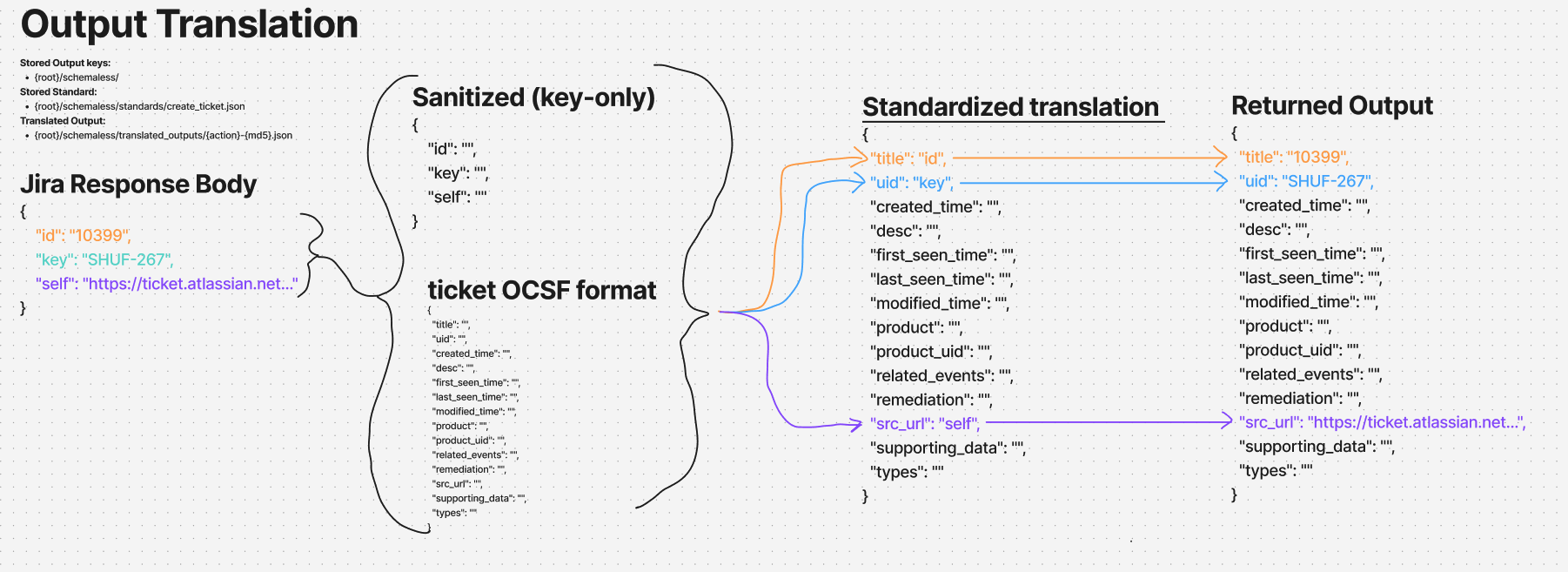
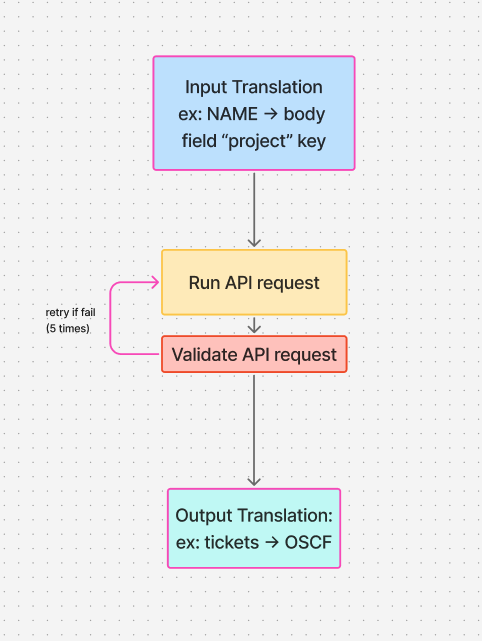
- For your input AND output, we store the format and know how to translate it after successful requests. This is then reusable in subsequent requests
- Singul ensures all input fields ARE in the request, or fails out. You can modify the relevant files to update the body you want to send if this occurs after up to 5 request failures.
Stable Connections & stored authentication:
- Singul is based on how we built Shuffle and how we connect to APIs. We use the knowledge of Shuffle, including apps, categories, tags, actions, authentication mechanisms, code and more.
LLM Controls
Set these environment variables to control the behavior of Singul. The AI/LLM section is FOR NOW only supporting the OpenAI format, but we intend to add more in the future to make it work well standalone. Examples of how to change to a different providers with environment variables is:
- Local Ollama: OPENAI_API_URL=http://localhost:11434/v1, AI_MODEL=llama2
- Google Gemini: OPENAI_API_URL=https://generativelanguage.googleapis.com/v1beta/openai, OPENAI_API_KEY=, AI_MODEL=gemini-2.0-flash
- xAI Grok: OPENAI_API_URL=https://api.x.ai/v1, OPENAI_API_KEY=, AI_MODEL=grok-3-mini-fast-beta
- Anthropic: OPENAI_API_URL=https://api.anthropic.com/v1, OPENAI_API_KEY=, AI_MODEL=claude-3-7-sonnet-20250219
- Deepseek: OPENAI_API_URL=https://api.deepseek.com, OPENAI_API_KEY=, AI_MODEL=deepseek-reasoner
- Mistral: OPENAI_API_URL=https://api.mistral.ai/v1, OPENAI_API_KEY=, AI_MODEL=codestral-latest
- Amazon Bedrock: NOT COMATIBLE YET :(( ...
Other OpenAI compatible API's also work
Environment Variables
REQUIRED:
OPENAI_API_KEY=<key> # The API key for the OpenAI API, if you want to use a different provider. Default: None
Singul controls
DEBUG=true 				# Enables debug mode
FILE_LOCATION=./files 	# The location of the files. Default: ./files
SHUFFLE_ENCRYPTION_MODIFIER=randomstringhere # Required for local encryption of authentication.

# Where to download and control standards from
GIT_DOWNLOAD_USER=shuffle
GIT_DOWNLOAD_REPO=standards

# To upload results to a Datastore, find details on https://shuffler.io/admin. This is disabled by default
SHUFFLE_ORG="ORG_ID"
SHUFFLE_AUTHORIZATION="API KEY"
SHUFFLE_BACKEND="SHUFFLE BACKEND"
LLM controls:
AI_MODEL=<model> 			# The model to use for the LLM. We recommend reasoning models. Default: o4-mini
OPENAI_API_URL=<url> 	# The URL of the OpenAI API, if you want to use a different provider. Default: https://api.openai.com/v1/chat/completions
OPENAI_API_ORG=<org> 	# The organization ID for the OpenAI API, if you want to use a different provider. Default: None
Local Test Example
go run *.go create_ticket jira --project=SHUF --title="title2" --content="cool new body here 2"
go run *.go list_tickets jira --max_results=2
How it works
1 maintainer

Metadata
1 maintainer
Release files for singul 2.0.0
For a detailed explanation of source distributions (sdists) and built distributions (wheels), please see the package formats documentation.
Source distribution (sdist)
| File | Size | Uploaded | |
|---|---|---|---|
| singul-2.0.0.tar.gz | 13.9 kB | Details |
Built distribution (wheel)
| File | Interpreter | ABI | Platform | Reset |
|---|---|---|---|---|
| singul-2.0.0-py3-none-any.whl | Python 3 | none | any | Details |
Total release size: 28.8 kB
Release files / singul-2.0.0.tar.gz
| Download URL | singul-2.0.0.tar.gz |
|---|---|
| Size | 13.9 kB |
| Tags | Source |
|
SHA-256 checksum How to use checksums |
e161b07a8ee62a019899d4dc2ee6e47452fe762eca63c0af0a329791fd120bb0
|
|
BLAKE2b-256 checksum How to use checksums |
aff8a426ba8c1a66d47fdb10e8811f7f74b54ed80d78ce40773046ffb299620e
|
| Upload date | |
|
Uploaded using Trusted Publishing? What is trusted publishing? |
No |
| Uploaded via |
twine/6.0.1 CPython/3.10.10
|
Release files / singul-2.0.0-py3-none-any.whl
| Download URL | singul-2.0.0-py3-none-any.whl |
|---|---|
| Size | 14.9 kB |
| Tags | Python 3 |
|
SHA-256 checksum How to use checksums |
fff6d138814efda7d27bd34277b2626819e3537f8b7b8a42cb193ea8483c710b
|
|
BLAKE2b-256 checksum How to use checksums |
ed7e1d2bb85dfef2c80f42c276824d369d2773ac5b3864a7df4e3b4b51896258
|
| Upload date | |
|
Uploaded using Trusted Publishing? What is trusted publishing? |
No |
| Uploaded via |
twine/6.0.1 CPython/3.10.10
|














