
SIPHON: Production-ready AI telephony/calling agents in few lines of code.

Project description

SIPHON



Build calling agents in minutes, not months.
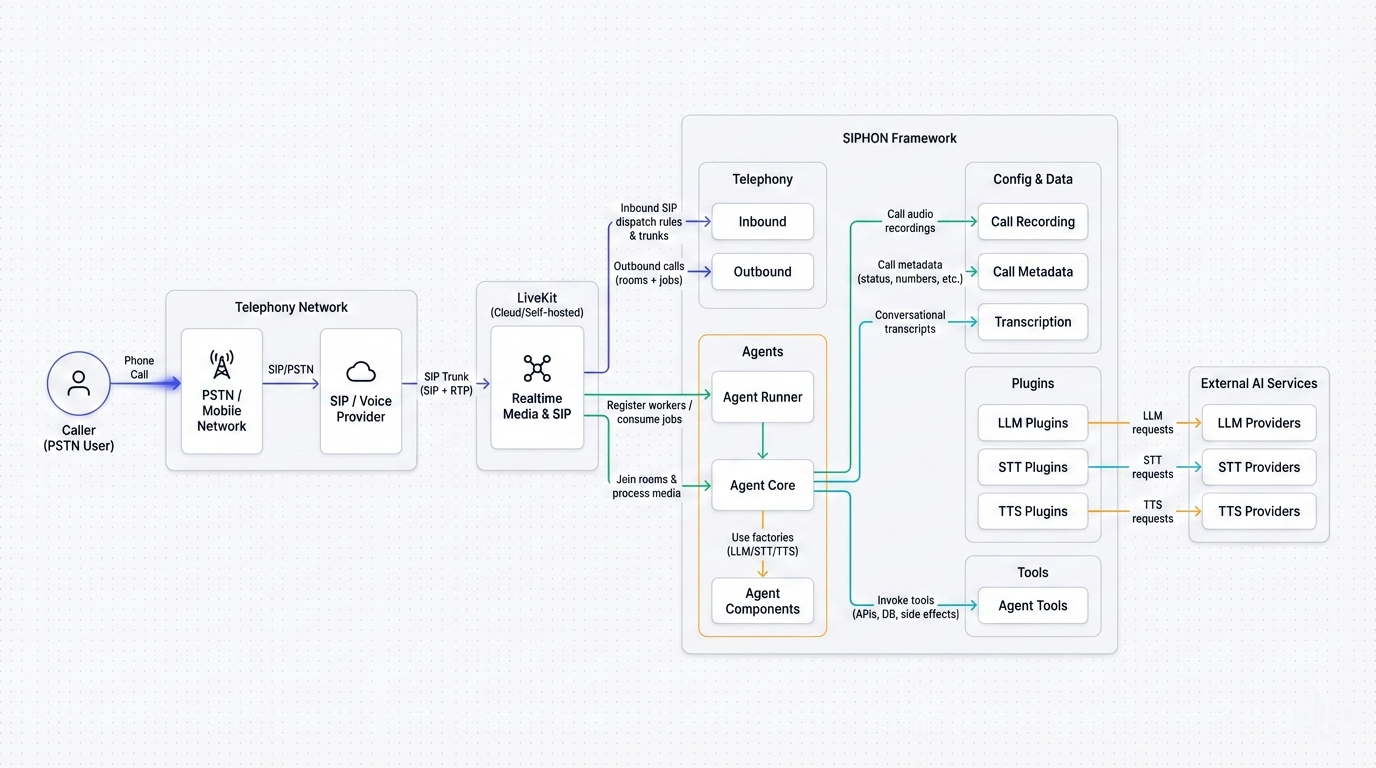
Building calling agents manually requires stitching together WebSockets, managing audio buffers, and synchronizing state across multiple AI models. Siphon abstracts this entire layer into a clean, developer-friendly API that scales effortlessly.
⭐ Drop a star to help us grow!
Not another toy framework.
Siphon is built for production environments where reliability and latency are non-negotiable.
| ⚡ Low Latency | 🛡️ Production Ready | 🚀 Infinite Scale |
|---|---|---|
| Powered by WebRTC (LiveKit) for sub-500ms voice interactions that feel like real human conversation. | Handles the chaotic reality of phone networks—audio packet loss, SIP signaling, and interruptions. | Define your agent once and run it on 1 or 1,000 servers. It balances the load automatically. |
Quick Start
If you're new to Siphon, we recommend checking out:
1. Install
pip install siphon-ai
2. Configure Environment
Siphon requires LiveKit for real-time media and API keys for your AI providers.
Create a .env file:
# LiveKit (Cloud: https://cloud.livekit.io/ or Self-hosted)
LIVEKIT_URL=...
LIVEKIT_API_KEY=...
LIVEKIT_API_SECRET=...

# AI Providers
OPENAI_API_KEY=...
DEEPGRAM_API_KEY=...
CARTESIA_API_KEY=...
3. Create your Agent
Create a file named agent.py. This simple agent acts as a helpful assistant.
from siphon.agent import Agent
from siphon.plugins import openai, cartesia, deepgram
from dotenv import load_dotenv

load_dotenv()

# Initialize your AI stack
llm = openai.LLM()
tts = cartesia.TTS()
stt = deepgram.STT()

# Define the Agent
agent = Agent(
    agent_name="Receptionist",
    llm=llm,
    tts=tts,
    stt=stt,
    system_instructions="You are a helpful receptionist. Answer succinctly.",
)

if __name__ == "__main__":
    # One-time setup: downloads required files (only needed on fresh machines)
    agent.download_files()

    # Start the agent worker in development mode
    agent.dev()

    # Start the agent worker in production mode
    # agent.start()
For more details on configuring your Agent (latency, interruptions, VAD...etc) and exploring available Plugins (Deepgram, Cartesia, OpenAI, ElevenLabs...etc), check out the documentation.
4. Run
Start your agent worker.
python agent.py
Horizontal Scaling: To scale, simply run this command on multiple servers. The worker architecture automatically detects new nodes and balances the load with Zero Configuration. Learn more about Scaling
Capabilities
📞 Receive Calls (Inbound)
Bind a phone number to your agent using a Dispatch rule.
import os
from siphon.telephony.inbound import Dispatch
from dotenv import load_dotenv

load_dotenv()

dispatch = Dispatch(
    dispatch_name="customer-support",
    agent_name="Receptionist", # Must match the name in agent.py
    sip_trunk_id=os.getenv("SIP_TRUNK_ID"),
    # Or: sip_number=os.getenv("SIP_NUMBER"),
)
dispatch.agent()
Note: For more details, check out the Inbound Documentation. To configure numbers with providers like Twilio, see the Twilio Setup Guide.
📱 Make Calls (Outbound)
Trigger calls programmatically from your code or API.
import os
from siphon.telephony.outbound import Call
from dotenv import load_dotenv

load_dotenv()

call = Call(
    agent_name="Receptionist", # Must match the name in agent.py
    sip_trunk_setup={ ... }, # Your SIP credentials
    # Or: sip_trunk_id=os.getenv("SIP_TRUNK_ID"),
    number_to_call="+15550199"
)
call.start()
Note: For more details, check out the Outbound Documentation. To configure trunks with providers like Twilio, see the Twilio Setup Guide.
💾 Persist Call Data
Siphon enables call recordings, transcriptions, and metadata persistence via environment variables.
# Enable saving features
CALL_RECORDING=true
SAVE_METADATA=true
SAVE_TRANSCRIPTION=true

# Configure storage location (locally, S3, Redis, Postgres, etc)
METADATA_LOCATION=Metadata # saves locally
TRANSCRIPTION_LOCATION=postgresql://..... # saves to postgresql

# Configure S3 (Call Recordings are always saved to S3)
AWS_S3_ENDPOINT=
AWS_S3_ACCESS_KEY_ID=
AWS_S3_SECRET_ACCESS_KEY=
AWS_S3_BUCKET=
AWS_S3_REGION=
AWS_S3_FORCE_PATH_STYLE=true
Note: Siphon supports multiple storage backends. For detailed configuration instructions, see the Call Data Documentation.
🚀 Examples and demo
Coming soon stay tuned 👀!
📖 Documentation
For detailed documentation, visit Siphon Documentation, including a Quickstart Guide.
🤝 Contributing
We love contributions from the community ❤️. For details on contributing or running the project for development, check out our Contributing Guide.
Support us
We are constantly improving, and more features and examples are coming soon. If you love this project, please drop us a star ⭐ at GitHub repo to stay tuned and help us grow.
License
Siphon is Apache 2.0 licensed.


Download files
Download the file for your platform. If you're not sure which to choose, learn more about installing packages.
Source Distribution
Built Distribution
Filter files by name, interpreter, ABI, and platform.
If you're not sure about the file name format, learn more about wheel file names.
Copy a direct link to the current filters
File details
Details for the file siphon_ai-0.1.0.tar.gz.
File metadata
- Download URL: siphon_ai-0.1.0.tar.gz
- Upload date:
- Size: 40.6 kB
- Tags: Source
- Uploaded using Trusted Publishing? No
- Uploaded via: twine/6.2.0 CPython/3.13.11
File hashes
| Algorithm | Hash digest | |
|---|---|---|
| SHA256 |
7c564bc75afa16fc53fce7578c69355bdfbeb07fd0384d10e35a09f7598bbd5a
|
|
| MD5 |
5ecaee27104c5754f4dc9a66176e95df
|
|
| BLAKE2b-256 |
5d7e395e09327cb7d5766ba067359745bd0bd985a576423145665b815b37eeaf
|
File details
Details for the file siphon_ai-0.1.0-py3-none-any.whl.
File metadata
- Download URL: siphon_ai-0.1.0-py3-none-any.whl
- Upload date:
- Size: 55.6 kB
- Tags: Python 3
- Uploaded using Trusted Publishing? No
- Uploaded via: twine/6.2.0 CPython/3.13.11
File hashes
| Algorithm | Hash digest | |
|---|---|---|
| SHA256 |
a95e6faff674e5b7108c986d3f5cfaab0bd3955047a6f8ee5df586faf76ae462
|
|
| MD5 |
dca0471dab1693f430a4ab5d78fa0fa1
|
|
| BLAKE2b-256 |
53d0a259b771edccd603680ccb90661c21953df2935ecae6f0c2307a1dc7f27d
|






