
Siss
A command-line tool for applying duotone and halftone effects to video and still-image files. Duotone maps per-pixel luminance to a linear blend between two user-supplied RGB colors; halftone renders plus, asterisk, slash, or dot symbols at luminance-proportional sizes over a 3×3-pixel sampled grid, on a square or hex-offset screen. Accepts hex strings, CSS named colors, RGB triples, and named two-color palettes.
Features
- Duotone – maps per-pixel luminance to a linear gradient between two RGB colors;
color1is applied to dark areas,color2to light areas - Halftone – renders plus, asterisk, slash, or dot symbols at sizes proportional to local luminance (3×3-pixel sampled average), with independent symbol and background colors, over a square or hex-offset sampling grid
- Color input – accepts 3- and 6-digit hex strings (with or without
#), case-insensitive CSS named colors, RGB integer triples, and named two-color palettes via--palette - Still-image output – write PNG, JPEG, BMP, TIFF, or WebP by using an image extension for the output path; reuses the same per-frame effect closures as video output
- Codec selection – probes
cv2.VideoWriter_fourcccandidates per output format and OS; falls back through a priority list until a working codec is found - Audio passthrough – copies the original audio track into the output with
ffmpegafter rendering; disable with--no-audio - Custom palettes – load your own two-color looks from a JSON file with
--palette-file; custom names shadow built-in ones
Installation
pip install siss
Quick Start
After installation, run siss from the command line:
siss input_video.mp4 output_video.mp4 --effect duotone
To process a still image, use an image extension for the output path:
siss input.jpg output.png --effect duotone --palette sunset
Specifying Colors
Colors accept hex strings, CSS names, RGB triples, or curated palettes:
siss input.mp4 output.mp4 --effect duotone --color1 "#3b1f4b" --color2 gold
siss input.mp4 output.mp4 --effect duotone --palette sunset
siss --list-palettes
Example Effects
Duotone Effect
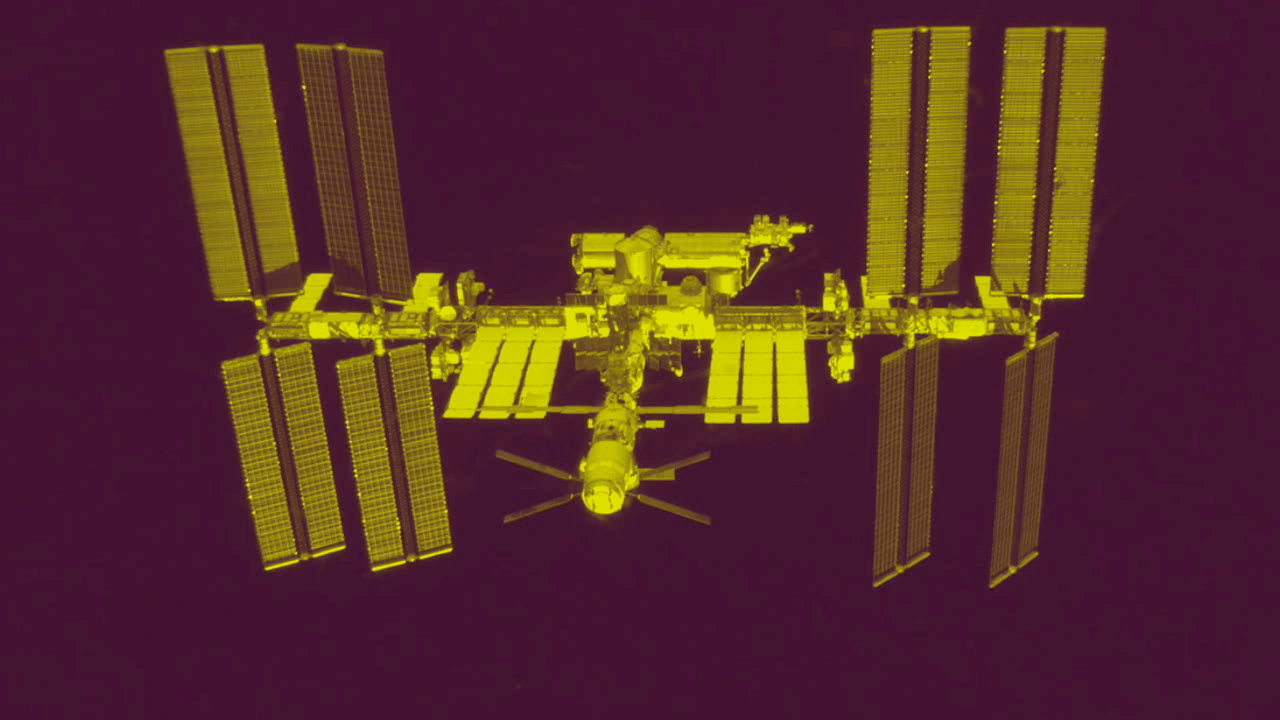
siss input.mp4 output.mp4 --effect duotone --color1 56 12 45 --color2 217 237 3
Applies a duotone effect with deep purple mapped to dark areas and bright yellow-green to light areas.
Halftone Effect

siss input.mp4 output.mp4 --effect halftone --symbol_type slash --symbol_size 20 --color1 56 12 45 --color2 217 237 3
Applies a halftone effect with slash symbols at luminance-proportional sizes.
Documentation
See the GitHub repository for full documentation.
Requirements
- Python 3.9+
- OpenCV (
cv2) - NumPy
- tqdm
- ffmpeg (optional — for audio passthrough)
1 maintainer

Release files for siss 0.7.2
For a detailed explanation of source distributions (sdists) and built distributions (wheels), please see the package formats documentation.
Source distribution (sdist)
| File | Size | Uploaded | |
|---|---|---|---|
| siss-0.7.2.tar.gz | 43.7 kB | Details |
Built distribution (wheel)
| File | Interpreter | ABI | Platform | Reset |
|---|---|---|---|---|
| siss-0.7.2-py3-none-any.whl | Python 3 | none | any | Details |
Total release size: 67.2 kB
Release files / siss-0.7.2.tar.gz
| Download URL | siss-0.7.2.tar.gz |
|---|---|
| Size | 43.7 kB |
| Tags | Source |
|
SHA-256 checksum How to use checksums |
5b5416b1ebd9fe7bedcf6ee04f02b00d8e098774d9e2d902aef66fde4fa2a01b
|
|
BLAKE2b-256 checksum How to use checksums |
e4dd581f70a645648dcce56c2e1eeb0bdf961adb1f983166157a567091a40eeb
|
| Upload date | |
|
Uploaded using Trusted Publishing? What is trusted publishing? |
Yes |
| Uploaded via |
twine/6.1.0 CPython/3.13.14
|
Provenance
Provenance describes where a file came from. On PyPI, provenance is shared via attestations, which provide a verifiable record of the build or publishing details. View details, limitations and caveats.


PyPI Publish Attestation
PyPI verified that this artifact, at this checksum, originated from the publisher listed below.
Signed by GitHub Actions, verified by PyPI on Jul 27, 2026.
Transparency logRelease files / siss-0.7.2-py3-none-any.whl
| Download URL | siss-0.7.2-py3-none-any.whl |
|---|---|
| Size | 23.5 kB |
| Tags | Python 3 |
|
SHA-256 checksum How to use checksums |
10ecdfb286317c565ab8672e30eec5445dc9af7bc5b74a63621b828c66aa716d
|
|
BLAKE2b-256 checksum How to use checksums |
a3b2fe2a2bc7d58baf3633fc7974a638386032cd3b594bfb7dd4e04b262d06d0
|
| Upload date | |
|
Uploaded using Trusted Publishing? What is trusted publishing? |
Yes |
| Uploaded via |
twine/6.1.0 CPython/3.13.14
|
Provenance
Provenance describes where a file came from. On PyPI, provenance is shared via attestations, which provide a verifiable record of the build or publishing details. View details, limitations and caveats.
PyPI Publish Attestation
PyPI verified that this artifact, at this checksum, originated from the publisher listed below.
Signed by GitHub Actions, verified by PyPI on Jul 27, 2026.
Transparency log













