
site2mcp
Turn any website into an MCP server your AI agents can call
HAR-to-MCP generator for recorded website APIs. Export a browser session to OpenAPI 3.1, a typed Python client, and a standalone Model Context Protocol server.


Quick start · Why site2mcp · What it does · How it works · Sample output · FAQ · Docs
pipx install site2mcp
Or run without a persistent install: uvx site2mcp --help.
Registry installs require the first release to be published. Until then, use the source checkout below.
Why site2mcp
You have a website session an agent needs to repeat, but no MCP server for its API.
- Record the actions you need in your browser, then inspect the inferred tools before running them.
- Generate OpenAPI, a typed Python client, and an MCP server from the same recording.
- Learn locally without contacting the recorded site. Optional CLI descriptions use sanitized metadata.
- Supply fresh credentials at runtime. Write tools stay hidden until you enable them.
Quick start
Install with Python 3.11+ and pipx:
pipx install site2mcp
To use uv instead, prefix each command with uvx, for example uvx site2mcp inspect session.har.
For a source checkout, install the pinned dependencies with uv and make:
git clone https://github.com/harinaralasetty/site2mcp.git
cd site2mcp
make setup
Source installs expose the command at .venv/bin/site2mcp. Dependency installation needs network access.
The tests and demo run offline against loopback only.
-
In Chrome, open DevTools, select Network, enable Preserve log, and use the app normally. Right-click the request list and choose Save all as HAR with content, or use the HAR export button. Some versions export sanitized HAR by default. Missing cookies or response bodies reduce what can be inferred.
-
Capture different IDs, optional fields, and pagination for the actions you need. Keep the raw HAR private.
-
Preview the recording and generate the server:
site2mcp inspect session.har
site2mcp learn session.har -o out --name 'My account' --describe none
-
Read
out/README.mdand supply the required environment variables or createout/.envwith fresh credentials. Start the MCP stdio server:site2mcp serve out
If the page and API use different hosts, use the exact API hostname in both commands:
site2mcp inspect session.har --host api.example.com
site2mcp learn session.har --host api.example.com -o out --name 'My account' --describe none
To run the full offline loop from the source checkout:
make setup
make demo
.venv/bin/site2mcp inspect demo-output/session.har
The demo starts a local notes and tags app, logs in to that loopback app, records its requests,
learns the API, validates OpenAPI, and calls the generated server through the official SDK's MCP stdio client.
It also runs the generated typed client in a separate process, then shuts its server down.
To explore the demo separately, run .venv/bin/python -m demo.app, then run
.venv/bin/python -m demo.record in another terminal. The recorder only accepts loopback HTTP.
Recording, flags, credentials, and edge cases
In Firefox, open Developer Tools, select Network, enable Persist Logs, perform the session, then use the request list context menu's Save All As HAR. Include response content when available. HAR exports may contain credentials and personal data even when the browser describes the export as sanitized.
--host on learn or inspect selects an exact first-party hostname, optionally
with its port. Without it, site2mcp chooses the first document host, or the most
frequent non-static, non-analytics host. Each excluded category and count is reported.
Credentials and writes
The generated README lists the environment variables needed for each capture.
Create out/.env yourself, using literal KEY=VALUE lines, or set environment
variables before launching the server. No .env or credential values are
generated. Environment values override .env; shell expressions and variable
references in .env are not evaluated.
Cookie sessions use SITE2MCP_COOKIE, containing the whole Cookie request header.
Bearer authentication uses SITE2MCP_AUTHORIZATION, including its Bearer prefix.
An X-CSRF-Token header uses SITE2MCP_X_CSRF_TOKEN. Other sensitive headers,
query parameters, and nested body fields get documented environment bindings in
manifest.json. Supply fresh values from your own session, and refresh cookies
and CSRF tokens together. CSRF round-trip detection is recorded as a note; this
version does not automatically log in or refresh tokens.
Only GET, HEAD, and GraphQL queries are exposed by default. To expose writes:
site2mcp serve out --allow-writes --rate 2 --timeout 15
Every write tool says Changes data in its description. The Python client also
requires allow_writes=True for write calls. Read methods are classified from
HTTP methods and GraphQL operation types; a poorly designed site's GET can still
have side effects. Review the inferred operations before connecting an agent.
The runtime spaces requests at a default maximum of 2 requests per second, uses
15-second HTTP timeouts, caps responses at 4 MiB, refuses redirects, and does not
retry mutations. Expired sessions produce an error asking you to re-record or
refresh your cookie. SITE2MCP_BASE_URL overrides origins for local testing.
Connect Claude Code or Codex
Use absolute paths to the Python interpreter with mcp==1.26.0 installed and to
the generated server. The examples below are configuration templates; substitute
your paths. Keep credentials in the generated directory's local .env.
For Claude Code, put this entry in a project .mcp.json, following the
official MCP configuration instructions:
{
  "mcpServers": {
    "my_site": {
      "type": "stdio",
      "command": "/absolute/path/to/site2mcp/.venv/bin/python",
      "args": ["/absolute/path/to/out/server.py"]
    }
  }
}
For Codex, add this to ~/.codex/config.toml, following the
official OpenAI MCP documentation:
[mcp_servers.my_site]
command = "/absolute/path/to/site2mcp/.venv/bin/python"
args = ["/absolute/path/to/out/server.py"]
Add "--allow-writes" to either args array only when you intend to expose
mutations. The generated directory works independently of the site2mcp package;
install its pinned requirements.txt in the interpreter used by the host.
Inference and optional descriptions
Numeric, UUID, and long hexadecimal path segments become named parameters, with confidence notes. Schemas merge observed types, nested objects, arrays, optional fields, formats, and repeated query values. Small repeated string vocabularies can become enums. Pagination notes recognize page/limit, offset, and cursor-style fields. They do not implement automatic traversal.
--describe claude can ask an installed Claude Code CLI for names and
descriptions. It receives only sanitized method/path metadata, no captured
examples, runs in an empty temporary directory with an isolated home, has tools,
hooks and MCP disabled, and has a timeout. Authentication uses an already-set
provider API key. --describe codex first checks whether the installed CLI
explicitly supports disabling all tools. Versions without that capability fall
back immediately. Missing CLIs, unsupported flags, provider failures, timeouts,
and invalid responses all retain the deterministic names. Live provider calls
are optional and are not used by the demo or test suite.
Safety and limitations
For your own accounts and data only. Respect the site's terms. Do not bypass paywalls, captchas, or access controls.
Cookies, Authorization, Set-Cookie, API-key-style fields, nested secrets, and
personal example values are omitted or redacted before generation. Redaction
also checks copied values, JSON strings, and URL query strings. Private dynamic
JSON keys become map schemas. Default artifacts contain no raw examples.
--keep-examples retains personal examples but still redacts credentials. This
is a heuristic filter, not a way to make arbitrary HAR files safe to publish.
Free text and unusual field names need human review. Raw HARs, outputs, and .env
files are git-ignored; bundled fixtures use synthetic data.
Only recorded operations are discovered. Requiredness and enums describe the
samples, not server guarantees. String slug IDs may remain literal paths;
subdomain APIs require --host. Multipart uploads, WebSockets, streaming, binary
responses, OAuth flows, automatic cookie/CSRF refresh, and GraphQL batching or
subscriptions are unsupported. GraphQL requires one named operation and
variable-based arguments; inline literals and defaults are reported and skipped.
Malformed selected bodies produce a clear error rather than silent inference.
HAR limits are 32 MiB, 50,000 entries, 1 MiB per captured body, and nesting depth 64.
REST POST endpoints count as writes even when they only read, as some search APIs do.
Use --allow-writes to expose them. Path parameter names are heuristic and can be generic.
What it does
| Input or output | What you get |
|---|---|
| Browser HAR | A preview of inferred API tools and counts of excluded requests |
openapi.yaml |
OpenAPI 3.1 for observed HTTP operations and schemas |
client.py |
A typed Python client with an explicit write gate |
server.py |
A standalone MCP stdio server, with writes hidden by default |
manifest.json |
Inferred operations, confidence notes, and credential environment bindings |
| Supporting files | runtime.py, pinned requirements.txt, and a credential instruction README.md |
openapi.yaml uses JSON syntax, which is valid YAML 1.2, so generation needs no YAML dependency.
GraphQL shares one OpenAPI HTTP operation with an x-graphql-operations list,
while MCP exposes a tool for each observed name.
How it works
site2mcp reads a HAR locally, filters traffic to the selected host, redacts captured values,
and groups observed requests into operations. It merges their schemas and writes the generated files.
serve loads the generated manifest and calls the real site with credentials you supply.
Learning and inspection do not contact the recorded site. Optional --describe modes can contact a provider
through an installed CLI; deterministic naming with --describe none is the default.
Sample output
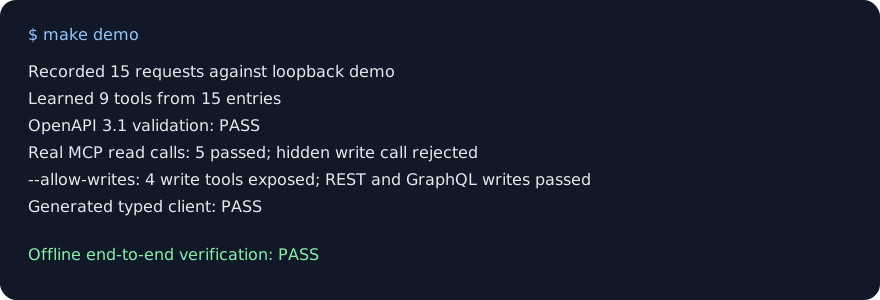
Real output from make demo, trimmed to the verification lines:
Recorded 15 requests against loopback demo
Learned 9 tools from 15 entries
OpenAPI 3.1 validation: PASS
Default MCP tools: get_note, get_tag, graphql_list_notes, list_notes, list_tags
Real MCP read calls: 5 passed; hidden write call rejected
--allow-writes: 4 write tools exposed; REST and GraphQL writes passed
Generated typed client: PASS
Offline end-to-end verification: PASS
A real-site check on 28 October 2026 loaded a Chrome recording of
Hacker News search with 44 requests. Selecting the API host with
--host learned 2 tools. None of 7 credential-like values from the recording appeared in any generated file.
This checks one recording, not every site or session.
FAQ
How do I turn a website into an MCP server? Record the actions in Chrome, export a HAR with response content,
then run site2mcp inspect, site2mcp learn, and site2mcp serve. Supply fresh credentials before serving.
Does it send my cookies anywhere? Learning and inspection stay local and do not contact the recorded site; optional descriptions send only sanitized method/path metadata to a provider CLI. Serving sends the credentials you supply to the real site to perform tool calls.
Which sites work? Start with sites whose recorded requests expose JSON REST APIs or supported named GraphQL operations.
Select the API host with --host when it differs from the page; multipart uploads, WebSockets, and streaming are unsupported.
Can an agent change data? Write tools are hidden unless you pass --allow-writes, and the typed client requires allow_writes=True.
REST POST searches also need this flag; a site's GET endpoint can still have side effects.
Does the recording describe the whole API? No. Schemas, required fields, enums, and operations describe only the recorded samples. Record different IDs, optional fields, and pagination, then review the inference notes.
How is this different from mitmproxy2swagger or browser agents? site2mcp starts from a browser HAR and generates OpenAPI, a typed Python client, and an MCP server. It replays the observed API calls with supplied credentials instead of controlling the page.
Does it need an LLM or an API key? No. The default --describe none uses deterministic names offline.
Optional --describe claude and --describe codex modes use installed CLIs and fall back when unavailable or unsupported.
Can I run it from npm? The npm wrapper launches the same pinned Python release through uvx or pipx. It still needs a Python tool runner and is available after the npm and PyPI releases are published.
Where this fits
Use site2mcp when a recorded website workflow needs reusable API tools for an MCP client. The OpenAPI output can also feed other API tooling, and the typed client works independently of MCP. For UI steps that are not API calls, keep using a browser tool.
Documentation
- HAR fixture provenance describes the synthetic browser fixtures.
- AI assistant summary lists commands and limits.
- npm wrapper describes the Python launcher.
- Changelog records releases.
Contributing
Use Python 3.11+, uv, and make. Install the pinned development environment, then run:
make setup
make test
make lint
make demo
The pinned official MCP Python SDK
provides protocol handling and transports. HAR parsing, schema inference, redaction, generation,
dotenv loading, HTTP requests, CLI parsing, and the demo use the Python standard library.
The SDK has its own transitive dependencies. openapi-spec-validator and ruff are pinned
development dependencies; uv.lock locks the resolved environment.
Report reproducible bugs through GitHub Issues. Use synthetic or reviewed, redacted captures in reports. Keep raw HARs and credentials private.
License
1 maintainer

Metadata
1 maintainer
Release files for site2mcp 0.1.0
For a detailed explanation of source distributions (sdists) and built distributions (wheels), please see the package formats documentation.
Source distribution (sdist)
| File | Size | Uploaded | Provenance | |
|---|---|---|---|---|
| site2mcp-0.1.0.tar.gz | 127.4 kB | Without provenance | Details |
Built distribution (wheel)
| File | Interpreter | ABI | Platform | Reset |
|---|---|---|---|---|
| site2mcp-0.1.0-py3-none-any.whl | Python 3 | none | any | Details |
Total release size: 159.2 kB
Release files / site2mcp-0.1.0.tar.gz
| Download URL | site2mcp-0.1.0.tar.gz |
|---|---|
| Size | 127.4 kB |
| Tags | Source |
|
SHA-256 checksum How to use checksums |
82e272f603494149cd80acdeb9568d586e9c43d87b260b3984dedd2f0175ebcf
|
|
BLAKE2b-256 checksum How to use checksums |
f19cc9d14355a4701faeacf552b84478865242c1c7329dd25458b347d9b36c0a
|
| Upload date | |
|
Uploaded using Trusted Publishing? What is trusted publishing? |
No |
| Uploaded via |
uv/0.12.19 {"installer":{"name":"uv","version":"0.12.19","subcommand":["publish"]},"python":null,"implementation":{"name":null,"version":null},"distro":{"name":"macOS","version":null,"id":null,"libc":null},"system":{"name":null,"release":null},"cpu":null,"openssl_version":null,"setuptools_version":null,"rustc_version":null,"ci":null}
|
Release files / site2mcp-0.1.0-py3-none-any.whl
| Download URL | site2mcp-0.1.0-py3-none-any.whl |
|---|---|
| Size | 31.9 kB |
| Tags | Python 3 |
|
SHA-256 checksum How to use checksums |
d008df1977963b20ffff8e91ad6b08909b2b78fa5f23c2ad95bfd83fe08253c0
|
|
BLAKE2b-256 checksum How to use checksums |
05f06ec993130276e5979188705f62dac14dcd5f6dfe1ada4cdf501f0cf6b3d6
|
| Upload date | |
|
Uploaded using Trusted Publishing? What is trusted publishing? |
No |
| Uploaded via |
uv/0.12.19 {"installer":{"name":"uv","version":"0.12.19","subcommand":["publish"]},"python":null,"implementation":{"name":null,"version":null},"distro":{"name":"macOS","version":null,"id":null,"libc":null},"system":{"name":null,"release":null},"cpu":null,"openssl_version":null,"setuptools_version":null,"rustc_version":null,"ci":null}
|
Security for site2mcp 0.1.0
Provenance
Provenance describes where a file came from. On PyPI, provenance is shared via attestations, which provide a verifiable record of the build or publishing details. View details, limitations and caveats.
No provenance found
None of the files in this release were uploaded with provenance metadata.
A note on package security
PyPI is a repository for distributing packages, not a service for auditing them. While third-party security researchers and our staff do their best to detect and remove malicious packages, PyPI cannot guarantee the quality, security or suitability of any given package.
To learn more about protecting yourself from malicious actors, visit our package security documentation.













