
CLI tool to fetch URLs from sitemap.xml, check their existence, and generate performance reports

Project description
Siteprobe
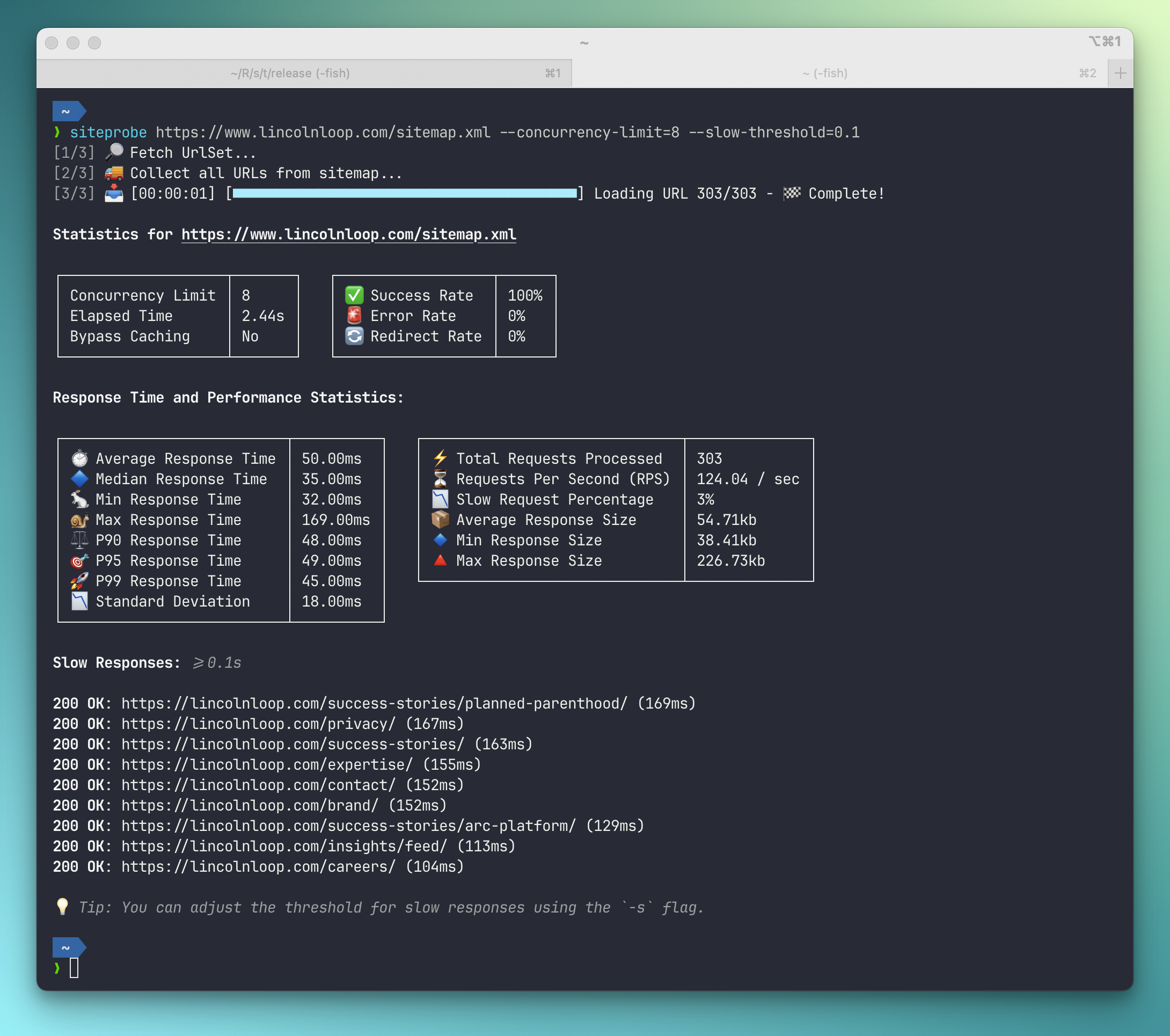
Siteprobe is a Rust-based CLI tool that fetches all URLs from a given sitemap.xml
url, checks their existence, and generates a performance report. It supports various
features such as authentication, concurrency control, caching bypass, and more.
Features
- Fetch and parse sitemap.xml to extract URLs, including nested Sitemap Index files recursively.
- Check the existence and response times of each URL.
- Generate a detailed performance CSV report.
- Support for Basic Authentication.
- Adjustable concurrency limits for request handling.
- Configurable request timeout settings.
- Support for configuring rate limits, such as 300 requests per 5-minute interval.
- Redirect handling with security precautions.
- Filtering and reporting slow URLs based on a threshold.
- Custom User-Agent header support.
- Option to append random timestamps to URLs to bypass caching mechanisms.
- Save downloaded documents for further inspection or use as a static site mirror.
Installation
You can install Siteprobe using Cargo:
cargo install siteprobe
Alternatively, build from source:
git clone https://github.com/bartTC/siteprobe.git
cd siteprobe
cargo build --release
Usage
siteprobe <sitemap_url> [OPTIONS]
Arguments
<sitemap_url>- The URL of the sitemap to be fetched and processed.
Options
Usage: siteprobe [OPTIONS] <SITEMAP_URL>

Arguments:
  <SITEMAP_URL>  The URL of the sitemap to be fetched and processed.

Options:
      --basic-auth <BASIC_AUTH>
          Basic authentication credentials in the format `username:password`
  -c, --concurrency-limit <CONCURRENCY_LIMIT>
          Maximum number of concurrent requests allowed [default: 4]
  -l, --rate-limit <RATE_LIMIT>
          The rate limit for all requests in the format 'requests/time[unit]',
          where unit can be seconds (`s`), minutes (`m`), or hours (`h`). E.g.
          '-l 300/5m' for 300 requests per 5 minutes, or '-l 100/1h' for 100
          requests per hour.
  -o, --output-dir <OUTPUT_DIR>
          Directory where all downloaded documents will be saved
  -a, --append-timestamp
          Append a random timestamp to each URL to bypass caching mechanisms
  -r, --report-path <REPORT_PATH>
          File path for storing the generated `report.csv`
  -j, --report-path-json <REPORT_PATH_JSON>
          File path for storing the generated `report.json`
  -t, --request-timeout <REQUEST_TIMEOUT>
          Default timeout (in seconds) for each request [default: 10]
      --user-agent <USER_AGENT>
          Custom User-Agent header to be used in requests [default: "Mozilla/5.0
          (compatible; Siteprobe/0.5.0)"]
      --slow-num <SLOW_NUM>
          Limit the number of slow documents displayed in the report. [default:
          100]
  -s, --slow-threshold <SLOW_THRESHOLD>
          Show slow responses. The value is the threshold (in seconds) for
          considering a document as 'slow'. E.g. '-s 3' for 3 seconds or '-s
          0.05' for 50ms.
  -f, --follow-redirects
          Controls automatic redirects. When enabled, the client will follow
          HTTP redirects (up to 10 by default). Note that for security, Basic
          Authentication credentials are intentionally not forwarded during
          redirects to prevent unintended credential exposure.
  -h, --help
          Print help
Example Usage
# Fetch and analyze a sitemap with default settings
siteprobe https://example.com/sitemap.xml

# Save the report to a specific file
siteprobe https://example.com/sitemap.xml --report-path ./results/report.csv --output-dir ./example.com

# Set concurrency limit to 10 and timeout to 5 seconds
siteprobe https://example.com/sitemap.xml --concurrency-limit 10 --request-timeout 5


Download files
Download the file for your platform. If you're not sure which to choose, learn more about installing packages.
Source Distributions
Built Distributions
Filter files by name, interpreter, ABI, and platform.
If you're not sure about the file name format, learn more about wheel file names.
Copy a direct link to the current filters
File details
Details for the file siteprobe-1.2.2-py3-none-manylinux_2_34_x86_64.whl.
File metadata
- Download URL: siteprobe-1.2.2-py3-none-manylinux_2_34_x86_64.whl
- Upload date:
- Size: 2.6 MB
- Tags: Python 3, manylinux: glibc 2.34+ x86-64
- Uploaded using Trusted Publishing? No
- Uploaded via: twine/6.1.0 CPython/3.13.7
File hashes
| Algorithm | Hash digest | |
|---|---|---|
| SHA256 |
80a24d39e6f816e68ca64cba5fded9b8d8c43ea4caca70a51d9aa8b15d903e08
|
|
| MD5 |
834308f1c9af32288925affb7f27a436
|
|
| BLAKE2b-256 |
1dc8d32fae97d7ccbcd5d43cc4243fd19107119fb3c8539b1390ce2f5d784310
|
File details
Details for the file siteprobe-1.2.2-py3-none-manylinux_2_34_aarch64.whl.
File metadata
- Download URL: siteprobe-1.2.2-py3-none-manylinux_2_34_aarch64.whl
- Upload date:
- Size: 2.6 MB
- Tags: Python 3, manylinux: glibc 2.34+ ARM64
- Uploaded using Trusted Publishing? No
- Uploaded via: twine/6.1.0 CPython/3.13.7
File hashes
| Algorithm | Hash digest | |
|---|---|---|
| SHA256 |
b660599619c483313afb7f8bc7277a0894e81dba0584dee0142df2fb44c87a5b
|
|
| MD5 |
88b7f9f5fc4212b008ab813b3ae1a3fa
|
|
| BLAKE2b-256 |
1b50bfa23920beffa191c358a9395a6d9352c27908fd93e4c0ebbaa36a3e0a93
|
File details
Details for the file siteprobe-1.2.2-py3-none-macosx_11_0_arm64.whl.
File metadata
- Download URL: siteprobe-1.2.2-py3-none-macosx_11_0_arm64.whl
- Upload date:
- Size: 2.4 MB
- Tags: Python 3, macOS 11.0+ ARM64
- Uploaded using Trusted Publishing? No
- Uploaded via: twine/6.1.0 CPython/3.13.7
File hashes
| Algorithm | Hash digest | |
|---|---|---|
| SHA256 |
5c59f3d8b850c942942530b1e31d4a58eef671cfb726dd2d9d662fdcaeaa5c0c
|
|
| MD5 |
cd55668ca5821b837a4aeccbb22de340
|
|
| BLAKE2b-256 |
554411277721edba79f33b9ac5f1c2280f42567d3ab47b9caa21a45999755986
|
File details
Details for the file siteprobe-1.2.2-py3-none-macosx_10_12_x86_64.whl.
File metadata
- Download URL: siteprobe-1.2.2-py3-none-macosx_10_12_x86_64.whl
- Upload date:
- Size: 2.4 MB
- Tags: Python 3, macOS 10.12+ x86-64
- Uploaded using Trusted Publishing? No
- Uploaded via: twine/6.1.0 CPython/3.13.7
File hashes
| Algorithm | Hash digest | |
|---|---|---|
| SHA256 |
5a2b9258fca9490f08e6c17934f9432da7611c5d1cc7188c68fa0643f85c5606
|
|
| MD5 |
096e461d3861e0aa4f5f0d2d62be1794
|
|
| BLAKE2b-256 |
ba6210b1300635960941e3acd784fbf57bb817abf72fc476ca6fbf822a2ab312
|






