
Manifest-backed e621/e926 dataset fetching from tiny numeric commands.

Project description
six2one



Quick Start • Local-first Search • Queries • Storage • Commands
You've never met an e621 downloader quite like this one. six2one turns ordinary e621 searches into a local, reusable cache: post JSON in SQLite, image variants on disk, and just-in-time sidecar data for richer queries.
The cache itself is what separates six2one from other download scripts and packages. Each query leaves its results behind — post JSON, sidecar data, images — and over time the store grows into a searchable local archive of the parts of e621 you actually use. Later queries reuse whatever earlier ones already pulled, so nothing is fetched or downloaded twice.
The result is a tool that stays light for a quick search and dependable for collections you return to over weeks: an artist reference folder, an archive of a saved query, or a training set carved from a larger cache. Eventually, your searches grow into a local, curated mirror of the e621 tags, posts, and metadata you actually use.
Quick Start
Install six2one from PyPI:
$ python -m pip install six2one
This puts the 621 command on your PATH. Then you can set up the local workspace alongside your credentials:
$ 621 bootstrap          # initialize the local workspace
$ 621 auth               # store your e621 API credentials
six2one allows you to fetch broadly, and export narrowly. Fetch one wide query, then slice it as many ways as you need — by score, by enrichment, by pool — without touching the network again:
$ 621 fetch "dragon rating:s" --limit 1000
$ 621 export "dragon rating:s score:>100" -o ./best-dragons
$ 621 export "dragon rating:s notes:any" -o ./noted-dragons
$ 621 export "dragon rating:s pool:*" -o ./pool-dragons
If you simply want to browse the entire collection, images are stored in ~/.six2one before exporting.
How Queries Work
six2one speaks e621's own post search syntax, so there is no new query language to learn. It supports every construct on e621's post search syntax cheatsheet: negated tags, loose-OR terms, nested groups, metatags, ranges, sorting, ratings, status filters, wildcards, aliases, and implications. Before anything runs, six2one can explain the query in plain language: what must match, what is excluded, how aliases and implications expand, and what extra data may need to be cached.
$ 621 query explain "fox ( ~dog ~cat )"
Query
  canine ( ~dog ~cat )

Meaning
  1. The post must match canine. More-specific tags that imply canine can also match.
  2. Inside the group, the post only needs to match one option: domestic_dog or domestic_cat.
  3. Results are ordered by post id, descending.

Tag matching
  canine
    Matches posts tagged canine.
    Also matches posts with more-specific tags that imply canine,
    such as canis, fox, mythological_canine, and 434 other tags.

  dog → domestic_dog
    Matches posts tagged domestic_dog, because dog is an alias.
    Also matches posts with more-specific tags that imply domestic_dog,
    such as spitz, pastoral_dog, hunting_dog, and 286 other tags.

  cat → domestic_cat
    Matches posts tagged domestic_cat, because cat is an alias.
    Also matches posts with more-specific tags that imply domestic_cat,
    such as calico_cat, tabby_cat, hairless_cat, and 65 other tags.
This feature is what keeps fetches efficient, and ensures offline search works the same way it does on e621. Every fetch starts locally: six2one asks the cache for posts that match the parts of the query it can already decide, then pages e621 for any newer or not-yet-cached posts. If the query needs richer data, such as comments, notes, pools, sets, or favorites, six2one queues that enrichment for both local candidates and newly discovered remote candidates, stores it once, and reuses it later.
In other words, simple queries only cache posts, complex queries automatically cache additional data as you go:
 # Only caches posts and downloads images
$ 621 fetch "dragon rating:s" --limit 100

# This query needs comment data, so six2one fetches and stores it
$ 621 fetch "dragon rating:s comments:any" --limit 100

# This query reuses any cached posts, images, and comments
$ 621 fetch "dragon rating:s comments:any order:score" --limit 100
Enrichment is cached by post, not by query. Once six2one has comments for post 6407238, any future query that needs that post’s comments can use the cached copy. Thus, overlapping searches become cheaper over time:
# Reuses any cached posts, images, and comments from the prior 3 commands
621 fetch "scales comments:any order:score" --limit 100
Local-first Search
six2one keeps a canonical SQLite cache and a rebuildable search index side by side. SQLite stores the durable facts: posts, tags, aliases, implications, source runs, queue jobs, image records, enrichment coverage, and collection membership. The derived index stores the fast lookup shapes: tag and field bitmaps, ordered post-id lists, and text indexes for source, description, and note search.
That split is what makes the workflow feel local-first without becoming fragile. A query is parsed and bound with e621-compatible semantics, including aliases and implications, then the local index contributes every cached or mirrored post that can match the locally decidable parts of the query. e621 pagination is used as discovery for newer or missing posts, not as the only source of candidates. If a query needs more data, such as comments, notes, pools, sets, favorites, votes, or moderation metadata, six2one queues the missing enrichment for the combined local and remote candidate set, stores it in SQLite, updates coverage, and reuses it the next time.
Broad fetches fill the archive, narrower queries carve it, and exports turn matching downloaded posts into portable folders. Interrupted work is safe to resume because fetches run through the internal queue; fetch --queue drains queued work once, while fetch --queue --watch keeps a worker alive for new jobs. Downloaded images are keyed by post ID and variant rather than by query spelling, so aliases and overlapping searches converge on the same cached files.
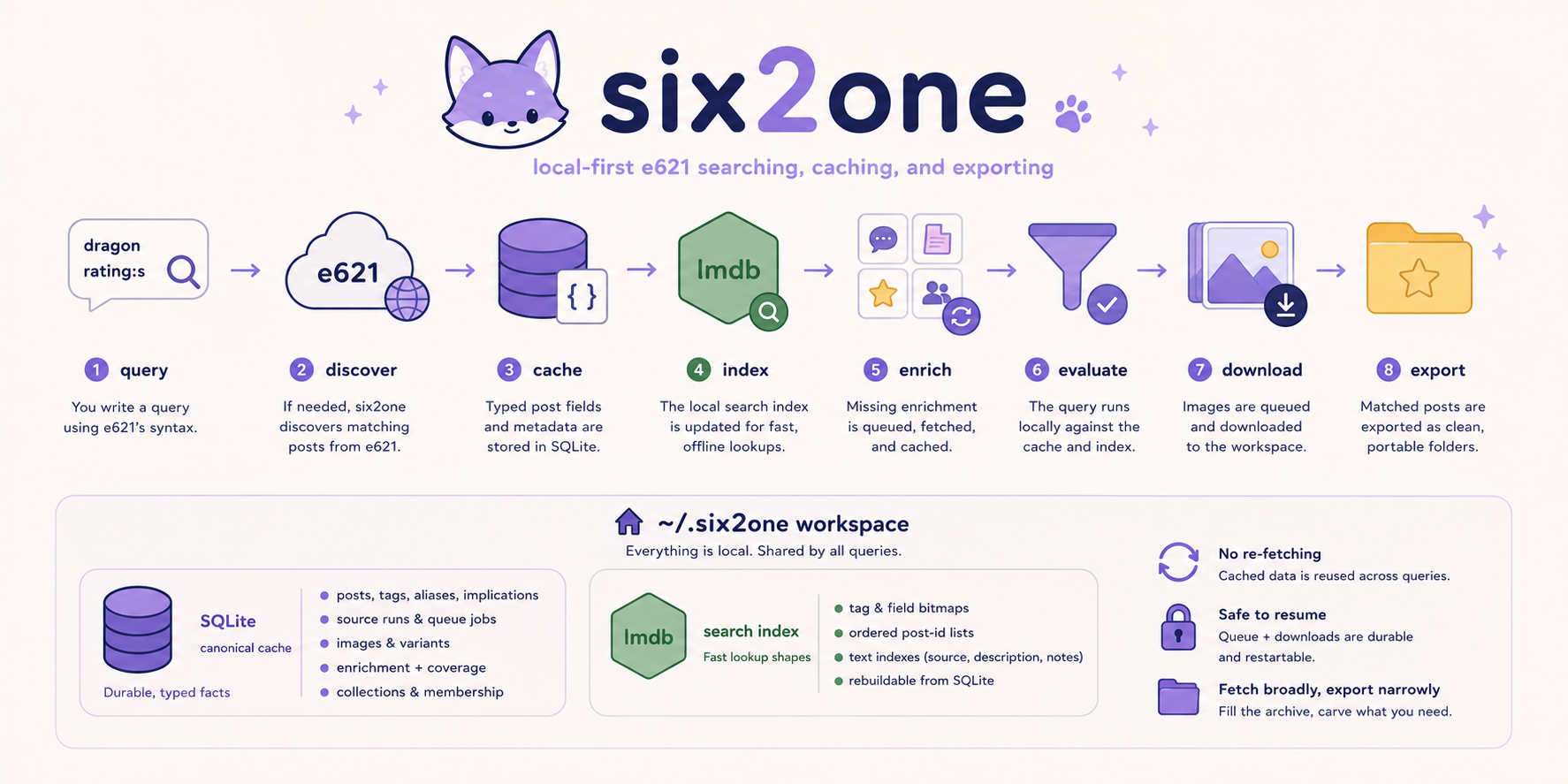
A single run moves through the same stages, from a raw query to files on disk:
query
  → compile the query
  → find cached/mirrored candidates locally
  → page e621 for additional remote candidates
  → cache typed post fields
  → update the local search index
  → fetch missing enrichment
  → evaluate the query locally
  → queue image downloads
  → drain once with fetch --queue, or keep a worker alive with fetch --queue --watch
  → export semantic subsets
Everything six2one caches lives under ~/.six2one. The global cache is deliberate — it is what lets unrelated queries share data. Cached source runs preserve raw query text, canonical query metadata, backend metadata, and timestamps, while enrichment coverage makes missing, pending, ready, and failed data explicit. Downloaded files are never scattered through your working directories; they stay in the workspace until you export them somewhere explicit.
Local Storage
bootstrap creates the six2one workspace under ~/.six2one:
~/.six2one/
  config.toml
  bootstrap.json
  cache/
    six2one.sqlite
    index/
      bitmaps.lmdb
      delta.lmdb
      ordered/
  images/
SQLite is the canonical cache. The files under cache/index/ are derived search indexes that make local query evaluation fast and rebuildable:
| Data | Purpose |
|---|---|
| Cached posts | Typed post fields, tags, files, sources, and details. |
| Source runs | Query runs and discovery metadata. |
| Queue jobs | Pending, running, failed, and completed work. |
| Enrichment coverage | Which sidecar data has already been fetched. |
| Tags | Tag metadata, aliases, implications, and categories. |
| Images | Where downloaded image variants live on disk. |
| Search index | Roaring bitmap, ordered, and text indexes derived from SQLite. |
Images are stored on disk by post ID and variant, so if two queries match the same post and ask for the same variant, the image is downloaded only once:
~/.six2one/images/
  000006407238/
    preview.jpg
    sample.jpg
    original.png
| Variant | e621 post field |
|---|---|
preview |
post["preview"] |
sample |
post["sample"] |
original |
post["file"] |
For each file, the database records which variant it is, where it was written, and the source URL it came from.
Commands
usage: 621 COMMAND [options]

Queue, enrich, and fetch e621 posts into the local six2one store.

commands:
  bootstrap   initialize the local six2one workspace
  auth        configure e621 API credentials
  query       inspect e621-style query syntax
  queue       discover and enqueue query work
  fetch       discover, enqueue, and download posts
  export      export downloaded images and cached post JSON
Bootstrap
$ 621 bootstrap
bootstrap prepares the workspace: it writes the config file, initializes the SQLite store, runs migrations, and imports the e621 tag data that query binding needs for tag lookup, aliases, implications, and categories. Most other commands expect it to have run first.
Auth
$ 621 auth
$ 621 auth --test
$ 621 auth --remove
auth stores the e621 API credentials used by network commands. --test verifies them; --remove deletes them.
Query Explain
$ 621 query explain "fox ( ~dog ~cat )"
$ 621 query explain "score:>100 order:score rating:s" --compact
$ 621 query explain "dragon rating:e" --json
query explain parses, binds, and explains a query without touching the network. It reports the required and excluded tags, loose-OR groups, metatags, sorting, the data the query depends on, and any compatibility notes or diagnostics — the safest way to see what a long fetch will do before you start it.
Queue
Use queue when you want to inspect, modify, or stage work before downloading. It runs discovery only: it finds matching cached/mirrored posts locally, pages e621 for additional matching posts, caches their post JSON, enqueues any enrichment the query needs, evaluates the query locally, and queues image downloads — without downloading them.
$ 621 queue "dragon rating:s" --limit 10
six2one queue

Query
  dragon rating:s

Phase 1/1: Discovering posts
  pages                    48 / 48
  cached post JSON         3,812
  new image jobs           3,812
  already queued           0
  already downloaded       0
  skipped                  0

Queued.

Next
  Download queued images:
    621 fetch --queue

  Keep processing future queued work:
    621 fetch --queue --watch
Inspect and manage queued work:
$ 621 queue list
$ 621 queue list --failed
$ 621 queue clear --failed --yes
$ 621 queue clear q_01HXW6T2KZ9A
queue clear also accepts a query. It is not text-matched against the original run — it is evaluated against the cached post data, and removes only the queued jobs whose posts match. queue clear "canine -paws", for instance, drops the queued images for posts that are tagged canine but not also tagged paws:
$ 621 queue clear "young"
$ 621 queue clear "canine -paws"
$ 621 queue clear "rating:e dragon -animated"
queue amend does the inverse — instead of clearing from a run, it folds a new exclusion into the source run itself and updates the jobs that remain:
$ 621 queue amend q_01HXW6T2KZ9A --exclude "young"
$ 621 queue amend q_01HXW6T2KZ9A --exclude "canine -paws"
Either way, cached post JSON, downloaded images, and source-run metadata are left untouched; the run stays inspectable. A staged workflow looks like:
$ 621 queue "dragon rating:s" --limit 1000
$ 621 queue clear "young"
$ 621 queue amend q_01HXW6T2KZ9A --exclude "canine -paws"
$ 621 fetch --queue
For a background terminal, use worker mode instead:
$ 621 fetch --queue --watch
Worker mode keeps polling the durable queue and processes new jobs as they arrive. Stop it with Ctrl-C. Failed jobs are still left in the queue for inspection unless you explicitly run with --retry-failed.
Fetch
$ 621 fetch "dragon rating:s" --limit 10
fetch runs both phases: everything queue does, then the download. It searches the local database first, pages e621 for additional posts, caches post JSON, fetches missing enrichment, evaluates the query, and writes the matching images to disk.
six2one fetch

Query
  dragon rating:s

Phase 1/2: Discovering posts
  Fetching result pages       48 / 48
  Cached post JSON            3,812 posts
  New image jobs              3,812
  Already queued              0
  Already downloaded          0
  Skipped                     0

Phase 2/2: Downloading images
  Downloaded                  3,812 / 3,812
  Failed                      0
  Skipped existing files      0
  Written                     7.42 GB

Done.
fetch and queue both take --limit N, which caps remote discovery from e621. Local cached or mirrored posts that match the query are still considered, so after 621 mirror a fetch can queue downloads for matching local posts beyond what e621 will serve in ordinary result pages. Without --limit, six2one processes every e621 page the query returns. Pick the image variant with --file-type:
$ 621 fetch "dragon rating:s" --file-type original
$ 621 fetch "dragon rating:s" --file-type sample
$ 621 fetch "dragon rating:s" --file-type preview
Run already-queued work once with --queue, keep a worker alive with --queue --watch, and retry failed jobs with --retry-failed. Failed jobs are kept for inspection until you retry or clear them.
$ 621 fetch --queue
$ 621 fetch --queue --watch
$ 621 fetch --queue --retry-failed
$ 621 fetch --queue --watch --retry-failed
Use the one-shot drain when you want a command to finish after the queue is empty. Use watch mode when another shell, script, or scheduled task may continue adding work with 621 queue ....
Export
$ 621 export "dragon rating:s" -o ./dragon-export
$ 621 export -o ./all-downloaded
export builds a clean folder of symlinks and cached post JSON. Given a query, it exports the downloaded images whose cached posts match; given none, it exports everything downloaded.
The query is the same e621 language fetch and queue use, not a filename filter, so export can carve precise subsets out of the store:
$ 621 export "dragon rating:s score:>100" -o ./high-score-dragons
$ 621 export "fox ( ~dog ~cat ) -comic" -o ./fox-animal-overlap
$ 621 export "notes:any rating:s" -o ./posts-with-notes
$ 621 export "pool:* order:score" -o ./pool-posts
If a subset query needs cached data that is not present yet — notes, comments, pool membership — export fetches that enrichment before filtering. It never downloads images, though: it links what is already on disk and reports what is missing.
dragon-export/
  images/
    000006407238/
      original.png
      sample.jpg
      preview.jpg
  posts/
    000006407238.json
Fetch broadly, export narrowly. This is the workflow export is built for. Fetch one wide query, then slice it as many ways as you need — by score, by enrichment, by pool — without touching the network again:
$ 621 fetch "dragon rating:s" --limit 1000
$ 621 export "dragon rating:s score:>100" -o ./best-dragons
$ 621 export "dragon rating:s notes:any" -o ./noted-dragons
$ 621 export "dragon rating:s pool:*" -o ./pool-dragons
Development
Install with Poetry, then run the CLI and tests from inside the environment:
$ poetry install
$ poetry run 621 --help
$ poetry run 621 query explain "fox ( ~dog ~cat )"
$ poetry run 621 fetch --help
$ poetry run pytest
$ poetry run python -m compileall -q src
six2one — local e621 fetching, enrichment, and export.
Crafted with ❤️ by Nolla Fox
Release history Release notifications | RSS feed


Download files
Download the file for your platform. If you're not sure which to choose, learn more about installing packages.
Source Distribution
Built Distribution
Filter files by name, interpreter, ABI, and platform.
If you're not sure about the file name format, learn more about wheel file names.
Copy a direct link to the current filters
File details
Details for the file six2one-0.3.9.tar.gz.
File metadata
- Download URL: six2one-0.3.9.tar.gz
- Upload date:
- Size: 181.0 kB
- Tags: Source
- Uploaded using Trusted Publishing? No
- Uploaded via: poetry/2.2.1 CPython/3.12.12 Darwin/25.1.0
File hashes
| Algorithm | Hash digest | |
|---|---|---|
| SHA256 |
445e4e0d93c1a85fd7dbf90f628113660856f37e9d54655bbc61bbd2b5484a26
|
|
| MD5 |
43710aed685609bd8eed372df365f36e
|
|
| BLAKE2b-256 |
616249afcfa7106142e42133b477b6e213f58af172f4c2b27c0a9a8f7433400a
|
File details
Details for the file six2one-0.3.9-py3-none-any.whl.
File metadata
- Download URL: six2one-0.3.9-py3-none-any.whl
- Upload date:
- Size: 245.4 kB
- Tags: Python 3
- Uploaded using Trusted Publishing? No
- Uploaded via: poetry/2.2.1 CPython/3.12.12 Darwin/25.1.0
File hashes
| Algorithm | Hash digest | |
|---|---|---|
| SHA256 |
40b74753cd30c77a910fc89b3e8354bd6ec4bd0439b0b9db605587dbc19c12c9
|
|
| MD5 |
1a411de51151e6029152942eb87a8803
|
|
| BLAKE2b-256 |
756cd800666254db223151623f4043490c948fc900a46574175142a6351e97c8
|






