
SIXAMP
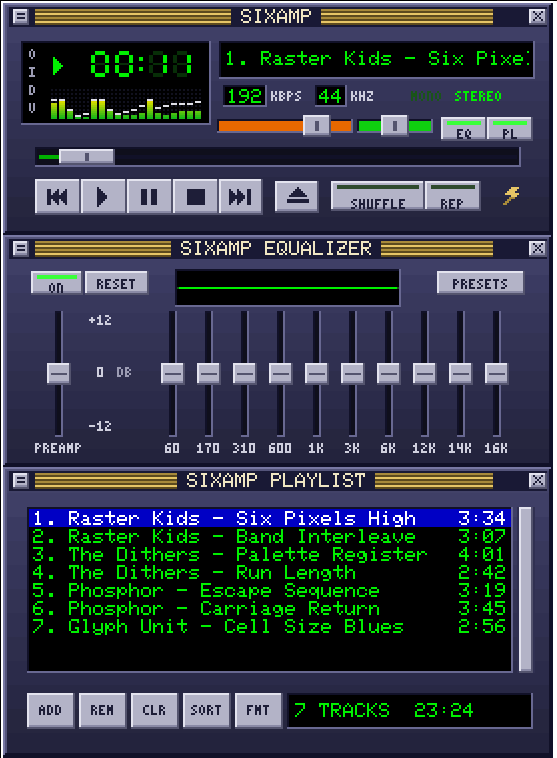
A 1990s-style MP3 player for the terminal, drawn entirely in Sixel graphics: a spectrum analyser, a ten-band equalizer, a playlist and a file browser, all driven by the keyboard or the mouse.
Install
pip install sixamp
sixamp ~/Music
You can pass files, folders or .m3u playlists. Without arguments SIXAMP reopens your
last playlist. It plays MP3, FLAC, WAV and Ogg Vorbis on Linux, macOS and Windows.
sixamp.py is also a single self-contained file: with numpy and miniaudio
installed you can run python sixamp.py directly.
Terminals
SIXAMP needs a terminal that shows Sixel graphics, for example foot, WezTerm,
Konsole, mlterm, iTerm2, Contour, Windows Terminal 1.22 or newer, or
xterm -ti vt340. Kitty and Alacritty do not support Sixel.
To check a terminal, run sixamp --probe: you should see coloured stripes. If the
skin looks scrambled, the terminal could not report its cell size; pass it yourself
with --cell WIDTHxHEIGHT, for example --cell 10x20.
Keys
| Key | Action | Key | Action |
|---|---|---|---|
z |
previous track | b |
next track |
x |
play | c / Space |
pause |
v |
stop | l |
open files |
| Left / Right | seek 5 seconds | + / - |
volume |
[ / ] |
balance | Up / Down, Enter | choose and play a track |
j |
jump to a track | i |
track info |
r / s |
repeat / shuffle | e / p |
equalizer / playlist window |
o / n |
equalizer on / next preset | f |
playlist format |
w |
visualizer mode | t |
elapsed / remaining time |
d |
pixel scale | ? / q |
help / quit |
Everything on the skin also works with the mouse. The wheel scrolls the playlist, moves the slider under the pointer, or changes the volume.
Options
sixamp [--format TEXT] [--scale N] [--cell WxH] [--no-audio] [--probe] [--debug] [PATH ...]
--format sets the playlist line, for example --format "%n. %t (%a)". The codes
are %n number, %a artist, %t title, %l album, %f file name, %d folder
and %% a percent sign. Run sixamp --help for everything.
Settings are stored in ~/.config/sixamp/state.json and the log in
~/.cache/sixamp.log.
pyterm
pyterm ships SIXAMP support built in, through its
sixamp_support plugin: a persistent Sixel layer, exact mouse positions and live cell
sizes across theme changes. Keep plugins enabled when you run SIXAMP there.
Licence
MIT, see LICENSE. The bundled 5x7 font comes from the Adafruit GFX Library under the BSD licence; see THIRD_PARTY_NOTICES.
SIXAMP is an independent project inspired by the look of classic desktop music players. It is not affiliated with, endorsed by or connected to Winamp, Nullsoft or Llama Group. All graphics are original.
1 maintainer

Metadata
1 maintainer
Release files for sixamp 1.0.0
For a detailed explanation of source distributions (sdists) and built distributions (wheels), please see the package formats documentation.
Source distribution (sdist)
| File | Size | Uploaded | Provenance | Actions |
|---|---|---|---|---|
| sixamp-1.0.0.tar.gz | 31.8 kB | With provenance | Details for sixamp-1.0.0.tar.gz |
Built distribution (wheel)
| File | Interpreter | ABI | Platform | Actions Reset |
|---|---|---|---|---|
| sixamp-1.0.0-py3-none-any.whl | Python 3 | none | any | Details for sixamp-1.0.0-py3-none-any.whl |
Total release size: 64.6 kB
Release files / sixamp-1.0.0.tar.gz
| Download URL | sixamp-1.0.0.tar.gz |
|---|---|
| Size | 31.8 kB |
| Tags | Source |
|
SHA-256 checksum How to use checksums |
9524a980827c7b9fd964c7e0805d02d05467261f0a95deebce3134cc22d5b192
|
|
BLAKE2b-256 checksum How to use checksums |
f7c04c763ab25aad562faba72c2c4a55227e4c80cbabb9a1cd50591165e3d7aa
|
| Upload date | |
|
Uploaded using Trusted Publishing? What is trusted publishing? |
Yes |
| Uploaded via |
twine/7.0.0 CPython/3.13.16
|
Provenance
Provenance describes where a file came from. On PyPI, provenance is shared via attestations, which provide a verifiable record of the build or publishing details. View details, limitations and caveats.


PyPI Publish Attestation
PyPI verified that this artifact, at this checksum, originated from the publisher listed below.
Signed by GitHub Actions, verified by PyPI on Nov 7, 2026.
Transparency logRelease files / sixamp-1.0.0-py3-none-any.whl
| Download URL | sixamp-1.0.0-py3-none-any.whl |
|---|---|
| Size | 32.8 kB |
| Tags | Python 3 |
|
SHA-256 checksum How to use checksums |
b0b1b97b1c627978c6eb35185ca6fbaac4dfe2a65f76b18201ee96b5593a3548
|
|
BLAKE2b-256 checksum How to use checksums |
e07476d836f999c42706b943e49cb643e5d154dc75a11c7f3e3f66b2a48af4b2
|
| Upload date | |
|
Uploaded using Trusted Publishing? What is trusted publishing? |
Yes |
| Uploaded via |
twine/7.0.0 CPython/3.13.16
|
Provenance
Provenance describes where a file came from. On PyPI, provenance is shared via attestations, which provide a verifiable record of the build or publishing details. View details, limitations and caveats.
PyPI Publish Attestation
PyPI verified that this artifact, at this checksum, originated from the publisher listed below.
Signed by GitHub Actions, verified by PyPI on Nov 7, 2026.
Transparency logSecurity for sixamp 1.0.0
Provenance
Provenance describes where a file came from. On PyPI, provenance is shared via attestations, which provide a verifiable record of the build or publishing details. View details, limitations and caveats.
Full provenance
Both files in this release have been uploaded with provenance metadata.
Attestation for sixamp-1.0.0.tar.gz
PyPI Publish Attestation
PyPI verified that this artifact, at this checksum, originated from the publisher listed below.
Signed by GitHub Actions, verified by PyPI on Nov 7, 2026.
Transparency logA note on package security
PyPI is a repository for distributing packages, not a service for auditing them. While third-party security researchers and our staff do their best to detect and remove malicious packages, PyPI cannot guarantee the quality, security or suitability of any given package.
To learn more about protecting yourself from malicious actors, visit our package security documentation.













