
SiyuanYuque
Sync SiYuanNote & Yuque.
- Sync Setting in doc attribute.
- Batch Sync Via SQL
- SiYuan Image Hosting Supported
- Internal Link Supported
Install
Use pip to install.
pip install SiyuanYuque
Execute like this:
python -m SiyuanYuque
Remember to create a sqconfig.toml config file in the current directory.
user_token = ""
siyuan_token = ""
api_host = "https://www.yuque.com/api/v2"
last_sync_time = "20210915225457"
Fill in your Yuque user_token and siyuan_token.
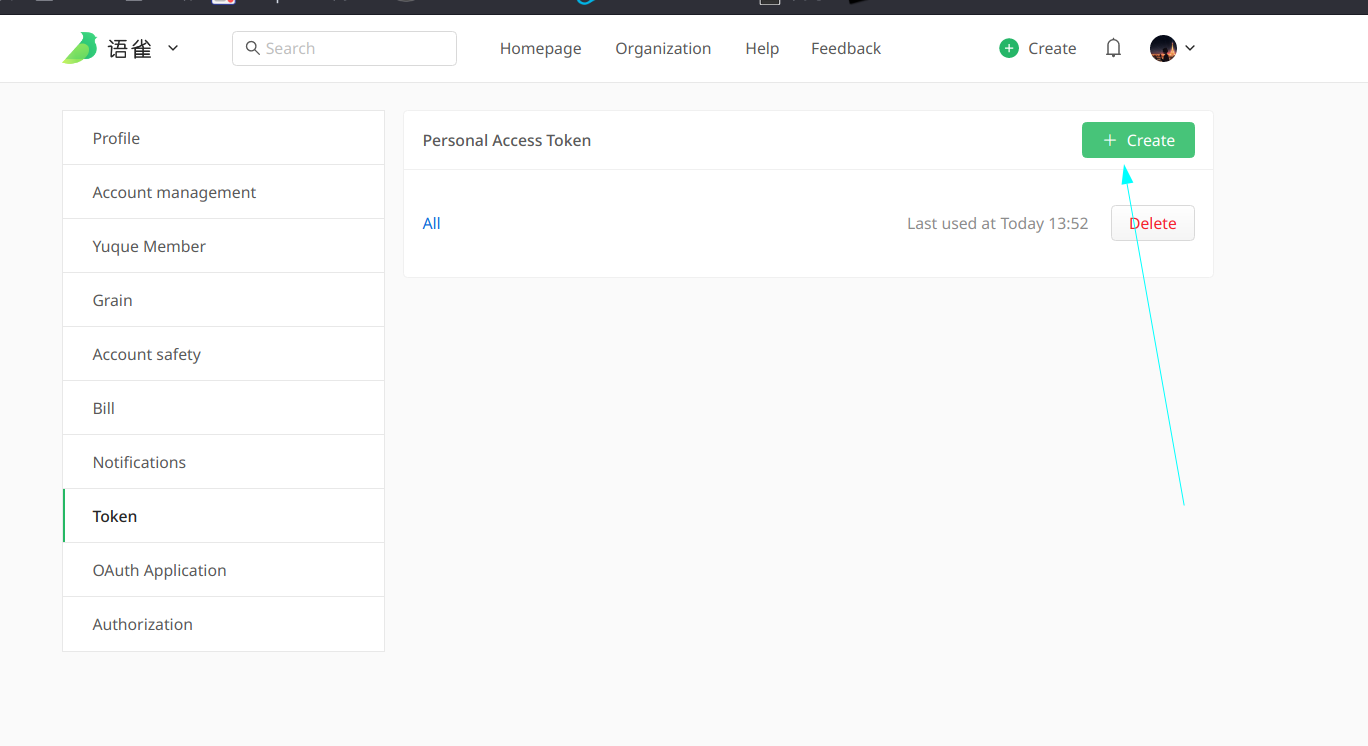
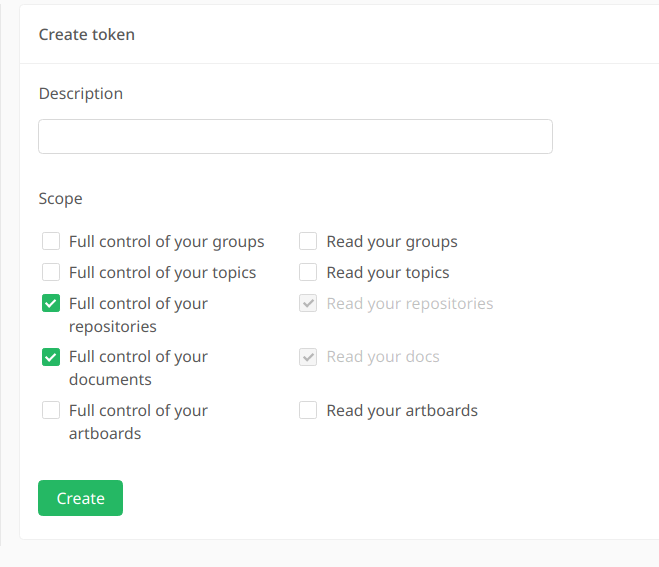
Set Atrribute in SiyuanNote
You can only sync documents to Yuque.
Set Attributes like this:
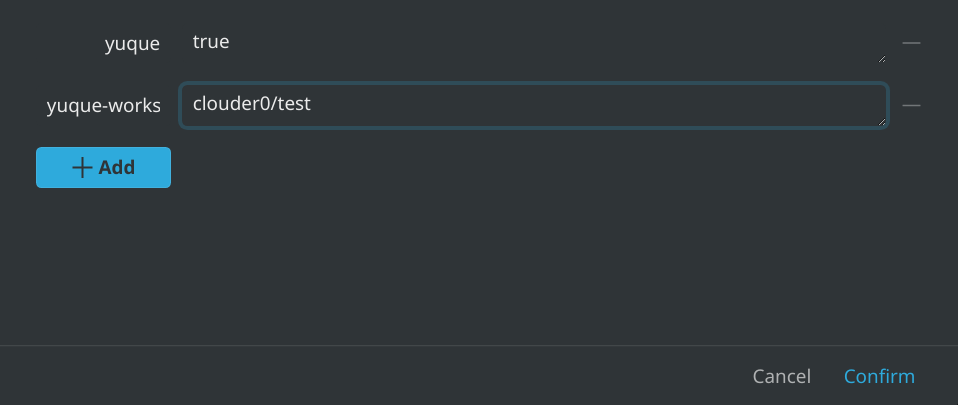
yuque: true
yuque-workspace: your workspace
Workspace format: username/repo
Then run python -m SiyuanYuque, and check the attributes again.
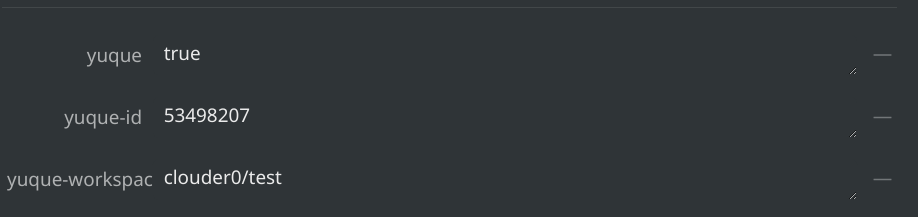
You'll see yuque-id appended to your document's attributes. Don't manually modify this unless you know what you are doing.
That's the basic usage for the time being.
Remember not to edit the documents sync from SiYuan, as the update will be lost upon the next sync.
Custom Sync
It is supported to sync documents by SQL.
A simple example:
user_token = ""
siyuan_token = ""
api_host = "https://www.yuque.com/api/v2"
last_sync_time = "20210916223903"
assets_replacement = "https://b3logfile.com/siyuan/1609132319768/assets"
[[custom_sync]]
sql = "select * from blocks where hpath like '%Math/%' and type='d'"
yuque-workspace = "clouder0/gaokao"
Multiple custom syncs can be defined.
user_token = ""
siyuan_token = ""
api_host = "https://www.yuque.com/api/v2"
last_sync_time = "20210916223903"
assets_replacement = "https://b3logfile.com/siyuan/1609132319768/assets"
[[custom_sync]]
sql = "select * from blocks where hpath like '%Math/%' and type='d'"
yuque-workspace = "clouder0/gaokao"
[[custom_sync]]
sql = "select * from blocks where hpath like '%Chinese/%' and type='d'"
yuque-workspace = "clouder0/gaokao"
More Config
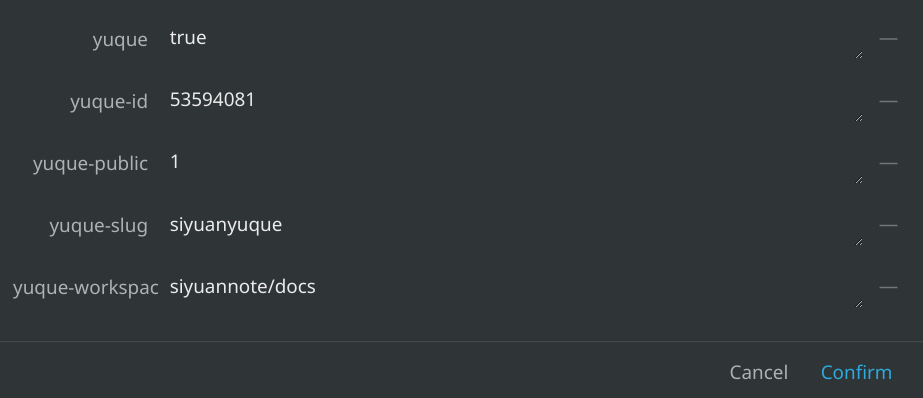
yuque-public: 1 for public and 0 for private.
yuque-slug: the slug of the document. https://www.yuque.com/siyuannote/docs/siyuanyuque
Assets Replacement
Replace the assets string in your markdown content to support SiYuan online image.
Internal Link
SiYuan-Setting: Ref Block: Anchor Text with block URL.
This script will replace siyuan://blocks with https://yuque.com/{workspace} so that your ref blocks that have been exported and in the same workspace of yuque will be accessible.
Square Support
For yuque square, you can modify api_host to operate in squares.
For example, you'd like to sync in a square clouder.yuque.com, then you should change your config:
api_host = "https://clouder.yuque.com/api/v2"
Do bear in mind that once you decide to use a square, you can no longer stay synced with the original public www.yuque.com.
Theoretically, there exists the possibility to support both at the same time, but I haven't seen such demand yet.
1 maintainer

Metadata
1 maintainer
Release files for siyuanyuque 0.1.1
For a detailed explanation of source distributions (sdists) and built distributions (wheels), please see the package formats documentation.
Source distribution (sdist)
| File | Size | Uploaded | |
|---|---|---|---|
| siyuanyuque-0.1.1.tar.gz | 6.2 kB | Details |
Built distribution (wheel)
| File | Interpreter | ABI | Platform | Reset |
|---|---|---|---|---|
| siyuanyuque-0.1.1-py3-none-any.whl | Python 3 | none | any | Details |
Total release size: 12.8 kB
Release files / siyuanyuque-0.1.1.tar.gz
| Download URL | siyuanyuque-0.1.1.tar.gz |
|---|---|
| Size | 6.2 kB |
| Tags | Source |
|
SHA-256 checksum How to use checksums |
17fb160602a9a8d6eaf00bb11b7c883625302ca6f9934981018b24e75fbc6aca
|
|
BLAKE2b-256 checksum How to use checksums |
98b509353365ccb023d2c7f5382515a77782c5441c51a5b41874c2e49ff6e6bb
|
| Upload date | |
|
Uploaded using Trusted Publishing? What is trusted publishing? |
No |
| Uploaded via |
poetry/1.1.13 CPython/3.10.2 Linux/5.13.0-1022-azure
|
Release files / siyuanyuque-0.1.1-py3-none-any.whl
| Download URL | siyuanyuque-0.1.1-py3-none-any.whl |
|---|---|
| Size | 6.7 kB |
| Tags | Python 3 |
|
SHA-256 checksum How to use checksums |
15e7d3a34e95caa236425cea43269bb500c2bc085a20dae294d0867b81169c9e
|
|
BLAKE2b-256 checksum How to use checksums |
2e7aec8171f731237f1c32ef20be9ff0b3a19bee15a7db604cd8b7a63755018d
|
| Upload date | |
|
Uploaded using Trusted Publishing? What is trusted publishing? |
No |
| Uploaded via |
poetry/1.1.13 CPython/3.10.2 Linux/5.13.0-1022-azure
|














