







Works with






Parses


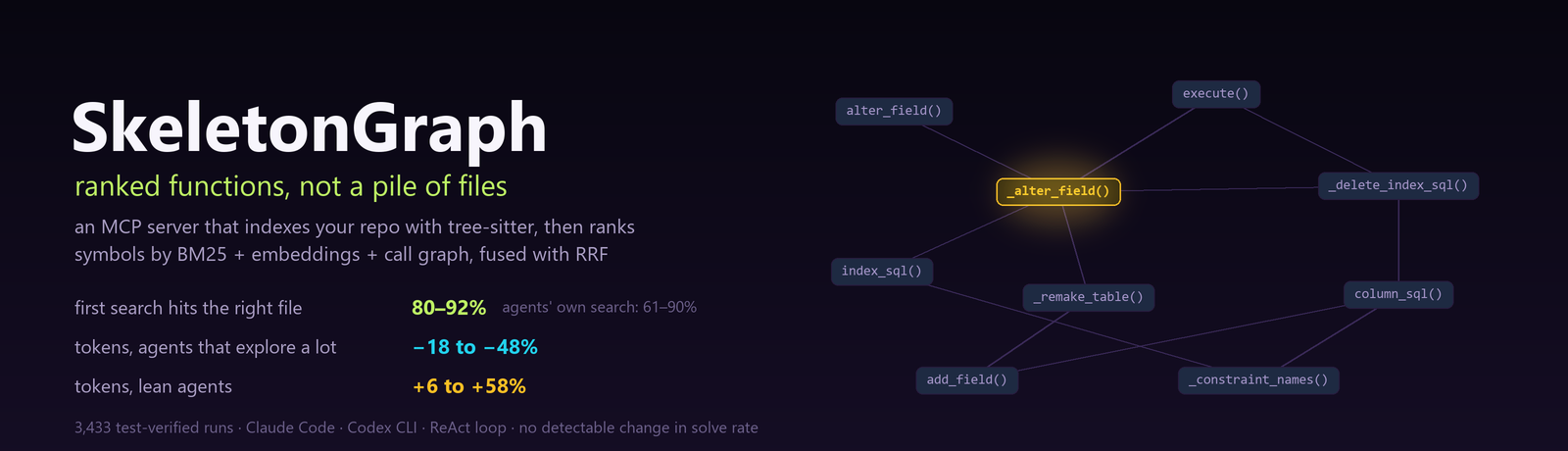
SkeletonGraph indexes your repository with tree-sitter — no LLM — and hands a coding agent a ranked list of the functions relevant to its task, over MCP. It is also the instrument of a study of what better code retrieval actually buys an agent that has to fix the code, across two production agents, two Claude behavioral regimes, and two benchmarks. The short answer is below; it is more useful, and less flattering, than a token ratio.
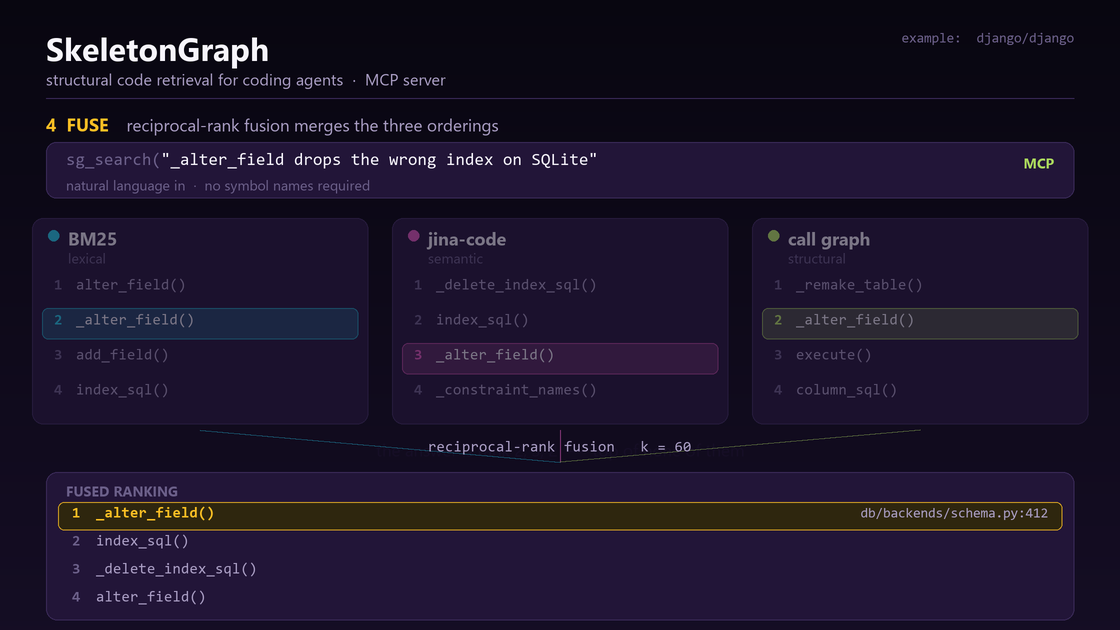
Index once with tree-sitter (no LLM) → three signals rank the same symbols → reciprocal-rank fusion returns ranked functions with file and line, served to your agent over MCP.
What we found
We ran the same retriever in every setting we could: without an agent, in a controlled agent loop on an open-weight model, and inside Claude Code (exploratory and lean regimes) and Codex CLI, on SWE-bench Verified and the decontaminated SWE-rebench — 3,433 runs, every patch verified by running the project's tests, every comparison paired by task. The evaluation covers Python repositories.
1. It finds code better than every agent's own search
Without an agent, on 100 SWE-bench Verified tasks (file level):
| ranker | MRR | recall@5 | recall@10 |
|---|---|---|---|
| grep | 0.159 | 0.236 | 0.348 |
| BM25 | 0.482 | 0.626 | 0.719 |
sg-rerank (BM25 + structure) |
0.518 | 0.701 | 0.824 |
| BM25 + dense | 0.551 | 0.714 | 0.843 |
sg-fusion (BM25 + dense + structure) |
0.658 | 0.785 | 0.856 |
Inside the agents, over all tasks, SkeletonGraph's first search returned a file the fix changes on 80–92% of tasks, against 61–90% for the agents' own first search (87–96% against 60–93% on the tasks where the agent actually called it). The largest margin was Codex, where the right file came first on 71% of the tasks where it was called, instead of 32%.
2. But the agents already found the right code — so that gain doesn't reach the fix
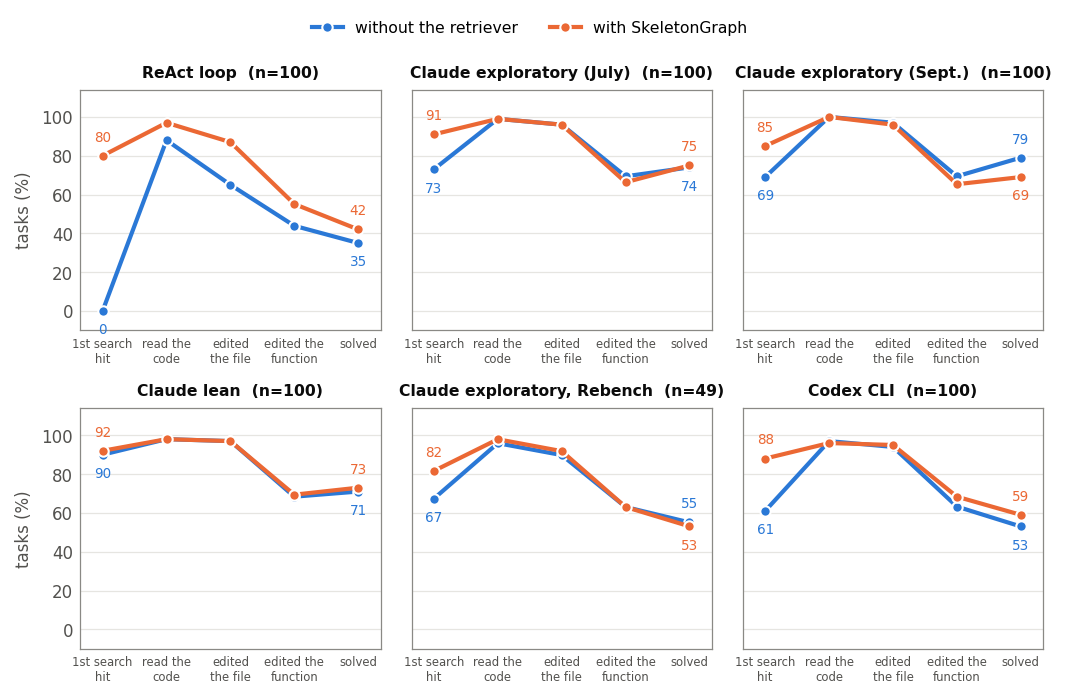
With or without SkeletonGraph, the production agents read code from the right file on 96–100% of tasks — on SWE-bench Verified usually with their very first tool call — and edited it on 88–97%. At the level of functions, where they are far from perfect (63–69% edited a function the fix changes), SkeletonGraph did not move them either. Of the 69 tasks whose outcome differed between arms, 61 were tasks where both arms had already edited the right file: they differ in whether the change was correct, not in where it was made. No production-agent setting showed a statistically detectable solve-rate improvement from retrieval. Only an agent that often failed to find the code on its own — the controlled loop, whose search-free arm edited the right file on 65% of tasks — gained (35 → 42 solved, not statistically significant).
3. What it changes is cost — and the agent decides the direction
| setting | tokens per task on its own | with SkeletonGraph |
|---|---|---|
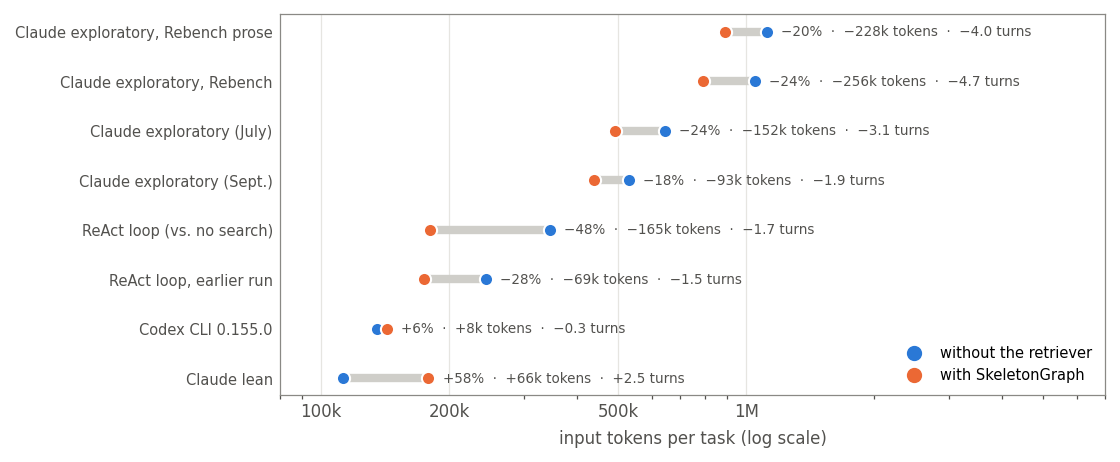
| Claude exploratory, SWE-rebench | 1,048,603 | −24% (−256k tokens, −4.7 turns, −12¢) |
| Claude exploratory (July) | 644,504 | −24% (−152k tokens, −3.1 turns, −6¢) |
| Claude exploratory (September) | 530,478 | −18% (−93k tokens, −1.9 turns, −3¢) |
| ReAct loop (open-weight model) | 344,642 | −48% (−165k tokens, −1.7 turns, −1¢) |
| Codex CLI 0.155.0 | 134,955 | +6% (+8k tokens, −0.3 turns, −0.4¢) |
| Claude lean | 112,813 | +58% (+66k tokens, +2.5 turns, +2¢) |
Where an agent spends a lot searching, reading and re-checking, SkeletonGraph replaces that work and saves; where it already finds the code in one or two calls, the retriever is added on top and costs a little more. The penalty is small and bounded; the saving grows with how much the agent would have spent.
4. Agents change underneath you
Across two Claude Code windows three weeks apart—exploratory through 2.1.274 and lean at 2.1.278, on the same tasks and prompt—the built-in agent went from 10.9 to 4.7 tool turns per task, read a fifth as much, ran code after editing on 2 tasks instead of 40, and its own first search put the right file first on 85 tasks instead of 59. The same SkeletonGraph setup went from saving 93k tokens a task to costing 66k. The product release, available tools, account-loaded skills, and possibly the served model changed together. We can describe the two regimes, not attribute the break to the version number alone.
What this means if you use it
- Expect better first searches, not more solved tasks. The bottleneck for current frontier agents is turning located code into a correct fix, which retrieval does not address.
- The saving depends on your agent and its version. It is largest with agents and tasks that explore a lot, and it can turn into a small overhead with lean ones. Measure it on your own setup.
- Integration instructions cost tokens. On Codex, the shipped integration added 53k tokens a task against 8k for the plain one, with no detectable difference in solve rate.
Every result with its confidence interval and caveats is in
docs/RESULTS.md; how to reproduce it is in
eval/README.md. The July 2026 preprint reported the first Claude Code
release window only.
SkeletonGraph has two product surfaces:
- SG IDE: MCP context server for Cursor, Claude Code, Copilot, Codex, Antigravity, Windsurf, and other agentic IDEs.
- SG CLI: terminal pipeline for route, prepare, dry-run, provider execution, and cost-aware model selection.
How it works
SkeletonGraph parses a repository into function-level structure, a cross-file call graph, and PageRank centrality with zero LLM calls — deterministic, cheap, and instant to rebuild after every edit. At query time it resolves the symbols an issue names, walks the call graph outward, and ranks candidates by three signals — BM25, code embeddings, and structural confirmation — fused with reciprocal-rank fusion.
prompt -> (optional) retrieval planner -> classify task -> find target nodes -> expand graph -> assemble packet
sg-rerank, the product default, skips the dense leg for a lighter index; sg-fusion
adds it and ranks best in our retrieval benchmark (table above).
Install
pip install skeletongraph           # core: indexing, MCP server, CLI (no API key needed)
pip install "skeletongraph[llm]"    # + litellm for sg run --execute / sg summarize --tier cloud
pip install "skeletongraph[all]"    # everything, including the evaluation harness
Quick Start: SG IDE
Use this path when you already work inside Cursor, Claude Code, Copilot, Codex, Antigravity, or another MCP-capable coding environment.
cd your-project
sg init
sg build
sg doctor
sg init writes the MCP config and the agent instruction file for the selected
IDE. SG IDE does not require an API key. Your IDE subscription/model still does
the reasoning and editing; SkeletonGraph supplies the retrieval.
Supported IDE setup targets include:
| IDE | Integration | Model switching |
|---|---|---|
| Cursor | MCP + rules | manual in IDE |
| Claude Code | MCP + CLAUDE.md |
/model command |
| GitHub Copilot | MCP + instructions | manual in IDE |
| Codex | MCP + AGENTS.md |
manual in agent |
| Antigravity | MCP + rules | manual in IDE |
| Windsurf | MCP + rules | manual in IDE |
Quick Start: SG CLI
Use this path when you want a terminal-first context and model-routing pipeline.
cd your-project
sg build
sg route "fix the auth token validation bug"
sg prepare "fix the auth token validation bug" --out .skeletongraph/context.md
sg run "fix the auth token validation bug" --dry-run
sg route, sg prepare, and sg run --dry-run do not need an API key.
To call a provider:
sg config --cli-provider anthropic
$env:ANTHROPIC_API_KEY = "..."
sg run "fix the auth token validation bug" --execute
To test locally without a paid provider key:
ollama pull qwen3-coder:latest
ollama serve
sg config --cli-provider local
sg run "fix the auth token validation bug" --dry-run
sg run "fix the auth token validation bug" --execute
Local execution is intended for cheap pipeline testing. Use provider models for quality benchmarks unless the benchmark is specifically for local models.
Model Dependency, Prewarming, and Keeping the Index Fresh
SG downloads two small embedding models on first use, both via
sentence-transformers (a hard dependency, not optional):
jinaai/jina-embeddings-v2-base-code(SG_DENSE_MODEL) — the semantic leg offusion/sg_search. Loaded onsg warmor on an agent's first dense-retrieval query. Loads withtrust_remote_code=True(Jina ships custom modeling code on the HF Hub) — this executes code from that model repo, same as anytrust_remote_codemodel.all-MiniLM-L6-v2(SG_EMBED_MODEL) — a smaller, separate model used only as a confidence-score tiebreaker at index time. Downloads automatically on the firstsg build, not onsg warm.
Both need internet access the very first time each is used on a machine — after
that, both are cached locally (Hugging Face's model cache, plus SG's own
content-hash caches: .skeletongraph/dense_cache for the dense leg,
.skeletongraph/embeddings.npz for the confidence tiebreaker) — so later builds
are incremental: only functions whose text actually changed get re-embedded.
Prewarm before launching an agent, so that cost lands during setup instead of on the agent's first real search:
sg build                 # parse + structural index (no LLM, fast)
sg warm --path .          # prebuild BM25 + dense caches (one-time; minutes on CPU)
sg warm --path . --mode rerank   # skip the dense leg entirely (no embedding cost)
Without this, the first sg_search call an agent makes pays the cold-encode
cost inline — on a large repo this can exceed the dense retrieval leg's
internal timeout (SG_DENSE_TIMEOUT_S, 20s by default), in which case it
silently degrades to a 2-signal (lexical + structural) result rather than
failing outright. Prewarming avoids relying on that fallback altogether.
Keeping the index current as files change — two options, pick based on how you work:
sg update --path .        # one-shot: re-index only files that changed since last build
sg watch --path .         # background daemon: auto-reindexes on save (needs `pip install "skeletongraph[daemon]"`)
sg watch is the hands-off option for active development — it debounces
rapid saves and calls the same incremental update path as sg update, so
editing a file is reflected in the index without a manual rebuild.
Model Routing
SkeletonGraph separates IDE-facing model labels from CLI provider model names.
For IDEs, model tiers are recommendations:
| Tier | Typical use |
|---|---|
| SLM | docs, explanations, simple lookup |
| MLM | normal coding, debugging, tests, review |
| LLM | architecture, broad migrations, low-confidence tasks |
For CLI execution, SkeletonGraph can route to provider model names:
sg config --cli-provider anthropic
sg config --cli-provider openai
sg config --cli-provider google
sg config --cli-provider local
Dynamic routing uses task mode, confidence, candidate count, token size, and complexity. Code-changing work keeps an MLM floor by default so cost savings do not come from making weak models edit code unsafely. Retrieval planning can use small models to propose targets over AST/summaries before the heavy model runs.
IDE Integration
After sg init and sg build, register SG as an MCP server and write IDE hooks:
sg install --ide claude-code   # Claude Code: hooks + MCP server + CLAUDE.md rules
sg install --ide cursor        # Cursor: MCP + .cursor/rules/skeletongraph.mdc + hooks
sg install --ide cline         # Cline: MCP config + rules block
sg install --ide roo           # Roo: MCP config + rules block
sg install --ide copilot       # GitHub Copilot: MCP + copilot-instructions.md
sg install --ide windsurf      # Windsurf: MCP + .windsurfrules
sg install --ide zed           # Zed: MCP config + rules block
sg install --ide continue      # Continue: MCP config + rules block
sg install                     # auto-detect all installed IDEs
codex and antigravity are accepted as aliases and currently route through the
Copilot-style MCP installer.
For any other MCP-capable client, or to configure it by hand, see
mcp.example.json for the raw server config
(sg serve --path /path/to/your/project). The "plain" integration measured above is
the server started with SG_MCP_PLAIN=1, which removes the guidance text from tool
descriptions and results, registered without the rules and hooks sg install writes.
After install, restart your editor. SkeletonGraph runs as a background MCP server
(sg serve --path .) that the IDE connects to automatically.
MCP Tools
Seven tools are exposed to the agent:
| Tool | When to call | Returns |
|---|---|---|
sg_overview |
Session start — once per session | Constraints + top-N functions (by PageRank) + recent turns + index stats |
sg_search "query" |
Primary retrieval | Top-3 matches with body excerpts + summaries + 1-hop callers; top-4..N as signatures + summaries |
sg_get "fqn" |
When the exact FQN is known | Signature + summary + 1-hop callers + callees |
sg_expand "target" |
When more body is needed than sg_search returned |
Full function body / file / line range (token-capped) |
sg_constraint list / propose |
Before proposing changes | Confirmed + proposed project rules |
sg_log |
Reviewing recent session turns | Last-N turn summaries with files touched |
sg_decision |
A design/implementation choice is made (picked or rejected, and why) | Recorded so it survives context compaction — recall later with sg_log(kind="decision") |
Smart context routing. On each UserPromptSubmit, SG classifies the prompt
(architecture / explain / decision / debug / test / review / general) and
includes the matching MD file from .skeletongraph/ — e.g. architecture.md
only for design/refactor queries, project.md only for "what is this codebase"
queries. Constraints + session digest + relevant functions are always injected.
Cold start. If no .skeletongraph/ index exists when an MCP tool is called,
SG auto-builds on first invocation (see auto_build_on_query in config).
CLI Reference
Indexing & status
| Command | Purpose |
|---|---|
sg init [--agent cursor] |
Configure project, IDE preset, MCP, constraints |
sg index |
Full index (alias for sg build) |
sg index --incremental |
Only re-index changed files |
sg build |
Full index with detailed output |
sg update |
Incremental update |
sg status |
Show index status |
sg doctor |
Check index, routing, provider, Ollama readiness |
sg overview |
Project skeleton: top functions, constraints, session |
sg install [--ide <name>] |
Write IDE hooks + MCP config |
Retrieval
| Command | Purpose |
|---|---|
sg search "query" |
BM25 + graph search (no API key) |
sg get "fqn" |
Get function signature, summary, callers |
sg expand "target" |
Expand function body / file / line range |
Constraints & session
| Command | Purpose |
|---|---|
sg constraint list |
List all constraints |
sg constraint propose "text" |
Add a proposal |
sg constraint confirm <id> |
Promote proposal → decisions.md |
sg constraint remove <id> |
Remove a constraint |
sg constraint aggregate |
Import from IDE rule files |
sg log [--last-n 10] |
Show recent session turns |
Summarization
| Command | Purpose | API key |
|---|---|---|
sg summarize --tier local |
Ollama Tier-0.5 (free, on-device) | no |
sg summarize --tier cloud |
Cloud LLM Tier-1 | provider key |
sg summarize --tier cloud --force |
Re-summarize all functions | provider key |
Model routing & execution
| Command | Purpose | API key |
|---|---|---|
sg route "task" |
Show task mode, tier, recommended model | no |
sg run "task" --dry-run |
Plan routed execution | no |
sg run "task" --execute |
Call configured provider | provider or local |
sg config [--agent cursor] |
Configure IDE and CLI models | no |
sg config --cli-provider anthropic |
Set CLI execution provider | no |
Background indexing
| Command | Purpose |
|---|---|
sg watch |
Daemon: auto-reindex files on save |
Provider output from sg run --execute is written to .skeletongraph/runs/.
Python API
from skeletongraph.engine import SGEngine

engine = SGEngine(project_root=".")
result = engine.query("fix the content-length bug", delivery="cli")

print(result.context_text)
print(result.query_mode)
print(result.model_tier)
print(result.recommended_model)
print(result.routing_reason)
Repository layout
src/skeletongraph/      the package
  parser/                 AST extraction (tree-sitter)
  graph/                  dependency graph and ranking
  storage/                .skeletongraph persistence
  retrieval/              classification, resolution, model routing
  assembly/               context packet construction
  session/                memory and dedup
  server/                 MCP server
  install/                per-IDE hook + MCP config writers (`sg install`)
  hooks/                  IDE hook handlers
  llm/                    LiteLLM wrapper for optional CLI execution
  cli/                    Click commands
  engine.py               unified query pipeline
tests/                  unit tests (pytest)
eval/                   the evaluation harness — see eval/README.md
  datasets/               the frozen task sets
docs/
  RESULTS.md              every result, with confidence intervals and caveats
  assets/                 README images and the script that draws the banner and hero
Reproducing the results
Everything — task sets, drivers for every agent, verification, and the scripts behind
every number and figure — is in eval/. The per-run records and
transcripts are several gigabytes and are published with the tagged release rather than
in git. eval/results_summary.json holds the computed results, so the figures
regenerate without them:
pip install -e ".[all]"
python -m eval.scripts.make_v2_paper_figures
License
SkeletonGraph is released under the MIT License — free to use, modify, and distribute, for commercial and private projects alike.
Citation
If SkeletonGraph is useful in your research, please cite the preprint:
@misc{doke2026skeletongraph,
  title  = {SkeletonGraph: A Zero-LLM Structural Retrieval Engine for Coding Agents,
            and Why Its Gains Land in the Cost Tail, Not the Median},
  author = {Doke, Yash},
  year   = {2026},
  note   = {Preprint, Research Square},
  doi    = {10.21203/rs.3.rs-10749266/v1},
  url    = {https://doi.org/10.21203/rs.3.rs-10749266/v1}
}
1 maintainer

Release files for skeletongraph 0.2.0
For a detailed explanation of source distributions (sdists) and built distributions (wheels), please see the package formats documentation.
Source distribution (sdist)
| File | Size | Uploaded | |
|---|---|---|---|
| skeletongraph-0.2.0.tar.gz | 248.7 kB | Details |
Built distribution (wheel)
| File | Interpreter | ABI | Platform | Reset |
|---|---|---|---|---|
| skeletongraph-0.2.0-py3-none-any.whl | Python 3 | none | any | Details |
Total release size: 520.7 kB
Release files / skeletongraph-0.2.0.tar.gz
| Download URL | skeletongraph-0.2.0.tar.gz |
|---|---|
| Size | 248.7 kB |
| Tags | Source |
|
SHA-256 checksum How to use checksums |
fcc9828e42377a6fd61db908a66bc2db03b77e46599c7547efc1c964a0ff6e14
|
|
BLAKE2b-256 checksum How to use checksums |
ba0e74ba0e3808814ed4eea7c2876459ea97ae1a80c557f64464bbf25183364c
|
| Upload date | |
|
Uploaded using Trusted Publishing? What is trusted publishing? |
No |
| Uploaded via |
twine/7.0.0 CPython/3.11.9
|
Release files / skeletongraph-0.2.0-py3-none-any.whl
| Download URL | skeletongraph-0.2.0-py3-none-any.whl |
|---|---|
| Size | 272.0 kB |
| Tags | Python 3 |
|
SHA-256 checksum How to use checksums |
51fdef708d67db78cd531363d931dcddc313bb611eb82029fa3edeef0bf0160b
|
|
BLAKE2b-256 checksum How to use checksums |
eac1787eb6b7914685d7bff0740e93170a1b12934a2fac6145173a066f61d817
|
| Upload date | |
|
Uploaded using Trusted Publishing? What is trusted publishing? |
No |
| Uploaded via |
twine/7.0.0 CPython/3.11.9
|














