
AI-powered CLI tool for interactive, personalized learning experiences

Project description

AI-powered interactive learning CLI for developers




Features • Installation • Usage • Architecture • Contributing
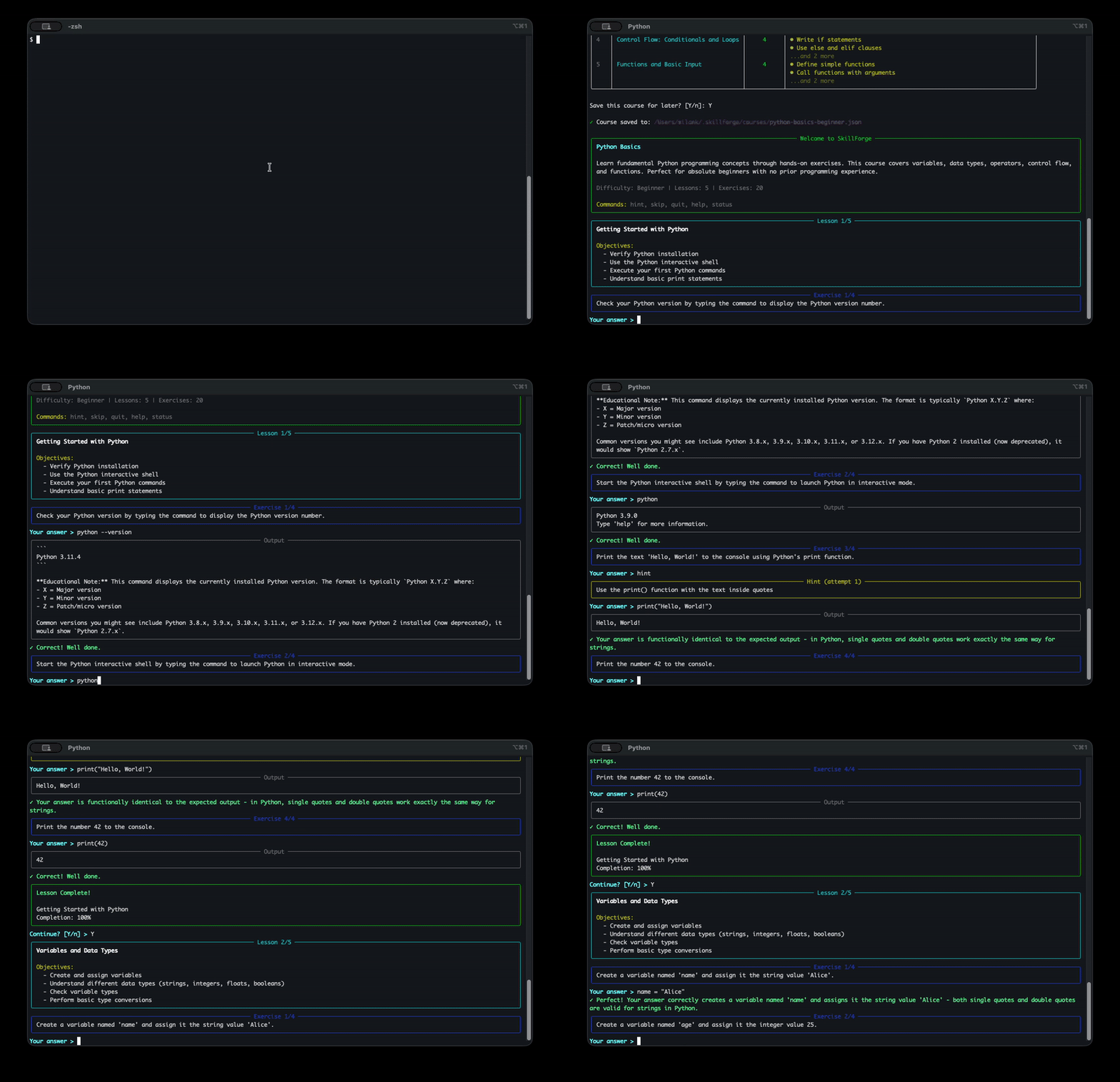
SkillForge helps developers learn new frameworks, tools, and technologies through hands-on practice in safe, simulated environments. Get personalized courses, step-by-step guidance, and real-time feedback—all from your terminal.
Status
🚧 Active Development — Interactive learning sessions now available!
Features
AI-Powered Course Generation — Uses Claude or GPT to create personalized curricula with intelligent caching
Safe Command Simulation — Practice shell, Python, git, Docker, and kubectl without risk to your system
Intelligent Validation — Pattern matching + LLM evaluation with progressive hints and feedback
Progress Persistence — Save and resume sessions at any time
Rich Terminal UI — Beautiful course overviews, progress indicators, and formatted output
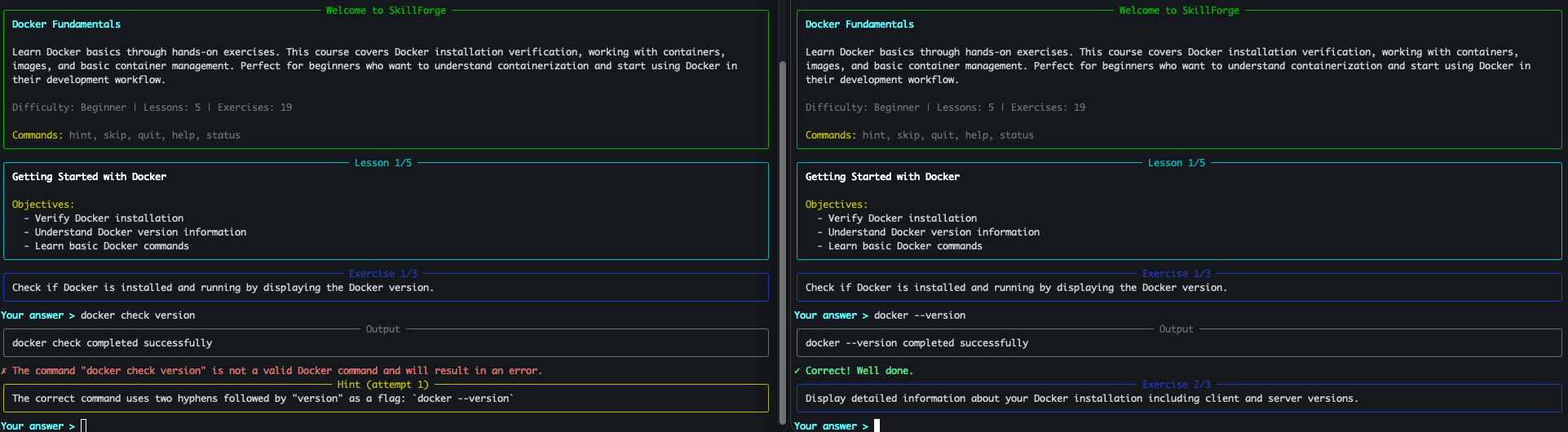
Intelligent Feedback
SkillForge provides helpful feedback whether you get it right or need another try:
Installation
Install from PyPI
pip install skillforge-cli
# or
pipx install skillforge-cli
Then set up your API key and start learning:
export ANTHROPIC_API_KEY=sk-ant-...
skillforge learn "python basics"
Development Setup
Requirements: Python 3.12 or higher
-
Clone the repository
git clone https://github.com/milank94/skillforge.git
cd skillforge
-
Create a virtual environment
python3 -m venv venv
source venv/bin/activate  # On Windows: venv\Scripts\activate
-
Install in editable mode
pip install --upgrade pip
pip install -e ".[dev]"
-
Set up API key
export ANTHROPIC_API_KEY=sk-ant-...
# or
export OPENAI_API_KEY=sk-...
-
Verify installation
skillforge --version
skillforge --help
Usage
Generate a Course
# Start a learning session (uses Anthropic by default)
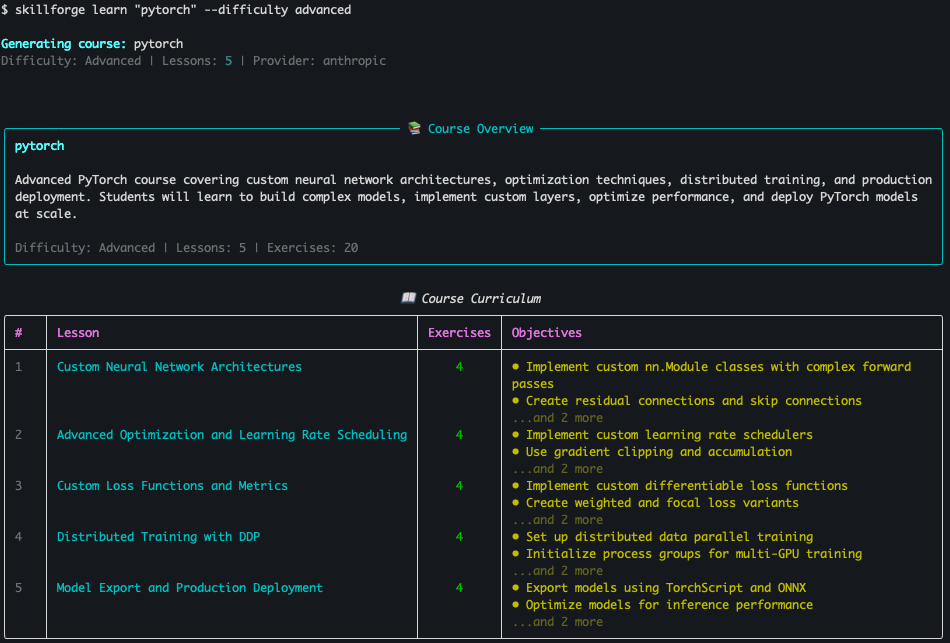
skillforge learn "pytorch basics"

# Specify difficulty and lesson count
skillforge learn "docker fundamentals" --difficulty intermediate --lessons 7

# Use OpenAI instead
skillforge learn "kubernetes" --provider openai

# Non-interactive mode (just display the course)
skillforge learn "git basics" --no-interactive
📸 Example: Generated PyTorch Course
Resume & Progress
# List saved sessions
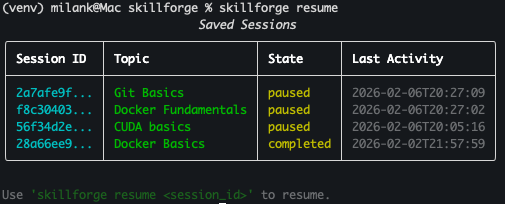
skillforge resume

# Resume a specific session (supports partial IDs)
skillforge resume abc123

# View progress without resuming
skillforge status abc123
📸 Example: Resume Menu
Cache Management
# View cache info
skillforge cache-info

# Clear cached courses
skillforge cache-clear
Configuration
Environment Variables
ANTHROPIC_API_KEY=sk-ant-...       # Anthropic API key
OPENAI_API_KEY=sk-...              # OpenAI API key
SKILLFORGE_LLM_PROVIDER=anthropic  # Default provider (anthropic or openai)
SKILLFORGE_MODEL=claude-sonnet-4-5-20250929  # Model to use
SKILLFORGE_TEMPERATURE=0.7         # Generation temperature
SKILLFORGE_DATA_DIR=~/.skillforge  # Data directory
Development
Running Tests
# Run all tests
pytest

# Run with verbose output
pytest -v

# Run specific test file
pytest tests/test_simulator.py

# Run integration tests (requires API keys)
pytest -m integration
Code Quality
# Format code
black skillforge/ tests/

# Lint code
ruff check skillforge/ tests/

# Type checking
mypy skillforge/
Architecture
┌─────────────────────────────────────────────┐
│              CLI Interface                   │
│           (typer + rich)                     │
└──────────────────┬──────────────────────────┘
                   │
┌──────────────────┴──────────────────────────┐
│           Course Generator                   │
│     (LLM-powered, hash-based caching)       │
└──────────────────┬──────────────────────────┘
                   │
┌──────────────────┴──────────────────────────┐
│          Command Simulator                   │
│  (pattern matching + LLM fallback)          │
│  Virtual file system, shell, Python,        │
│  git, docker, kubectl simulation            │
└──────────────────┬──────────────────────────┘
                   │
┌──────────────────┴──────────────────────────┐
│          Exercise Validator                  │
│  (pattern matching + LLM evaluation)        │
│  Progressive hints, score feedback          │
└─────────────────────────────────────────────┘
Roadmap
- Phase 1: Basic package setup and CLI structure
- Phase 2: Data models (Course, Lesson, Exercise, Progress)
- Phase 3: LLM integration (course generator, simulator, validator)
- Phase 4: Interactive learning sessions and progress tracking
Project Structure
skillforge/
├── skillforge/              # Main package
│   ├── __init__.py          # Package initialization
│   ├── cli.py               # CLI interface (typer + rich)
│   ├── core/                # Core functionality
│   │   ├── course_generator.py  # LLM-based course creation
│   │   ├── session.py           # Interactive session manager
│   │   ├── simulator.py         # Command simulation engine
│   │   └── validator.py         # Exercise validation engine
│   ├── models/              # Pydantic data models
│   │   ├── course.py            # Course, Lesson, Exercise
│   │   ├── config.py            # AppConfig, LLMConfig
│   │   ├── enums.py             # Difficulty, LLMProvider, etc.
│   │   ├── progress.py          # Progress tracking
│   │   └── session.py           # Learning session
│   └── utils/               # Utilities
│       ├── llm_client.py        # Anthropic + OpenAI clients
│       ├── output.py            # Rich display helpers
│       └── serialization.py     # JSON serialization
├── tests/                   # 354 tests, 93% coverage
├── pyproject.toml           # Project configuration
├── README.md                # This file
└── CLAUDE.md                # Development guide
Contributing
This is currently a learning project. Contributions and suggestions are welcome!
License
MIT License - see LICENSE file for details
Learn More
For detailed architecture and development guidelines, see CLAUDE.md.
Release history Release notifications | RSS feed


Download files
Download the file for your platform. If you're not sure which to choose, learn more about installing packages.
Source Distribution
Built Distribution
Filter files by name, interpreter, ABI, and platform.
If you're not sure about the file name format, learn more about wheel file names.
Copy a direct link to the current filters
File details
Details for the file skillforge_cli-0.1.1.tar.gz.
File metadata
- Download URL: skillforge_cli-0.1.1.tar.gz
- Upload date:
- Size: 63.2 kB
- Tags: Source
- Uploaded using Trusted Publishing? No
- Uploaded via: twine/6.2.0 CPython/3.12.12
File hashes
| Algorithm | Hash digest | |
|---|---|---|
| SHA256 |
d3996a1b2577a05fa891976a4cfb926b339bec7449c5ecf1491a3c6ba8c04632
|
|
| MD5 |
179bacdc2eb07f6865f4ef29e7f7fdc1
|
|
| BLAKE2b-256 |
71aebaef2d6e33a58374266a963b3e5e7cfaf9c4acf725d22c18739999bcb37f
|
File details
Details for the file skillforge_cli-0.1.1-py3-none-any.whl.
File metadata
- Download URL: skillforge_cli-0.1.1-py3-none-any.whl
- Upload date:
- Size: 40.5 kB
- Tags: Python 3
- Uploaded using Trusted Publishing? No
- Uploaded via: twine/6.2.0 CPython/3.12.12
File hashes
| Algorithm | Hash digest | |
|---|---|---|
| SHA256 |
adef4a83c313630646c9dd0cee42833651fdd12c504e9004321834444a8b181d
|
|
| MD5 |
4d32ef833895e68d6818c30efca37d48
|
|
| BLAKE2b-256 |
2136cb1c2e082868f7c7335fe49e74d2135f5d5b2a29d0dd63af2b61a1788afa
|






