
SkillSinc



Write your agent skills, instructions, agents, prompts, MCP servers, reference files, and hooks once. SkillSinc copies them into Claude Code, GitHub Copilot, VS Code, Codex, and the shared ~/.agents folder, converting formats where it must and saying so when a conversion loses something.
It replaces hand-copying, symlinks, and per-tool sync scripts with one command that shows you every change before it makes it.
How it works
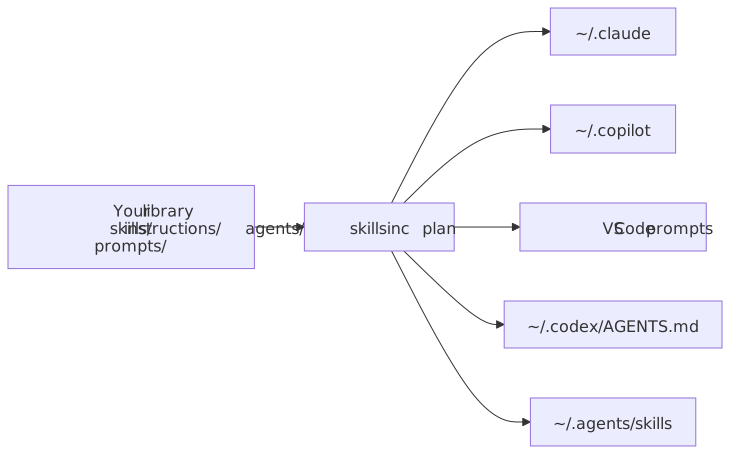
- Your library is the source of truth. A sync makes each destination match it: new items are added, changed items updated, removed items deleted.
- SkillSinc only touches what it wrote. It records every file it owns. An existing file it did not write blocks that destination until you review it and pass
--adopt. - Nothing is written without a plan.
skillsinc planlists every change;skillsinc syncapplies the same plan. - Lossy conversions are opt-in. If a harness cannot represent a field (for example, Claude ignores Copilot
toolslists), the item is skipped until the route setsallow_lossy = true. - A broken source never deletes anything. If a library cannot be read completely, its destinations are left untouched.
Install
Requires Python 3.12+ and uv.
uv tool install git+https://github.com/mikejhill/skillsinc.git
Quick start
-
Write a configuration. It enables a destination for every harness folder found on this machine and creates an empty library at
~/.config/skillsinc/library($XDG_CONFIG_HOME/skillsinc/library). Pass--source DIRto use an existing library instead:skillsinc init -
Preview the changes:
skillsinc plan -
Apply them:
skillsinc sync -
Keep destinations in sync on a schedule (Task Scheduler on Windows, launchd on macOS, a systemd user timer or cron on Linux):
skillsinc schedule install --interval 5m
Installing the package cannot register this for you; run it once per machine.
skillsinc schedule statusshows the last result andskillsinc schedule removeundoes it. See scheduling. An overlapping run exits without writing.
Library layout
The layout matches GitHub Copilot's file conventions, so an existing Copilot library works unchanged:
my-agent-library/
├── skills/<name>/SKILL.md            # plus any supporting files
├── instructions/<name>.instructions.md
├── agents/<name>.agent.md
├── prompts/<name>.prompt.md
├── mcp/<name>.json                   # one MCP server definition per file
├── resources/<name>.md               # reference files, copied as written
├── hooks/<name>.json                 # one Copilot CLI hook file per file
└── plugins/<plugin>/                 # Claude Code plugin layout, expanded into the kinds above
INTENT.md, *.intent.md, and hidden files are never distributed. A plugin's skills/, agents/, commands/, and .mcp.json are synced as skills, agents, prompts, and MCP servers; everything else in it (hooks, scripts, LSP servers) is reported as a loss. See decision 0005.
What each harness receives
| Profile | Skills | Instructions | Agents | Prompts | MCP servers | Resources | Hooks |
|---|---|---|---|---|---|---|---|
claude |
skills/ |
rules/<name>.md (paths) |
agents/<name>.md |
commands/<name>.md |
~/.claude.json mcpServers |
resources/ + CLAUDE.md @ import |
settings.json hooks |
copilot |
skills/ |
instructions/ |
agents/ |
— | mcp-config.json mcpServers |
resources/ |
hooks/ |
vscode |
— | <name>.instructions.md |
<name>.agent.md |
<name>.prompt.md |
User/mcp.json servers |
— | — |
codex |
— | managed block in AGENTS.md |
agents/<name>.toml |
— | — | — | — |
agents |
skills/ |
— | — | — | — | — | — |
generic |
verbatim | verbatim | verbatim | verbatim | verbatim | verbatim | verbatim |
Run skillsinc profiles for the same table. See harness profiles for exact conversions.
Commands
| Command | Purpose |
|---|---|
skillsinc init |
Write a starter configuration |
skillsinc plan |
Show every change a sync would make; write nothing |
skillsinc sync |
Apply the plan |
skillsinc profiles |
List harness profiles and what each kind becomes |
skillsinc schedule |
install, remove, or show status of a scheduled sync |
plan and sync accept --destination NAME (repeatable), --adopt, --json, --verbose, --log-file PATH, and --config PATH. Exit codes: 0 success, 1 a destination was blocked or failed, 2 configuration or usage error, 130 interrupted.
Documentation
- Configuration reference
- Command-line reference
- Scheduling
- Development guide
- Roadmap
- Harness profiles
- Philosophy and goals
- Architecture
- Decision: rebuild scope
- Decision: MCP server entries
- Decision: resources and Claude imports
- Decision: TOML entries with tomlkit
- Decision: plugins expand into kinds
- Decision: entry files beside a destination root
- Decision: edit VS Code's JSONC mcp.json in place
- Decision: one copy of each item per harness
- Decision: MCP server options and per-profile overrides
- Contributing · Security · Changelog
License
1 maintainer

Metadata
1 maintainer
Release files for skillsinc 0.2.1
For a detailed explanation of source distributions (sdists) and built distributions (wheels), please see the package formats documentation.
Source distribution (sdist)
| File | Size | Uploaded | Provenance | |
|---|---|---|---|---|
| skillsinc-0.2.1.tar.gz | 69.4 kB | With provenance | Details |
Built distribution (wheel)
| File | Interpreter | ABI | Platform | Reset |
|---|---|---|---|---|
| skillsinc-0.2.1-py3-none-any.whl | Python 3 | none | any | Details |
Total release size: 152.1 kB
Release files / skillsinc-0.2.1.tar.gz
| Download URL | skillsinc-0.2.1.tar.gz |
|---|---|
| Size | 69.4 kB |
| Tags | Source |
|
SHA-256 checksum How to use checksums |
2cc744559726cead9ef0e7af78c18f888c452dc72082098386be972262f4ae40
|
|
BLAKE2b-256 checksum How to use checksums |
4dc6368c3fe95bd8ea48469bd1667734ec49644ecb9562329b08ecb009a3d048
|
| Upload date | |
|
Uploaded using Trusted Publishing? What is trusted publishing? |
Yes |
| Uploaded via |
twine/7.0.0 CPython/3.13.14
|
Provenance
Provenance describes where a file came from. On PyPI, provenance is shared via attestations, which provide a verifiable record of the build or publishing details. View details, limitations and caveats.


PyPI Publish Attestation
PyPI verified that this artifact, at this checksum, originated from the publisher listed below.
Signed by GitHub Actions, verified by PyPI on Oct 21, 2026.
Transparency logRelease files / skillsinc-0.2.1-py3-none-any.whl
| Download URL | skillsinc-0.2.1-py3-none-any.whl |
|---|---|
| Size | 82.7 kB |
| Tags | Python 3 |
|
SHA-256 checksum How to use checksums |
a9fffcc5d52d952e8a144d9c75e8cd5bcba347ccc4551daadb7fd97c6bf3d7f1
|
|
BLAKE2b-256 checksum How to use checksums |
cfeaa3946cef7f9b0900b41ec1e8f221570e38c6c3e310e272f39c246d0916a5
|
| Upload date | |
|
Uploaded using Trusted Publishing? What is trusted publishing? |
Yes |
| Uploaded via |
twine/7.0.0 CPython/3.13.14
|
Provenance
Provenance describes where a file came from. On PyPI, provenance is shared via attestations, which provide a verifiable record of the build or publishing details. View details, limitations and caveats.
PyPI Publish Attestation
PyPI verified that this artifact, at this checksum, originated from the publisher listed below.
Signed by GitHub Actions, verified by PyPI on Oct 21, 2026.
Transparency logSecurity for skillsinc 0.2.1
Provenance
Provenance describes where a file came from. On PyPI, provenance is shared via attestations, which provide a verifiable record of the build or publishing details. View details, limitations and caveats.
Full provenance
All 2 files in this release have been uploaded with provenance metadata.
Attestation for skillsinc-0.2.1.tar.gz
PyPI Publish Attestation
PyPI verified that this artifact, at this checksum, originated from the publisher listed below.
Signed by GitHub Actions, verified by PyPI on Oct 21, 2026.
Transparency logA note on package security
PyPI is a repository for distributing packages, not a service for auditing them. While third-party security researchers and our staff do their best to detect and remove malicious packages, PyPI cannot guarantee the quality, security or suitability of any given package.














